Musicolet Music Player
- 243.47K
- 4.6
- Installs
- 10.00M
- Price
- Free

Screenshots
Analysis by Reviewed APKs
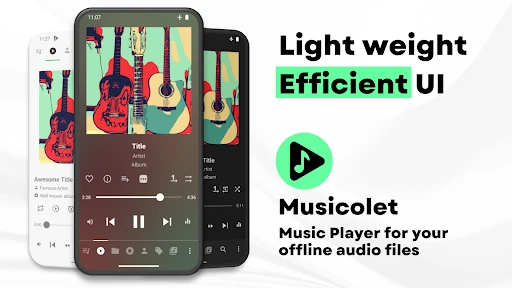
Musicolet Music Player is for people who already keep music files on an Android phone or SD card and want a capable player for listening offline. It does not find or stream new music, so it is a poor fit for building a library from scratch. After spending time with its queues, folder browsing, and playback tools, I found it practical and thoughtfully arranged, though its many options suit hands-on listeners best.
A listening queue that sticks
When I first opened Musicolet, the key question was whether my music was already stored on the device. This is a local-file player, so I would start with a collection of downloaded or transferred tracks rather than search for an artist online. Once those files are available, I can browse by folders, albums, artists, or playlists and begin listening without relying on a music-streaming catalog.
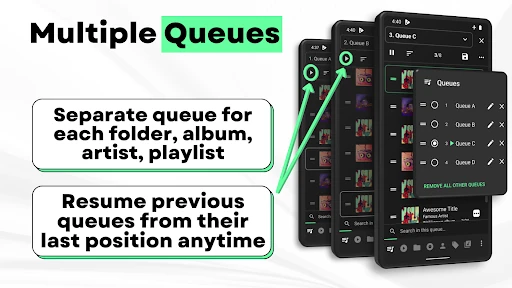
A useful everyday example is a commute that starts with an album and ends with a few favorite tracks. Musicolet keeps separate queues for sources such as folders, albums, artists, and playlists, and it can resume a previous queue at its last position. I like that distinction: switching what I want to hear does not have to mean rebuilding the earlier listening session from scratch.
A player, not a music service
Compared with a streaming app, Musicolet puts the emphasis on managing and playing files already on the phone. It cannot search for, stream, or download new music online. That makes it a natural companion for a carefully built offline collection, but not a replacement for a subscription catalog, radio service, or app whose main job is introducing listeners to music they do not own or store.
Against a basic preinstalled player, Musicolet offers more ways to organize playback and adjust the listening experience. Multiple queues, folder browsing, tag editing, and separate equalizer settings give it room to suit different habits. The trade-off is that someone who only taps shuffle on a small collection may find the extra controls unnecessary. Its strengths show up most when the listener wants to manage files and queues directly.
Small habits, smoother listening
I would make a habit of starting playback from the view that matches the moment: an album for focused listening, a playlist for a longer mix, or a folder when I am browsing an organized collection. Since queues can be kept separately and resumed, it is worth treating them as distinct listening sessions instead of continually replacing one with another.
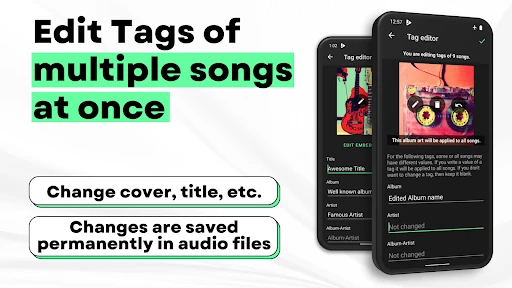
For a collection with imperfect labels, the tag editor can change tags and album art for multiple songs at once. I would set aside a short cleanup session rather than interrupt listening every time I spot a mismatch. Bookmarks and notes can also help keep a place or thought tied to a track. These are modest tools, but they make a local library easier to revisit and maintain.
More From Our News Desk

Zoom Meetings, Google Meet, or Teams: Which Is Easiest to Join?

How I Build a Free Streaming Lineup With Tubi

Why Crunchyroll Is the Default Anime App for So Many Fans

YouTube TV: A Practical Guide to Cutting Cable

Rummikub and the Small Comfort of Phone Games

TeamViewer Remote Control or AnyDesk for Helping Family?
Who will enjoy Musicolet
I would recommend Musicolet to Android listeners who keep music files locally and care about how those files are organized. It has useful options for people who switch between albums, folders, and playlists, use headphones or speakers in different settings, or want to pick up a queue later. Listeners who appreciate offline playback and do not need an online catalog will get the clearest value from its approach.
It may not suit someone who expects to type an artist's name and immediately stream or download a new album. Musicolet does not provide that service, and lyrics are not fetched automatically either. Its broad set of controls may also feel like more than a casual listener needs. If the goal is simply discovering new music through an online platform, I would choose a different kind of app and keep Musicolet for local files.
Musicolet Music Player is developed by Krosbits and is listed on Google Play in the Music & Audio category. Google Play shows over 10 million installs and a 4.6-star rating from about 243,000 ratings. The app is free to install, contains no ads, and offers in-app purchases. Its content rating is Everyone.
The version is shown as varying with device. Google Play gives a release date of June 24, 2016, and a last update date of August 20, 2026. The minimum Android version is not included in the facts available for this review, so check the Google Play entry on your device for compatibility details. The listed in-app product prices range from $8.99 to $159.92 per item.
The details that shape everyday listening
A straightforward first look
When I first opened Musicolet, what stood out was how much of the experience is built around getting to a music collection quickly. The main player, queues, folders, albums, artists, and playlists are grouped for easy access. That approach makes sense for a player you may open for a quick song change rather than a long browse through unfamiliar recommendations.
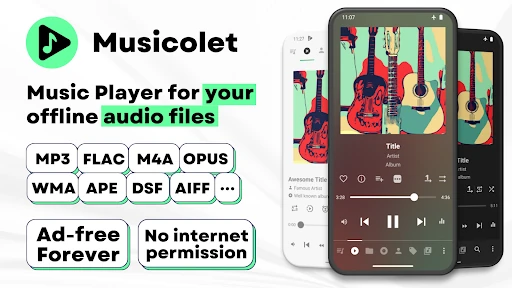
The first practical step is having audio files stored on the phone or an SD card. Musicolet plays local files, including common formats such as MP3, M4A, WMA, FLAC, Opus, AAC, ALAC, APE, and DSF. The supported list also includes other formats. This breadth is handy for a mixed library, though the app's role remains clear: play files you already have.
Playback through the day
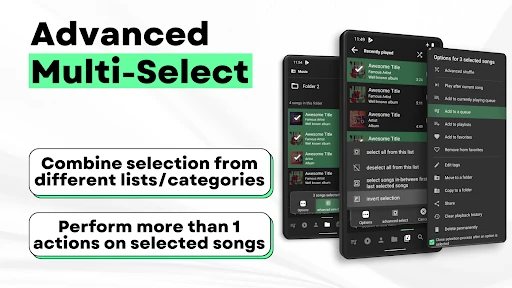
Day to day, the separate queues are one of the features I would notice most. A folder, album, artist, or playlist can have its own queue, and a previous queue can be resumed from its last position. That makes it easier to move between a planned album and a casual playlist without treating every change as a permanent reset.
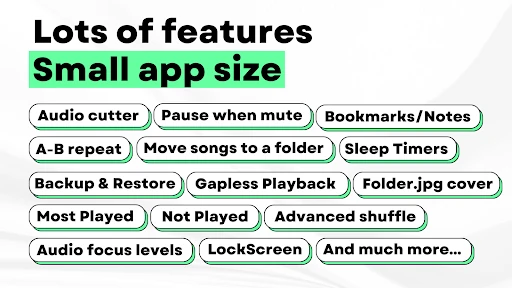
Gapless playback is another practical touch for albums and other listening where pauses between tracks can be distracting. Earphone controls support single-click play or pause, double-click next, and triple-click previous; repeated presses of four or more can fast-forward. Those controls are useful when the phone is tucked away, although the exact convenience depends on the earphones being used.
Tools beyond the play button
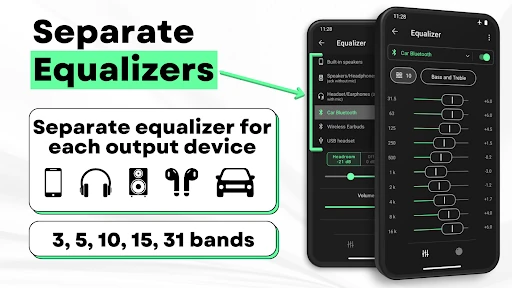
The equalizer can use separate settings and presets for speakers, headphones, Bluetooth, and other listening situations. I like the idea of having those adjustments ready for different output types instead of changing one setting every time I switch how I listen. The value is practical rather than magical: it gives interested listeners more control over playback without turning the app into a streaming service.
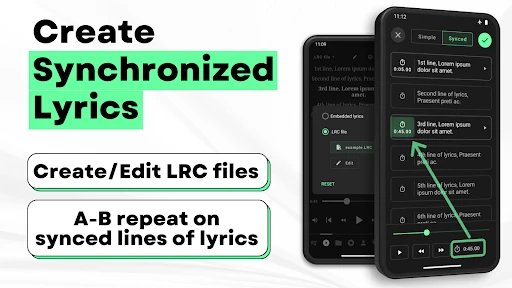
Musicolet also supports embedded lyrics and LRC files, plus tools for creating synchronized lyrics. The important catch is that lyrics are not fetched automatically. Embedded lyrics can be edited in the tag editor; an LRC file needs to be obtained separately and placed in the same folder with a matching filename. It is a useful feature for people willing to prepare their files, not an automatic lookup.
A routine for a commute
For a commute, I would choose a playlist or album before leaving, then rely on the queue and earphone controls for small changes along the way. If I switch to another source, the separate queues make it possible to return to the earlier session. A sleep timer can also close the app after a chosen amount of time or after a set number of songs, which is handy when listening while winding down.
At home, I might use a different routine: browse a folder, tidy several tags or album-art entries together, and then create a playlist from the cleaned-up collection. The app can move or copy songs and rename folders directly. None of that is required for ordinary playback, but it gives someone with a growing local library a way to handle common organization tasks in the same place.
Know the boundaries
The biggest limitation is also the clearest: Musicolet does not stream, search for, or download music online. It depends on a local collection, so anyone starting with an empty music folder will need another way to obtain audio files. That focus is not a flaw for offline-library owners, but it changes the app's usefulness considerably depending on what is already on the device.
Some of its extras involve manual effort. Lyrics need to be present in the audio file or supplied as a matching LRC file, and tag cleanup is something the listener chooses to do. The range of playback and library controls can also take a little exploration. I would give it time if those options matter, but would not recommend it as the simplest possible player for someone who wants only a basic play button.
Musicolet is a capable local music player with a clear sense of its purpose. Separate queues, flexible browsing, playback controls, and library tools make it more than a bare-bones player, while its offline focus keeps expectations grounded. I especially like that it supports a variety of listening routines without requiring an online music catalog.
I would try it if I already had music files on my Android device and wanted more control over how I played and organized them. I would look elsewhere if streaming and discovery are the main priorities. For local-library listeners, Musicolet is a thoughtful option; for everyone else, its central limitation is hard to work around.
Musicolet Music Player Frequently Asked Questions
What is Musicolet Music Player used for?
Musicolet plays and organizes audio files stored on an Android device or SD card. It supports browsing by folders, albums, artists, and playlists, as well as separate queues and playback tools. It does not search for, stream, or download new music online, so it is intended for people who already have local audio files.
Which devices can run Musicolet Music Player?
Musicolet is an Android app. Its description also mentions Android Auto support for controlling music and accessing a library from an Android Auto-enabled car. The minimum Android version can vary or depend on the device, so check the Google Play entry for the compatibility details that apply to your phone.
What Android version does Musicolet require?
The Android version requirement may vary by device and app release. Check Musicolet's Google Play page from the device you plan to use for the current compatibility information. The app is designed to play local audio files, so you will also need music files stored on the device or an SD card.
Is Musicolet Music Player free?
Musicolet is free to install and contains no ads. Google Play also shows in-app purchases, with listed item prices ranging from $8.99 to $159.92. Purchase options and prices may vary, so check the current Google Play entry for the details available in your region.
Is Musicolet a good fit for every music listener?
It is a good fit for Android users who keep music files locally and want tools for queues, folders, playlists, or playback adjustments. It is less suitable if you want to discover and stream new music inside the app, since Musicolet does not provide online search, streaming, or downloads.
Pros
- Separate queues make it easier to switch between albums, folders, artists, and playlists.
- Supports many audio formats, along with gapless playback and configurable equalizer settings.
- Useful library tools include batch tag editing, folder changes, bookmarks, and notes.
- No ads, with lyrics, widgets, timers, and Android Auto support among its extras.
Cons
- It cannot search for, stream, or download new music online.
- Lyrics are not fetched automatically and may require manual file preparation.
- The many controls may be more than casual listeners need.
- Category
- Music & Audio











