MS NOW: Live & Breaking News
- 60.64K
- 4.5
- Installs
- —
- Price
- Free

Screenshots







Analysis by Reviewed APKs
MS NOW: Live & Breaking News is a news app for following headlines, political reporting, and the stories you care about. I like its mix of a curated feed, free articles, alerts, and optional live programming; it gives readers several ways to check in without making video the only focus. It will suit people who already follow MS NOW, though its membership features and strong editorial identity are worth weighing.
A quick daily check-in
On a busy morning, I’d use MS NOW as a focused first stop: open the curated feed, scan the day’s headlines, and choose whether to read an article or watch a video. That is a more deliberate rhythm than bouncing among social posts and multiple news sites. The app also covers breaking news and political reporting, so it can serve as a regular check-in when a developing story is on my mind.
If I wanted to keep up while doing other things, the app’s alerts could bring important updates to me rather than requiring repeated manual checks. I could also follow favorite MS NOW hosts and topics after creating an account, making later visits more relevant. I appreciate that the basic reading experience includes access to MS NOW articles for free; the membership is an additional way to participate, not a requirement for every article.
A focused news alternative
Compared with a general-purpose news aggregator, MS NOW centers its own journalists, hosts, reporting, analysis, and opinions. That focus is useful if those voices are already part of my news routine, and the curated feed offers a simple place to start. It also brings articles, video, live programming, and alerts together, instead of asking me to switch between separate services for each format.
That same focus means it is not a neutral, all-outlets directory or a substitute for comparing coverage across many publishers. I would not treat it as a broad search engine for every perspective on a story. Its strongest fit is following MS NOW’s coverage and programming, with membership adding community and live conversations. Readers who want a wider mix of publishers may prefer to pair it with other sources.
Make the feed work
A useful habit would be to check the feed at a couple of set moments rather than opening it every time a headline catches my eye. I could read the day’s key stories in the morning, then return later for a specific update or a video. Following topics and hosts can help shape those visits around my interests, while alerts are there for breaking developments I do not want to miss.
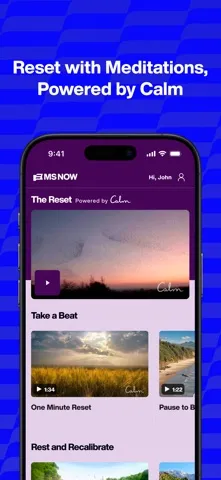
I’d also separate quick updates from longer viewing. Articles are handy when I have a few quiet minutes, while live shows and replays make more sense when I can give them my attention. If the news feels like too much, the app includes meditations powered by Calm. That gives the routine a small reset option without asking me to leave the app or turn news checking into an all-day scroll.
More From Our News Desk

Zoom Meetings, Google Meet, or Teams: Which Is Easiest to Join?

How I Build a Free Streaming Lineup With Tubi

Why Crunchyroll Is the Default Anime App for So Many Fans

YouTube TV: A Practical Guide to Cutting Cable

Rummikub and the Small Comfort of Phone Games

TeamViewer Remote Control or AnyDesk for Helping Family?
Who may enjoy it
I’d recommend MS NOW to readers who regularly follow its journalists, political coverage, or TV shows and want those formats in one app. It can work for a quick headline scan, a deeper article read, or watching or listening to a live program. The ability to follow topics and hosts also makes it a better fit for people who want a more tailored connection to the MS NOW lineup.
It may be less appealing if you want a broad selection of publishers, a purely text-based news reader, or no account and membership options at all. The app is available in the U.S. only, and membership features require a subscription. I’d treat the free articles and the paid community and programming benefits as separate parts of the experience, then decide whether the latter actually fits my habits.
MS NOW: Live & Breaking News is developed by Versant Media LLC and is listed in the News & Magazines category. On the Apple App Store, it has a 4.5-star rating from 60,644 ratings. The app is free to download, and the store age rating is 4+. The app description says it is available in the U.S. and that data charges may apply when watching video.
The current version is 14.6.0, and the recorded release date is January 11, 2011, with the last update on October 26, 2026. It requires iOS 17.6 or later. Creating an MS NOW account is free, while membership benefits and features require a subscription. Membership pricing can vary, so I’d check the App Store for current terms before subscribing.
A More Deliberate Way to Follow News
A clear starting point
When I first opened MS NOW, the clearest idea was that it wants to be a home for several kinds of news use: reading, watching, listening, and following topics. The curated feed is a sensible starting point for someone who does not want to begin by sorting through a long list of sources. Its emphasis is on the day’s important headlines and videos, alongside MS NOW reporting.
Getting more personalized use involves creating an account, which is free. The description says an account may be requested, and it lets readers follow favorite hosts and topics and receive relevant notifications. I’d start with the feed before opting into more alerts. That makes it easier to see whether the app’s coverage and pace suit me, without turning setup into a commitment to every available feature.
Reading, watching, listening
Day to day, the main appeal is choice of format. I can read an article when I have a short break, watch a video when I want more context, or stream a show when I have time to follow a longer discussion. Live MS NOW programming is available around the clock, and replays let viewers catch up on their own schedule.
The mix also makes the app more than a headline alert inbox. There is reporting, analysis, and opinion from MS NOW journalists and experts, along with the day’s headlines and videos. For a commute or a household task, listening to a show may be a better fit than watching. Video use can consume mobile data, so I’d keep that in mind when choosing where to stream.
Features with a point
Following favorite hosts and topics gives the app a personal angle beyond a general headline feed. Breaking news alerts can surface developments, while topic notifications help me keep tabs on issues I care about. The app also offers opportunities to get questions heard, connecting news consumption with a chance to take part in conversations around coverage.
The membership goes further with live Q&As, member-exclusive series, community discussions, and connection with journalists and hosts. Members can also access practical guidance on subjects such as mindfulness, parenting, caregiving, and relationships. Those are meaningful additions for someone who wants an ongoing community, rather than just another way to read headlines, but they sit behind a subscription.
I also noticed the app offers meditations powered by Calm for moments when I want a reset from the day’s news. That is a thoughtful counterpoint to an otherwise information-heavy product. It does not change the app’s core purpose, but gives a news routine a way to pause instead of immediately moving from one story to the next.
A routine that stays manageable
My practical routine would begin with one short visit in the morning: scan the curated headlines, open one or two stories, and leave the rest for later. I’d follow only a few topics and hosts at first, then use alerts selectively. That keeps the app useful for staying informed without making every notification feel like an invitation to stop what I’m doing.
Later in the day, I’d return for a particular show or replay if I wanted a fuller discussion. If I were considering membership, I’d first ask whether I’d actually join live Q&As or use the community features, rather than subscribing just because they are available. The free articles make it possible to get a feel for the reporting before deciding whether those extra ways to participate matter to me.
Keep the limits in view
MS NOW’s editorial focus is both its strength and its main limitation. It gathers the network’s journalism and programming in one place, but it is not designed to cover every publisher or give me a multi-outlet comparison by default. For a fuller view of a major story, I’d still look beyond one source. That is a practical distinction, not a reason to dismiss what the app does well.
Some of the most interactive features depend on membership, which requires a subscription. The description also says users must be at least 18 to create an account or purchase membership, even though the App Store age rating is 4+. The app is U.S.-only, and video can use mobile data. Those conditions are worth considering before building it into a daily routine.
Finally, the volume of breaking news can still make any news app feel busy, even when it offers a curated feed and meditations. I’d use the controls described for following topics and receiving notifications with some restraint. MS NOW offers ways to check in and participate, but it works best when I choose when to engage rather than letting every update dictate my attention.
MS NOW: Live & Breaking News brings free articles, a curated feed, alerts, and live or replayed programming into one place. I found its best use is as a convenient home for people who already value MS NOW’s reporting and shows. The meditations and membership community add options, but they are not essential to the basic news-reading appeal.
I’d recommend trying it if you want a regular connection to MS NOW and are comfortable with its focused editorial scope. If you want a wide range of publishers, use it alongside other news sources. Start with the free articles and a restrained set of alerts; consider membership only if its live conversations and exclusive programming match how you actually follow the news.
MS NOW Frequently Asked Questions
What is MS NOW: Live & Breaking News used for?
MS NOW: Live & Breaking News is for following breaking news, political reporting, analysis, and other stories covered by MS NOW. It offers a curated feed, articles, videos, alerts, and live programming or replays. Readers can also follow hosts and topics, and membership adds community discussions and live Q&As.
Which devices can run MS NOW: Live & Breaking News?
The app is available for iOS and requires iOS 17.6 or later. The available platform information does not specify individual device models, so check the Apple App Store compatibility details for the device you plan to use. The app description says the service is available in the U.S. only.
What iOS version does MS NOW: Live & Breaking News require?
MS NOW: Live & Breaking News requires iOS 17.6 or later. The current version is 14.6.0. If you are unsure whether your device can install that version of iOS, check its software settings and the App Store’s compatibility information before downloading.
Does MS NOW: Live & Breaking News cost money?
The app is free to download, and the description says MS NOW articles are available for free in the app. Creating an account is also free. MS NOW membership features require a subscription, and current membership pricing and terms may vary, so check the Apple App Store before subscribing.
Is MS NOW: Live & Breaking News right for me?
It may suit you if you follow MS NOW’s journalists, political coverage, or TV shows and want articles, alerts, and video together. It may be less suitable if you want a broad mix of publishers or do not want membership options. The app is U.S.-only; creating an account or purchasing membership requires being at least 18.
Pros
- Combines a curated headline feed with articles, video, live shows, and replays.
- MS NOW articles are available for free in the app.
- Topic and host follows help tailor updates to personal interests.
- Meditations offer a small reset from the day’s news.
Cons
- Its coverage centers on MS NOW rather than a broad range of publishers.
- Membership features, including live Q&As and community discussions, require a subscription.
- The app is available in the U.S. only, and video may use mobile data.
- Category
- News & Magazines
- Version
- 14.6.0