Modisoft Back Office
- 147
- 4.1
- Installs
- 10.00K
- Price
- Free
Screenshots
Analysis by Reviewed APKs
Modisoft Back Office is a business app for checking operations across convenience stores, restaurants, and other businesses, including those with more than one location. I see its main appeal in putting sales, reports, staffing, and inventory tasks within reach when I’m away from the business. It is more of a management companion than a customer-facing tool, and it makes the most sense for owners or managers already working with Modisoft.
A quick check between stops
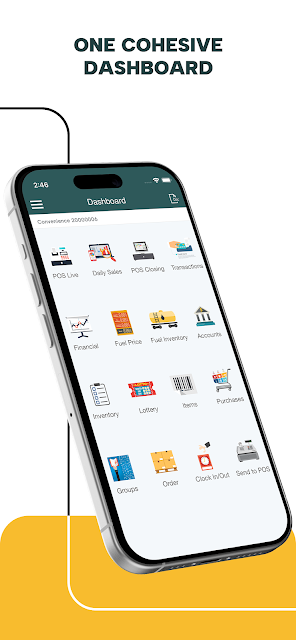
Picture a manager leaving one store to visit another, with a few minutes in the car park before the next appointment. Rather than waiting to return to a desk, they can use Modisoft Back Office to check sales, review a customized report, or look across multiple locations from a consolidated dashboard. That remote overview is the app’s central job: giving someone responsible for day-to-day operations a way to keep tabs on the business while away.
I’d use that kind of check-in to spot what needs attention, not to spend the whole day studying numbers on a phone. A sales update or daily reconciliation can help frame a conversation with staff later, while fuel and lottery reports are relevant for businesses that handle those sales. The app also brings employee and inventory management into the same general workflow, so a manager can move from monitoring performance to considering a practical next step.
Back office, not checkout
The obvious comparison is with desktop business software or a point-of-sale system. Modisoft Back Office is positioned around remote oversight and management tasks: viewing sales, reports, and information from multiple locations, as well as handling inventory and employee responsibilities. That makes it a useful counterpart to work done at a register or in an office, rather than a replacement for the customer’s checkout experience.
It is also not a general-purpose accounting, customer relationship, or invoicing app based on the described feature set. Its emphasis is the operational picture for businesses such as convenience stores and full-service restaurants. If I ran a single small business with no need to monitor staff, stock, or sales away from the premises, this could be more management layer than I need. The value rises when there are several moving parts to coordinate.
Make check-ins deliberate
A sensible routine is to choose a few specific moments for opening the app instead of constantly refreshing it. For example, a manager could review sales during a quiet stretch, check the day’s reconciliation, then look at timesheets or shifts before planning the next schedule. The app describes real-time sales tracking and customized reports, so it can support quick reviews as well as more focused checks when there is a question to answer.
For a business with multiple locations, I’d make the consolidated view part of a regular comparison rather than treating each site as a separate phone task. Inventory tracking and automated reordering may also fit into a recurring stock review, while employee management can support a separate staffing check. Keeping those habits distinct helps the app serve as a practical reference instead of turning every brief glance into an attempt to manage the whole business at once.
More From Our News Desk

Zoom Meetings, Google Meet, or Teams: Which Is Easiest to Join?

How I Build a Free Streaming Lineup With Tubi

Why Crunchyroll Is the Default Anime App for So Many Fans

YouTube TV: A Practical Guide to Cutting Cable

Rummikub and the Small Comfort of Phone Games

TeamViewer Remote Control or AnyDesk for Helping Family?
Who may find it useful
I’d recommend Modisoft Back Office to owners and managers who oversee a convenience store, restaurant, or similar operation and want to check business activity remotely. It is especially relevant if they manage several locations, since the app describes a consolidated dashboard for viewing information across sites and tools for managing employees across them. People who regularly need sales reports, reconciliation, inventory tracking, or staff scheduling have a clearer reason to keep it close.
It may be less compelling for someone looking for a basic personal finance app, a customer ordering service, or a standalone tool for one isolated task. The described features are broad, but they are all tied to running business operations rather than serving customers directly. I’d also expect it to be most useful as part of a Modisoft-based business workflow, rather than assuming it can replace every system a company already uses.
Modisoft Back Office is a free Android business app from Modisoft. Google Play shows more than 10,000 installs and a 4.1-star rating from 147 ratings. It is marked as suitable for Everyone. The app is described as supporting businesses including convenience stores and full-service restaurants, with tools for remote monitoring, sales reporting, inventory, and employee management.
The current version shown is 2.78, and the app was released on September 4, 2015. Its most recent update was May 4, 2026. The app has no in-app purchases and contains no ads. The minimum Android version is not included in the available app facts, so it is worth checking the Google Play page for device compatibility before installing.
A closer look at remote operations
Getting oriented
When I first opened an app with this job, the question I’d want answered is simple: can I get a useful picture of the business without digging through several separate reports? Modisoft Back Office is built around that promise of a consolidated view, with customized reports and multi-location information among its stated tools. The design goal is practical visibility, rather than a long list of consumer-style extras.
The best first step would be to orient around the information that matters most to a particular business. A restaurant manager may focus on sales and staff, while a convenience store manager could also care about fuel or lottery sales reporting. The listed features give those users a range of operational areas to explore, but the exact day-to-day setup will depend on the business and the locations being managed.
The daily management loop
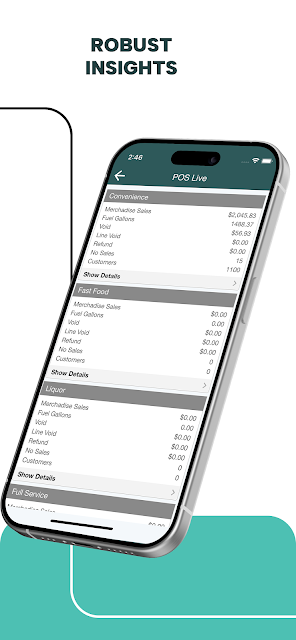
Day to day, the app’s strongest role is as a place to check in on business activity and follow up on operational details. Real-time sales tracking can make a quick review more timely, while customized reports give managers a way to look at information in a format suited to their needs. Daily reconciliation adds a recurring task to that picture, rather than limiting the app to occasional high-level summaries.
I’d treat the phone as a convenient window into the operation, not as an invitation to make every decision on the spot. A brief sales check can tell me where to look next; a report or conversation with staff may be needed to understand why something happened. That distinction matters with any management app: access to figures is helpful, but the numbers still need context from the people and processes behind them.
Tools beyond reporting
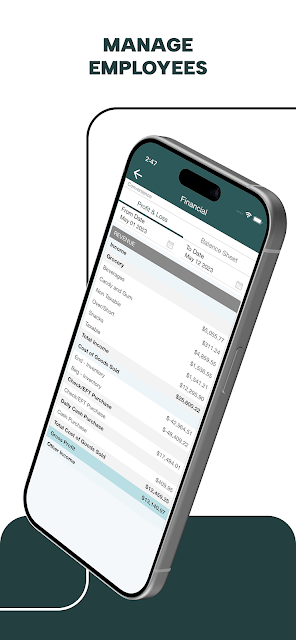
The range of features is what gives Modisoft Back Office its broad management angle. Inventory tools are described as supporting stock tracking and automated reordering, with the aim of reducing purchasing errors. Employee management covers timesheets, shift scheduling, and payroll. Those capabilities bring routine operational concerns into the same product as sales visibility, rather than treating reporting as the entire job.
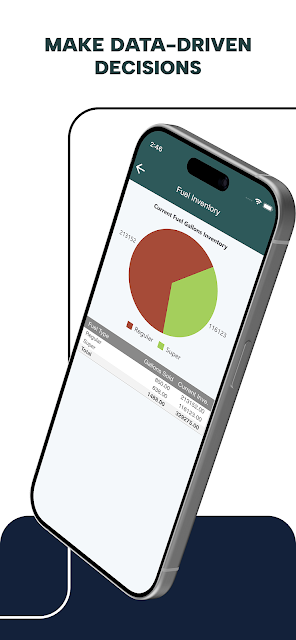
Multi-location management is another notable part of the package. The app describes a consolidated dashboard for viewing data across sites, along with employee management across multiple locations. For a manager balancing several stores, that can be more relevant than a single-location snapshot. Fuel and lottery sales reports are more specialized touches for businesses that handle those categories, while customized reports give the broader reporting tools room to suit different needs.
A useful weekly rhythm
One workable routine would be a quick sales check during the day, a more deliberate review during daily reconciliation, and a separate weekly pass over stock and staffing. That division keeps the app tied to familiar management moments. If a report raises a question, I’d note it for follow-up instead of trying to solve the entire issue from a brief phone session.
For managers covering multiple locations, I’d make the consolidated dashboard part of the weekly rhythm as well. Comparing locations can help focus attention on where a closer look may be worthwhile, while employee tools can support shift planning and timesheet review. The point is not to turn every metric into a verdict; it is to make the information easier to revisit when planning the next practical step.
Keep expectations grounded
The app’s wide scope can be a strength, but it also means different businesses will care about different parts of it. A restaurant that does not handle fuel or lottery sales has no reason to build those reports into its routine. Likewise, a business with only one location may not gain as much from a consolidated dashboard as a manager responsible for several sites.
Modisoft Back Office is described as a management app, not a replacement for every business system or an automatic answer to operational problems. Its usefulness depends on the relevance of its tools to the way a business works. I’d also check the current Google Play information for device compatibility before relying on it, since Android requirements can vary. A clear fit with the existing Modisoft workflow is the sensible starting point.
Modisoft Back Office is aimed at a specific, practical need: keeping business operations in view when a manager is away from the premises. Sales reports, reconciliation, inventory, employee tools, and multi-location oversight give it more reach than a simple dashboard, while its strongest appeal remains operational rather than customer-facing.
I’d consider it for a Modisoft business user who needs regular remote check-ins or coordinates several locations. It is less of an obvious pick for someone seeking a general-purpose business utility. If its reports and management tools match the way your workplace runs, it could make routine oversight more convenient.
Modisoft Back Office Frequently Asked Questions
What is Modisoft Back Office used for?
Modisoft Back Office is a business management app for monitoring operations remotely. Its described tools include sales tracking and customized reports, daily reconciliation, inventory management, employee timesheets and scheduling, and information across multiple locations. Some reports cover fuel and lottery sales. It is intended for business owners and managers, including those working with convenience stores or full-service restaurants.
Which devices can run Modisoft Back Office?
Modisoft Back Office is an Android app available through Google Play. The minimum Android version is not included in the available app details, and compatibility can vary by device and app update. I’d check the current Google Play page before installing, particularly if you are using an older phone or tablet.
Does Modisoft Back Office cost money?
The app is free to download on Google Play. It has no in-app purchases and contains no ads according to its app facts. Business services or systems outside the app are not covered by those details, so anyone evaluating it for a workplace should check the store information and relevant Modisoft business arrangements for current terms.
Can Modisoft Back Office manage several locations?
Yes. The app describes a consolidated dashboard for viewing information from multiple locations and tools for managing employees across them. It also includes sales reporting and other operational features. The usefulness of those tools depends on the business setup, so a manager should check the current Google Play description and workplace configuration for details relevant to their locations.
Who is Modisoft Back Office best suited to?
It is best suited to business owners and managers who need to monitor sales or coordinate operational tasks remotely, especially across multiple locations. The described features cover reporting, inventory, and employee management. It may not suit someone looking for a customer-facing app or a general personal finance tool. Whether it fits a particular business depends on its existing workflow.
Pros
- Combines sales reporting, reconciliation, inventory, and employee tools in one management app.
- Supports a consolidated view of multiple business locations.
- Includes specialized fuel and lottery sales reports.
- Free to download, with no ads or in-app purchases.
Cons
- Its broad management focus may be unnecessary for a single-location business.
- The app is geared toward business operations, not customer-facing tasks.
- Android device requirements are worth checking before installation.
- Category
- Business
- Version
- 2.78











