MathGPT - AI Math Solver
- 6.40K
- 4.8
- Installs
- —
- Price
- Free

Screenshots
Analysis by Reviewed APKs
MathGPT - AI Math Solver is an iPhone and iPad study app for getting explanations, practice materials, and visual help with school problems. It suits students who want more than a final answer, especially when a worked example or another way to review a topic would help. I like the breadth of its learning tools, though it is best treated as a study aid rather than a substitute for checking your work.
A Study Session in Your Pocket
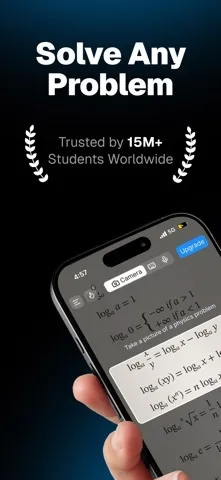
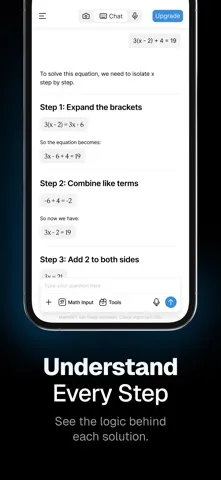
Picture a homework session that stalls on an algebra problem. With MathGPT, the intended workflow is to photograph the question and get a solution with steps to follow. I can see the appeal: instead of leaving a student with a number to copy, the explanation is meant to show how the problem moves from start to finish. That makes the app most useful at the moment a specific exercise stops making sense.
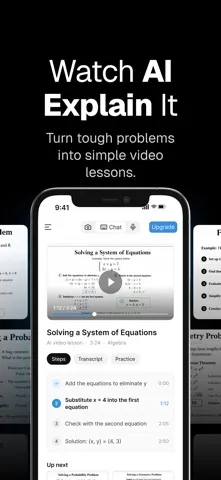
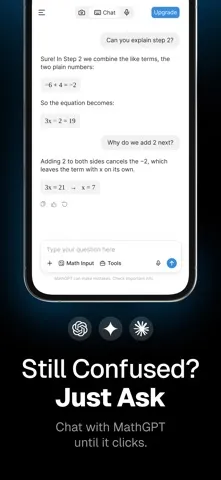
After working through the explanation, a student could ask a follow-up question or make a practice exam to check whether the method stuck. The app also offers flashcards and animated math videos, so the same study session can shift from solving to reviewing. That range is helpful when a topic needs more than one pass, although it still depends on the student engaging with the explanation rather than simply accepting an answer.
More Than a Calculator
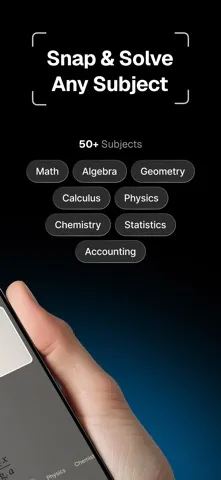
A conventional calculator is quicker when all I need is a basic result. MathGPT is aimed at the next question: how did the answer come about, and can I practice the idea afterward? Its step-by-step solutions, practice exams, and follow-up questions put it closer to a pocket study companion than a bare calculator. It also reaches beyond math into subjects including physics, chemistry, accounting, and statistics.
That breadth does not make it a full classroom or tutoring service. The material describes tools for solving, explaining, practicing, graphing, and memorizing, not live instruction or a complete course with a teacher. I would use it to work through a particular question or review a concept, then compare the result with class notes or assigned material. Students who only want a simple calculator may find the extra learning options unnecessary.
Small Habits That Help
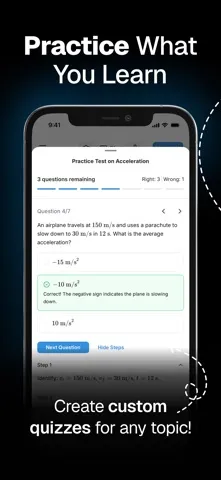
I would get more from MathGPT by treating each solution as a prompt to try the method again, not as the end of the assignment. After reading the steps, cover them and attempt a similar problem, then use an on-demand practice exam to test the topic. The app says those exams track progress, give feedback, and grade work, which can make review feel more purposeful than rereading a page of notes.
For topics with unfamiliar vocabulary, the flashcard generator offers another useful rhythm: choose a topic, review the generated set, and revisit it while studying. When a function or equation is hard to picture, the GeoGebra-powered graphing tool can provide an interactive visual. I would pick the tool that matches the sticking point, rather than generating everything at once; a focused question is easier to learn from than a pile of extras.
More From Our News Desk

Zoom Meetings, Google Meet, or Teams: Which Is Easiest to Join?

How I Build a Free Streaming Lineup With Tubi

Why Crunchyroll Is the Default Anime App for So Many Fans

YouTube TV: A Practical Guide to Cutting Cable

Rummikub and the Small Comfort of Phone Games

TeamViewer Remote Control or AnyDesk for Helping Family?
Who Will Get the Most From It
I would recommend MathGPT to students who regularly meet problems they cannot unpack on their own and want guided steps they can review. It is particularly appealing to learners who switch between solving, visualizing, and memorizing: the app brings explanations, graphs, practice exams, videos, and flashcards into one study toolkit. The range of supported subjects may also help someone whose homework is not limited to standard math exercises.
It may be less satisfying for someone seeking live personal tutoring, a structured course, or only a fast answer with no explanation. The app's tools are designed around AI-generated help, so I would still check important work against a teacher's instructions and course materials. It is also an iOS app with an iOS 16.4 minimum, so it will not suit someone who needs an Android or desktop version.
MathGPT - AI Math Solver is made by MathGPT LLC and is listed in the Education category on the Apple App Store. The store shows a 4.8 out of 5 rating from 6,399 ratings. Its content rating is 4+. The app is free to download, and the listed version is 1.14.1.
The app was released on November 25, 2024, and its last update is dated October 26, 2026. It requires iOS 16.4 or later. These practical details are useful when checking compatibility before installing, particularly if an older iPhone or iPad is involved.
A Closer Look at MathGPT
A Clear Study Focus
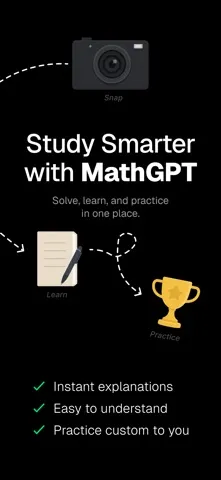
MathGPT's first impression, from its stated purpose, is that it wants to be a learning workspace rather than a single-purpose calculator. The central promise is straightforward: bring a question to the app and get help understanding it. Photos, custom explanations, calculators, practice exams, and flashcards all support that broader study role.
I like that the tools map to familiar student needs. Sometimes I want a worked solution; sometimes I need a graph to make a function feel less abstract. A flashcard set or practice exam serves a different moment again. The potential downside is choice: a student arriving with one urgent question may need to decide which of the available learning tools is the best fit.
Working Through Problems
The core experience centers on solving problems and explaining the work behind them. MathGPT says it can take a photo of a question and return a step-by-step solution, with explanations intended to build understanding of the concepts. It also includes an AI calculator for difficult calculations across subjects such as math, physics, chemistry, statistics, accounting, and engineering.
That combination could be handy during a homework break: use the relevant calculator or submit a problem, read the steps, then follow up where the reasoning is unclear. The description emphasizes instant help, but I would still read each explanation critically. A clear-looking sequence is most useful when I can connect it to the method taught in class and reproduce the reasoning myself.
Tools Beyond Solutions
The standout difference is the collection of ways to revisit a problem. MathGPT offers on-demand AI-generated practice exams with progress tracking, feedback, and grading, as well as follow-up questions. Those options give a student a path from seeing a worked example to checking whether they can handle related work independently.
There are also AI-generated animated math videos, described as including voiceover and animated diagrams, plus custom flashcards for a chosen topic. For graphing, the app uses GeoGebra-powered interactive visuals to help represent functions related to a problem. I would not use every format for every question; the value is having a visual or memory aid available when a written explanation alone is not clicking.
A Useful Weekly Routine
A practical routine could start with the hardest question from a homework set. I would use the photo-based solver to study its steps, then ask a follow-up about the part that feels unfamiliar. If the question involves a function, I could look at the graphing tool; if it introduces a lot of new vocabulary, I could generate flashcards for that topic.
Later, a practice exam can provide a check on whether the idea has settled. That sequence gives each feature a job instead of turning study time into random tapping: explain the question, visualize or review what is difficult, and practice without relying on the original worked answer. The app describes progress tracking and feedback for practice exams, so those may help guide what to review next.
Keep Its Role in Perspective
MathGPT has a broad collection of AI study tools, but breadth does not guarantee that every answer will fit a student's course or level of detail. I would treat the generated steps, videos, and practice materials as support for learning, then compare them with class examples and assignment directions. That is especially sensible when a teacher expects a specific method or notation.
The app's focus is academic help, not live teaching or a complete curriculum. Its many options may also be more than someone needs if the only goal is a quick arithmetic result. Finally, it requires iOS 16.4 or later, so device compatibility is a practical consideration before making it part of a regular study routine.
MathGPT - AI Math Solver makes a strong case as a flexible study companion: it combines problem explanations with practice, visuals, and memory aids. I especially like the idea of moving from a worked solution to a practice exam, rather than stopping at the answer.
I would suggest it to iPhone and iPad students who want several ways to approach a difficult topic. Students looking for live tutoring or a simple calculator should look elsewhere, and everyone should use its AI help thoughtfully alongside their course materials.
MathGPT Frequently Asked Questions
What is MathGPT - AI Math Solver used for?
MathGPT is a study app for solving and understanding problems. It offers photo-based step-by-step help, calculators, follow-up questions, practice exams, flashcards, animated math videos, and graphing visuals. The description also names physics, chemistry, accounting, statistics, and engineering among the subjects its tools can address.
What devices can run MathGPT - AI Math Solver?
MathGPT - AI Math Solver is available for iOS through the Apple App Store and requires iOS 16.4 or later. Check the App Store entry for current compatibility details for a particular iPhone or iPad. It is not described here as an Android or desktop app.
What iOS version does MathGPT - AI Math Solver require?
The listed minimum is iOS 16.4. If your iPhone or iPad is running an older version, check the app's App Store page for current requirements and compatibility information before trying to install it.
Does MathGPT - AI Math Solver cost money?
MathGPT - AI Math Solver is listed as free to download on the Apple App Store. Pricing details and any in-app purchase options may vary, so check the current App Store page for the latest information before downloading.
Is MathGPT - AI Math Solver right for every student?
It may suit students who want explanations and extra ways to practice or review topics. Its tools are geared toward academic problem-solving, not live tutoring or a full course. Students should check generated help against class instructions, and people who only need a basic calculator may prefer a simpler option.
Pros
- Combines step-by-step problem help with practice exams, flashcards, and animated videos.
- Includes graphing visuals powered by GeoGebra for exploring functions.
- Covers study tools for math and several other school subjects.
Cons
- Requires iOS 16.4 or later, limiting use on older Apple devices.
- Its many study tools may feel excessive for someone seeking only a basic calculator.
- AI-generated explanations should be checked against course instructions and examples.
- Category
- Education
- Version
- 1.14.1











