Linksys
- 74.29K
- 3.2
- Installs
- 5.00M
- Price
- Free

Screenshots
Analysis by Reviewed APKs
Linksys is a companion app for managing compatible Linksys Smart WiFi routers and Velop systems. It suits people who want to check connected devices, manage guest access, or adjust home internet controls without sitting beside the router. After looking through what it offers, I see it as a practical remote control for an existing Linksys network, rather than a general-purpose Wi-Fi analyzer or a way to improve any router.
A Quick Check From Anywhere
Picture getting a message that a guest has arrived while you are still out. With a compatible router set up, the Linksys app lets you use an internet connection to check the network and arrange guest access remotely. That is the kind of small, useful job it is built for: handling routine home Wi-Fi tasks from your phone instead of waiting until you are back near the router.
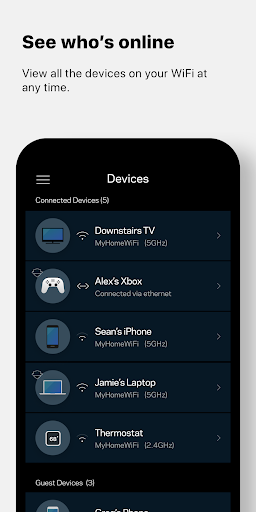
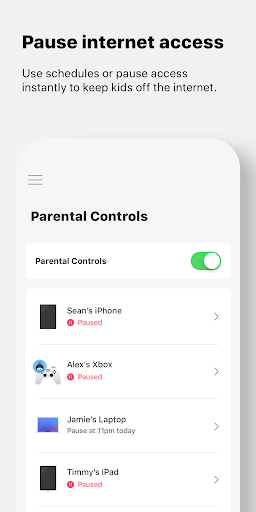
At home, the connected-device view gives you a place to check what is using the network. If a child needs to focus on homework, parental controls can pause internet access for a device. And if a household member is streaming or gaming, device prioritization can give a selected device Wi-Fi priority. These are targeted controls, not a substitute for deciding how your household wants to manage its network.
A Router Companion, Not a Tester
The important distinction is that Linksys works with Linksys Smart WiFi routers and Velop systems. It is not a universal tool for managing routers from other brands, and it is not presented as a speed-test app or a general network troubleshooting suite. If you already have compatible Linksys equipment, its appeal is having useful controls gathered in one place, including options you can reach when away from home.
Compared with opening a router’s web interface, a phone app can make everyday tasks feel more direct, particularly when the job is checking devices, setting up guest access, or pausing a connection. But the app depends on a compatible Linksys product and a user account connected to it. If you are shopping for a new router, or want an app that manages mixed-brand equipment, this is not the right starting point.
Make Controls Part of a Routine
A sensible way to get value from Linksys is to decide in advance which controls you actually expect to use. For example, guest access can be a convenient option when visitors need internet access, while keeping them separate from personal data. Device prioritization is another occasional adjustment for a favored device, rather than something most people need to revisit every day.
Parental controls may fit into a household routine when internet access needs to pause during homework or another agreed time. I would treat that as a deliberate household setting, not as a complete answer to questions about online habits. The dashboard and connected-device check can also help make the network easier to keep an eye on, without turning ordinary Wi-Fi use into a constant monitoring task.
More From Our News Desk

Zoom Meetings, Google Meet, or Teams: Which Is Easiest to Join?

How I Build a Free Streaming Lineup With Tubi

Why Crunchyroll Is the Default Anime App for So Many Fans

YouTube TV: A Practical Guide to Cutting Cable

Rummikub and the Small Comfort of Phone Games

TeamViewer Remote Control or AnyDesk for Helping Family?
Who Will Get the Most From It
I would recommend Linksys to someone who already owns a supported Velop system or Linksys Smart WiFi router and wants convenient access to its controls. It makes the most sense for households that have a clear use for guest access, device prioritization, or parental controls. Remote access is particularly handy when a simple network change comes up while you are away from home.
It may not suit people with other router brands, or anyone expecting a broad toolkit for diagnosing internet problems. Its usefulness depends on the Linksys hardware and connected account, so the app alone will not manage a home network. People who rarely adjust router settings may also find that they only need it occasionally. The main question is less whether the controls sound appealing and more whether your equipment is compatible.
Linksys is developed by Linksys Development. On Google Play, it has over 5 million installs and a 3.2-star rating from about 74,000 ratings. The app is free, with no in-app purchases or ads. Its content rating is Everyone, which is consistent with a utility for managing a home Wi-Fi network.
The current version is 3.6.1. Linksys was released on June 25, 2012, and its most recent update was November 12, 2025. The app is designed to work with compatible Linksys Smart WiFi routers and Velop systems. Setup requires a user account connected to a Linksys product; the Android requirement is covered in the system details below.
How Linksys Handles Everyday Network Control
Getting Set Up
My first impression is that this app has a defined job: it is a control point for supported Linksys equipment, not a standalone service. Before relying on it, you need a compatible Velop system or Linksys Smart WiFi router and a user account connected to that product. That hardware requirement is the first thing I would check, since the app cannot manage a router simply because it is installed on the phone.
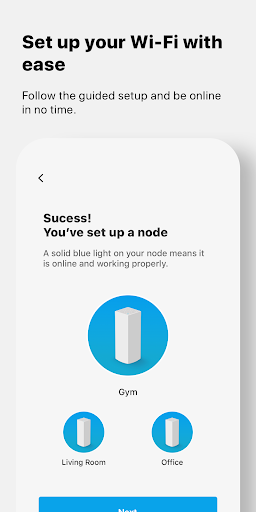
Linksys says setup can be done through an account created in the app or at its Linksys Smart WiFi site. Velop products also support Bluetooth setup. On Android 6 and later, apps need to request location permission to use Bluetooth; Linksys says its app does not collect or use location information. The stated system requirement for the app itself is Android 9.0 or later.
The Day-to-Day Controls
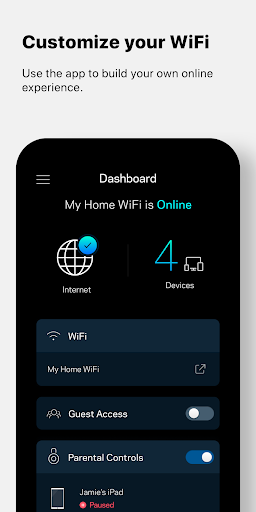
The dashboard is intended to put essential Wi-Fi information together on one page, with a connected-device view available for checking what is on the network. That makes the app most useful in short visits: check a device, make a specific adjustment, and get back to whatever you were doing. It is a more focused routine than opening a browser-based router interface for every small change.
Remote access means those controls are not limited to being at home, as long as you have an internet connection and the connected Linksys setup. I can see the appeal when a guest needs access or a household setting needs attention while someone is out. It is still a remote control for your own compatible network, not a way to connect to or manage unrelated Wi-Fi networks.
Useful Household Features
Guest access is one of the clearest everyday features. It gives visitors internet access while keeping personal data separate, which is a practical distinction in a home where people do not want to share their usual network details. Rather than making a guest arrangement each time from scratch, the app provides a dedicated control for that purpose.
Device prioritization can give favored devices Wi-Fi priority, with streaming and online gaming given as examples of activities that may benefit. Parental controls let users pause internet access to encourage healthier internet habits. Linksys also describes Linksys Shield as a network-security feature for addressing threats and malicious sites. I would treat that as a named capability of the compatible setup, not as a promise that every online risk disappears.
A Practical Home Routine
A low-effort routine could start with checking the connected-device view when you have a reason to review the network, rather than checking it repeatedly. If visitors are coming over, guest access is the relevant control. When a particular device needs priority for streaming or gaming, device prioritization is the more suitable adjustment. Keeping each setting tied to a real need makes the app feel like a useful utility rather than another thing to constantly manage.
For families, parental controls can be part of a clear homework routine: pause internet access when it is time to focus, then restore access when appropriate. The app gives a way to make that change, but the household still decides when and how to use it. Remote access can be useful if you are away when the need comes up, provided the Linksys product and account have already been set up.
Compatibility Is the Main Limit
The biggest limitation is also straightforward: the app is for compatible Linksys Smart WiFi routers and Velop systems. It will not turn another manufacturer’s router into a Linksys-managed network. Before installing with the expectation of controlling a particular device, check that router’s compatibility and make sure the required Linksys account is connected.
The feature set is aimed at management, not exhaustive diagnosis. The described tools cover a dashboard, device checks, guest access, prioritization, security features, and parental controls. If your main goal is measuring connection speed or investigating a complicated outage, those are not the tasks this app is described as handling. The Google Play rating is 3.2 stars, so I would also approach it as a practical companion whose usefulness depends heavily on your setup.
Linksys makes the most sense as a convenient companion for people who already use supported Linksys or Velop hardware. Its strengths are concrete: remote access, a connected-device view, guest access, device prioritization, and parental controls. Those options can simplify a few common household tasks without requiring a trip to the router.
I would try it if your router is compatible and you want those controls on your phone. I would skip it if you need a brand-neutral network tool or a dedicated troubleshooting app. The hardware and account requirements matter more than the download itself, so check compatibility before making it part of your routine.
Linksys Frequently Asked Questions
What is the Linksys app used for?
Linksys is used to manage compatible Linksys Smart WiFi routers and Velop systems. Its features include checking connected devices, arranging guest access, prioritizing selected devices, and pausing internet access through parental controls. It also offers remote access when you have an internet connection. The available controls depend on having a compatible Linksys product connected to a user account.
Which devices and platforms support Linksys?
The app is for Android and is intended to work with Linksys Smart WiFi routers and Velop systems. Linksys states that it requires Android 9.0 or later. The router itself also needs to be supported, and a user account must be connected to the Linksys product. Check the Google Play store information and router compatibility details before setting it up.
Does Linksys cost money or include purchases?
Linksys is free on Google Play, and the app facts show no in-app purchases or ads. Its controls are for compatible Linksys routers and Velop systems, so the app is not a replacement for that hardware. Store details can change over time, so it is worth checking Google Play for the latest information before installing.
What Android version does Linksys require?
Linksys requires Android 9.0 or later, according to its system requirements. Velop products can use Bluetooth during setup; on Android 6 and later, apps must request location permission to use Bluetooth. Linksys says it does not collect or use location information in the app. Check the store page for current device requirements.
Is the Linksys app suitable for every router owner?
No. It is designed for compatible Linksys Smart WiFi routers and Velop systems, so it is not a general manager for routers from other brands. It may suit households that want remote controls, guest access, device priority, or parental controls. If you mainly need network diagnostics or use different hardware, it may not meet your needs.
Pros
- Remote access makes basic network controls available when you are away from home.
- Guest access offers visitors internet access while keeping personal data separate.
- Device prioritization and parental controls address common household needs.
- The app is free, with no ads or in-app purchases.
Cons
- It requires compatible Linksys Smart WiFi or Velop hardware and a connected account.
- Its described features focus on management rather than detailed network troubleshooting.
- The 3.2-star Google Play rating suggests experiences may be mixed.
- Category
- Tools
- Version
- 3.6.1











