Learn to Speak English
- 42.59K
- 4.7
- Installs
- 5.00M
- Price
- Free

Screenshots
Analysis by Reviewed APKs
Learn to Speak English is a practice-focused English learning app from TalkEnglish, built around spoken examples, listening and repeatable lessons. I’d point learners who want to work on everyday conversations, pronunciation or useful phrases toward it, especially if they like choosing their own topics. Its large lesson library and ability to record your voice make it practical; the ads and in-app purchases are worth bearing in mind.
Practice for Everyday Moments
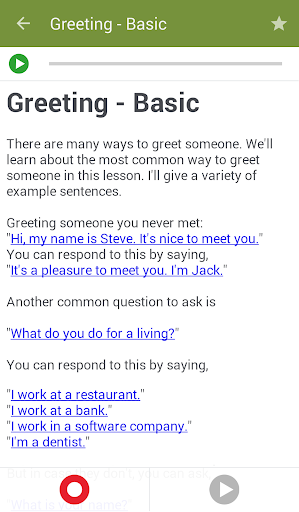
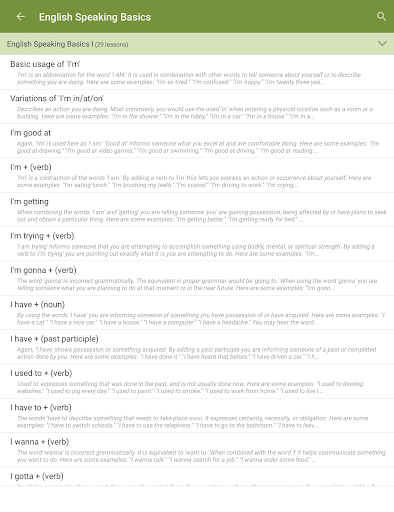
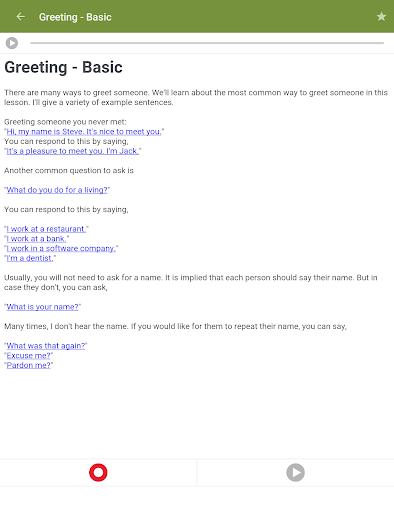
When I want to prepare for a conversation, I’d rather practice a few useful lines than read a long explanation about language rules. This app’s lessons cover situations such as shopping, work, travel and college life, so I can pick a topic that feels relevant. I can tap a sentence to hear a native English speaker say it, then repeat it aloud. That gives a short practice session a clear purpose.
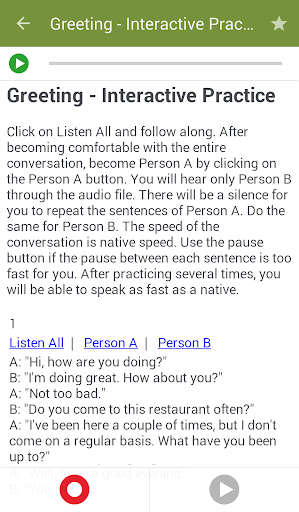
The recording tool adds a useful check to that routine. I can record myself reading a sentence and play it back alongside the provided audio, which gives me a chance to notice differences in rhythm or pronunciation. It is a simple exercise rather than a full conversation with a live partner, but it makes the lesson more active than listening alone. For a spare few minutes at home or before a trip, that distinction matters.
A Speaking Practice Companion
Compared with a textbook or a general reference app, Learn to Speak English puts more emphasis on hearing and saying sentences. The library includes conversation practice, listening and pronunciation lessons, as well as grammar basics and vocabulary. I can move between those areas depending on what I want to work on that day. The format suits self-directed study: choose a lesson, listen, repeat and use the recording tool when I want another point of comparison.
It is not a replacement for a teacher, a conversation partner or a structured course with personal feedback. The description focuses on prerecorded native-speaker audio and self-recording, not live tutoring or automatic speech evaluation. That makes it better suited to rehearsing examples than testing how I would handle an unpredictable exchange. I’d treat it as a useful practice resource alongside real conversations, rather than expecting it to do every part of learning a language.
Make Lessons Easy to Revisit
The lesson search and bookmarking tools can help turn a large library into something manageable. If I find a useful travel or interview lesson, I can bookmark it and return to it later instead of trying to remember its place among hundreds of topics. Favorites are especially handy when I want to repeat the same short practice over several days. The point is not to cover everything at once; it is to make the next useful lesson easy to find.
I’d build a small routine around one topic at a time. Listen to a sentence, repeat it, record a version and play it back; then revisit the bookmark later in the week. If I have more time, I can move from a basic lesson to a related conversation or listening exercise. Sharing is also available, though my main use would be keeping practice focused and returning to examples that fit a real situation.
More From Our News Desk

Zoom Meetings, Google Meet, or Teams: Which Is Easiest to Join?

How I Build a Free Streaming Lineup With Tubi

Why Crunchyroll Is the Default Anime App for So Many Fans

YouTube TV: A Practical Guide to Cutting Cable

Rummikub and the Small Comfort of Phone Games

TeamViewer Remote Control or AnyDesk for Helping Family?
Who May Find It Useful
I’d recommend Learn to Speak English to learners who want practical speaking and listening practice they can do independently. Its mix of daily, travel and business topics gives people a way to focus on situations they expect to encounter, while the clickable audio and self-recording tool make it easier to practice aloud. It may also suit someone who already studies English elsewhere but wants a convenient source of sentences and conversation examples to revisit.
It may be less appealing if you need a highly guided course, individualized correction or real-time conversation with another person. The lesson library is broad, so learners who prefer a tightly prescribed sequence may need to choose their own path through it. And if you are uncomfortable with ads or optional in-app purchases, take those into account before settling into regular use. I see it as a flexible practice aid, not a complete substitute for every kind of instruction.
Learn to Speak English is an Education app from TalkEnglish. On Google Play, it has more than 5 million installs and a 4.7-star rating from about 42,600 ratings. It is free to download, contains ads and offers in-app purchases. Individual in-app items are priced from $2.99 to $4.99. The content rating is Everyone, making it broadly accessible from a store-rating perspective.
The current version is 2.4.11. The app was released on December 8, 2014, and its most recent update was November 10, 2024. The supplied app information does not give a minimum Android version, so check the Google Play details on your device for compatibility. The lesson library is described as containing over 900 lessons and 8,000 audio files.
A Closer Look at Speaking Practice
A Direct First Impression
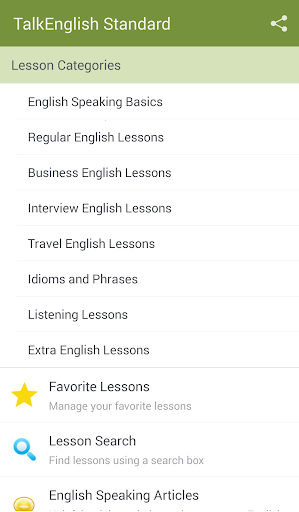
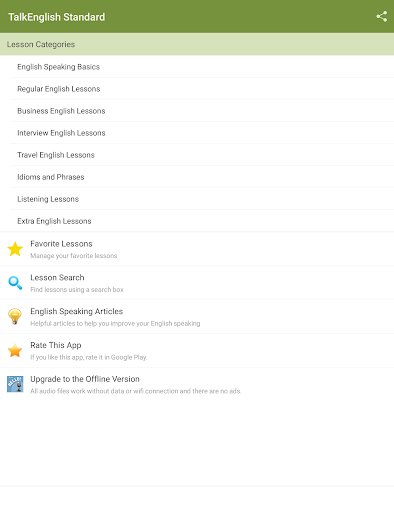
The central idea is easy to grasp: choose a lesson, tap a sentence to hear it and practice saying it yourself. I like that the app’s purpose is apparent without needing to understand a complicated learning system. The range of categories also gives a newcomer several obvious starting points, from basics and daily English to travel, business and interviews. If I had a specific conversation coming up, I could start with the topic that feels closest.
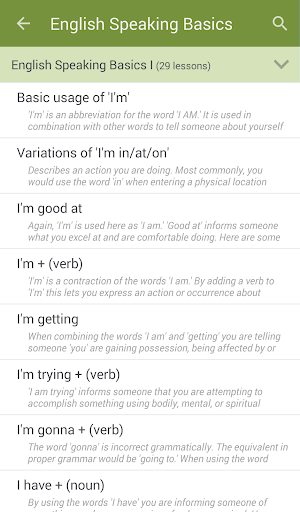
There is a lot of material to browse, and that can make the first choice less obvious. With hundreds of lessons, I would begin with one immediate need rather than trying to map out the whole library. Search and bookmarks give me ways to narrow things down and keep useful pages close. The most helpful first step is simply finding a sentence or scenario I can imagine using, then spending time listening and repeating it.
The Repeat-and-Record Loop
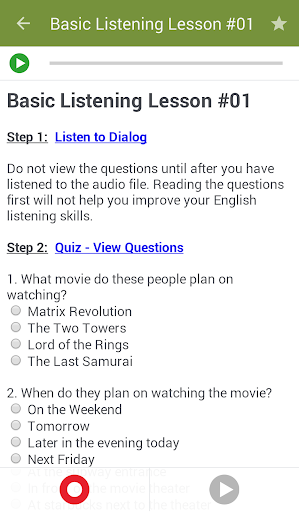
Day to day, the strongest learning loop is straightforward. I listen to a sentence spoken by a native English speaker, repeat it aloud and use the self-recording tool to hear my own attempt. Playing those recordings back gives me a chance to compare what I hear rather than relying only on how the words felt while speaking. That makes even a brief lesson more participatory than just reading text or letting audio play in the background.
This is still self-practice, not a conversation that reacts to my answer. I would use it to rehearse phrasing, become more familiar with how example sentences sound and spend focused time speaking. The app’s description does not promise personalized correction, so I would not treat the recording as a score or a formal assessment. Its value is in giving me a repeatable way to hear and practice examples at my own pace.
A Broad Topic Library
The breadth of the lesson categories is a notable part of the app. Alongside English basics and regular daily English, there are sections for business, travel and interviews, plus idioms, phrases, listening, pronunciation and grammar. A top 2,000 English-speaking vocabulary word list adds another kind of material. That variety means I can use the app for more than one narrow situation, while still choosing a category that fits what I want to practice.
Interactive conversation lessons and real-life scenarios give the material a practical angle. The examples span areas including movies, sports, shopping, college life, pets and work. I appreciate that the description points to specific everyday settings rather than only abstract language topics. A learner can browse toward a familiar context, then use the audio and repeat function to work through example sentences. It is a useful way to connect listening practice with phrases tied to an actual scenario.
A Short Daily Routine
For a manageable routine, I would pick one category that matches a current goal and work through a small number of sentences rather than trying to finish a large section in one sitting. I’d listen once for the overall sound, repeat the sentence, then record myself if I want to compare. That approach fits a short break at home or a quiet moment before an interview or journey, without turning practice into a major scheduling project.
At the end, I’d bookmark the lesson if I want to return to it. Search can help me locate another related topic later, while the favorites feature keeps particularly useful lessons within reach. On a different day, I could switch from speaking examples to a listening or pronunciation lesson. The app supports those categories, so a simple rotation can keep practice varied while still leaving me in control of what gets attention.
Keep the Scope in Mind
The app’s self-recording is useful for listening back to my own voice, but it should not be confused with a tutor evaluating a conversation. The described process is based on comparing a personal recording with native-speaker audio. That gives me a reference, not a tailored explanation of every difference. Anyone who needs detailed feedback or spontaneous back-and-forth practice will likely want to add other learning methods.
The large library is an advantage, but it also leaves the learner responsible for choosing what to study. People who want every lesson arranged into a fixed personal plan may find that freedom less convenient. Ads and in-app purchases are part of the practical picture, too. I would weigh those trade-offs against the free-to-download access and the app’s substantial collection of lessons and audio before making it a regular part of my study routine.
Learn to Speak English makes a practical case for learning by listening and speaking. Its lesson variety, native-speaker audio, recording tool and bookmarks give independent learners several ways to build short, repeatable practice sessions. I especially like the fit for people who have a real topic in mind and want to rehearse relevant sentences.
I’d recommend trying it if you are comfortable choosing your own lessons and want extra speaking practice on an Android device. If you need live conversation, a guided course or personal correction, treat it as one part of a broader approach. The ads and optional purchases are worth considering, but the core lesson format is clear and useful.
Learn to Speak English Frequently Asked Questions
What is Learn to Speak English used for?
Learn to Speak English is an English learning app with lessons for speaking, listening, pronunciation, grammar, vocabulary and everyday topics. You can tap many lesson sentences to hear a native English speaker, repeat them and record your own voice for playback and comparison. It also includes conversation practice, lesson search and bookmarks for returning to favorites.
Which devices can run Learn to Speak English?
Learn to Speak English is an Android app available through Google Play. The supplied app details do not specify a minimum Android version, so compatibility can vary by device and operating system. Check the Google Play store details from the Android device you plan to use before installing it.
Does Learn to Speak English cost money?
Learn to Speak English is free to download and contains ads. It also offers optional in-app purchases, with individual items priced from $2.99 to $4.99. Those are the listed purchase details; check Google Play for the current options and prices in your region, since store information can vary.
Does Learn to Speak English give pronunciation feedback?
Learn to Speak English lets you record yourself reading lesson sentences and play the recording back to compare with the native-speaker audio. It provides a way to listen to your own attempt, but its described tools do not promise individualized coaching or automatic pronunciation scores. Use it as self-practice, and check the store details for any changes to the app.
Who is Learn to Speak English best for?
Learn to Speak English may suit learners who want flexible, independent practice with spoken examples and lessons for practical situations. Its broad set of topics lets you choose what to work on, while recording and bookmarks support repeat practice. It may not suit someone looking specifically for live tutors, spontaneous conversation or a fully guided personal course.
Pros
- Clickable native-speaker audio makes individual lesson sentences easy to hear and repeat.
- Self-recording lets learners play back their own spoken practice.
- Topics cover daily life, travel, business, interviews, listening and pronunciation.
- Search and bookmarks help learners return to relevant lessons.
Cons
- The described recording tool does not provide individualized coaching or live conversation.
- A large lesson library means learners must choose their own study path.
- The app contains ads and offers optional in-app purchases.
- Category
- Education
- Version
- 2.4.11











