Krispy Kreme
- 15.67K
- 3.2
- Installs
- 1.00M
- Price
- Free

Screenshots
Analysis by Reviewed APKs
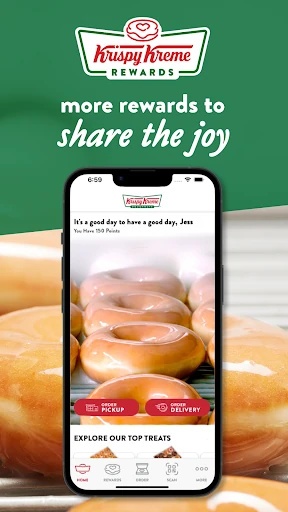
Krispy Kreme is a Food & Drink app for ordering doughnuts and other treats for pickup or delivery, finding nearby shops, and earning rewards. I found it most useful when I already knew I wanted a Krispy Kreme stop and wanted to make the visit easier. It brings ordering and loyalty into one place, though it is naturally less useful if you rarely visit the chain.
A quicker doughnut stop
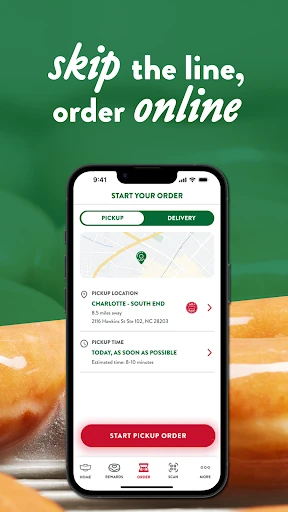
When I first imagined using Krispy Kreme, it was for the familiar in-between moment: I’m heading to meet someone, want to bring a box of doughnuts, and don’t want to spend extra time deciding at the counter. The app lets me place an order ahead for pickup or delivery, so I can sort out the treat before the rest of the errand. That focus makes its purpose easy to understand.
The other part of that routine is finding a shop and checking whether the Hot Light is on. I like that those ideas sit alongside ordering rather than feeling like unrelated extras. If I’m out and about, a nearby location can help me plan a stop; if I’m already at home, delivery may suit better. The app is built around getting Krispy Kreme treats, not turning snack planning into a project.
A chain-specific companion
Compared with calling a shop or deciding what to order after I arrive, Krispy Kreme gives me an advance-order option and a place to manage Rewards. That can make a routine visit feel more organized, especially when I want to collect something on the way. The shop locator and Hot Light notifications also give the app a role beyond the checkout moment, helping me decide whether a stop makes sense.
It is not a general restaurant finder, a broad food-delivery marketplace, or a recipe app. Its usefulness depends on wanting Krispy Kreme and having a participating shop or ordering option that works for the visit. I would not install it to compare lots of unrelated food choices. For occasional visitors, the app may be more than they need; regular customers have more reason to keep its ordering and rewards tools handy.
Small habits that help
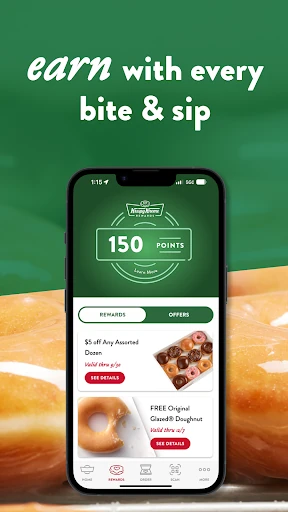
I’d get the most from the app by checking Rewards before placing an order, then making a habit of using the account when I buy a treat. The program is designed to award points toward free treats, and the app describes a welcome treat and a birthday treat as part of joining. Those benefits give regular visits a little continuity, rather than leaving each purchase as a separate transaction.
Notifications are another choice worth making deliberately. The app can send updates about offers and limited-time doughnuts, and Hot Light notifications can help when I’m curious about fresh doughnuts at a nearby shop. I’d enable only the alerts I actually want, then use the locator when planning a visit. That simple routine keeps the app useful without turning every doughnut craving into a reason to check my phone.
More From Our News Desk

Zoom Meetings, Google Meet, or Teams: Which Is Easiest to Join?

How I Build a Free Streaming Lineup With Tubi

Why Crunchyroll Is the Default Anime App for So Many Fans

YouTube TV: A Practical Guide to Cutting Cable

Rummikub and the Small Comfort of Phone Games

TeamViewer Remote Control or AnyDesk for Helping Family?
Who may enjoy it
I’d recommend Krispy Kreme to people who already visit the chain and like ordering ahead, checking nearby shops, or collecting loyalty rewards. It makes particular sense for someone who picks up treats for a family breakfast, a work gathering, or an occasional coffee break. If those visits are part of your routine, putting ordering and Rewards in one app can be more convenient than handling each stop from scratch.
It may not be worth keeping around if you rarely choose Krispy Kreme or prefer to decide everything at the counter. The app is focused on one chain, so it won’t help much when you’re choosing between different restaurants. I’d also keep expectations practical: the appeal is convenience and a more connected rewards experience, not a completely different way to enjoy doughnuts.
Krispy Kreme is developed by Krispy Kreme and is available on Google Play for Android. The store shows more than 1 million installs and a 3.2-star rating from about 15,700 ratings. It is free to download, with no in-app purchases or ads. Its content rating is Everyone, and the stated minimum Android requirement is Android 7.0.
The current version shown is 2026.01.26. The app was released on December 15, 2011, and was last updated on January 28, 2026. Those details give a useful snapshot of its availability and maintenance, while the rating offers a reminder that customer experiences vary. I’d check Google Play for the current store information before installing, since app details can change.
How the app fits a doughnut run
A clear first impression
When I first opened the idea of the app, the main jobs were immediately understandable: order treats, use Rewards, find a shop, and keep up with Hot Light activity. That’s a sensible set of reasons to have a chain’s app on my phone. It doesn’t ask me to learn a complicated new service before I can see why it might be useful.
Getting started is most appealing if I’m ready to use Rewards or place an order. The description invites new members to join the program and earn points with purchases, with a welcome treat and a birthday treat mentioned as benefits. I’d take a moment to understand the rewards terms in the app before assuming how a particular purchase or redemption works.
Ordering day to day
The everyday draw is ordering ahead for pickup or delivery. For pickup, I can think through the order before reaching the shop; for delivery, I can place a treat order without making a separate trip. That flexibility is useful in ordinary situations, like bringing something to share or satisfying a specific craving when I’m already busy.
I appreciate that the app presents ordering as a way to skip the line, but I’d still plan around the practical details of a particular shop and order. The core benefit is the chance to arrange the purchase in advance. I wouldn’t treat the app as a promise that every location, item, or delivery option will work identically in every situation.
Rewards and Hot Light
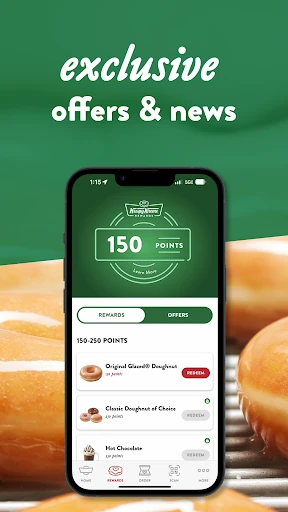
Rewards is a standout because it gives repeat visits a simple purpose beyond placing the next order. The program lets members earn points toward free treats, and the app describes a reward arriving after as little as one visit. It also mentions a joining treat and a birthday treat. Those are appealing reasons to check the program if Krispy Kreme is already part of my routine.
The Hot Light feature gives the locator a little more character than a basic shop search. The app can help find nearby Krispy Kreme shops, while Hot Light notifications let me know when fresh doughnuts are coming off the line. I like that this can turn a vague idea of stopping in into a more timely plan, without needing to make a shop visit first.
A simple visit routine
For a planned group breakfast, I’d start by checking the app before leaving home. I could look for a nearby shop, decide whether pickup or delivery fits the morning, and place an order ahead if that option suits the plan. Before paying, I’d check that I’m signed in to Rewards so the visit can count toward the program as described.
On a less organized day, I might use the locator to see whether there is a Krispy Kreme nearby and pay attention to a Hot Light notification if I’ve enabled one. After a purchase, I’d keep Rewards in mind for the next visit rather than treating points as an afterthought. These are small steps, but together they make the app feel like a practical companion instead of a one-time download.
Keep expectations grounded
The biggest limitation is the narrow focus. If I’m not in the mood for Krispy Kreme, the app has little to offer, and it cannot replace a broader way to compare restaurants. Its core tools are useful within the chain’s world: ordering, rewards, shop finding, offers, and Hot Light information. That specialization is also what keeps the app’s purpose straightforward.
The store rating is 3.2 stars from about 15,700 ratings, so I wouldn’t assume every user has a smooth experience. I’d treat that as context rather than a verdict on a specific order or shop. Rewards and offers are also reasons to read the current in-app details, since the practical terms matter when deciding whether a perk fits my plans.
Notifications can be helpful, but they may not suit someone who prefers a quiet phone. Since the app uses alerts for offers, limited-time doughnuts, and Hot Light updates, I’d choose notification settings based on what I genuinely want to hear about. The app is easiest to appreciate when those updates serve a real habit, rather than simply adding more interruptions.
Krispy Kreme makes the most sense as a focused companion for people who already enjoy the chain. I like the combination of advance ordering, shop finding, Hot Light updates, and Rewards, because it supports both planning a visit and making a regular stop feel a little more rewarding.
I’d try it if I expect to visit Krispy Kreme more than once in a while, especially if pickup or loyalty perks appeal to me. If I rarely go, it may not earn a spot on my phone. Either way, the practical value comes down to how often its chain-specific tools fit my everyday plans.
Krispy Kreme Frequently Asked Questions
What is the Krispy Kreme app used for?
Krispy Kreme is used to order treats for pickup or delivery, join and use the Krispy Kreme Rewards program, and find nearby shops. It can also provide offers, limited-time doughnut updates, and Hot Light notifications. I’d think of it as a companion for Krispy Kreme visits rather than a general food-ordering app.
Which devices can run the Krispy Kreme app?
The app is available on Google Play for Android devices. The stated minimum requirement is Android 7.0. I’d check the Google Play store page on the device I plan to use, since compatibility and current app requirements can vary over time.
What Android version does Krispy Kreme require?
The listed minimum Android version for Krispy Kreme is Android 7.0. If your phone runs an older version, check the Google Play store page to see whether the current app is compatible with your device. Requirements can change as the app is updated.
Does the Krispy Kreme app cost money?
The app is free to download on Google Play, and the available store facts show no in-app purchases or ads. Ordering food is separate from downloading the app, so the cost of a purchase depends on the order. Check the store and app for current details before placing one.
Is Krispy Kreme suitable for occasional visitors?
It can be, especially if you want to place an order ahead or locate a nearby shop for a particular visit. Its Rewards program may be more useful to people who return regularly, while occasional visitors may not use every feature. The app is focused on Krispy Kreme rather than other food choices.
Pros
- Combines pickup and delivery ordering with shop finding in one chain-focused app.
- Rewards points can go toward free treats, with welcome and birthday treats described.
- Hot Light notifications can help time a visit for fresh doughnuts.
- Free to download, with no in-app purchases or ads shown in store facts.
Cons
- Its usefulness is limited if you rarely visit Krispy Kreme.
- A 3.2-star Google Play rating suggests user experiences are mixed.
- Offers and Hot Light alerts may be unnecessary if you prefer fewer notifications.
- Category
- Food & Drink
- Version
- 2026.01.26











