Amazon Kindle: Reading App
- 5.89M
- 4.9
- Installs
- —
- Price
- Free

Screenshots

Analysis by Reviewed APKs
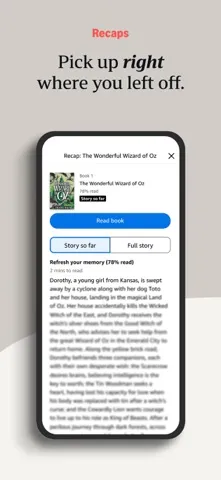
Amazon Kindle: Reading App turns an iPhone or iPad into a flexible place to read books, magazines, comics, and manga. It suits people who already buy Kindle books or want reading tools that adapt to different routines, from a quick bus ride to a longer evening session. After spending time with its feature set, my take is that it is a capable reading companion, especially if you value adjustable text, saved notes, and syncing across devices.
A Book for the In-Between
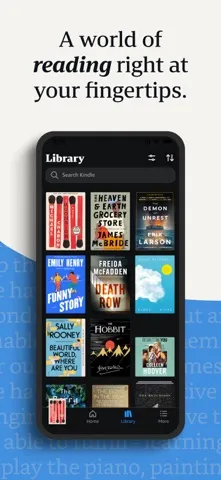
When I think about where Kindle fits best, it is in the small gaps that do not quite suit a paper book: a few minutes on the bus, a quiet lunch break, or the last stretch before bed. Books bought on Amazon appear in the app, so I can open one on my iPhone without carrying another item. If I have more time later, I can continue on an iPad and pick up where I stopped.
The reading tools make those short sessions feel less like settling for a phone screen. I can enlarge the text, change the font or background, and switch between page turns and continuous scrolling. A progress indicator and estimates for the chapter or book give me a sense of how much reading fits before I need to get off the bus or turn out the light. It is a practical setup for reading in fragments.
A Reading App, Not a Bookstore Replacement
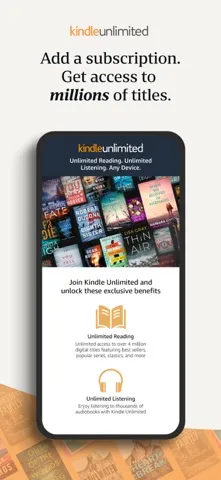
Kindle is most compelling if your reading life already touches Amazon. Purchased Kindle books show up in the app, while Kindle Unlimited and Amazon Prime members can select and download books directly there. The app also offers free samples, which are useful when I want to try the opening of a title before committing to it. Its combination of a library and reading tools is more useful than a bare document viewer.
It is not a general-purpose note-taking app, a writing tool, or a promise that every book is free. Its job is to help you find and read Kindle content, with extra support for magazines, comics, and some books with Audible narration. If you prefer physical pages or keep your entire collection outside Amazon, the app may be less central to your routine. The best fit is a reader comfortable with Amazon’s book ecosystem.
Small Habits That Help
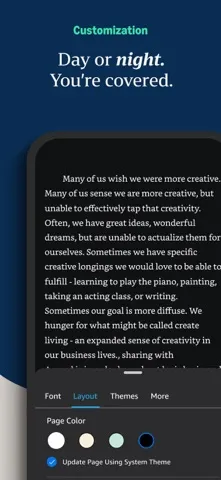
I would start by adjusting the page before settling into a book. A comfortable font size, margin, orientation, and background can make a phone or tablet easier to read for longer stretches. Brightness and background color are adjustable, too, which helps when I move from a bright daytime setting to a dim room. These are small choices, but getting them right means less fiddling once I am absorbed in a chapter.
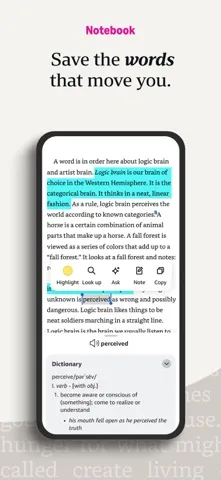
For books I want to revisit, I would use bookmarks, highlights, and notes as I go rather than relying on memory. The My Notebook area gathers notes in one place, and search or the built-in reference tools can help when a name or unfamiliar word slows me down. Page Flip is handy when I want to skim or jump around while keeping my place. Syncing carries reading progress and annotations between devices.
More From Our News Desk

Zoom Meetings, Google Meet, or Teams: Which Is Easiest to Join?

How I Build a Free Streaming Lineup With Tubi

Why Crunchyroll Is the Default Anime App for So Many Fans

YouTube TV: A Practical Guide to Cutting Cable

Rummikub and the Small Comfort of Phone Games

TeamViewer Remote Control or AnyDesk for Helping Family?
Who Will Get the Most From It
I would recommend Kindle to people who already read books bought on Amazon, commuters who like having a book on their phone, and readers who switch between an iPhone and iPad. The adjustable display and progress tools are particularly useful if you read in short sessions or at different times of day. Prime and Kindle Unlimited members also have a way to select and download eligible reading material within the app.
It may not suit someone who strongly prefers paper, wants one app to manage every kind of reading material, or does not want to use Amazon’s book ecosystem. The screen can be adjusted, but it is still a phone or tablet display, and the selection you can access depends on the books and memberships involved. I see it as a flexible reading option, not a reason every reader needs to replace their existing habits.
Amazon Kindle: Reading App is developed by AMZN Mobile LLC and is available for iPhone and iPad through the Apple App Store. The store shows a 4.9-star rating from about 5.9 million ratings. It is free to download, has a 12+ age rating, and the listed version is 7.70.3.
The listed release date is March 4, 2009, and the latest update date provided is November 4, 2026. The minimum requirement is iOS 17.0. An install count and details about advertising or in-app purchases are not included in the available store facts, so I have left those out.
A Flexible Reading Routine on iPhone
Opening a Familiar Library
When I first opened Kindle, the basic appeal was straightforward: books purchased on Amazon can appear in the app, ready to read on an iPhone or iPad. Kindle Unlimited and Amazon Prime members can also select and download books directly in the app. That makes it less of a blank reader and more of a practical doorway into the reading already associated with an Amazon account.
There is also a discovery angle for readers still deciding what to try. The app includes access to a large Kindle book selection, along with magazines and comics, and offers free samples. I like the sample idea because it gives me a low-commitment way to test whether a book’s voice works for me. The overall first impression is of a reading space with several ways to choose what comes next.
Reading in Everyday Sessions
Day to day, the strongest part of Kindle is how much control it gives over the page. I can change text size, font, margins, alignment, and orientation, then choose between turning pages and scrolling continuously. Brightness and background colors are adjustable as well. I do not need the same settings for a quick daytime read and a longer session at night, and the app lets me adapt the display to each.
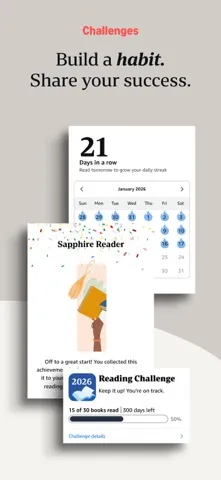
Progress information adds a useful sense of scale. I can see the percentage completed, and for most top titles the app provides real page numbers. Estimates of the time left in a chapter or book are based on my reading speed. I find that more immediately useful than a percentage alone when I have a few minutes to spare and want to decide whether to begin another section.
Tools Beyond the Page
The built-in reference options help keep a reading session moving. I can tap and hold a word for its definition, look up information through Wikipedia, use instant translations, or search within a book. X-Ray is another way to look up people and places. These tools are especially handy when a novel introduces a long cast of characters or a nonfiction title uses unfamiliar terms.
Kindle also gives readers ways to keep and revisit their own thoughts. I can bookmark a passage, highlight text, and add notes, then open My Notebook to see notes together. Page Flip offers a way to skim, move between pages, or get a broader view of a book while saving my place. For image-heavy books, magazines, comics, and manga, high-definition color images can be zoomed in on.
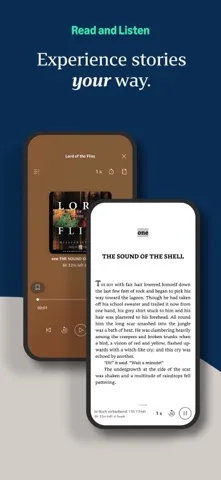
The app supports switching between reading a Kindle book and listening to its Audible book within Kindle. That can be useful when my hands or attention are needed elsewhere, though the feature depends on having the relevant content. Notifications about new releases from authors I like add another way to keep track of reading interests.
A Routine That Travels
A simple routine could start with choosing a book at home and downloading it before heading out. On the way to work, I can read a few pages on my iPhone, use the progress estimate to judge how much time I have, and bookmark a passage worth returning to. Later, on an iPad, Kindle can sync where I left off along with bookmarks, highlights, and notes.
That continuity matters most when reading happens in several small windows rather than one long stretch. I would use the phone for waiting rooms or transit and the iPad for a more relaxed evening session. If I pause to look up a term or jot down a thought, I can return to the text without building a separate system for tracking everything. It is a modest workflow, but a convenient one.
Keep the Fit in Perspective
Kindle’s biggest limitation is also part of its identity: it is built around Kindle books and Amazon’s reading options. Readers with collections elsewhere may not find it equally useful as a central library. The app’s selection includes books, magazines, and comics, but that does not mean every title or format is available. The reading experience is flexible, while the catalog still depends on what content can be accessed.
There are also practical considerations around the device and the way you like to read. The app requires iOS 17.0 or later, so older iPhones or iPads that cannot meet that requirement are not a fit. And no amount of font or background adjustment changes the fact that reading takes place on a screen. I would treat Kindle as a useful alternative or complement to paper, rather than assuming it replaces every reader’s preferred format.
Amazon Kindle: Reading App is a well-rounded option for readers who want their Amazon books close at hand and like adjusting the page to suit the moment. Syncing, notes, reference tools, and reading progress make it more capable than a simple book viewer. Its greatest value comes when you use those features as part of an existing reading routine.
I recommend it to iPhone and iPad users who read Kindle content and want a convenient way to continue across devices. Readers who avoid screens or do not use Amazon’s book ecosystem may have less reason to make it their main reading app. For everyone else, it is a practical companion with plenty of useful reading controls.
Amazon Kindle Frequently Asked Questions
What is Amazon Kindle: Reading App used for?
Amazon Kindle: Reading App is for reading Kindle books, magazines, comics, and manga on an iPhone or iPad. It includes tools for changing the page appearance, checking reading progress, looking up words, and saving bookmarks, highlights, and notes. Books purchased on Amazon can appear in the app, and eligible members can select and download reading material there.
Which devices can run Amazon Kindle: Reading App?
The app is available for iPhone and iPad through the Apple App Store. The minimum listed requirement is iOS 17.0. Check the App Store for current compatibility details for a particular device, since requirements and availability can vary over time.
Is Amazon Kindle: Reading App free?
The app is free to download. Kindle books and membership options are separate parts of the reading experience, and the details for purchases or in-app options may vary. Check the Apple App Store for current pricing and purchase information before deciding what content or services you want to use.
Does Amazon Kindle: Reading App include books?
The app lets you read Kindle books purchased on Amazon, and Kindle Unlimited and Amazon Prime members can select and download books directly in the app. It also offers free samples. The books available to you depend on the content and membership options you use, so check the store for current details.
Who should use Amazon Kindle: Reading App?
It is a good fit for people who read Kindle books and want to continue on an iPhone or iPad, especially if they value adjustable text, notes, and syncing between devices. It may be less appealing to readers who prefer paper or do not use Amazon’s book ecosystem. The app requires iOS 17.0 or later.
Pros
- Adjustable text, page layout, brightness, and background colors suit different reading settings.
- Syncs reading progress, bookmarks, highlights, and notes across devices.
- Includes dictionary, translation, search, X-Ray, and Wikipedia lookup tools.
- Free samples make it easier to try a book before choosing it.
Cons
- Most useful when your reading already centers on Kindle books and Amazon.
- Requires iOS 17.0 or later, leaving some older devices out.
- Reading on a phone or tablet will not suit everyone who prefers paper.
- Category
- Tools
- Version
- 7.70.3











