JustAnswer: Ask for help, 24/7
- 10.88K
- 3.8
- Installs
- 1.00M
- Price
- Free

Screenshots

Analysis by Reviewed APKs
JustAnswer: Ask for help, 24/7 connects people with professionals for questions about topics such as health, law, pets, cars, technology, and home repairs. I see it as a handy place to start when a specific problem needs a knowledgeable human answer, especially outside ordinary business hours. Its wide range is appealing, though the membership model means it is worth understanding the terms before making it part of your routine.
When a Quick Answer Matters
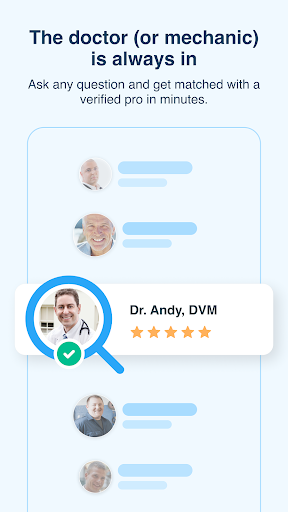
Imagine finding a strange warning light on your car after dinner, or wondering whether a pet’s new behavior deserves attention. JustAnswer gives you a way to describe the situation and connect with an Expert in the relevant field. You can talk, text, or chat, and the service says it is available around the clock. That can be more useful than searching through pages of results when your question depends on the details.
The practical appeal is getting to explain your own circumstances rather than trying to match them to a generic article. I would use the app to clarify what to ask next, understand a confusing issue, or get a professional perspective before deciding on a next step. JustAnswer says it connects members in minutes and provides notifications when an Expert replies, which suits questions that are easier to handle as a conversation.
A Conversation, Not a Search
The obvious alternative is a web search: it is quick, broad, and often free, but it can leave you sorting through advice that may not fit your situation. JustAnswer is built around asking a professional directly and following up through a conversation. Its range spans specialties from legal and medical topics to pet care, vehicle issues, computers, and household repairs, so it can cover questions that do not belong in one narrow help app.
That breadth does not make it a replacement for every kind of service. It is not presented as an emergency response tool, and an online exchange is not the same as an in-person examination, repair, or formal professional engagement. I would treat it as a way to get guidance and clarify options, not as a shortcut around the appropriate care or hands-on help a situation may require.
Make the Question Useful
A little preparation can make an expert conversation more productive. Before asking, I would write down what happened, when it began, and what I have already tried. For a technology problem, that might mean naming the device and the error; for a home issue, describing the appliance or symptom. The app covers many specialties, so choosing the closest topic and giving focused context should help frame the question.
I would also treat follow-up as part of the process rather than expecting one short prompt to settle everything. Save Experts you expect to contact again, as the app supports favoriting them, and keep notifications enabled if a reply is time-sensitive. JustAnswer describes unlimited conversations for members and two free phone calls to Experts each month. Those details make it sensible to check membership terms and available contact options before relying on a particular workflow.
More From Our News Desk

Zoom Meetings, Google Meet, or Teams: Which Is Easiest to Join?

How I Build a Free Streaming Lineup With Tubi

Why Crunchyroll Is the Default Anime App for So Many Fans

YouTube TV: A Practical Guide to Cutting Cable

Rummikub and the Small Comfort of Phone Games

TeamViewer Remote Control or AnyDesk for Helping Family?
Who May Find It Useful
I would recommend JustAnswer to people who regularly run into practical questions across different parts of life and want the option of speaking with a specialist. It may be especially convenient for someone who needs help outside standard office hours, wants to ask follow-up questions, or is not sure which kind of professional to consult. The app’s broad coverage means it can be one place to start for topics ranging from pets and cars to computers and home maintenance.
It may be less appealing if you only want a quick, no-cost search result, prefer to handle every question with local in-person help, or do not want a membership-based service. The breadth also means it is important to choose the right specialty and explain the situation clearly. For urgent health or safety concerns, I would not rely on an online chat as a substitute for appropriate immediate assistance.
JustAnswer: Ask for help, 24/7 is a Lifestyle app from JustAnswer, LLC. Google Play shows over 1 million installs and a 3.8-star rating from about 10,900 ratings. The app is free to download, and the provided app facts say it contains no ads and has no in-app purchases. Its content rating is Everyone.
The listed version is 2.3.19. The app was released on March 9, 2018, and its recorded last update is October 23, 2026. JustAnswer describes the service as operating through a monthly membership, with questions handled through conversations with Experts; the app description also mentions two free Expert phone calls per month. Check Google Play for current membership terms and device requirements.
How JustAnswer Fits Everyday Problems
Starting With a Question
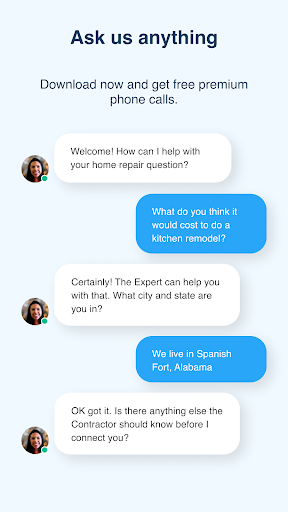
My first impression of JustAnswer is that its purpose is easy to grasp: bring a question to a professional rather than trying to find the right page or forum. The range of listed specialties is broad, and the app describes a straightforward sequence: explain the situation, get connected with an Expert, then talk, text, or chat. That keeps the focus on the problem rather than on browsing a large reference library.
For setup, I would begin by deciding what kind of help I actually need and gathering the basics that describe the issue. The app supports questions in hundreds of professional specialties, so a clear topic and concise explanation matter. JustAnswer says it connects users with an appropriate Expert in minutes and sends a notification when a response arrives. That makes it practical to ask and return to the conversation when there is an update.
The Daily Exchange
The core experience is a continuing exchange, not simply a one-time answer. The service says users can talk, text, or chat with Experts and ask follow-up questions. That is useful when an initial explanation brings up a detail you had not considered, or when the next step depends on more context. I like that the format leaves room to clarify instead of forcing every situation into a fixed set of search results.
Notifications help the conversation fit around an ordinary day. I could submit a question, get on with other tasks, and return when the Expert responds rather than keeping the app open. The service is described as available 24/7, which is helpful for questions that arise at awkward times. Still, a reply-based service depends on an exchange, so it may not feel as instant as finding a short answer in a search engine.
A Wide Expert Menu
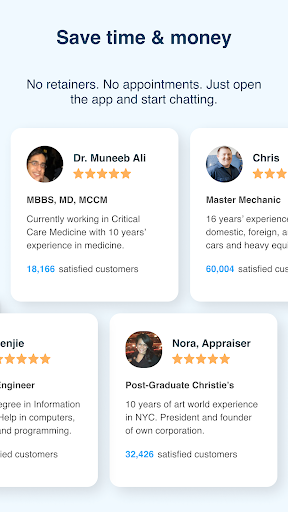
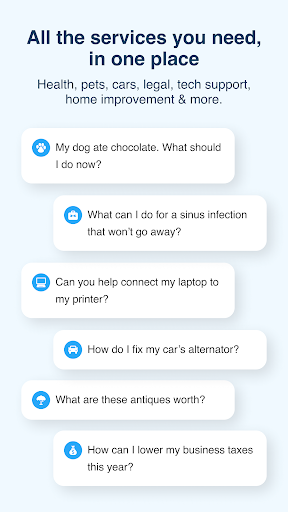
The standout feature is the range of subjects in one app. JustAnswer names legal and health professionals, veterinarians, mechanics, computer technicians, electricians, plumbers, tax accountants, and more. It also lists specialties within those areas, including pet care for many kinds of animals and support for devices such as computers, printers, and televisions. That variety makes the service relevant to a household’s scattered questions, not just one ongoing project.
The app also supports saving favorite Experts, which is a thoughtful touch if you have a recurring question in one area. JustAnswer says its Experts are vetted through a process that includes license verification and peer reviews. I would still pay attention to the limits of an online conversation and the specific situation at hand. The feature is access to professional guidance, not a promise that every issue can be resolved remotely.
A Practical Question Routine
For a routine use case, I would keep the app in mind when an everyday problem is too specific for a quick search but not obviously suited to a scheduled appointment. A computer setting that will not behave, a pet-care concern, or a home repair question can all begin with a short explanation. I would include relevant details and say what outcome I am trying to reach, so the Expert has a useful starting point.
After receiving a reply, I would use follow-up questions to make sure I understand the guidance and what it does or does not cover. If I found an Expert whose specialty matched a recurring need, I could save that person for later. The app’s notifications can make it easier to keep up with responses between other tasks. This is a simple routine, but it depends on choosing the right topic and keeping expectations realistic.
Limits to Keep in Mind
The largest consideration is the membership model. JustAnswer describes monthly membership access and unlimited conversations for members, while also mentioning two free phone calls per month. The Google Play facts show the app itself as free with no in-app purchases, but that does not explain every current service term. I would review the membership details before assuming that asking a question or continuing a conversation will work a particular way.
There are also natural limits to remote advice. A professional may be able to help explain a situation, but some problems require an in-person assessment, inspection, or other service. The app’s broad subject list is convenient, yet it can put the responsibility on the user to select the most relevant specialty and describe the issue well. I would see JustAnswer as a useful starting point, not a universal substitute for hands-on help.
JustAnswer’s strongest quality is convenience: one app brings together conversations with professionals across an unusually broad set of everyday topics. Notifications, follow-up conversations, and the option to save Experts make that model more practical than a one-off search when a question needs context.
I would recommend trying it if expert guidance across different areas would be useful and you are comfortable checking the membership terms first. If you only need free reference material or need hands-on or urgent help, another route may fit better. Use it as a starting point for informed next steps.
JustAnswer Frequently Asked Questions
What do people use JustAnswer: Ask for help, 24/7 for?
JustAnswer connects users with Experts for questions across areas such as law, health, pet care, cars, technology, home improvement, and more. The app supports talking, texting, or chatting and lets users follow up in a conversation. It is intended for professional guidance on individual questions, rather than as a replacement for every in-person service.
Which devices can run JustAnswer: Ask for help, 24/7?
JustAnswer: Ask for help, 24/7 is an Android app distributed through Google Play. The provided app information does not specify a minimum Android version, so the requirement may vary with the current release and device. Check the Google Play store page on your phone for compatibility details before installing.
Does JustAnswer: Ask for help, 24/7 cost money?
The app is free to download, and its app facts show no in-app purchases. However, JustAnswer describes access through a monthly membership and mentions two free Expert phone calls per month. Service terms can vary, so check the Google Play store page and the membership details before starting a conversation.
Is JustAnswer: Ask for help, 24/7 suitable for urgent problems?
JustAnswer says Experts are available 24/7, and the app is designed for asking questions and continuing a conversation. That availability does not make an online exchange a substitute for emergency assistance, an in-person examination, or a hands-on repair when one is needed. For urgent situations, use an appropriate immediate service.
Who should try JustAnswer: Ask for help, 24/7?
It may suit people who want access to professional guidance across several topics, appreciate follow-up conversations, or have questions outside ordinary business hours. It may be less suitable for someone who wants only free search results or needs a face-to-face service. Consider the membership arrangement and the kind of help your situation requires.
Pros
- Covers a broad mix of professional topics, from pet care and technology to home repairs.
- Supports follow-up conversations by chat, text, or phone.
- Notifications help users return when an Expert replies.
- Lets users save favorite Experts for future questions.
Cons
- The monthly membership model deserves a careful look before relying on the service.
- Online guidance cannot replace hands-on help for every situation.
- The wide topic range means users must choose a relevant specialty and explain their issue clearly.
- Category
- Lifestyle
- Version
- 2.3.19











