Jolt
- 544
- 4.3
- Installs
- 100.00K
- Price
- Free

Screenshots
Analysis by Reviewed APKs
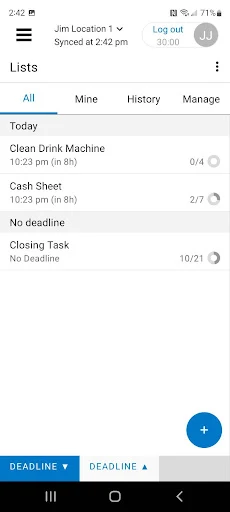
Jolt is a business operations app for teams that need to keep checklists, food-safety tasks, and employee processes organized. It is aimed more at workplaces than at someone managing a personal to-do list, especially businesses with recurring procedures to track. After looking at what it brings together, my overall take is that Jolt is a practical operations hub: focused on consistent team routines rather than general-purpose productivity.
A shift with fewer loose ends
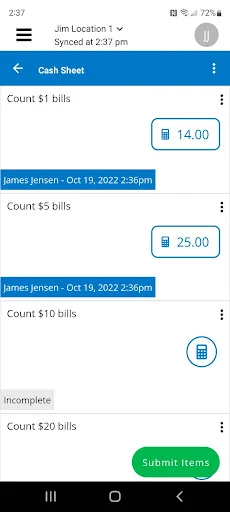
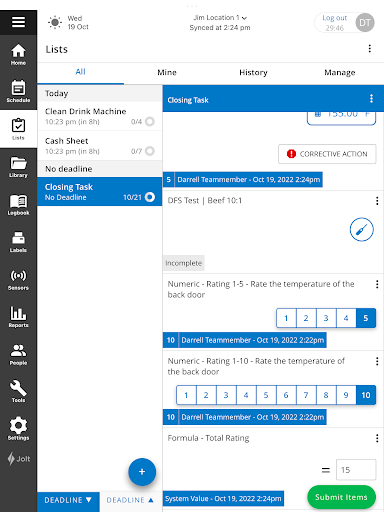
Picture opening a busy food-service shift and needing the team to cover several routine checks while customers are arriving. Jolt’s digital checklists give those recurring tasks a shared home, while its team-accountability and food-safety focus make it relevant to the work happening on the floor. I like the idea of having operational steps organized in one system instead of relying on a mix of paper lists and informal reminders.
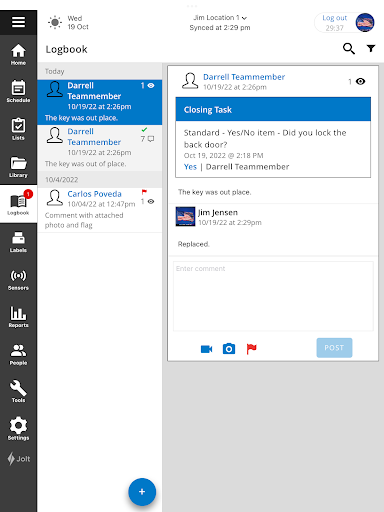
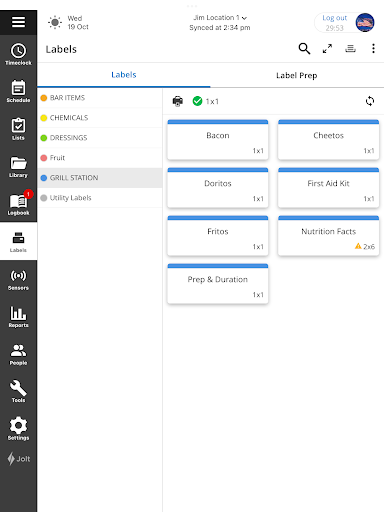
The app’s listed capabilities also reach beyond simply checking items off. Temperature probes and label printing are integrated into its food-safety offering, and corrective actions provide a way to address issues that come up during operations. I would see Jolt as a tool for making established workplace routines easier to follow and account for, not as a replacement for the judgment employees need when something unusual happens.
Built for team operations
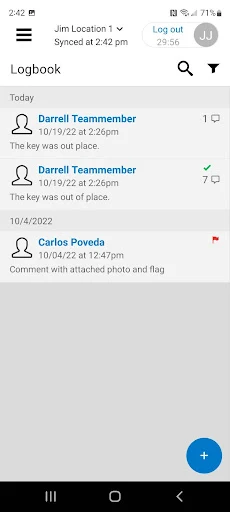
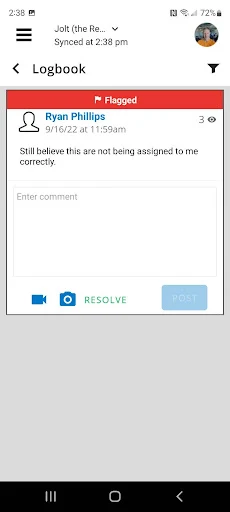
Jolt sits in a different lane from a standard personal task manager. Its emphasis is on business checklists, employee performance, food safety, scheduling, corrective actions, and reporting. That combination makes more sense for an organization coordinating repeatable work than for someone who just wants a private shopping list or a place to track weekend errands.
It also is not presented as a broad project-planning or general communication app. The details provided center on operational processes and accountability, so I would not choose it expecting a full suite for brainstorming or day-to-day team chat. For businesses that need consistent procedures, that narrower focus can be an advantage; for casual individual use, the workplace orientation may feel like more than is needed.
Make routines repeatable
The most useful way to think about Jolt is as a home for tasks that come around again and again. A team can use digital checklists to keep those steps visible, then draw on reporting to review operational activity. I’d start by identifying the routines that matter most, rather than trying to move every informal task into a new system at once.
For food-safety work, the integrated temperature probes and label printing stand out as practical tools to consider alongside checklists. Corrective actions can also matter when a check surfaces something that needs attention. Scheduling and employee-performance features widen the picture beyond one checklist, so teams can decide which parts of Jolt fit their actual operation and build habits around those needs.
More From Our News Desk

Zoom Meetings, Google Meet, or Teams: Which Is Easiest to Join?

How I Build a Free Streaming Lineup With Tubi

Why Crunchyroll Is the Default Anime App for So Many Fans

YouTube TV: A Practical Guide to Cutting Cable

Rummikub and the Small Comfort of Phone Games

TeamViewer Remote Control or AnyDesk for Helping Family?
Who Jolt may suit
I’d recommend Jolt to businesses that rely on repeated operational steps and want a digital way to organize team accountability. Its food-safety tools make it especially relevant to workplaces where checks, temperature handling, and labels are part of the routine. Scheduling, employee performance, corrective actions, and reporting may also appeal to managers looking for a wider operational toolkit rather than a standalone checklist.
It may be a poor fit if you want a simple personal planner, or if your main need is open-ended project collaboration. Jolt’s described strengths are tied to business processes, and its sanitization lists require registration at Jolt.com or contact with an account manager. I’d consider whether those workplace workflows match your needs before adopting it; the feature set is most compelling when a team will use it together.
Jolt is a free Android business app from jolt. Google Play shows over 100,000 installs and a 4.3-star rating from 544 ratings. It is marked Everyone and contains no ads. The listed version is 7.4.9. Those figures give a useful snapshot of the app’s store presence, though ratings and install totals can change over time.
The app is listed at no cost and does not offer in-app purchases. Its release date is October 10, 2018, and its listed last update is October 27, 2026. A minimum Android version is not provided in the supplied app details, so check Google Play for device compatibility before installing.
A closer look at workplace routines
First impressions and setup
Jolt’s first impression is shaped by its business focus: this is a place for operational checklists and team processes, not a consumer app built around personal reminders. I’d approach setup by thinking about the routines a team already follows and which ones would benefit from being digital. That keeps the app grounded in real work instead of turning setup into a project of its own.
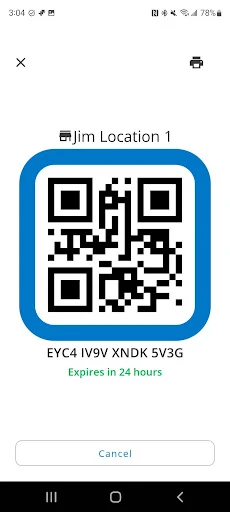
The description says free sanitization lists are available, with registration at Jolt.com or a conversation with an account manager. That is worth keeping in mind for teams interested in that specific resource. Beyond that, the app’s listed feature set points toward a broader operations platform, so a business should consider which capabilities it wants to use rather than assuming every feature is needed from day one.
The daily operating rhythm
In day-to-day use, the central idea is straightforward: digital checklists help make recurring work visible, while accountability and reporting support a team-oriented approach. That can be useful when several people share responsibility for the same standards. I’d expect the value to come less from novelty and more from having repeatable tasks represented in a consistent digital process.
Food-safety work gives that routine a more specific shape. Temperature probes and label printing are named as integrated capabilities, while corrective actions address the need to respond when a check calls for follow-up. These tools make Jolt feel aimed at operational details that can be easy to overlook during a busy shift, rather than at abstract productivity goals.
More than a checklist
The most distinctive part of Jolt is the range around its checklist platform. It brings together team accountability, digital food safety, and employee performance, with scheduling and advanced reporting also included in the description. That makes it broader than a basic digital list, especially for organizations that want to connect routine checks with other operational responsibilities.
The food-safety elements are particularly concrete: integrated temperature probes and label printing give the offering a practical workplace angle. Corrective actions add another layer to the checklist concept, since operations sometimes require more than marking a task complete. I’d treat these as useful capabilities for relevant teams, not assume they will matter equally to every business using Jolt.
A workable team routine
A sensible routine would begin with the tasks a team already repeats, such as the checks that anchor a shift or a food-safety process. I’d use Jolt’s digital checklist approach to bring those steps into one shared operational system, then consider whether scheduling or employee-performance features belong in the same workflow. Keeping the initial scope focused should make adoption easier to judge.
From there, reporting can help managers review operations, while corrective actions provide a named tool for issues that need follow-up. For teams working with temperatures or labels, the integrated probe and printing capabilities may fit naturally into the routine. The practical test is whether the app supports the work people already need to do, rather than adding steps for their own sake.
Limits to keep in mind
Jolt’s workplace orientation is both its strength and its main limitation. A person looking for a lightweight personal organizer may find its focus on team accountability, food safety, and employee operations misplaced. It is also not described as a general-purpose project-management or messaging tool, so I would not select it on the assumption that it covers every kind of team coordination.
Some capabilities are most relevant to particular businesses. Temperature probes, label printing, and sanitization lists will not be priorities for every organization, while the sanitization-list information points users toward registration or an account manager. I’d check Google Play for current compatibility details and make sure the app’s operational focus matches the team’s needs before settling on it.
Jolt makes the most sense as a digital operations tool for teams with recurring procedures, especially where food safety and accountability are part of the work. I like that its checklist focus is supported by related capabilities such as corrective actions, scheduling, and reporting, rather than standing alone as a simple list.
I’d recommend it to businesses that want to organize repeatable team routines and can make use of its operational feature set. For personal task tracking or broad project collaboration, I’d look elsewhere. Jolt is at its best when a workplace has clear processes that a team needs to follow consistently.
Jolt Frequently Asked Questions
What is Jolt used for?
Jolt is a business operations app centered on digital checklists, team accountability, food safety, and employee performance. Its described capabilities include integrated temperature probes and label printing, corrective actions, employee scheduling, and advanced reporting. It is intended for organizing workplace routines rather than serving as a general personal to-do list.
Which devices can run Jolt?
Jolt is listed as an Android app on Google Play. The supplied details do not give a minimum Android version, so compatibility can vary by device and software version. Check the Google Play store entry for current requirements before installing it on a particular phone or tablet.
Does Jolt cost money?
Jolt is listed as free, with no in-app purchases and no ads. The description says free sanitization lists are available, but accessing them involves registering at Jolt.com or talking to an account manager. Check the store listing for current app pricing and details that may vary.
What Android version does Jolt require?
A minimum Android version is not provided in the app details used for this review. Requirements can vary as the app is updated and across devices, so check Google Play for the current compatibility information before downloading or updating Jolt.
Is Jolt a good fit for a small team?
It may suit a small team if the business needs digital checklists, accountability, or food-safety processes. Its usefulness depends on whether the team has recurring operational routines that match its features. Someone seeking only a personal planner or broad project-collaboration tool may prefer a different kind of app.
Pros
- Combines digital checklists with team accountability and food-safety operations.
- Includes practical capabilities such as temperature probes and label printing.
- Adds corrective actions, scheduling, and reporting to the operations toolkit.
- Free to install, with no ads or in-app purchases listed.
Cons
- Its business-process focus may feel excessive for personal task tracking.
- Some food-safety features will matter more to certain workplaces than others.
- The minimum Android version is not provided in the supplied details.
- Category
- Business
- Version
- 7.4.9











