Jersey Mike's
- 139.19K
- 4.8
- Installs
- 5.00M
- Price
- Free

Screenshots
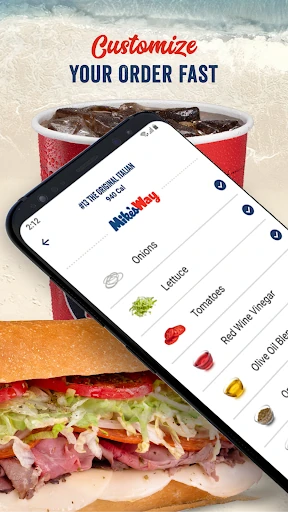
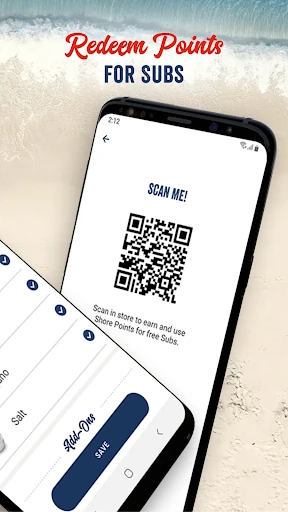
Analysis by Reviewed APKs
Jersey Mike's is a food-ordering app for browsing the menu, customizing an order and arranging pickup ahead of time. I found its appeal is straightforward: it brings ordering and Shore Points into one place, which can be handy when lunch breaks are short or I already know what I want. It suits regular customers especially well, though it is less useful if you prefer to order entirely in person.
Lunch Without the Line
Imagine I have a short lunch break and want to pick up a sub on the way back to work. I can open Jersey Mike's, look for a nearby location, browse the menu and put together the order before I arrive. The estimated ready time gives me a rough idea of when to head over, so I can fit the stop around the rest of my day rather than starting from scratch at the counter.
The useful part is that the app handles more than the initial order. I can customize items, add a note and use a saved payment card, then earn Shore Points on the purchase. When I visited the idea of this workflow, what stood out was how naturally ordering and rewards sit together: I do not have to treat the loyalty program as a separate errand after lunch.
A Companion to the Counter
Jersey Mike's is best thought of as a convenient ordering option for people who already want food from the chain. It offers a menu to explore, location finding, customization and pickup ordering in one app. For someone who likes choosing toppings with a staff member face to face, the restaurant counter remains the more natural alternative; the app is for getting the order underway before that interaction.
It is not a general restaurant discovery service or a meal-planning tool. Its focus is Jersey Mike's menu and its own Shore Points program, rather than comparing restaurants or organizing meals for the week. I would not install it expecting a broad collection of food choices. The tradeoff is clear and practical: if you visit Jersey Mike's, the focused experience can save steps; if you do not, there is little reason to keep it around.
Make Ordering a Habit
A simple way to get more out of the app is to check the menu before deciding what to order. That gives me time to compare the available items and customize a choice without holding up a line. If I have a particular request, I can add an order note as part of the process. I would still review the finished order carefully, especially when changing several details, before sending it through.
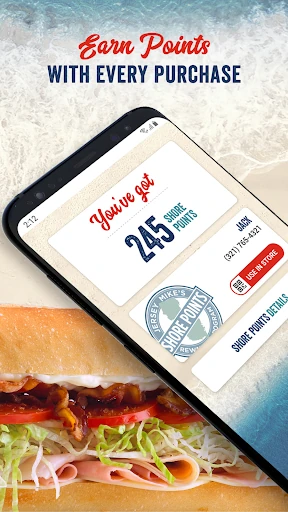
The other habit is to keep Shore Points in view. MyMike's lets me track points, and the app supports redeeming them during a purchase or by scanning a QR code in a store. That makes it easier to remember the program whether I order ahead or buy in person. I also like that the location finder and estimated ready time can help me plan the pickup around a commute or a busy afternoon.
More From Our News Desk

Zoom Meetings, Google Meet, or Teams: Which Is Easiest to Join?

How I Build a Free Streaming Lineup With Tubi

Why Crunchyroll Is the Default Anime App for So Many Fans

YouTube TV: A Practical Guide to Cutting Cable

Rummikub and the Small Comfort of Phone Games

TeamViewer Remote Control or AnyDesk for Helping Family?
Who Will Get the Most From It
I would recommend Jersey Mike's to people who already visit the restaurant and want a quicker way to place repeat orders. Menu browsing and customization are useful when I want to decide in advance, while saved payment details and estimated preparation time help make pickup feel more organized. Shore Points tracking and redemption add a practical reason for regular customers to use the app instead of treating each visit as a one-off.
It may not suit someone who rarely eats at Jersey Mike's, dislikes ordering through a phone or prefers to work through every detail with restaurant staff. The app's scope is intentionally narrow: it supports the chain's menu, ordering and rewards rather than offering a wider food service. I would also keep expectations grounded; it helps arrange an order, but the actual pickup still depends on visiting a Jersey Mike's location.
Jersey Mike's is published by Jersey Mike's Subs and is listed in Google Play's Food & Drink category. It has over 5 million installs and a 4.8-star rating from around 139,000 ratings. The app is free to download, with no in-app purchases or ads indicated in its store details. Its content rating is Everyone.
The listed Android requirement is Android 8.0 or later. The current version is 2.45.0, and the app was last updated on January 21, 2026. Its original release date was April 6, 2016. These details are useful to check against your device before installing, particularly if you are using an older Android phone.
A Closer Look at Ordering Ahead
Starting With the Basics
When I first opened Jersey Mike's, its purpose was immediately clear: find a location, look through the menu and place an order. That focus makes it easier to approach than an app packed with unrelated services. I could see how it would fit into a familiar routine, especially if I already know the restaurant and want to spend less time deciding at the counter.
MyMike's is the account area described for creating an account, signing up for the email club and keeping track of Shore Points. I like that the loyalty information has a place alongside ordering, rather than being detached from the meal itself. The overall setup is centered on the chain's own services, so the main decision is simply whether I expect to order there often enough to make the app worthwhile.
The Everyday Order
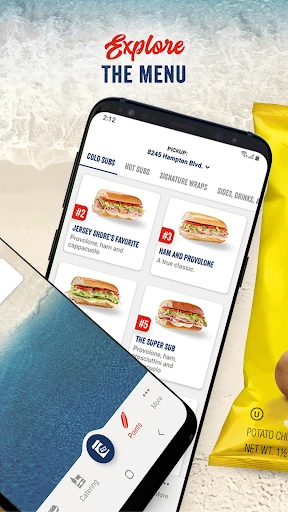
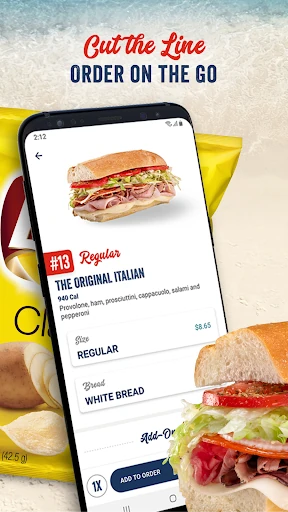
Day to day, the central task is selecting food and arranging an order ahead. I can explore the menu, choose an item and customize it, including choosing the familiar Mike's Way style or creating my own combination. That matters most when I have a specific preference and would rather sort it out before reaching the register. I can also add a note, which gives the order process another way to capture a request.
The app shows an estimated time for when an order will be ready. I treat that as useful planning information rather than a reason to cut my timing too close. On a busy day, even a rough estimate can help me decide when to leave or whether pickup fits into my schedule. Using a saved payment card is another convenience, particularly for someone placing similar orders regularly.
Rewards in the Same Place
Shore Points are the standout feature beyond ordering itself. The app lets customers earn points on purchases of subs, including kids' meals and catering boxes, and redeem points through the app during a purchase. For an occasional customer, that may be a small extra. For someone who visits often, having the balance and redemption process close to the ordering flow makes the program easier to keep track of.
There is also an in-store option: points can be redeemed by using a QR code to scan at the restaurant. I appreciate that the app supports both the order-ahead routine and a visit where I choose to order in person. MyMike's ties in with this by letting me track Shore Points and access the email club, so the account serves more than one narrow purpose.
A Workday Pickup Routine
For a practical routine, I would start by checking nearby locations when I know a lunch stop is coming up. Then I would browse the menu, customize the item and add any relevant note before placing the order. The estimated ready time can help me coordinate the walk or drive over. This is a modest workflow, but it removes some of the decision-making from the moment when I am already hungry and short on time.
After pickup, I would keep an eye on the Shore Points balance in MyMike's rather than trying to remember it later. If I order in person next time, the QR code option gives me another way to use the program. That combination is what makes the app feel more useful over repeated visits: it supports both the immediate meal and a small bit of follow-through for the next one.
Keep the Scope in Mind
The main limitation is also the app's defining choice: it is built around Jersey Mike's. Anyone looking for a broad restaurant directory, a way to compare unrelated menus or a general-purpose food service will need something else. I also would not expect the app to replace the in-person ordering experience for people who prefer discussing a custom order directly with staff.
There are a few practical details worth keeping in mind. An estimated ready time is a planning aid, not a promise about exactly when a meal will be available. Customization and notes make it easier to communicate a preference, but I would still review what I selected before checkout. The app is most convincing when I already have a location and an order in mind, rather than when I am still deciding where to eat.
Jersey Mike's does a focused job: it puts menu browsing, customized orders, pickup timing and Shore Points in one place. I found the strongest case for it is a familiar lunch routine, where a few taps can make ordering feel less rushed. Its rewards tools are a useful extra for repeat customers, while the narrow restaurant focus keeps the experience easy to understand.
I would try it if Jersey Mike's is already part of your regular rotation and you want to order ahead or keep track of points. If you visit only rarely or prefer ordering at the counter, it is less compelling. For its intended audience, though, the app offers a practical mix of convenience and loyalty features without asking users to learn a complicated system.
Jersey Mike's Frequently Asked Questions
What is the Jersey Mike's app used for?
Jersey Mike's is used to find a nearby location, browse the restaurant's menu, customize food and order ahead. It also shows an estimated time for when an order will be ready, supports saved payment cards and lets customers earn or redeem Shore Points. MyMike's provides account features such as tracking points and signing up for the email club.
Which phones and devices support Jersey Mike's?
The supplied platform information is for Android, and the listed minimum requirement is Android 8.0. I would check the Google Play store entry against your particular device before installing, since compatibility can depend on the device and software it runs. The app's store information identifies it as an Android app.
What Android version does Jersey Mike's require?
Jersey Mike's requires Android 8.0 or later according to its listed requirements. If your phone is running an older version, check the Google Play store entry on that device for the latest compatibility details. The current listed app version is 2.45.0, last updated January 21, 2026.
Does Jersey Mike's cost money or include purchases?
The app is free to download. Its store details indicate no in-app purchases and no ads. Food orders are separate from the app download, and the app supports using a saved payment card when placing an order. Check the Google Play store entry for current details, as store information can change.
Is Jersey Mike's a good fit for occasional customers?
It can be useful for occasional customers who want to browse the menu or place an order ahead, but its rewards and account features are especially relevant to repeat visits. Someone who rarely goes to Jersey Mike's or prefers ordering entirely in person may get less value from installing it. Its focus is the chain's own menu and Shore Points.
Pros
- Combines menu browsing, customization and ordering ahead in one focused app.
- Shows an estimated ready time to help plan a pickup.
- Supports tracking and redeeming Shore Points in the app or in store.
- Location finding and saved payment cards support repeat orders.
Cons
- Its usefulness is limited to people who choose Jersey Mike's.
- An estimated ready time is a planning guide, not an exact pickup promise.
- People who prefer ordering face to face may not need the app.
- Category
- Food & Drink
- Version
- 2.45.0











