Jeep®
- 20.24K
- 4.8
- Installs
- 500.00K
- Price
- Free
Screenshots
Analysis by Reviewed APKs
Jeep® is a companion app for people who own or use a Jeep, bringing vehicle information and selected owner services into one place. I found its appeal less about browsing for fun and more about having practical details ready when I need them: a manual, service history, dealer contact information, or a recall alert. It is most useful when its vehicle-specific features match your Jeep and your needs.
Useful Before a Service Visit
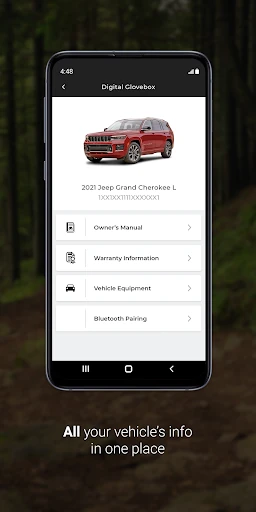
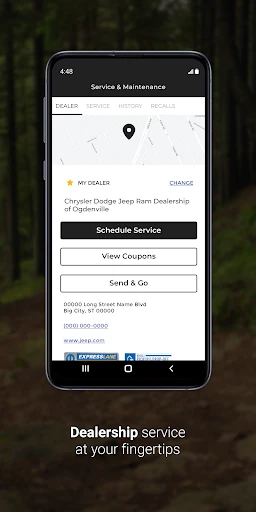
Imagine noticing a dashboard question or realizing that a service visit is due while planning the week. Instead of digging through a glove box or searching old messages, I can use My Garage and Digital Glovebox to access vehicle information, the owner’s manual, and service history. When it is time to arrange help, My Dealer can show a preferred dealership’s address and let me schedule service or call directly.
That kind of task is where the app makes sense in everyday life. I might check the manual at home, then use the dealer details while deciding where to take the vehicle. Recall Alert adds another practical reason to open it occasionally: it can keep me up to date on open recalls. The app does not replace a mechanic or a service appointment; it helps put relevant ownership information and contact options within reach.
An Owner Tool, Not a Trip Planner
Compared with a general note-taking app or a folder of vehicle paperwork, Jeep® is purpose-built around Jeep ownership. Its focus is vehicle information, recall notices, dealership contact, and, on equipped vehicles, selected remote controls. That makes it a better fit for checking ownership details than for planning a route, comparing cars, or keeping a broad household calendar. I would treat it as a companion to the vehicle, not an all-purpose driving app.
The distinction matters because not every feature applies to every owner. Remote start or stop, door locks, horn, and exterior lights depend on the vehicle being equipped for them, and remote services require an active Jeep® Connect, SiriusXM Guardian™, or Uconnect Access subscription. If I only need general directions or a place to store unrelated documents, another tool may be simpler. Jeep® is at its strongest when I want Jeep-specific details and services.
Make It Part of Ownership
I would get more from the app by setting it up before I need it in a hurry. Adding the vehicle information through My Garage and checking the Digital Glovebox while I am at home gives me a better chance of finding the manual or service history when a question comes up. I would also choose a preferred dealer so its address and contact options are already handy when a maintenance task needs attention.
A light routine is enough: check for recall alerts from time to time, and look at the available vehicle information before a service visit. If my Jeep supports remote features, I can decide whether those controls are useful for my routine, while keeping the subscription requirement in mind. The app also offers some features on compatible smartwatches, including Wear OS. I would use that as an extra convenience rather than a reason to expect every phone feature on a watch.
More From Our News Desk

Zoom Meetings, Google Meet, or Teams: Which Is Easiest to Join?

How I Build a Free Streaming Lineup With Tubi

Why Crunchyroll Is the Default Anime App for So Many Fans

YouTube TV: A Practical Guide to Cutting Cable

Rummikub and the Small Comfort of Phone Games

TeamViewer Remote Control or AnyDesk for Helping Family?
Who Gets the Most From It
I would recommend Jeep® to Jeep owners who want a convenient place to look up vehicle information, review service history, find a dealer, or keep an eye on recall alerts. It is especially appealing if I prefer having ownership details on my phone rather than relying on paper manuals and saved phone numbers. Owners whose vehicles support remote services may also value the available controls, provided they have the required active subscription.
It may be less useful to someone who does not own or use a Jeep, or who expects every feature to work with every vehicle. The app’s value depends on what information and services apply to a particular Jeep. I would also skip it if I mainly want navigation or general trip planning: the description focuses on vehicle ownership and related services, not those broader tasks.
Jeep® is developed by FCA US LLC and is listed on Google Play in the Lifestyle category. It has over 500,000 installs and a 4.8-star rating from 20,243 ratings. The app is free to download, with no in-app purchases or ads reported in the supplied app facts. Its content rating is Everyone.
The supplied facts identify version 1.99.705, a release date of June 15, 2021, and a last update date of September 17, 2026. The minimum Android version is not included in the supplied details, so I would check the Google Play store entry for the requirement that applies to a device. Remote services have a separate active-subscription requirement.
A Closer Look at Jeep Ownership
A Practical First Impression
When I first opened the idea of Jeep®, what stood out was its owner-focused scope. This is not a social feed or a showcase of vehicle specifications; it is intended to keep useful ownership services close at hand. The most tangible parts are My Garage, Digital Glovebox, My Dealer, and Recall Alert. Together, they point to a simple purpose: make it easier to find vehicle details and take the next step when ownership calls for it.
Setup is most worthwhile when I have a Jeep and can connect the app to the vehicle information that applies to me. I would start by looking through My Garage and the Digital Glovebox, then identify a preferred dealer. That gives the app a useful baseline before I am standing in a parking lot trying to remember where a manual or service record lives. The particular options available still depend on the vehicle and services in use.
The Everyday Ownership Loop
Day to day, Jeep® seems designed for quick checks rather than long sessions. I might open it to review service history, consult the owner’s manual, or find the address and phone option for my dealer. These are small tasks, but they are exactly the sort that can become annoying when the information is split between paperwork, bookmarks, and contacts. Keeping those ownership details together is the app’s practical center of gravity.
I would not expect to need it every time I drive. Its usefulness comes in short visits around maintenance, vehicle questions, and recall awareness. That can make the app feel quiet during an ordinary week, then handy when I need it. Recall Alert is a particularly straightforward reason to keep it in the routine, while the manual and dealer tools help with specific ownership jobs rather than trying to fill every moment.
Features With a Clear Purpose
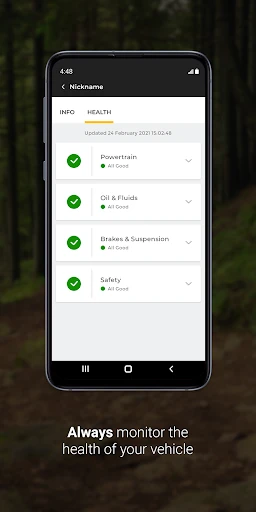
My Garage and Digital Glovebox provide access to vehicle information, including the owner’s manual and service history. My Dealer brings together practical next steps: finding a preferred dealership’s address, scheduling service, or calling. Recall Alert is there to keep owners up to date on open recalls. I like that these tools are described in terms of actual ownership tasks, rather than as vague claims of convenience.
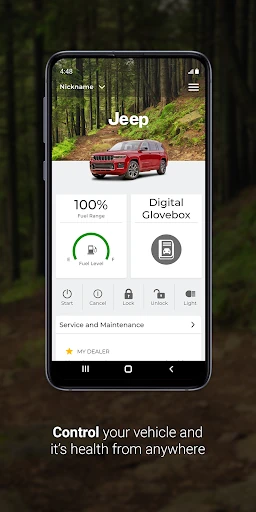
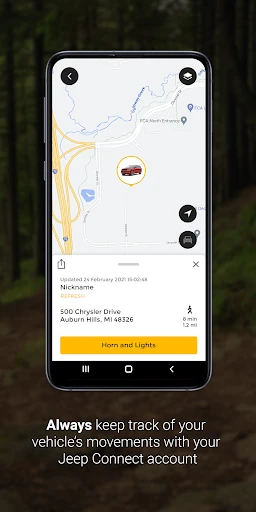
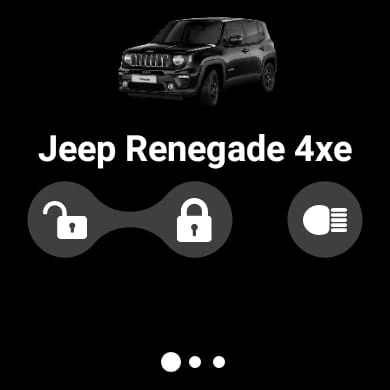
For vehicles equipped to use them, remote controls include starting or stopping the vehicle, locking or unlocking doors, and activating the horn or exterior lights. These are conditional features, not something I would assume every Jeep can do through the app. Remote services also require an active Jeep® Connect, SiriusXM Guardian™, or Uconnect Access subscription. Some features are available on compatible smartwatches, including Wear OS, which may suit an owner who likes glanceable access.
A Simple Monthly Check-In
A practical routine could be to open Jeep® once in a while at home and make sure I know where the vehicle information and dealer tools are. Before a service visit, I can review the service history and use My Dealer to find the address or arrange an appointment. If a vehicle question comes up, the Digital Glovebox and manual are natural places to look before I start hunting through paperwork.
I would also make Recall Alert part of an occasional ownership check, rather than waiting for a convenient moment after a warning appears somewhere else. If remote services apply to my vehicle, I would decide whether their controls fit my regular use and remember that an active subscription is needed. This is a modest workflow, but the payoff is having relevant information and contact options ready when a task comes up.
Keep the Boundaries in Mind
The main limitation is that features are not universal. Remote controls depend on vehicle equipment, and their use also depends on an active subscription to one of the specified services. That means the app’s value can differ between owners, even if they both drive Jeep vehicles. I would check which features apply to my own vehicle instead of assuming the app provides the same controls across the range.
Jeep® is also not presented as a substitute for every tool an owner might want. Its described strengths are vehicle information, dealer contact, recalls, and available remote services; it is not pitched as a general navigation or trip-planning product. The app will be most satisfying when those ownership needs are the reason I install it. If I expect a broad driving dashboard, its focused purpose may feel limited.
Jeep® earns its place as a practical ownership companion, especially for keeping vehicle information, service history, dealer contact, and recall alerts close at hand. I like that the useful tasks are easy to understand. The caveat is that remote controls depend on vehicle equipment and an active subscription, so the experience is not identical for every owner.
I would recommend it to Jeep owners who want a straightforward digital home for ownership details and occasional service tasks. If I were mainly looking for navigation or a general-purpose driving app, I would look elsewhere. For the right owner, though, Jeep® is a sensible tool to have ready before a question or service need appears.
Jeep Frequently Asked Questions
What is the Jeep® app used for?
Jeep® helps owners access vehicle information such as the owner’s manual and service history, find or contact a preferred dealer, schedule service, and stay up to date on open recalls. If a vehicle is equipped for it, the app can also offer remote controls such as starting or stopping the vehicle and locking or unlocking doors.
Which phones and devices support Jeep®?
The app is listed on Google Play for Android. Some features are also available on compatible smartwatches, including Wear OS. The supplied details do not specify a minimum Android version, so the requirement for a particular phone may vary; check the Google Play store entry before installing.
What Android version does Jeep® require?
The minimum Android version can vary with the app’s current release and device compatibility. Check the Google Play store entry for the requirement shown for your phone. The supplied app facts identify version 1.99.705, but do not give a minimum Android version.
Does Jeep® cost money or require a subscription?
The app is free to download, and the supplied facts report no in-app purchases or ads. However, remote services require an active subscription to Jeep® Connect, SiriusXM Guardian™, or Uconnect Access. Whether that requirement matters depends on which features are available for a vehicle and which ones its owner wants to use.
Is Jeep® useful for every Jeep owner?
It can be useful for owners who want vehicle information, service history, dealer contact, and recall alerts in one app. Remote controls are available only when the vehicle is equipped for them, and require an active service subscription. Owners looking mainly for general navigation or trip planning may find the app’s ownership-focused tools less relevant.
Pros
- Combines vehicle information, owner’s manual, and service history in one place.
- Makes dealer contact and service scheduling accessible from the app.
- Recall Alert helps owners stay informed about open recalls.
- Remote controls are available for equipped vehicles with an active subscription.
Cons
- Remote features depend on vehicle equipment and an active service subscription.
- Its ownership focus may not suit people seeking general navigation or trip planning.
- Available features can differ from one Jeep vehicle to another.
- Category
- Lifestyle
- Version
- 1.99.705











