Informed Delivery® Mobile
- 132.76K
- 4.9
- Installs
- —
- Price
- Free

Screenshots
Analysis by Reviewed APKs
Informed Delivery® Mobile gives USPS customers a way to preview eligible incoming mail and check package tracking from an iPhone. I found its appeal in the small daily convenience: a quick look at what may be arriving can make the mailbox feel less like a guessing game. It is a focused postal companion, not an all-purpose mail organizer, and that narrow job is exactly where it makes sense.
A morning mailbox preview
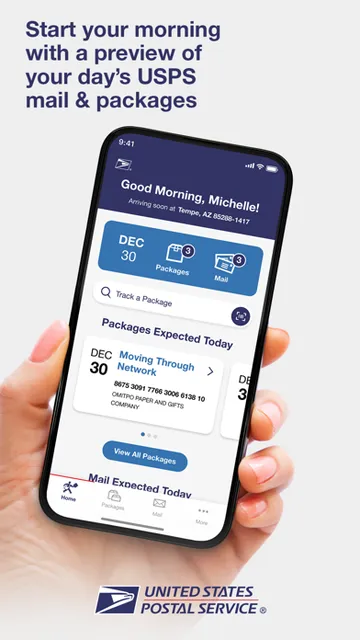
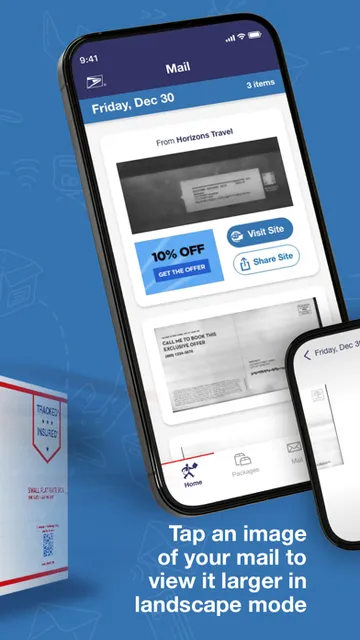
When I first imagined using Informed Delivery, the natural moment was over breakfast: open the app, glance at the daily digest, and see whether any pictured letters or tracked packages are on the way. That can help me recognize an expected envelope before I check the physical mailbox later. The mail images show the address side in grayscale, so this is a preview of what is coming, not a way to read the letter itself.
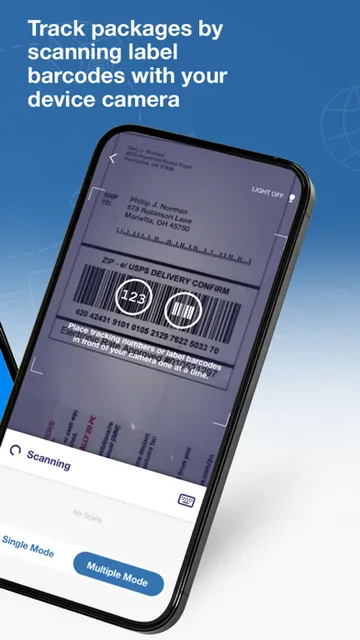
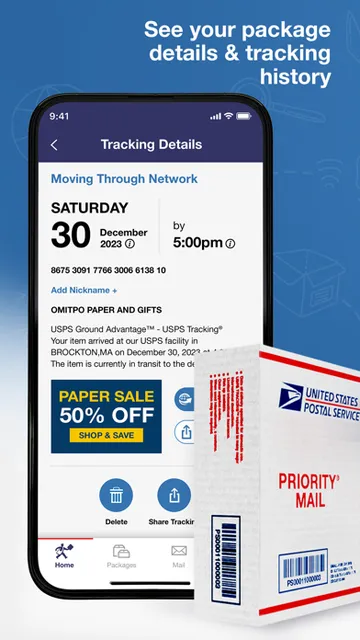
For a package, I can scan an eligible tracking number or label barcode and follow its USPS status on my phone. That makes the app useful on a day when I am out running errands and want to check whether a delivery has moved along. I would treat a digest or status update as helpful context, rather than a promise about the exact moment an item will arrive.
A focused USPS companion
I see this as a complement to checking the mailbox and following USPS packages, rather than a replacement for either. The mail preview adds an advance look at eligible letter-sized pieces, while tracking updates give package information in one place on a phone. If I mainly want to know whether a particular USPS package has changed status, tracking is the more direct task; the digest is the feature that makes this app feel distinct.
The boundaries matter. Informed Delivery is about USPS mail and packages, not a unified inbox for email or correspondence from every carrier. Its mail images are limited to letter-sized pieces processed through USPS automated equipment, and they show only the exterior address side. I would not choose it to manage messages, inspect letter contents, or organize deliveries from other postal services.
Make the digest a habit
A simple routine is to check the daily digest once in the morning, then return to package tracking only when I have something in transit. That keeps the app from becoming another thing I refresh all day. If an item catches my eye, I can use the tracking tools for eligible package labels; otherwise, the preview is just a useful heads-up before I go about my day.
I would also give the delivery timing some breathing room. The app notes that mail and packages may not arrive on the same day as a notification and asks users to allow several days for delivery. Keeping that in mind makes the digest easier to use sensibly: it is a preview and status aid, not a schedule I should plan down to the hour.
More From Our News Desk

Zoom Meetings, Google Meet, or Teams: Which Is Easiest to Join?

How I Build a Free Streaming Lineup With Tubi

Why Crunchyroll Is the Default Anime App for So Many Fans

YouTube TV: A Practical Guide to Cutting Cable

Rummikub and the Small Comfort of Phone Games

TeamViewer Remote Control or AnyDesk for Helping Family?
Who will appreciate it
I would recommend Informed Delivery to people who receive USPS mail regularly and like having a quick preview before walking to the mailbox. It is especially handy if a household is expecting an important-looking envelope or has a package on the way and would rather check a phone than repeatedly wonder about its status. The daily digest and delivery updates make the most sense for someone willing to glance at them as part of an existing routine.
It may be less useful if most of your deliveries come through other carriers, or if you want an app that handles every kind of mail and correspondence. The preview images cover only eligible letter-sized pieces and do not reveal what is inside. I would also skip it if I rarely receive USPS items or do not want to create or sign in to an account to use the service.
Informed Delivery® Mobile is developed by the United States Postal Service and is available for iOS through the Apple App Store. The app is free, has a 4.9-star rating from 132,762 ratings, and carries a 4+ age rating. The store information gives version 1.3.3, with a release date of September 17, 2025 and a last update date of October 14, 2026.
The stated minimum requirement is iOS 18.0. In practice, that means checking your iPhone’s software version before downloading if you are unsure whether it meets the requirement. The app supports creating an account or signing in with an existing account, then viewing mail previews and USPS tracking information. Store details can change over time, so I would check the App Store for current compatibility information.
A closer look at the daily routine
Opening the app
The first step is straightforward in concept: create an account or sign in with an existing one. After that, the app’s purpose is easy to understand because the main promise is concrete: see a daily digest of mail and packages expected soon, and check USPS delivery status from a smartphone. I like that this is a practical task rather than a broad dashboard that asks me to manage unrelated parts of my life.
The first useful distinction is between a mail preview and a package update. A preview image is a grayscale picture of the exterior address side of an eligible letter-sized mailpiece. It does not show the contents. I would keep that in mind from the start, so the image serves as a reminder of what may be coming rather than an attempt to read or interpret the letter.
Checking in day to day
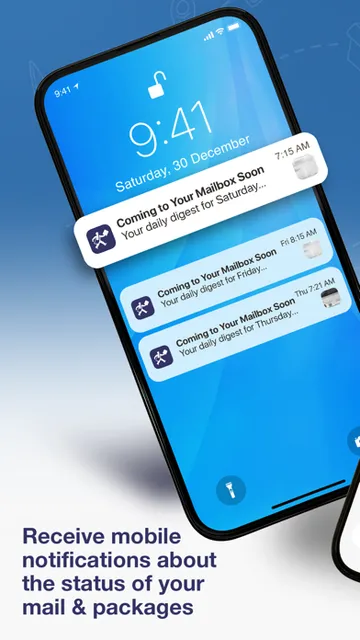
The everyday rhythm is naturally brief. I can open the daily digest to get a sense of mail and packages scheduled to arrive soon, then move on. For packages, tracking updates provide another reason to return when an item is in transit. The app can send digest notifications and delivery status updates to a smartphone, which makes it easier to check in without relying only on a trip to the mailbox.
What I appreciate about that setup is how little it asks me to do once I know what I am looking for. A quick morning glance can tell me whether there is a pictured letter to watch for or a package whose status I want to follow. I would not treat each notification as a precise arrival appointment, though; the app says delivery may happen several days after a notification.
Previews and tracking tools
The standout feature is the preview of eligible incoming letter mail. Seeing the address side before delivery can help me recognize an expected piece and remember to bring in the mail. The limitation is equally clear: images are available only for letter-sized mail processed through USPS automated equipment. Some pieces will not have a preview, and the image does not reveal the letter’s contents.
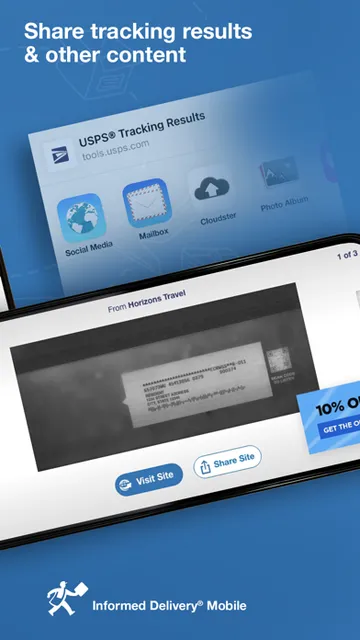
Package tools round out the experience. I can scan eligible tracking numbers or label barcodes to follow inbound or outbound USPS packages, and the app can send delivery status updates directly to my smartphone. There is also mailer-provided digital content associated with mail, such as special offers or related links. Those extras may be relevant for some pieces, but the basic value remains the preview and tracking.
A practical weekly routine
My most sensible routine would be to check the digest in the morning, especially on weekdays when I already expect mail, and then look at package status when I have a delivery in progress. If a label is eligible, scanning its tracking number or barcode gives me a way to follow that item. This keeps the app connected to a real need instead of turning it into a screen I open without a reason.
For a household, the preview can be a useful prompt to keep an eye out for a letter, while the package status can help with general planning. I would still leave room for delays between the notification and the actual delivery. The app’s own guidance to allow several days makes the best routine a flexible one: use the information to stay aware, not to set a minute-by-minute expectation.
Limits to keep in mind
The biggest limitation is coverage. Mail images are not a complete picture of everything headed to an address; they are provided only for eligible letter-sized pieces processed through USPS automated equipment. Since the images show the exterior address side, they are not a substitute for opening mail. Anyone expecting a particular item should understand that a missing preview does not make the app a comprehensive record of incoming correspondence.
Timing is another reason to use the app with reasonable expectations. A notification does not mean the item will arrive that same day, and the stated guidance is to allow several days. The service is also centered on USPS, so it will not serve as a single place to track deliveries handled by other carriers. For someone who wants a broad package manager, that narrow scope may feel limiting.
Informed Delivery® Mobile does one useful job: it gives USPS customers a phone-based preview of eligible mail and a way to follow package updates. I like the practical mix of the morning digest, grayscale letter images, barcode scanning, and delivery status notifications, as long as I remember that previews and timing have limits.
I would try it if USPS mail is part of my regular routine and I value a little advance notice. I would not expect it to cover every piece of mail or every carrier. For its focused purpose, it is an appealing convenience rather than a replacement for checking what actually arrives.
Informed Delivery® Mobile Frequently Asked Questions
What is Informed Delivery® Mobile used for?
Informed Delivery® Mobile lets users preview grayscale images of eligible incoming letter-sized mail and receive USPS package tracking and delivery status updates. Its daily digest can show mail and packages scheduled to arrive soon. The images show only the exterior address side, and mail or packages may arrive several days after a notification.
Which devices can run Informed Delivery® Mobile?
Informed Delivery® Mobile is an iOS app available through the Apple App Store. The stated minimum requirement is iOS 18.0, so it is intended for compatible Apple devices running that version or later. Compatibility details can change, so it is worth checking the App Store before downloading if your device is older.
Does Informed Delivery® Mobile cost anything?
Informed Delivery® Mobile is free to download. It allows users to create an account or sign in with an existing one and use its mail preview and USPS tracking features. Store terms can change, so check the Apple App Store for current cost and purchase details before installing.
Does Informed Delivery® Mobile show every letter?
No. Informed Delivery® Mobile provides images only for letter-sized mailpieces processed through USPS automated equipment. The grayscale image shows the exterior address side, not the contents, and some mail will not have an image. Package and mail notifications are useful previews, but delivery may take several days.
Who is Informed Delivery® Mobile best for?
It is best suited to people who regularly receive USPS mail or packages and want a daily preview or delivery status updates on a smartphone. It may be less useful for someone who mainly uses other carriers or wants to manage all mail in one place. Its mail images cover only eligible letter-sized pieces.
Pros
- Daily digest offers a convenient preview of eligible incoming USPS mail and packages.
- Grayscale images can help identify letter mail before checking the mailbox.
- Barcode scanning and tracking updates support inbound and outbound USPS packages.
- Mailer-provided digital content can add relevant links or offers to some mail.
Cons
- Mail images cover only eligible letter-sized pieces processed through automated equipment.
- Preview images show the address side, not the contents of a letter.
- Notifications do not mean delivery will happen that same day.
- Category
- Business
- Version
- 1.3.3











