Hobby Lobby Stores
- 14.84K
- 3.4
- Installs
- 5.00M
- Price
- Free

Screenshots
Analysis by Reviewed APKs
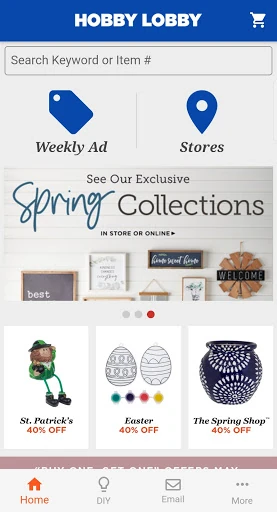
Hobby Lobby Stores is a practical companion for shoppers who want to check the weekly ad, find a nearby store, or look up a gift card balance. I see it as most useful before or during an in-person shopping trip, especially for people who browse crafts, home accents, and seasonal supplies. Its purpose is focused rather than expansive, and that makes it handy when you need a quick store-related task done.
Plan a Store Visit
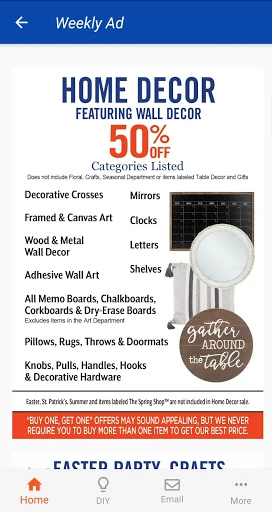
Imagine you have a free hour to pick up supplies for a weekend craft project. Before leaving home, you can open the weekly ad and see what Hobby Lobby is featuring, then use the store locator to look for a nearby location. That is the app's clearest everyday job: it helps turn a vague shopping idea into a more informed trip without making you search through unrelated information.
I would use it again once I reached the store, too. If I had a gift card tucked into my wallet, checking its balance could help me decide whether to use it for the project or save it for another visit. These are small tasks, but they fit naturally around a shopping routine. The app is most useful when I already have Hobby Lobby in mind and want a quick practical reference.
A Store Companion, Not a Catalog
Compared with a general-purpose shopping app, Hobby Lobby Stores is much more tied to one retailer and to the in-store experience. The listed features focus on the weekly ad, nearby locations, and gift card balances. That makes it a straightforward companion for people who already shop at Hobby Lobby, rather than a broad marketplace for comparing craft supplies across different shops.
I would not treat it as a complete project-planning tool or assume it replaces browsing the store itself. The app description does not present a detailed online shopping workflow, project tutorials, or a way to manage a craft inventory. Its narrower scope is useful when you want store information, but less compelling if you are looking for inspiration, product research, or a full digital storefront.
Make Quick Checks a Habit
A simple routine gets the most out of the app: check the weekly ad before planning a trip, then use the store locator when deciding where to go. I like that sequence because it keeps the app connected to a real errand rather than turning it into another place to browse without a purpose. If I am already carrying a Hobby Lobby gift card, checking its balance is another useful step before checkout.
The feedback option can also be useful if you have something specific to share about the app, and the description says you can share the app with family and friends. I would keep my expectations modest and use those options when they fit, rather than expecting a social community or a project organizer. The app's value comes from making a few small shopping tasks easier to handle in one place.
More From Our News Desk

Zoom Meetings, Google Meet, or Teams: Which Is Easiest to Join?

How I Build a Free Streaming Lineup With Tubi

Why Crunchyroll Is the Default Anime App for So Many Fans

YouTube TV: A Practical Guide to Cutting Cable

Rummikub and the Small Comfort of Phone Games

TeamViewer Remote Control or AnyDesk for Helping Family?
Who Will Find It Useful
I would recommend Hobby Lobby Stores to regular customers who like checking weekly offers, need help locating a store, or want to keep a gift card balance handy. It also makes sense for occasional shoppers who are planning a particular trip and want to check the ad first. The app covers a few familiar points in the shopping routine without asking users to learn a complicated system.
It may not suit someone who wants a broad craft inspiration app, a comprehensive project guide, or a multi-store product comparison tool. The available description centers on store-oriented conveniences, not a deep collection of creative resources. If your main goal is to plan a project or explore ideas, you may still need other sources alongside it. For a quick Hobby Lobby reference, though, its limited scope can be a plus.
Hobby Lobby Stores is published by Hobby Lobby Stores, Inc. On Google Play, it has over 5 million installs and a 3.4-star rating from about 14,800 ratings. The app is free to download, and the provided store facts say it contains no ads and offers no in-app purchases. Its content rating is Everyone, which makes the rating suitable for a general audience.
The provided app version is 3.0.19. The app was released on November 9, 2012, and its latest update is dated January 22, 2026. The available facts do not specify a minimum Android version, so it is worth checking the Google Play entry on your device for compatibility details. Those practical details are useful to review before installing, particularly if you use an older phone.
A Focused Helper for Hobby Lobby Trips
A Straightforward First Look
When I first opened the app, the most appealing part of its purpose was how easy it is to understand. This is a Hobby Lobby shopping companion, not a general lifestyle dashboard. The stated options point to three immediate errands: look at the weekly ad, find a store, and check a gift card balance. There is little guesswork about the kind of task it is meant to support.
That clarity is a good starting point for someone who wants a quick reference before heading out. I would begin by checking the ad and locating a store, then use the gift card balance option if I planned to pay with one. The available description does not detail a lengthy setup process, so I would keep the first session focused on those practical tasks rather than expecting a personalized onboarding experience.
Useful Around the Errand
Day to day, the app makes the most sense as something I open briefly before a shopping trip. A weekly ad check can help me see what is being featured, while the store locator addresses the basic question of where to go. These functions are easy to connect to a real plan: decide what kind of supplies or home items you need, check the ad, and locate a store.
I would not expect the app to do the shopping for me. Its described role is to help with store information and a gift card balance, not to replace the in-person experience or provide a full project workflow. That distinction matters: it is a useful add-on for a particular retailer, but it does not claim to be the one app that handles every part of a craft project.
Three Handy Store Features
The weekly ad is the feature I would check most often. It gives shoppers a place to view Hobby Lobby's current weekly advertising, which is handy when planning a visit around the kinds of items the store carries. The description refers to a broad selection spanning crafts, home accents, fabric, art supplies, seasonal goods, and more, so the ad can be relevant to quite different shopping lists.
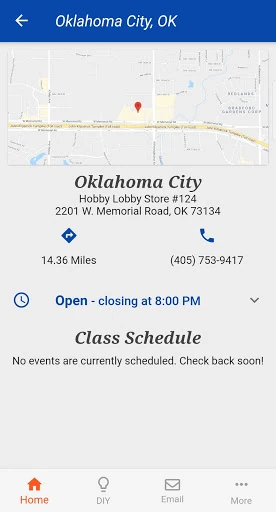
The store locator is another practical inclusion, especially when I am away from my usual neighborhood or need to choose a location. Gift card balance checking rounds out the core set by answering a simple question before checkout. The app also invites feedback and lets users share it with family and friends. Together, these are modest but clear conveniences rather than an elaborate collection of extras.
A Simple Shopping Routine
For a planned weekend project, I would start with the weekly ad a day or two before shopping. If I spotted a relevant category, I could add it to my mental list and check the store locator to decide where to visit. The app does not need to become the place where I design the project; it can simply help me organize the store-related steps around it.
Before leaving, I might check the balance on a Hobby Lobby gift card so I know what I have available to spend there. Once the trip is over, I could share the app with someone who also shops at the store, or send feedback if I have a useful comment. That routine keeps the app's role realistic: quick checks that support an errand, not a substitute for planning or shopping itself.
Keep the Scope in Mind
The main limitation is also the app's defining trait: its described features are narrow. Someone hoping to browse a complete online catalog, build project plans, or compare prices between retailers should not assume those tasks are part of this experience. The app information emphasizes the weekly ad, store locations, gift card balances, feedback, and sharing, so that is the sensible set of expectations to bring.
The Google Play rating is 3.4 stars from about 14,800 ratings, which is useful context when deciding whether to try it, though ratings alone cannot tell me how it will work for every shopper. I would also check the store entry for device compatibility before downloading. If your needs match its small set of store conveniences, its focused approach may be enough; if not, its limits will be apparent quickly.
Hobby Lobby Stores is a modest, practical app for a specific audience: people who shop at Hobby Lobby and want quick access to the weekly ad, nearby stores, or gift card balances. I like that its purpose is easy to grasp, even if it does not reach beyond those store-related tasks.
I would try it if those checks are already part of my shopping routine, especially before a planned visit. I would skip it if I wanted a broad creative resource or a complete online shopping experience. For the right Hobby Lobby shopper, it is a useful extra to keep within reach.
Hobby Lobby Frequently Asked Questions
What is Hobby Lobby Stores used for?
Hobby Lobby Stores is a Lifestyle app for store-related shopping tasks. Its described features include viewing the weekly ad, finding nearby Hobby Lobby locations, and checking a gift card balance. It also offers ways to send feedback and share the app. It is best understood as a retailer companion rather than a general craft planning or inspiration tool.
Which devices can run Hobby Lobby Stores?
The app is listed for Android on Google Play. The available information does not give a minimum Android version, and device compatibility can vary. Check the Google Play entry from your device before installing, especially if you use an older phone or tablet. The described features are intended to help with Hobby Lobby store visits.
Does Hobby Lobby Stores cost money?
The app is free to download. The provided Google Play facts say it has no in-app purchases and contains no ads. Store information can change, so it is sensible to check the current Google Play entry for the latest details before installing. You can use the app's described store features without an app purchase.
Does Hobby Lobby Stores work on iPhone?
The supplied platform information identifies Hobby Lobby Stores as an Android app on Google Play. It does not provide details about an iPhone version, so availability for other platforms may vary. Check the relevant app store for current options if you want to use the app on a device other than Android.
Who is Hobby Lobby Stores best for?
It is best suited to people who shop at Hobby Lobby and want to check the weekly ad, locate a store, or review a gift card balance. It may be less useful if you want broad craft tutorials, project planning, or product comparisons across retailers. Its appeal depends on whether those store-specific tasks fit your routine.
Pros
- Puts the weekly ad and store locator together for planning Hobby Lobby trips.
- Includes gift card balance checking for a useful pre-checkout task.
- Free to download, with no ads or in-app purchases in the provided facts.
- Its purpose is focused and easy to understand.
Cons
- The described feature set is narrow and centered on Hobby Lobby stores.
- Not presented as a full craft project planner or inspiration library.
- Minimum Android requirements are worth checking in Google Play.
- Category
- Lifestyle
- Version
- 3.0.19











