Hide My phone number
- 1.07K
- 2.9
- Installs
- 500.00K
- Price
- Free

Screenshots
Analysis by Reviewed APKs
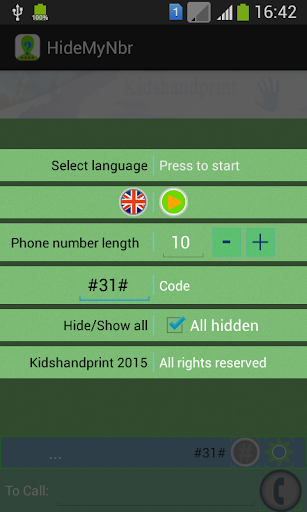
Hide My phone number is a simple contacts and caller ID tool for people who want to hide their number when calling particular people or everyone. I like the straightforward idea: choose contacts, add the hide code used in your country, and manage who can see your number. It is a narrow utility rather than a full privacy service, so its usefulness depends on how well that calling method works with your phone and carrier.
A more private call
When I first thought through the app's everyday use, the most natural example was calling someone I do not know well and would rather not give my number to. Hide My phone number is designed to let me select that contact and apply the hide code for my country, so the call can be made without displaying my number. That is a focused job, not a complicated privacy setup with several services to learn.
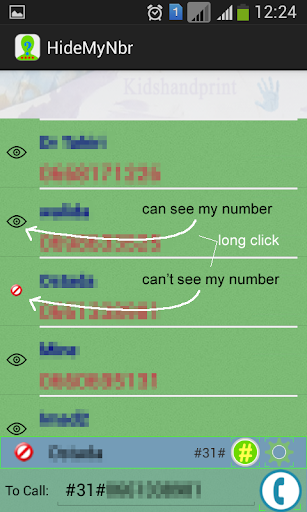
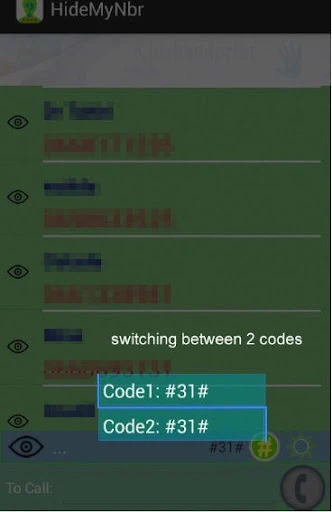
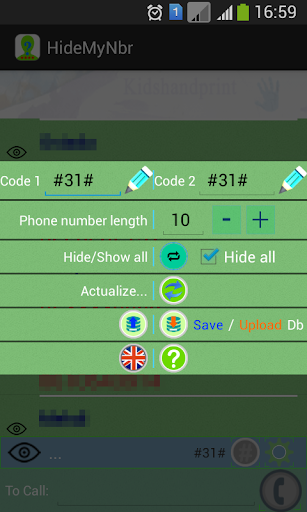
The contact-by-contact approach also makes sense for routine calls. I might want my number visible to friends and family but hidden for a particular contact, or choose the option to hide it for all contacts. The appeal is being able to make that choice before calling, rather than treating caller ID as an all-or-nothing setting. The actual result can depend on whether the code and calling arrangement work as expected.
A focused caller ID tool
Compared with manually entering a caller ID hiding code each time, the app's stated value is pairing the country code with selected contacts. It can also serve as an alternative contact manager or phone, according to its description. That keeps its scope close to calls and contact selection, rather than turning it into a general-purpose communications product.
It is not a temporary-number service, and I would not approach it as one. The available description is about hiding caller ID through a country code, not generating a new number, forwarding calls, or protecting text messages. If I needed a second number or a messaging privacy tool, this would not answer that need. Its usefulness is narrower, but the intended task is easy to understand.
Make the choice deliberate
A sensible way to use a tool like this is to decide which contacts should see a number before an important call, then check that the right contact is selected. That small pause matters more than any elaborate workflow. The app's described controls center on choosing contacts and setting the hide code, so keeping those details current is the practical habit to build.
I would also avoid assuming that one setting will suit every call. Some calls may be better made with caller ID visible, while others may call for hiding it. Since the app can be configured for specific contacts or all of them, the choice deserves a quick review rather than a set-and-forget approach. It is a small utility, and careful selection is the main way to get value from it.
More From Our News Desk

Zoom Meetings, Google Meet, or Teams: Which Is Easiest to Join?

How I Build a Free Streaming Lineup With Tubi

Why Crunchyroll Is the Default Anime App for So Many Fans

YouTube TV: A Practical Guide to Cutting Cable

Rummikub and the Small Comfort of Phone Games

TeamViewer Remote Control or AnyDesk for Helping Family?
Who may find it useful
I would recommend Hide My phone number to Android users who want a straightforward way to manage caller ID visibility for selected contacts. It may suit someone who makes occasional calls where sharing a number is not desirable, but still wants their number visible in other situations. The central idea is simple enough to understand: add the country hide code and select contacts, or choose to hide the number more broadly.
It may not suit people looking for temporary numbers, private texting, or a broader communication suite. The app's description focuses on hiding caller ID during calls, not those other services. I would also keep expectations measured: Google Play shows a 2.9-star rating from about 1,073 ratings, so it is worth checking whether its approach fits your needs before relying on it for an important call.
Hide My phone number is a free Android app from AHMED SOUSANE. Google Play shows over 500,000 installs and a 2.9-star rating from about 1,073 ratings. The app is marked as containing ads, and its content rating is Everyone. It was released on December 15, 2015.
The app has no listed in-app purchases. Its version is shown as varying with the device. An Android minimum requirement and a last-update date are not included in the available app facts, so check Google Play for current device compatibility and details.
A Closer Look at Caller ID Control
A simple starting point
The first impression is of a utility with one clear purpose: manage whether a caller's number is visible. The description presents a short path to that goal, involving the hide code for the user's country and a choice of contacts. I appreciate that the idea does not require a long explanation, even if setting it up still calls for care.
I would start by identifying the contacts for which hiding caller ID makes sense, then make sure the country code being used is the right one. The app's description does not lay out a more elaborate onboarding process, so I would keep the initial setup simple and verify the intended selection before making a call.
The everyday call flow
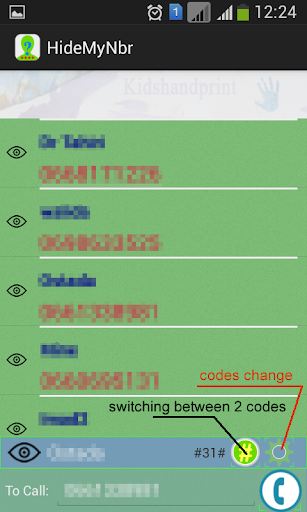
Day to day, this is meant to help decide who can see a phone number when a call is placed. The meaningful distinction is between hiding it for selected contacts and hiding it for all of them. That gives the app a practical role in a calling routine without asking it to replace every other way I communicate.
The experience depends on a country-specific hide code, which makes the local calling context important. I would not assume that selecting a contact alone does all the work independently of that code. The app's purpose is clear, but users should approach each setup choice with the same care they would give any caller ID preference.
Contact-based control
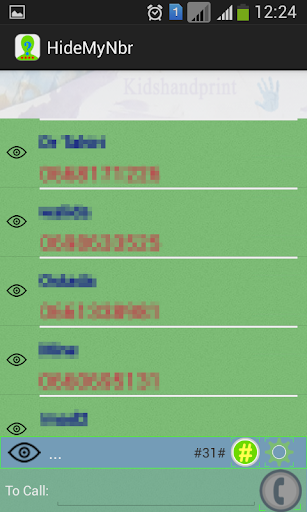
The standout feature is the ability to choose contacts for whom the phone number should be hidden. That is more targeted than simply wanting caller ID off for every call, and it gives the app a distinct use case for people with mixed preferences. The alternative is setting the app to hide the number for all contacts.
The description also calls the app an alternative contact manager or phone, but the core privacy function remains caller ID control. I would treat contact selection as the central feature and the phone-management description as secondary context, rather than assuming it offers a full set of calling or contact tools.
A careful calling routine
For a practical routine, I would review the selected contact before placing a call where number visibility matters. I would also keep the hide code for my country in mind, since the app's method relies on adding it. This is not a feature that needs constant attention, but checking the setup when circumstances change can prevent an unintended choice.
A useful distinction is between calls where I want a person to be able to call back and calls where I prefer not to display my number. The app is meant to support that decision by contact or across all contacts. Thinking through the purpose of a call first is a more reliable habit than applying one broad setting without consideration.
Keep expectations realistic
The biggest limitation is the narrow scope. Hide My phone number addresses caller ID on calls; its description does not promise temporary numbers, text message privacy, or a general-purpose anonymous communications service. That matters because the name might otherwise suggest a wider privacy toolkit. I would judge it on the specific contact and caller ID task it describes.
Compatibility and results are also worth checking in context. The app uses a country hide code, and the available facts do not give a minimum Android version. Its Google Play rating is 2.9 stars, which gives prospective users a reason to read current store feedback and decide whether the app fits their device and calling needs.
Hide My phone number has a clear, useful idea: select who should see your number, add the hide code for your country, and use that choice for calls. I like the focused approach, but it is not a substitute for temporary numbers or private messaging. The modest Play rating and country-code dependence are worth weighing.
I would consider it if caller ID control for selected contacts is exactly what I need, and I would check the current Google Play details before relying on it. If I wanted a broader privacy product, I would look elsewhere. For the right narrow use, its simplicity is the main reason to give it a try.
Hide My phone number Frequently Asked Questions
What is Hide My phone number used for?
Hide My phone number is a contacts and caller ID utility. Its description says users can add the hide code for their country and select contacts whose calls should hide the phone number, or choose to hide it for all contacts. It is aimed at call privacy rather than temporary numbers or private text messaging.
Which devices can run Hide My phone number?
Hide My phone number is an Android app. The minimum Android version can vary or may need to be checked against your device, so consult its Google Play store details for current compatibility before installing. The app's version is listed as varying with the device.
Does Hide My phone number cost money?
The app is listed as free on Google Play and has no in-app purchases in the provided store facts. It does contain ads. Store details can change, so check the current Google Play page for the latest information about cost and advertising.
How does Hide My phone number hide caller ID?
The app's description says to add the hide code for your country and select the contacts for whom you want to hide your number. It can also be set to hide the number for all contacts. The exact fit depends on your country and calling setup, so check the app's current store information and settings.
Is Hide My phone number right for everyone?
It may suit Android users who want a focused way to manage caller ID visibility for particular contacts. It is not described as a temporary-number or text privacy app, so people seeking those functions may want a different tool. Google Play shows a 2.9-star rating from about 1,073 ratings, which is worth considering.
Pros
- Lets users choose specific contacts or hide their number for all contacts.
- Has a clear, focused purpose centered on caller ID visibility.
- Free to install, with no in-app purchases listed.
Cons
- Relies on adding the hide code for the user's country.
- Does not describe temporary numbers or private text messaging.
- Google Play rating is 2.9 stars from about 1,073 ratings.
- Category
- Tools











