GoShare: Delivery & Moving
- 2.32K
- 4.1
- Installs
- 100.00K
- Price
- Free

Screenshots
Analysis by Reviewed APKs
GoShare: Delivery & Moving connects people and businesses with local pros for furniture delivery, small moves, store pickups, and other jobs that need a suitable vehicle or extra hands. I like that it covers both a single bulky purchase and more planned delivery work, with options such as scheduled service and multi-stop routes. It is practical rather than a general moving-planning app, and its usefulness depends on service being available near your addresses.
A bulky pickup, without a van
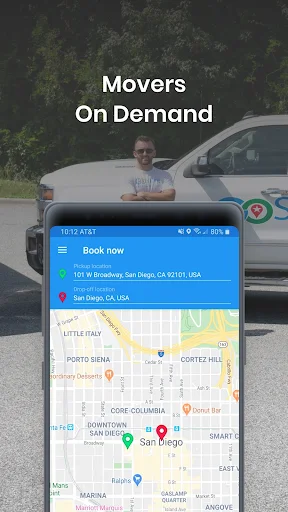
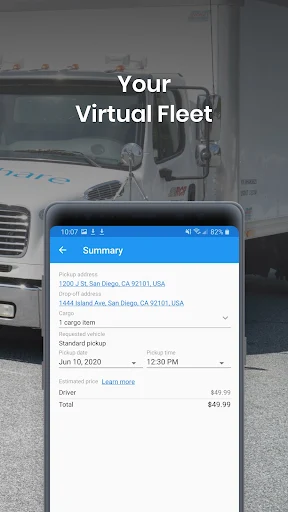
When I picture using GoShare on an ordinary Saturday, it is after buying a sofa from a local seller and realizing my car is no help. I can request a delivery, choose the pickup and drop-off details, and look for a pro with a vehicle suited to the item. The app is built for jobs like this, where the hard part is arranging transport and loading rather than finding another shopping app.
Once a project is underway, GoShare lets customers follow delivery status through real-time notifications and communicate directly with the pro in the app. That makes it easier to coordinate a pickup window or pass along a useful detail about the drop-off. After the job is complete, payment happens in the app, and customers can rate the pro and optionally leave a tip.
A service marketplace, not a planner
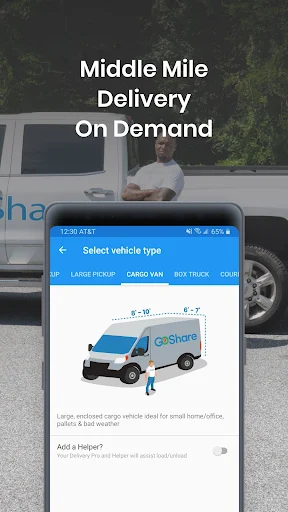
GoShare sits between a standard parcel courier and hiring a full moving company. It is aimed at goods that need a vehicle and people to load, deliver, and unload them: furniture, store purchases, packages, and even pallet shipments. Depending on the job, the available pros may use a car, SUV, pickup, cargo van, or box truck, so the app can serve more than one scale of delivery.
I would not treat it as a checklist for organizing a move, a marketplace for buying furniture, or a general ride service. Its job is to connect a customer with delivery or moving help. That distinction matters if the task needs packing, storage, or a broader relocation plan. Availability also varies by city, so the service may not fit every address even if the idea sounds right.
Make the request easier to handle
A little preparation can make a delivery request more useful. I would note the item’s size, where it is being collected, and any access details that could affect loading or unloading before I start. GoShare supports equipment requests such as dollies and lift gates, so it is worth considering what the job involves rather than assuming every vehicle arrives with every piece of gear.
For several deliveries, multi-stop routes can put multiple drop-off points into one project. If the job is mainly about carrying rather than transportation, the Labor Only option is designed for help loading and unloading at one address or moving between units in the same building. And when timing matters, a scheduled service request can be a better fit than waiting until the day of the task.
More From Our News Desk

Zoom Meetings, Google Meet, or Teams: Which Is Easiest to Join?

How I Build a Free Streaming Lineup With Tubi

Why Crunchyroll Is the Default Anime App for So Many Fans

YouTube TV: A Practical Guide to Cutting Cable

Rummikub and the Small Comfort of Phone Games

TeamViewer Remote Control or AnyDesk for Helping Family?
Who will get the most from it
I would recommend GoShare to someone who occasionally needs a bulky item moved, wants help with a store pickup, or is coordinating local deliveries for a small business. The range of vehicle types and the choice between delivery, moving help, and labor-only assistance give it a useful scope. Businesses handling last-mile delivery or local shipments may also find the marketplace relevant to their routine.
It may be a poor fit if you need a service in a city outside its coverage, or if your task needs a full-service move with planning beyond loading and transport. I would also avoid assuming that every request will have the same vehicle, equipment, or timing options. The best match is someone with a specific delivery or moving job who can check whether the service covers the addresses involved.
GoShare: Delivery & Moving is published by GoShare Inc. On Google Play, it has over 100,000 installs and a 4.1-star rating from 2,317 ratings. The app is free to download, with no in-app purchases or ads shown in the supplied store facts. Its content rating is Everyone.
The current version shown is 1.18.9. The app was released on September 28, 2016, and the recorded last update is August 28, 2026. The supplied facts do not give a minimum Android version, so check the Google Play page on your device for compatibility details.
How GoShare Handles the Heavy Lifting
A straightforward first impression
When I first opened GoShare, what stood out was how clearly its purpose is defined: arrange a delivery or moving job with a local pro. It is not trying to cover unrelated errands. The app describes same-day and scheduled service, along with vehicle choices ranging from cars to box trucks, which helps set expectations around the kinds of loads it is built to handle.
The first practical question is whether the pickup or drop-off address is in a supported area. GoShare says it operates in select cities across many states, but not in every city. I would check the actual addresses before planning around it. Once service looks plausible, having the item and access details ready should make the request more useful.
Keeping a delivery on track
Day to day, GoShare is most valuable when the job has enough moving parts that texting a friend or booking a standard parcel pickup will not cut it. The app connects the customer with a pro who loads, transports, and unloads the cargo. For a sofa, appliance, or business shipment, that end-to-end role is a meaningful difference from arranging a vehicle alone.
Status notifications and in-app communication are practical touches, especially when a pickup depends on a seller or a receiving location. I would use the chat to share clear logistics, not assume the other person knows the building layout or where to find the item. After delivery, the ability to pay in the app and rate the pro keeps the closeout tied to the project.
Options for different kinds of jobs
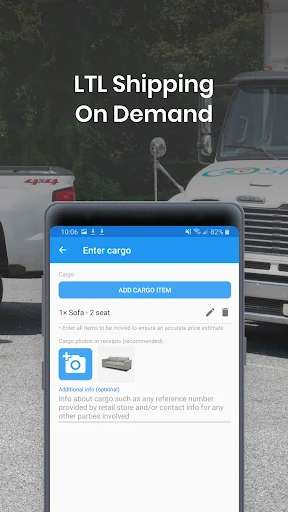
The vehicle variety is one of GoShare’s most useful ideas. A car or SUV may suit a smaller pickup, while a pickup, cargo van, or box truck can address larger cargo. The platform is also intended for business deliveries, including local freight and less-than-truckload shipments. The actual match depends on the job and available pros, but the range makes the service broader than a one-size-fits-all courier.
Two options make the service more flexible. Multi-stop routes are meant for projects with several drop-off points, while Labor Only is for loading and unloading help when transport is not the main need. Customers can also request equipment such as a furniture dolly, appliance dolly, lumber rack, or lift gate. White-glove service and assembly are described as available for most items.
A routine for a store pickup
For a store purchase, I would start by checking that the addresses fall within GoShare’s coverage and then decide whether the item calls for a pickup, van, or larger vehicle. I would include practical details about the item and the handoff, and choose a scheduled time if I need the pickup to line up with my own availability. The service supports booking seven days a week during its stated operating window.
If I had more than one destination, I would look at the multi-stop option rather than creating separate jobs by default. While the delivery is active, I would keep an eye on notifications and use in-app communication if a handoff needs clarification. It is a simple routine, but those small steps help prevent avoidable confusion around bulky goods and pickup points.
Keep availability in perspective
The biggest limitation is geographic coverage. GoShare operates in select cities, not every city in the states it names, so a state-level service area does not guarantee a particular neighborhood or route is covered. I would check the exact addresses before promising a delivery date or arranging a purchase around the app.
The service also depends on matching a project with an appropriate pro and vehicle. A customer may have a specific time, equipment need, or handling expectation, and those details are worth entering clearly. White-glove service and assembly are available for most items rather than being described as universal. For complicated moves, GoShare’s transport focus may not replace a fuller moving service.
GoShare is a focused tool for getting goods moved when a regular car, parcel courier, or a quick favor is not enough. I like its combination of different vehicle types, scheduled service, delivery tracking, and labor-only help. The strongest reason to try it is a specific bulky pickup or local delivery, provided the addresses are in its service area.
I would recommend it to individuals and businesses with practical transport jobs, especially those who value arranging the vehicle and the hands-on help together. I would not make plans around it until checking coverage and the options for the exact job. If those details line up, GoShare offers a convenient way to coordinate a delivery from request through payment.
GoShare Frequently Asked Questions
What is GoShare: Delivery & Moving used for?
GoShare connects customers with local independent pros for delivery and moving work. Common uses include furniture delivery, store pickups, small moves, donation drop-offs, business shipments, and labor-only loading or unloading. Customers can request same-day or scheduled service, track delivery status, and communicate with the pro in the app. Coverage is limited to select cities.
Which devices can run GoShare: Delivery & Moving?
GoShare: Delivery & Moving is listed as an Android app on Google Play. The supplied store facts do not specify a minimum Android version, so check the Google Play page from your device for current compatibility. The app’s described customer service includes requesting jobs, receiving notifications, communicating with a pro, and paying in the app.
What Android version does GoShare require?
The minimum Android version is not included in the supplied app facts. Requirements can vary as the app is updated and by device, so the Google Play page is the best place to check compatibility before installing. The current version shown in the facts is 1.18.9.
Does GoShare: Delivery & Moving cost anything?
The app is free to download on Google Play, and the supplied facts show no in-app purchases or ads. A delivery or moving project is a separate service arranged through the app; the exact cost can vary by job and is worth checking in the app before booking.
Is GoShare right for my move or delivery?
It may suit you if you need a local delivery, bulky-item pickup, moving help, or assistance with business shipments. It may not suit a task in an uncovered city or a move needing services beyond transport and loading. GoShare operates in select cities, so check your pickup and drop-off addresses and the available job options first.
Pros
- Supports different vehicle types for jobs ranging from small pickups to larger cargo.
- Offers scheduled service, multi-stop routes, and labor-only help.
- Delivery tracking and direct in-app communication help coordinate handoffs.
- Covers a variety of personal and business delivery needs.
Cons
- Available only in select cities, so coverage must be checked by address.
- Vehicle, equipment, and service options depend on the specific project.
- Its transport focus may not replace a full-service moving company.
- Category
- Business
- Version
- 1.18.9











