Golden Corral
- 36.37K
- 4.7
- Installs
- 1.00M
- Price
- Free

Screenshots
Analysis by Reviewed APKs
Golden Corral is a restaurant companion for people who want to check nearby locations, browse the menu, arrange curbside pickup, and collect Good As Gold Rewards. I found it most useful for turning a familiar meal into a simpler plan, especially when ordering the same family meal again. It keeps practical restaurant tasks together, though it is less relevant if you only want a general dining guide.
Planning a Golden Corral Stop
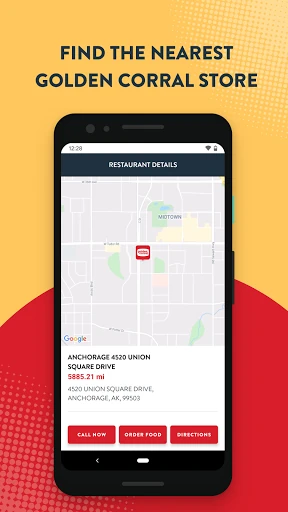
When I first opened Golden Corral, I pictured using it on a busy evening when nobody wanted to cook and the family needed a straightforward dinner plan. I could look up a nearby restaurant, check its hours and services, browse the menu, and place a curbside to-go order. Having those steps in one app makes the decision feel less scattered than searching for each detail separately.
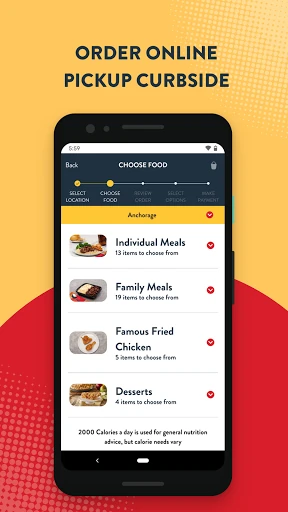
The ordering flow is especially useful when I already know what I want. I can choose individual or family meals, save an order, and bring it back later rather than rebuilding the same cart from scratch. The app also supports saving a preferred payment method, including a credit card, debit card, or gift card. That combination suits repeat visits better than a one-off menu browse.
A Restaurant Companion, Not a Food Guide
Golden Corral is best understood as a tool for interacting with this restaurant, not as a broad restaurant-discovery app. Its location finder, menu, curbside ordering, and rewards are all tied to Golden Corral. If I am deciding between several unrelated restaurants, I would still need another way to compare them. But once Golden Corral is the choice, the app helps with useful details and repeat ordering.
It also is not a substitute for the in-person buffet experience. The app’s ordering feature is for to-go meals with curbside pickup, while the rewards program can also recognize dining at a local restaurant through a code scan or receipt upload. That makes it handy across both pickup and dine-in visits, but the app itself is focused on planning, ordering, and rewards rather than replacing the meal.
Small Habits That Help
I would start by saving a favorite order after a successful pickup. The next time dinner plans come together at the last minute, reordering takes fewer taps and avoids trying to remember every item. Saving a preferred payment method can also make checkout quicker. These are modest conveniences, but they matter most when the app is part of a regular routine instead of something opened once and forgotten.
For people who visit in person as well as order ahead, it is worth remembering the rewards options. The app can record points when an order is placed through it, and a code scan or receipt upload can earn points for a restaurant visit. I would also check registered-member offers before making plans, since the app can provide local specials and event information.
More From Our News Desk

Zoom Meetings, Google Meet, or Teams: Which Is Easiest to Join?

How I Build a Free Streaming Lineup With Tubi

Why Crunchyroll Is the Default Anime App for So Many Fans

YouTube TV: A Practical Guide to Cutting Cable

Rummikub and the Small Comfort of Phone Games

TeamViewer Remote Control or AnyDesk for Helping Family?
Who Will Get the Most From It
I would recommend Golden Corral to regular customers who want a quicker way to find a location, check restaurant details, arrange curbside pickup, or keep track of rewards. It has a clear purpose for families and anyone who tends to repeat familiar orders. The ability to save a meal and earn points through both app orders and some in-person visits gives frequent customers more reasons to keep it installed.
It may be less compelling for someone who visits only occasionally or wants a general-purpose food app covering many restaurants. The app is centered on Golden Corral, and its ordering feature is specifically for curbside to-go pickup. If your usual routine is choosing restaurants on the spot or dining without using rewards, the location and menu tools may be enough, but the repeat-order conveniences will matter less.
Golden Corral is published by Golden Corral Corporation and is free to download on Google Play. It has over one million installs and a 4.7-star rating from around 36,000 ratings. The app is rated Everyone. There are no in-app purchases or ads, according to its Google Play details.
The app’s listed version is 1.14. It was released on April 19, 2021, and its most recent listed update was October 16, 2026. The Android version requirement is not included in the available app details, so anyone with an older device should check Google Play for compatibility before installing.
A Closer Look at Everyday Ordering
A Straightforward First Look
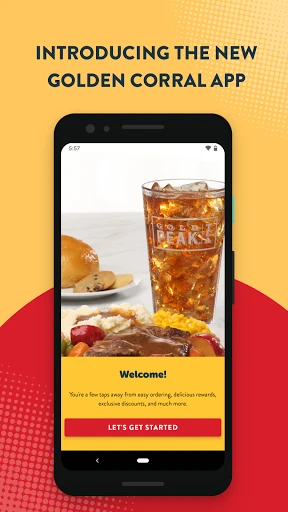
When I first opened Golden Corral, the purpose was easy to understand: find a restaurant, look at the menu, order to go, or use rewards. That direct focus is a plus for anyone who already knows the chain. Rather than trying to serve as a general dining directory, it gathers the restaurant-specific jobs people are likely to handle before a visit.
The first useful step is finding a location and checking its hours, services, and details. I like having those basics in reach before setting out, particularly when plans are being made around a group. From there, the menu and pickup ordering make sense as the next steps. The app is most helpful when I approach it as a practical companion, not as entertainment or a source of broad restaurant recommendations.
The Everyday Ordering Flow
For curbside pickup, the app lets customers order individual meals or family meals. I can see the appeal on a night when everyone is hungry and there is little time to coordinate a complicated dinner. Placing an order through the app can also earn rewards points automatically, so ordering and membership activity are connected rather than handled as unrelated chores.
The saved-order option is the feature I would notice most after a few visits. Once a familiar order is stored, bringing it back is simpler than starting over. That does not change what the restaurant serves, but it makes repeat use less tedious. The app also lets customers save payment details, including credit, debit, and gift cards, for a more convenient checkout.
Rewards Beyond Pickup
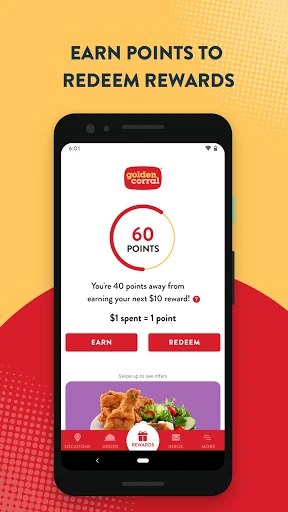
Good As Gold Rewards gives the app another role beyond ordering. Customers can register, earn points through app orders, and earn points for dining at a local Golden Corral by scanning a code or uploading a receipt. I appreciate that this gives the program a place in both pickup and restaurant visits, rather than tying it only to one way of eating.
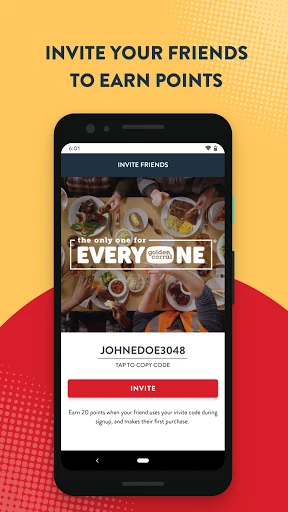
Rewards can be redeemed as they are earned or saved for a later occasion. The app also describes rewards for registering, accumulating points, and birthdays, along with bonus points for referring friends and family. Registered members can receive offers and information about local events and specials. Those features are most relevant to people who actually visit often enough to use them.
A Simple Weekly Routine
A practical routine might begin with checking a restaurant’s hours and services before leaving home. If pickup is the plan, I would browse the menu, choose a familiar meal, and reuse a saved order when it fits. After an in-person visit, I would remember the rewards code or receipt option, so points do not depend solely on orders placed through the app.
I would also make a habit of looking at member offers when planning a visit. That keeps the app useful between orders without requiring constant attention. For a family, the location details and family meal ordering can help bring the basic logistics together. The app is not doing the meal planning itself, but it can remove a few small steps from the process.
Keep the Scope in Mind
The main limitation is also the app’s defining choice: everything is built around Golden Corral. It will not help compare menus across a range of restaurants, and its pickup ordering is for curbside to-go service. Customers looking for a broad delivery marketplace or a general restaurant guide may need other apps alongside it.
Some of its value depends on whether a person uses the rewards program and returns often. A rare visitor can still use the location finder and menu, but saved orders and accumulating points are less likely to become habits. The Android version requirement can also be worth checking on Google Play before installation, especially if a device is older.
Golden Corral does a sensible job of bringing restaurant details, curbside ordering, repeat orders, and Good As Gold Rewards into one place. I would keep it in mind for regular visits, particularly if saved meals and points fit my routine. Its focused scope is a strength for returning customers, though it will not replace a general restaurant app.
My recommendation is straightforward: try it if Golden Corral is already part of your dining rotation and you want fewer steps around pickup or rewards. If you rarely visit, the location and menu tools may still be useful, but there is less reason to make the app a regular part of your phone.
Golden Corral Frequently Asked Questions
What is the Golden Corral app used for?
Golden Corral helps customers find nearby restaurants, check hours and services, browse the menu, and place curbside to-go orders. It also supports Good As Gold Rewards, including earning points through app orders or by scanning a code or uploading a receipt after dining at a local restaurant.
Which devices can run the Golden Corral app?
The app is available for Android through Google Play. The Android version requirement may vary with the app’s current release, so check its Google Play page for the requirement that applies to your device before installing.
Does Golden Corral cost anything to download?
Golden Corral is free to download on Google Play. Its store details say it has no in-app purchases and contains no ads. Store information can change, so it is worth checking the current Google Play page before downloading.
Can I earn rewards with the Golden Corral app?
Yes. Customers can register for Good As Gold Rewards and earn points automatically on orders made through the app. The app also offers ways to earn points for restaurant visits by scanning a code or uploading a receipt. Members can redeem rewards and receive offers.
Who is the Golden Corral app best for?
It is most useful for people who visit Golden Corral regularly and want restaurant details, curbside pickup, saved orders, or rewards in one place. Someone looking for a general restaurant guide or ordering across many chains may find its Golden Corral-specific focus too narrow.
Pros
- Combines location details, menu browsing, curbside ordering, and rewards in one focused app.
- Saved orders make familiar individual and family meals easier to reorder.
- Rewards points can be earned through app orders and qualifying restaurant visits.
- Free to download, with no in-app purchases or ads listed.
Cons
- Focused on Golden Corral rather than comparing multiple restaurant chains.
- Pickup ordering is for curbside to-go service, not a general delivery marketplace.
- Rewards and saved orders matter less to occasional visitors.
- Category
- Food & Drink
- Version
- 1.14











