GlobalProtect Legacy
- 39
- 2.9
- Installs
- —
- Price
- Free

Screenshots
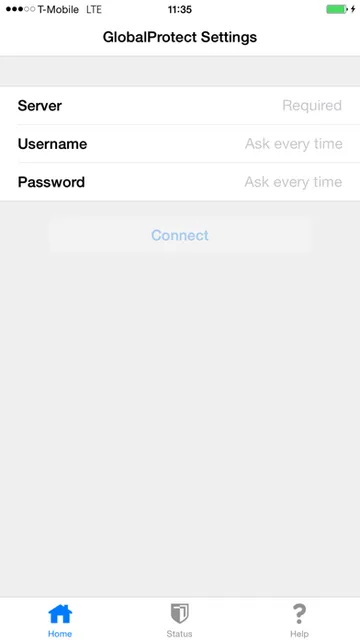
Analysis by Reviewed APKs
GlobalProtect Legacy is an iPhone and iPad app for connecting to an organization’s GlobalProtect gateway, giving people a secure way to reach work services while away from the office. It suits employees whose IT team has already enabled and configured the service, rather than anyone looking for a personal VPN. My overall take: it keeps the user-facing job focused, but its usefulness depends heavily on workplace support.
A workday beyond the office
Picture settling in at a café to finish a few work tasks, or opening a work app while traveling. GlobalProtect Legacy is meant to connect your iPhone or iPad to your organization’s gateway so you can use apps securely away from the traditional office. The key detail is that this is a company-managed setup: your organization must have enabled GlobalProtect gateway support on its Palo Alto Networks firewall.
When I think through that routine, the useful part is how little gateway decision-making the app is designed to require. It can discover an optimal gateway and adapt to the user’s location, while VPN On-Demand can establish a connection automatically. If your organization has configured it, you can get on with the task instead of treating the VPN as a separate destination.
A workplace VPN, not a general one
The obvious comparison is a consumer VPN app, but GlobalProtect Legacy has a different job. It connects to a GlobalProtect gateway on a Palo Alto Networks next-generation firewall and supports an organization’s security setup. That makes it relevant to employees whose IT department provides the service, not people who simply want to choose a VPN provider for personal browsing.
It also isn’t a standalone way to create workplace access. The organization needs the appropriate gateway subscription and configuration, and network administrators have a role in enabling support. If your workplace doesn’t use GlobalProtect, installing the app alone won’t solve that gap. I’d treat it as a companion to an existing company system, not a general-purpose networking tool.
Make setup part of the routine
The most practical first step is to check with your IT department before installing. That can establish whether your organization has enabled a GlobalProtect gateway subscription and how it expects the iOS app to be configured. This matters more here than it does with a consumer app, because the connection depends on workplace infrastructure and supported authentication methods.
Once your organization has provided its setup, automatic gateway discovery and VPN On-Demand are the features to lean on for everyday use. If you need to choose a gateway yourself, manual selection is available. Organizations can also deploy configuration through mobile device management, so employees should follow their own IT team’s instructions rather than trying to recreate a managed setup by guesswork.
More From Our News Desk

Zoom Meetings, Google Meet, or Teams: Which Is Easiest to Join?

How I Build a Free Streaming Lineup With Tubi

Why Crunchyroll Is the Default Anime App for So Many Fans

YouTube TV: A Practical Guide to Cutting Cable

Rummikub and the Small Comfort of Phone Games

TeamViewer Remote Control or AnyDesk for Helping Family?
Who it makes sense for
I’d recommend GlobalProtect Legacy to employees whose organization already runs a Palo Alto Networks GlobalProtect gateway and wants them to use work apps securely from iOS devices. It is especially relevant when IT has supplied configuration or manages devices through MDM. For that audience, automatic connection options and gateway discovery can make remote work feel more straightforward.
It may not suit someone seeking a personal VPN, a way to bypass workplace setup, or a service that works independently of an employer. The app’s value is tied to the organization’s firewall, gateway subscription, and configuration. I’d also pause before relying on it for a new deployment without checking with IT: the App Store details show an older release history, so the organization should confirm compatibility with its current setup.
GlobalProtect Legacy is a free iOS app from Palo Alto Networks. On the Apple App Store, it has a 2.9 rating from 39 ratings and a 4+ age rating. The store details give version 4.1.5, released March 14, 2013, with its last update dated September 14, 2018.
The minimum requirement is iOS 8.0. The app connects to a GlobalProtect gateway on a Palo Alto Networks next-generation firewall, and the description says the organization must enable gateway support. It also identifies supported firewalls running PAN-OS 4.0, 4.1, and 5.0. Check with your IT department about your organization’s configuration before depending on the app.
A closer look at work connections
First checks before setup
My first impression is that this app asks a practical question before anything else: does your workplace use GlobalProtect? That is the right place to start, since the app is designed to connect to an organization’s gateway rather than provide a personal VPN service. Checking with IT first can save time spent installing something that cannot connect to your work environment.
The setup story is intentionally tied to the organization. GlobalProtect supports configuration deployed through MDM, and it works with authentication methods supported by the organization’s PAN-OS setup. I’d follow the instructions from IT instead of assuming every employee will see the same sign-in process or need to enter the same details.
The everyday connection
In daily use, the core idea is to connect an iOS device to the company gateway so its apps can be used securely. The description emphasizes that users can securely use any app, rather than limiting the connection to a single work application. That gives the VPN a supporting role: it helps the device reach work resources while the employee gets on with a normal task.
Automatic VPN On-Demand support is useful for people who move between the office and other locations. The app can adapt to the user’s location and discover an optimal gateway, reducing the need to make that choice manually. Those behaviors depend on the organization’s configuration, but they explain why this app is built around workplace access rather than a collection of consumer-facing extras.
Choice when connection matters
Automatic gateway discovery is one of the more distinctive features: the app is designed to find an optimal gateway based on the user’s location. For a person moving between home, the office, and other places, that can make the connection feel less like a manual networking task. Manual gateway selection is also supported when an organization’s setup calls for it.
The app supports connecting through IPSec or SSL, and it supports authentication methods used by PAN-OS, including Kerberos, RADIUS, LDAP, client certificates, and a local user database. These are configuration options for an organization, not a checklist most employees need to manage themselves. The breadth matters most to IT teams supporting different workplace setups.
A simple remote-work rhythm
A sensible routine starts before a trip or a work-from-home day: confirm with IT that your account and device are ready, and use any configuration they provide. Once that groundwork is done, automatic connection through VPN On-Demand can take care of the connection when required. The point is to spend less time selecting network details and more time on the work task itself.
If the automatic route doesn’t match your organization’s needs, the app also supports manual gateway selection. I’d treat that as an option to use with IT’s guidance, rather than experimenting with gateways at random. For managed devices, configuration can be deployed through MDM, which may make the organization’s preferred routine different from a personally configured device.
The limits to keep in view
The largest limitation is also the clearest: this app needs an organization that has enabled GlobalProtect gateway support on a Palo Alto Networks firewall. It is not enough to download the app and expect a connection. That requirement makes it a poor fit for personal VPN use and means a prospective user should check with their workplace before relying on it.
The App Store details show version 4.1.5 and a last update date of September 14, 2018. I’d keep that age in mind when considering it for a current workplace, and ask IT to confirm compatibility with its firewall and iOS setup. The listed supported firewall software versions are PAN-OS 4.0, 4.1, and 5.0, so organizational guidance is especially important.
GlobalProtect Legacy has a focused purpose: connect iOS users to an organization’s GlobalProtect gateway, with automatic discovery, On-Demand VPN support, and managed configuration options. It is a practical tool when the workplace has already put the necessary infrastructure in place. It is not a ready-made VPN for someone setting out on their own.
I’d recommend it to employees whose IT department supports GlobalProtect and can provide the right configuration. If that describes your workplace, check with IT and follow its setup instructions. If you’re looking for a personal VPN or don’t know whether your organization uses this system, this app is unlikely to be useful by itself.
GlobalProtect Legacy Frequently Asked Questions
What is GlobalProtect Legacy used for?
GlobalProtect Legacy connects an iOS device to an organization’s GlobalProtect gateway on a Palo Alto Networks next-generation firewall. The purpose is to let mobile users securely use apps while away from the traditional office. It depends on workplace support, so check with your IT department about whether your organization has enabled and configured the service.
Which devices can run GlobalProtect Legacy?
GlobalProtect Legacy is an iOS app, and its listed minimum requirement is iOS 8.0. It is available through the Apple App Store. The app description is focused on iOS mobile use, so check the App Store details and your organization’s IT guidance for device compatibility with your particular setup.
What iOS version does GlobalProtect Legacy require?
The listed minimum operating system requirement for GlobalProtect Legacy is iOS 8.0. That requirement does not by itself establish whether your workplace’s gateway and configuration will work with your device. Ask your IT department to confirm that the app and your organization’s GlobalProtect setup are compatible before relying on it.
Does GlobalProtect Legacy cost anything?
GlobalProtect Legacy is listed as free on the Apple App Store. The supplied app details do not specify whether there are in-app purchases, so check the store page for current purchase information. The app also requires an organization to enable GlobalProtect gateway support, so ask your IT department about workplace access and setup.
Is GlobalProtect Legacy right for personal VPN use?
Generally, it is intended for employees connecting to an organization’s GlobalProtect gateway, not as a standalone personal VPN. It can suit you if your workplace supports the service and provides configuration. If you want a VPN for personal use or your organization does not use GlobalProtect, this app is unlikely to meet that need.
Pros
- Automatic VPN On-Demand support can reduce manual connection steps.
- Automatic gateway discovery adapts to the user’s location.
- Supports IPSec or SSL and several workplace authentication methods.
- Organizations can deploy configuration through mobile device management.
Cons
- Requires an organization with enabled GlobalProtect gateway support.
- Not designed as a standalone personal VPN service.
- The listed last update dates to September 2018.
- Category
- Business
- Version
- 4.1.5











