Genius — Song Lyrics Finder
- 86.43K
- 3.8
- Installs
- 10.00M
- Price
- Free

Screenshots
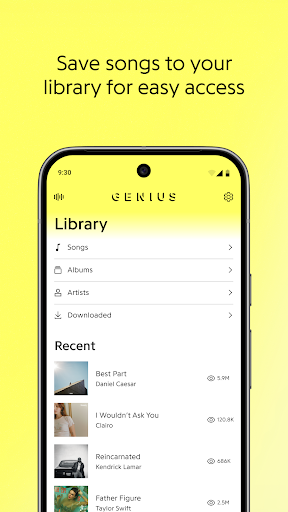
Analysis by Reviewed APKs
Genius — Song Lyrics Finder is for the moments when a song catches my ear and I want more than a quick title search. It combines lyrics, fan and artist annotations, song discovery, and tools for identifying music nearby or currently playing. I find it most appealing to curious listeners who like context alongside the words, though the ads and community-centered approach may not suit everyone.
When a song grabs you
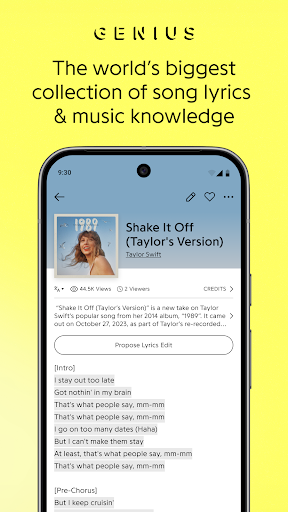
I often want to look up lyrics when a track comes on in the car, at a café, or in the middle of a playlist. With Genius, I can search for songs and browse trending tracks, then read the lyrics and tap highlighted lines for annotations. That makes it useful for more than checking a half-remembered phrase: it gives me a way to follow the words and explore what other listeners say they mean.
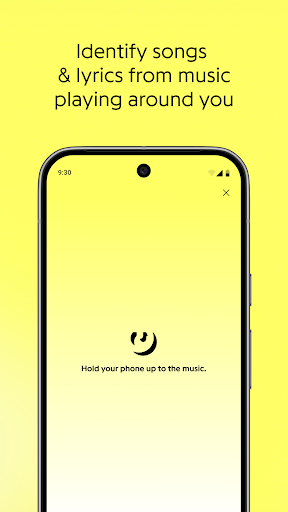
The soundwave option is handy when I hear something I can't identify. I can hold my phone up to the music and tap the button to discover the song and its lyrics. For tracks already playing through a streaming service, Genius can also send notifications that help me get to the lyrics. Those tools give the app a place in ordinary listening, rather than making it only a destination for deliberate searches.
Lyrics, not a full player
Genius sits beside music-streaming apps rather than replacing them. Its focus is lyrics and the knowledge around songs: search, charts, annotations, and identification. When I want to play a whole album, manage a queue, or organize a listening library, I would turn to a music player. When I want to understand a line or identify a song around me, Genius is the more relevant companion.
That distinction helps set expectations. The app is not presented as a streaming service, and its standout material is the community’s discussion of lyrics rather than audio playback. I would recommend it to listeners who enjoy reading along or exploring song meanings, but less to someone who only wants a plain lyric sheet with no extra context. The annotations are part of the appeal, but also make the experience more involved than a simple lookup.
Make listening more curious
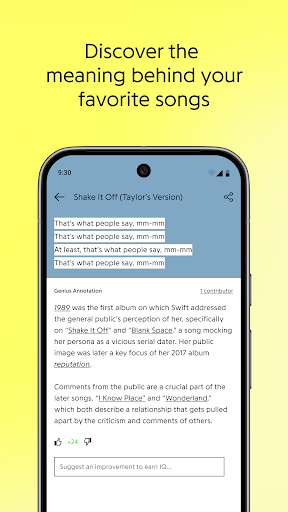
A simple way to get more from Genius is to start with a song I already know, then tap a highlighted lyric that has always seemed cryptic. The annotations can add background from verified artists and members of the Genius community. I like treating them as a path into a song, not as a reason to stop listening: read a note, return to the track, and see whether the line lands differently.
I can also use the app in two different modes: search when I have a title or lyric in mind, and reach for sound identification when I don't. For music playing through a streaming service, notification access can make lyrics easier to reach. If I want to contribute, Genius also lets me sign up to add knowledge about songs, artists, and albums. These small habits turn it into a listening companion rather than just a search box.
More From Our News Desk

Zoom Meetings, Google Meet, or Teams: Which Is Easiest to Join?

How I Build a Free Streaming Lineup With Tubi

Why Crunchyroll Is the Default Anime App for So Many Fans

YouTube TV: A Practical Guide to Cutting Cable

Rummikub and the Small Comfort of Phone Games

TeamViewer Remote Control or AnyDesk for Helping Family?
Who will enjoy Genius
I would recommend Genius to people who regularly wonder what a lyric means, enjoy browsing music discoveries, or like seeing how other fans interpret a song. It is especially useful if lyrics are part of how you listen, whether you are following along with a familiar track or trying to identify something playing nearby. The mix of search and annotations gives curious listeners a reason to linger after they have found the words.
It may be less satisfying for someone who wants only a bare lyrics lookup, or who expects one app to handle music playback as well. The community angle means the experience includes other people's explanations and contributions, which will not appeal to every listener. Ads are another consideration. I see Genius as an optional extra for an existing listening routine, not a replacement for the streaming service or player someone already uses.
Genius — Song Lyrics Finder is developed by Genius Media Group, Inc. On Google Play, it has more than 10 million installs and a 3.8-star rating from around 86,000 ratings. The app is free to download and contains ads. The supplied store facts say it does not offer in-app purchases, so there is no listed purchase price beyond the free download.
Google Play gives Genius a Teen content rating. The supplied app version is 8.2.1.5301. It was released on August 4, 2015, and its listed last update is October 5, 2026. A minimum Android version is not specified in the facts provided, so I would check the Google Play page on the device I plan to use.
A closer look at everyday listening
A focused first impression
When I first opened Genius, the idea was easy to grasp: find a song, read its lyrics, and follow the context around particular lines. The app's emphasis on lyrics and music knowledge makes it feel more like a reference companion than a player. That focus is useful if I arrive with a question about a track, and it gives browsing a clear purpose when I do not have one.
The setup choice that matters most depends on how I listen. If I want help reaching lyrics for music playing through streaming services, Genius requests notification access for that purpose. The description says it uses that permission to listen for music and does not access, read, or save notifications. I would consider whether that convenience is worth enabling before turning it on.
Search and follow along
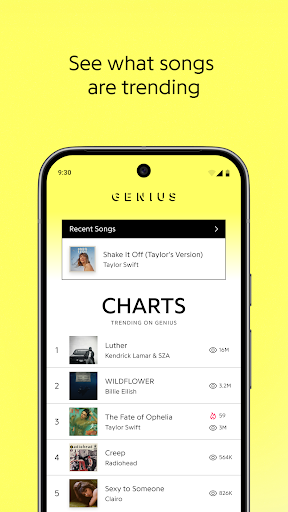
Day to day, the core experience is finding a song and reading its lyrics. Genius says it has millions of songs to search, and its charts offer a way into trending tracks when I am browsing without a particular title in mind. I can move from a familiar artist to a specific song, then spend a little longer with the words instead of bouncing straight back to my playlist.
I found the highlighted lines give the reading experience a clear next step: tap one to see its annotation. That keeps the explanations tied to the lyric they discuss. It also means the app is most rewarding when I have the time and curiosity to explore, rather than when I only need to check one word and immediately return to whatever I was doing.
Annotations add context
Annotations are the feature that most clearly separates Genius from a plain lyrics lookup. The app describes them as notes written by verified artists and millions of music fans. Tapping a highlighted line lets me see that added context right where it belongs, which is easier to follow than trying to connect a separate discussion to a particular verse.
I also appreciate that song discovery is not limited to typing a title. The soundwave button can identify music playing around me and lead me to its lyrics. For a track playing through a supported streaming-service context, notifications can make lyrics easier to access. Together, those features cover both the deliberate search and the spontaneous 'what is this song?' moment.
A low-effort listening routine
One practical routine is to keep Genius for the songs that leave me with a question. I can search after hearing a new track, read the lyrics, and tap a highlighted line if I want to understand more. On another day, I can open the charts to see what is trending or use sound identification when I cannot name the song. That is enough to make the app useful without turning every listening session into research.
For listeners who like contributing, Genius also offers a way to sign up and add knowledge to songs, artists, and albums. I would treat that as an optional extension of browsing, not a required step. Even without contributing, I can use the annotations as a starting point for exploring a track and return to the music with a better sense of what others hear in it.
A few limits to consider
Genius is centered on lyrics and explanations, so it will not serve as a one-stop music app for people looking to play and manage their collection. Its community annotations are a strength for curious listeners, but they are also more material to read than some people want. If I am in a hurry, searching for a lyric may be all I need, and the extra context can feel like a detour.
The app contains ads, which may interrupt a clean, focused reading session. Its notification-based access for music playing through streaming services is another trade-off: it can make lyrics easier to reach, but it requires a permission I may not want to enable. I would use the features that fit my routine and check the store page for device compatibility before installing.
Genius works best when I want to do something with a song beyond letting it play. Lyrics are easy to search, annotations invite a closer read, and the identification tools help when a track turns up unexpectedly. It is a focused companion to music listening, with ads and a community-rich approach that will suit some habits better than others.
I recommend giving it a try if lyrics and their meaning are part of why you enjoy music. If you want a player or a minimal lookup tool, Genius is not aimed at that job. For curious listeners willing to dip into notes and discoveries, it offers a useful extra layer to an everyday playlist.
Genius Frequently Asked Questions
What is Genius — Song Lyrics Finder used for?
Genius is used to search for song lyrics, browse trending songs, and read annotations about highlighted lines. It can also help identify music playing nearby or make lyrics easier to reach for songs playing through streaming services. I would think of it as a lyrics and music-knowledge companion, rather than an app for playing or managing a music library.
What devices can I use Genius on?
The supplied platform information places Genius on Android through Google Play. I would check the app's Google Play page for current device compatibility before installing, especially if I am using an older phone. The available information does not establish support for other platforms, so it is best to consult the relevant store for details.
What Android version does Genius require?
The minimum Android version can vary by app release and device. The supplied facts do not give a minimum requirement, so I would check the Google Play page from the Android device I plan to use. That is the practical way to confirm whether the current version is compatible before downloading.
Does Genius cost money or include purchases?
Genius is free to download and the supplied facts say it contains ads, with no in-app purchases. Store details can change, so it is worth checking Google Play for the latest information before installing. The app's description also mentions optional sign-up for people who want to contribute knowledge to songs, artists, and albums.
Is Genius a good fit for every music fan?
It is a good fit for listeners who enjoy reading lyrics, exploring annotations, or identifying songs they hear. It may be less appealing if you want a music player, a bare-bones lyric lookup, or an ad-free experience. Genius has a Teen content rating on Google Play, and I would check the store page for current details.
Pros
- Lyrics, charts, and annotations give curious listeners several ways to explore songs.
- Sound identification helps find music playing nearby.
- Notification access can make lyrics easier to reach while streaming music.
- Listeners can contribute knowledge about songs, artists, and albums.
Cons
- Ads may interrupt a focused lyrics-reading session.
- It is a lyrics companion, not a music player.
- Notification access may not suit listeners who prefer not to enable it.
- Category
- Music & Audio
- Version
- 8.2.1.5301











