Free Download Manager - FDM
- 58.58K
- 4.7
- Installs
- 5.00M
- Price
- Free

Screenshots
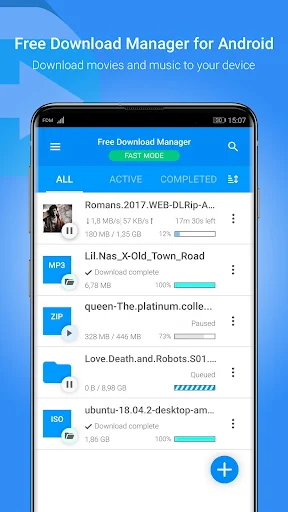
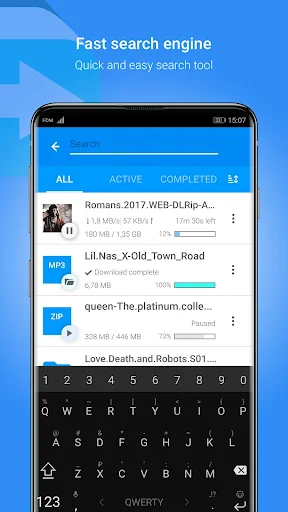
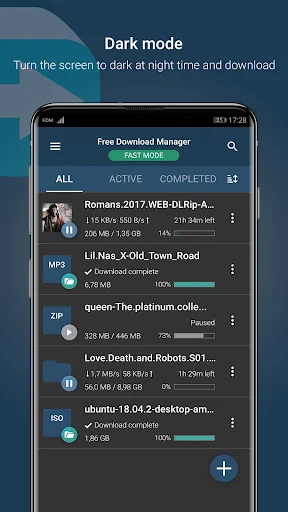
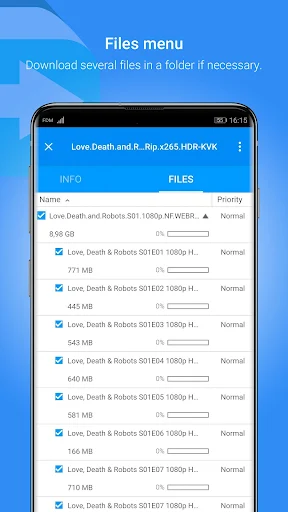
Analysis by Reviewed APKs
Free Download Manager - FDM is a tool for organizing and handling downloads on an Android device, including large files and torrents. I’d consider it for people who regularly move files onto their phone and want options such as scheduling, resuming, and managing bandwidth. Its feature set is broader than a basic download button, though it makes most sense when you have downloads to manage in the first place.
When a Download Takes Time
When I’m downloading a large file on a phone, the frustrating part is not always the wait; it’s losing progress when a connection drops or needing the network for something else. FDM is built for that sort of session. It can split a file into sections, handle multiple downloads, and resume broken downloads or expired links, so a long transfer has more options than simply starting over.
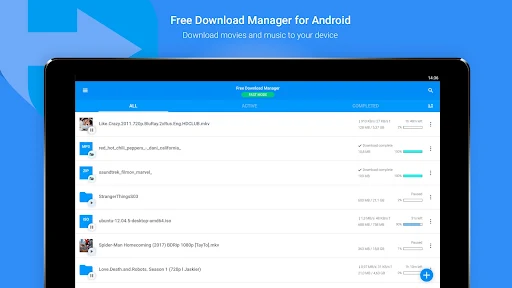
I’d use it when I have a few legitimate files to collect and want to keep them in one place. FDM can organize downloads by file type into predefined folders, and it can schedule a download for a set time. That turns the app into a small queue manager rather than a one-off downloader. The practical benefit is having controls for the transfer and its timing without treating every file as a separate chore.
A Manager, Not a Media Library
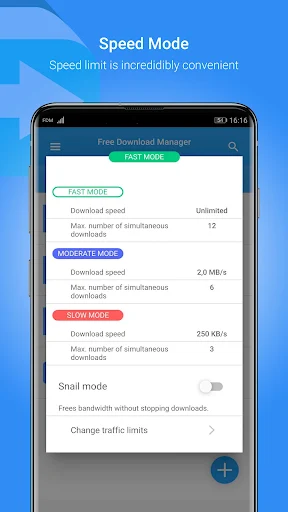
Compared with a basic browser download, FDM puts more emphasis on managing the transfer itself. It offers traffic-use controls, scheduling, Wi-Fi-only automatic downloads, and the ability to set priorities for torrents. For anyone who often downloads large files, those controls are more relevant than a simple list of completed items. I see it as a utility for moving files, not as a place to discover or stream entertainment.
That distinction matters. FDM supports torrents through BitTorrent and magnet links, and it can handle popular media formats, but that does not make it a substitute for a music or video service. The app also says downloading from YouTube is unsupported under that site's terms. I’d keep it for files I’m entitled to download and look elsewhere for browsing, playback, or a curated media collection.
Make the Queue Work for You
A little planning can make FDM less hands-on. If I know a download will take a while, I can schedule it for a chosen time rather than starting it immediately. The app also has an option to download automatically only when connected to Wi-Fi, which is useful when I want to avoid using mobile data for those transfers. These settings are most helpful when I set them before building a queue.
For torrents, file priorities give another way to shape what finishes first. I’d use that selectively when a torrent contains several files and one matters more than the rest. For ordinary downloads, organizing items into folders by type helps keep the destination tidy. FDM’s traffic controls can also help balance downloading against browsing, so I can adjust usage instead of leaving every transfer to compete equally.
More From Our News Desk

Zoom Meetings, Google Meet, or Teams: Which Is Easiest to Join?

How I Build a Free Streaming Lineup With Tubi

Why Crunchyroll Is the Default Anime App for So Many Fans

YouTube TV: A Practical Guide to Cutting Cable

Rummikub and the Small Comfort of Phone Games

TeamViewer Remote Control or AnyDesk for Helping Family?
Who Will Get the Most From It
I’d recommend FDM to people who regularly download large files, manage several transfers, or use torrents and want controls over priorities and timing. It is also a sensible fit for someone who has had downloads interrupted and would rather try resuming than begin again. The combination of scheduling, file organization, traffic controls, and Wi-Fi-only downloads gives frequent downloaders useful ways to make the process fit their routine.
It may be more than casual users need. If you only save an occasional small file, a browser’s built-in download handling may be enough, and FDM’s extra controls may go unused. It is also not a media discovery service, and it does not support downloading from YouTube. As with any download tool, the user remains responsible for choosing content they have the right to download.
Free Download Manager - FDM is made by SoftDeluxe, Inc. On Google Play, it has more than 5 million installs and a 4.7-star rating from 58,582 ratings. The app is free, with no in-app purchases and no ads. Its content rating is Everyone, making the store’s age category broad, though the kinds of files a person chooses to download are a separate consideration.
The current version is 6.35.2.7075. FDM was released on July 26, 2019, and its last update was October 23, 2026. The supplied app details do not give a minimum Android version, so it is worth checking the Google Play page on the device you plan to use. The app needs network access for downloading and file access to save downloads on the device.
A Closer Look at the Download Workflow
A Practical First Impression
When I first opened FDM, the main idea was clear from its purpose: this is a place to handle downloads, not a general-purpose file browser or entertainment app. Its feature set points toward people who want to do more than tap a link and wait. I’d approach it with a particular transfer in mind, then decide which of its controls are useful rather than trying to use every option at once.
The setup that matters most is deciding how I want downloads to behave. FDM can save files to the device, and its permissions include network access and permission to add, change, or delete stored files. I’d also consider whether I want automatic downloads restricted to Wi-Fi. Those are practical choices to make before relying on the app for a lengthy transfer.
Handling Transfers Day to Day
FDM’s everyday job is keeping file transfers manageable. It supports simultaneous downloads, and it can divide a file into sections that download at the same time. The description says this can speed up downloads, but real-world performance depends on the transfer and connection. I’d treat the controls as ways to manage a queue, not as a promise that every file will arrive faster.
The resume option is especially useful in the kind of routine where a connection is not always steady. If a download breaks, FDM can resume broken downloads and expired links, which may save time compared with starting again. It can also organize downloaded files by type into predefined folders. Together, those features make the app more useful when downloads are recurring rather than occasional.
Tools Beyond Basic Downloads
Torrent support is one of the more distinctive parts of FDM. It works with the BitTorrent protocol, accepts magnet links, and lets users control file priorities for torrents. Those details make it relevant to people who already use torrent files and want to manage their contents. I’d keep the priority controls focused on the files that matter rather than treating every item in a torrent equally.
FDM also lists support for common audio and video formats, including WEBM, AVI, MKV, MP4, and MP3. That describes supported formats, not a promise that every file will play perfectly on every device. The app’s description also covers scheduling downloads and adjusting traffic usage. Those features extend the manager’s role without turning it into a catalog or streaming platform.
One boundary is explicit: FDM does not support downloading from YouTube, citing that site's terms of service. I appreciate having that spelled out, because the app’s general ability to download media should not be read as support for every website. It is better suited to permitted file transfers than to trying to capture content from services that do not allow it.
A Routine for Bigger Files
For a practical routine, I’d first choose the files I need and add them to a manageable queue. If a download is large, I’d consider scheduling it for a time when I do not need as much bandwidth. FDM’s traffic-use controls are designed to let downloading and browsing coexist, so adjusting that balance can be more comfortable than simply running transfers at full tilt.
Next, I’d make sure the Wi-Fi-only automatic download option suits my connection habits. That setting can help avoid starting automatic downloads on mobile data. For a torrent with several files, I’d use priorities to focus on what I want first. Afterward, the type-based folders offer a straightforward way to keep the downloaded files from becoming one undifferentiated pile.
This is not a routine everyone needs. If I have only one small file, the extra planning would be unnecessary. The workflow pays off when a transfer takes time, when I have several items to manage, or when I want more control over when and how downloads use the connection.
Limits to Keep in Mind
FDM’s strengths depend on having downloads to organize. Its scheduling, torrent priorities, traffic controls, and resume support are useful options, but they add little to a simple occasional download. I would not install it expecting a library of content or recommendations; the app is a manager for files the user chooses to download.
The app’s description names its supported media formats and its torrent features, but compatibility and transfer results can depend on the particular file and network. It also calls out that YouTube downloads are unsupported. Those are useful boundaries to remember before starting a transfer, and they reinforce that the app is not a universal way to save content from every online service.
Finally, FDM needs network access and permission to save files on the device. Those permissions fit its stated purpose, but they are worth understanding before use. The store details supplied here do not specify a minimum Android version, so I’d check the Google Play page for device compatibility before installing.
Free Download Manager - FDM is a capable choice for people who want more control over large or repeated downloads. Its strongest practical points are resuming transfers, scheduling, organizing files, adjusting traffic use, and managing torrents. I like that its focus is clear: it helps handle downloads rather than pretending to be a broader media service.
I’d recommend trying it if downloads are a regular part of your phone routine and you will use those controls. For occasional small files, a basic download option may be simpler. Keep the YouTube limitation and your responsibility for downloaded content in mind, and check device compatibility in Google Play before installing.
Free Download Manager Frequently Asked Questions
What is Free Download Manager - FDM used for?
Free Download Manager - FDM helps manage downloads on an Android device, including large files and torrents. It can schedule transfers, resume broken downloads or expired links, organize files by type, adjust traffic use, and limit automatic downloads to Wi-Fi. It also supports magnet links and torrent file priorities. It is a download manager, not a service for discovering or streaming media.
Which devices can run Free Download Manager - FDM?
FDM is available for Android through Google Play. The supplied details do not specify a minimum Android version, so check the app’s Google Play page to see whether it supports your device. The app needs network access to download files and permission to save them on the device. Compatibility can depend on the Android version and device.
Does Free Download Manager - FDM cost money?
FDM is free on Google Play. The supplied store details say it has no in-app purchases and contains no ads. Store information can change over time, so it is sensible to check the Google Play page for the current details before installing. Your internet connection or mobile data plan may still affect the cost of downloading files.
What Android version does Free Download Manager - FDM require?
The minimum Android version is not provided in the app details available here. Check the Google Play page from the device you want to use, where compatibility information may vary by device and Android release. FDM requires network access and file access for its basic download and saving functions.
Is Free Download Manager - FDM a good fit for casual users?
It can work for casual users, but its extra controls are most valuable if you regularly handle large files, multiple transfers, or torrents. Someone saving a small file now and then may find a basic download option sufficient. FDM does not support downloading from YouTube, and users are responsible for choosing content they have the right to download.
Pros
- Resumes broken downloads and expired links, helping preserve progress on longer transfers.
- Offers scheduling, traffic controls, and Wi-Fi-only automatic downloads.
- Includes BitTorrent and magnet-link support with torrent file priorities.
- Organizes downloads by file type into predefined folders.
Cons
- Its advanced controls may be unnecessary for people who download only occasionally.
- YouTube downloads are explicitly unsupported.
- The minimum Android version should be checked on Google Play.
- Category
- Tools
- Version
- 6.35.2.7075











