FORScan Lite - for Ford, Mazda
- 199
- 3
- Installs
- —
- Price
- $6.99
Screenshots
Analysis by Reviewed APKs
FORScan Lite - for Ford, Mazda is a vehicle-diagnostics app for owners and technicians working with supported Ford, Mazda, Lincoln, and Mercury models. It connects through a compatible OBD adapter to read trouble codes, view vehicle data, and run some tests and service functions. I see it as a focused companion for hands-on troubleshooting, not a general car app or a replacement for the full desktop FORScan experience.
A Check-Engine Light at Home
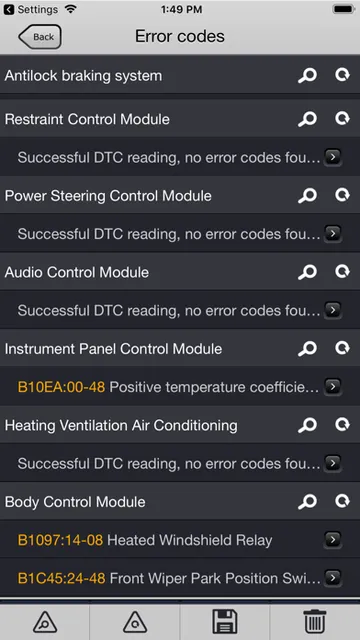
Picture a familiar moment: a warning light comes on during the week, and you want more context before deciding what to do next. With a supported vehicle and adapter, FORScan Lite can read diagnostic trouble codes from the vehicle’s modules and show sensor and other data. That gives me a practical starting point for understanding what the car is reporting, rather than relying on the dashboard light alone.
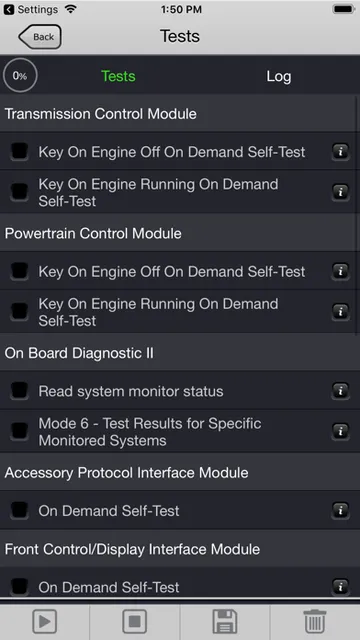
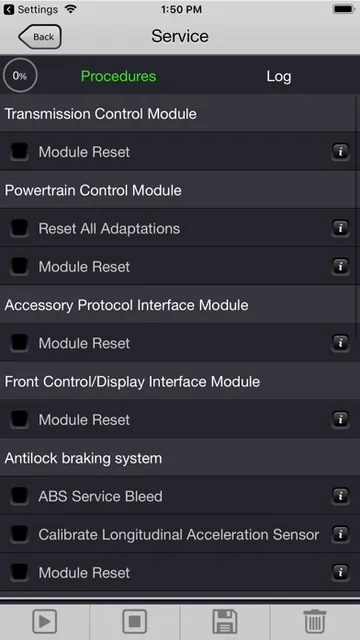
The app can also reset trouble codes and execute tests or many service functions. I’d treat those as deliberate diagnostic steps, not buttons to tap casually; a code is useful information, and clearing it does not explain its cause. Its value is in helping an informed owner or technician inspect a supported vehicle, with the adapter and vehicle compatibility sorted out before the job begins.
A Specialist, Not a Universal Scanner
Compared with a basic code reader, FORScan Lite reaches data and trouble codes across vehicle modules, and it can execute tests and many service functions. That broader scope will appeal to people who regularly work on Ford-family vehicles and want more than a single engine-code readout. The trade-off is that it is a specialist tool: the app supports Ford, Lincoln, Mercury, and Mazda vehicles, not cars from every manufacturer.
It is also not the full desktop FORScan feature set. The app’s description says configuration and programming functions, along with some service functions, are unavailable in Lite. That distinction matters if your goal is changing vehicle settings or programming modules. I’d consider it for diagnosis and supported maintenance tasks, but not as a universal scanner or a way to perform every advanced operation.
Make Each Scan Count
A little preparation makes a scan more useful. I’d first check that the vehicle falls within the supported model-year range and that the chosen OBD adapter is on the supported list. The app recommends OBDLink MX+, vLinker FS Bluetooth, and vLinker FD BLE. Other ELM327-compatible Wi-Fi or BLE adapters may work, but the description warns that poor-quality adapters can cause problems.
For a repeatable routine, I’d connect the adapter, use the app to inspect the vehicle’s network configuration, then read codes and relevant data before deciding whether to run a test or service function. Keeping the order consistent helps me compare what the vehicle reports across visits. I’d also avoid assuming that every function applies to every model; availability depends on the vehicle and the Lite feature set.
More From Our News Desk

Zoom Meetings, Google Meet, or Teams: Which Is Easiest to Join?

How I Build a Free Streaming Lineup With Tubi

Why Crunchyroll Is the Default Anime App for So Many Fans

YouTube TV: A Practical Guide to Cutting Cable

Rummikub and the Small Comfort of Phone Games

TeamViewer Remote Control or AnyDesk for Helping Family?
Who may find it useful
I’d recommend FORScan Lite to Ford, Mazda, Lincoln, or Mercury owners who already have a compatible adapter and want a closer look at vehicle diagnostics than a simple warning-light reader provides. It also makes sense for someone who routinely helps maintain supported vehicles and is comfortable interpreting diagnostic information. Its strongest appeal is that focused combination of multi-module data, trouble-code access, tests, and many service functions.
It may be a poor fit if you drive another make, expect broad compatibility with every Mazda model, or need configuration and programming features. Newer Mazda 7G models are only partially supported or may not be supported. I’d also hesitate if you have not chosen an adapter yet and want a tool that works without extra hardware. This is a specialized app, so the vehicle and adapter details matter.
FORScan Lite - for Ford, Mazda is developed by Aleksei Savin and is available for iOS through the App Store. The App Store shows a 3.0 rating from 199 ratings. The app costs $6.99. Its content rating is 4+, and the listed minimum operating system is iOS 9.0.
The current listed version is 1.5.31. The release date is November 2, 2014, and the last update date is May 9, 2026. The app description covers supported Ford, Lincoln, and Mercury models from 1996 through 2022 model years, with some 1994–1995 models also supported, and Mazda models from 1996 through 2022. Check the App Store and vehicle compatibility details before purchasing.
A Closer Look at FORScan Lite
First Connection
My first impression is that this app is built around a specific task: connecting to a vehicle and examining its systems. It is not presented as a general-purpose maintenance log or trip companion. Before opening it beside the car, I’d make sure I had a supported vehicle and an adapter that the description recommends. That bit of preparation is central to the experience, not an optional extra.
The adapter connects the app to the vehicle, and compatibility affects whether the session works well. FORScan Lite supports several named Bluetooth adapters and other ELM327-compatible Wi-Fi or BLE options, though those other adapters are not recommended. The description specifically cautions that a low-quality ELM327 adapter may not work properly. I’d check hardware carefully rather than blaming the app for a connection issue.
The Diagnostic Loop
In regular use, the core loop is straightforward in purpose: inspect the connected vehicle, read trouble codes, and look at sensor or other data from its modules. That kind of access can help turn a vague warning into a more specific diagnostic conversation. I like that the stated scope reaches all modules rather than being limited to one code source, although the usefulness still depends on the particular vehicle.
Resetting codes is available too, as are tests and many service functions. I’d approach those options with care and use them when I understand why I’m running them. The app is most helpful when it supports a considered check, not when I treat every function as an experiment. It offers access to information and actions; interpreting the results remains part of the user’s job.
More Than Code Reading
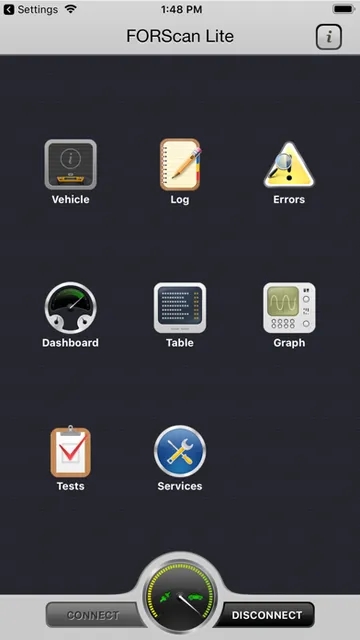
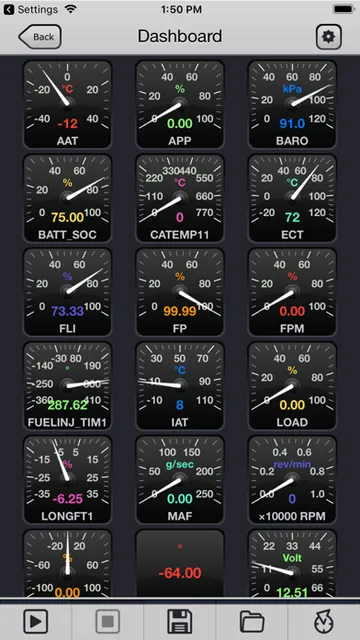
One feature that stands out is the ability to analyze the vehicle’s on-board network configuration. Alongside reading and resetting diagnostic trouble codes across modules, FORScan Lite can display sensor and other PID data from modules. That breadth gives the app a more involved diagnostic role than a simple code lookup tool, particularly for someone who already knows what information they want to examine.
The app can execute tests and the majority of service functions, according to its description. The qualifier matters: not every service function is available, and configuration and programming are excluded from Lite. I’d keep that boundary in mind before buying it for a particular job. The supported features are substantial for diagnosis, but they should not be confused with every capability associated with the broader FORScan name.
A Useful Garage Routine
For a weekend check, I’d start with compatibility: confirm the make and model year, then connect a recommended adapter. Once the app is communicating with the vehicle, I’d inspect the network configuration and read the codes before resetting anything. If a code points toward a system I want to understand, looking at available sensor data can add context without jumping straight to a repair decision.
I’d save tests and service functions for a specific reason, such as following up on what the scan revealed or carrying out a supported maintenance task. That keeps the session organized and reduces the temptation to explore unfamiliar options at random. The app’s diagnostic tools are most useful when paired with a clear question about the vehicle and a realistic understanding of what Lite does and does not include.
Compatibility Has Edges
The clearest limitation is its narrow vehicle focus. Ford, Lincoln, and Mercury models from 1996 to 2022 are listed, with some 1994 and 1995 models also supported; Mazda coverage is stated for 1996 to 2022. Mazda 7G models, including examples such as newer Mazda 3 and CX-30 vehicles, are only partially supported or may not be supported. Other makes are outside the stated coverage.
Hardware and feature limits are worth checking too. The app depends on an OBD adapter, and the description cautions that poor-quality compatible adapters can perform badly. Lite does not include configuration or programming functions, and some service functions are unavailable. If your vehicle, adapter, or intended task sits near one of those boundaries, I’d verify the details before paying rather than assuming every combination works.
FORScan Lite is a focused diagnostic tool with useful depth for supported Ford-family vehicles and Mazda models. Reading codes across modules, viewing data, and running available tests and service functions give it a clear role for hands-on owners and technicians. The required adapter and vehicle-specific coverage mean it is not a casual, universal car app.
I’d recommend it when your vehicle is supported, you have a suitable adapter, and the diagnostic features match the job you need to do. I would look elsewhere if you need broad make coverage or configuration and programming. Check compatibility and the App Store details before buying; for the right vehicle, the app offers a practical way to investigate what the car is reporting.
FORScan Lite Frequently Asked Questions
What is FORScan Lite - for Ford, Mazda used for?
FORScan Lite is used for computer diagnostics on supported Ford, Mazda, Lincoln, and Mercury vehicles. It can analyze the vehicle’s on-board network configuration, read and reset diagnostic trouble codes across modules, display sensor and other data, run tests, and perform many service functions. Configuration and programming functions are not included in the Lite app.
Which devices and vehicles work with FORScan Lite?
FORScan Lite is an iOS app available through the App Store, with a listed minimum requirement of iOS 9.0. It requires a compatible OBD adapter to connect to a vehicle. The description covers Ford, Lincoln, and Mercury models from 1996–2022, some 1994–1995 models, and Mazda models from 1996–2022. Mazda 7G coverage is partial or unavailable.
How much does FORScan Lite cost?
The App Store price is $6.99. The available app details do not state whether additional in-app purchases or advertising are involved, so those details may vary and are worth checking on the App Store before purchasing. The app also requires a compatible OBD adapter, which is separate hardware.
Does FORScan Lite work with Android?
The app details provided here describe FORScan Lite as an iOS app on the App Store, with a minimum requirement of iOS 9.0. They do not give Android requirements. Check the relevant store for current availability and device requirements, and confirm that your vehicle and OBD adapter are supported before relying on the app.
Is FORScan Lite suitable for every car owner?
It is best suited to people working with supported Ford, Mazda, Lincoln, or Mercury vehicles who want diagnostic codes, vehicle data, tests, or available service functions. It is not for other makes, and Lite excludes configuration and programming. Adapter quality and model-year compatibility matter, so it may not suit someone seeking a universal scanner.
Pros
- Reads diagnostic trouble codes across modules on supported vehicles.
- Displays sensor and other vehicle data from available modules.
- Includes tests and many service functions for supported tasks.
- Supports several recommended Bluetooth OBD adapters.
Cons
- Limited to Ford, Mazda, Lincoln, and Mercury vehicle coverage.
- Configuration and programming functions are not available in Lite.
- Requires a compatible adapter, and adapter quality can affect operation.
- Category
- Tools
- Version
- 1.5.31











