FlightAware Flight Tracker
- 45.36K
- 3.8
- Installs
- 10.00M
- Price
- Free

Screenshots
Analysis by Reviewed APKs
FlightAware Flight Tracker is for checking where a flight is, whether its status has changed, and what is happening around an airport. I’d reach for it when I’m picking someone up, following a trip across time zones, or simply curious about the planes overhead. Its live map and several ways to search make it more useful than a basic arrival-time check, though the extra detail may be more than a casual traveler needs.
Following a flight in real time
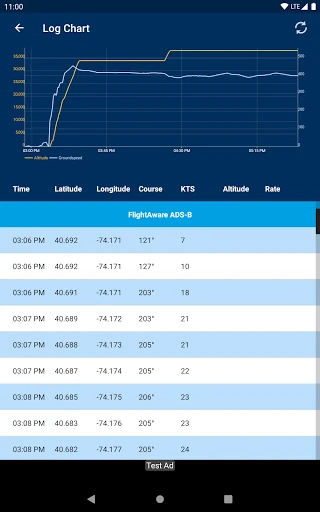
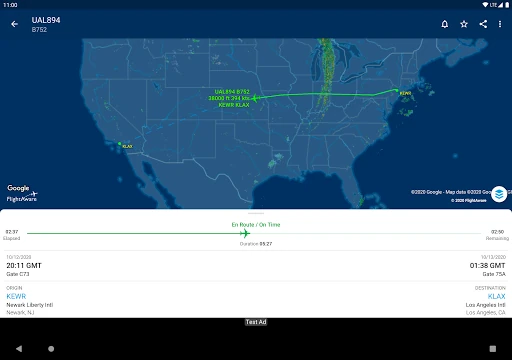
When I’m meeting someone at the airport, the usual routine is to ask for their flight number and keep checking the arrival time. FlightAware gives that routine a more useful view: I can search by flight number, then follow the flight’s status and its track on a live map. If the traveler sends an update while I’m on the way, I can check again without relying only on a text message.
I can also search by route, airline, city pair, airport code, or aircraft registration, which helps when I have only part of the information. The map turns an abstract status into something easier to interpret: I can see the flight’s path rather than just a line of text. For an airport pickup, that can make the waiting feel less like guessing, even though the app does not replace checking the airport’s own instructions.
More than an arrival board
A basic airline or airport status page is often enough if I only want to know whether a particular flight is on time. FlightAware is a better fit when I want to follow the aircraft’s movement, look up flights in different ways, or check airport delays and nearby traffic. Its coverage includes commercial flights worldwide and general aviation in the United States and Canada, so it reaches beyond a single airline’s itinerary screen.
That breadth does not make it a trip-planning app. The description centers on flight tracking, maps, alerts, and airport conditions, rather than booking tickets or organizing a whole vacation. If I’m looking for a simple confirmation and have no interest in a map or other flights, a compact airline status screen may feel quicker. FlightAware is most compelling when the journey itself is what I want to follow.
Small habits that help
I get the most out of a tracker by searching with the most specific detail I have. A flight number is convenient, but route, airline, city pair, airport code, and registration offer alternatives when the number is missing. Once I’ve found the right flight, I can set a real-time push alert rather than repeatedly opening the app to look for a change.
For a busy travel day, I’d check the flight status and airport delays before leaving, then use the map when I want a clearer sense of where the aircraft is. Nearby flights are a separate way to satisfy a passing curiosity about what is overhead. I’d keep those checks purposeful: the app has plenty of information, but not every screen or map view is needed for a straightforward pickup.
More From Our News Desk

Zoom Meetings, Google Meet, or Teams: Which Is Easiest to Join?

How I Build a Free Streaming Lineup With Tubi

Why Crunchyroll Is the Default Anime App for So Many Fans

YouTube TV: A Practical Guide to Cutting Cable

Rummikub and the Small Comfort of Phone Games

TeamViewer Remote Control or AnyDesk for Helping Family?
Who will get the most from it
I’d recommend FlightAware to frequent flyers, people meeting arriving passengers, and anyone who enjoys following aircraft on a map. The flexible search options are useful when a flight number is not at hand, while alerts can reduce the need to check manually. Travelers who like context around airport delays or want to see nearby flights also have more to explore than they would in a minimal status checker.
It may not suit someone who wants only a quick gate or itinerary glance, or who prefers a travel app focused on booking and trip organization. A map and aircraft details can be engaging, but they are not necessary for every journey. It is also worth remembering that the app includes ads and offers in-app purchases, so people who prefer an entirely uncluttered, no-extra-cost experience may want to compare options.
FlightAware Flight Tracker is published by FlightAware and is listed in the Travel & Local category. Google Play shows over 10 million installs and a 3.8-star rating from around 45,000 ratings. The app is free to download, contains ads, and offers in-app purchases priced from $0.99 to $5.99 per item. Its content rating is Everyone.
The current version shown is 5.16.3. The app was released on September 7, 2011, and the recorded last update is October 19, 2026. FlightAware’s description says Android 9 or higher is required. It supports tracking commercial flights worldwide and general aviation in the United States and Canada, with coverage and available details depending on the flight.
A closer look at following flights
A map-first first impression
When I first open a flight tracker, I want to get from curiosity to a useful result without needing to know every technical detail. FlightAware offers several search starting points, including a flight number, route, airline, city pair, airport code, or aircraft registration. That flexibility makes the app approachable even when the information I have is incomplete, and it gives the experience a practical purpose from the outset.
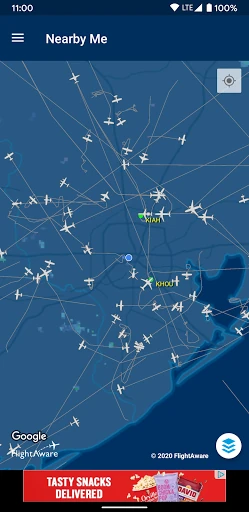
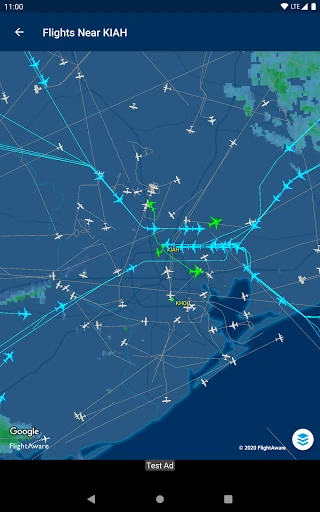
The clearest reason to use it becomes apparent once a flight is selected: the app pairs status information with a live map track. I can look at the journey spatially instead of interpreting a status label alone. The description also calls out full-screen maps and a NEXRAD radar overlay, making the map a central part of the experience rather than a small decorative preview.
Checking in day to day
For everyday use, the main loop is straightforward: find a flight, review its status, and return when I need an update. The range of search methods matters because travel information arrives in different forms. Someone may send a flight number, while a pickup plan may be organized around cities or an airport code. Having those routes into a search makes the tracker useful in more than one situation.
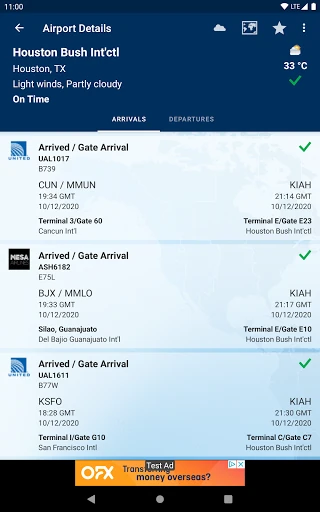
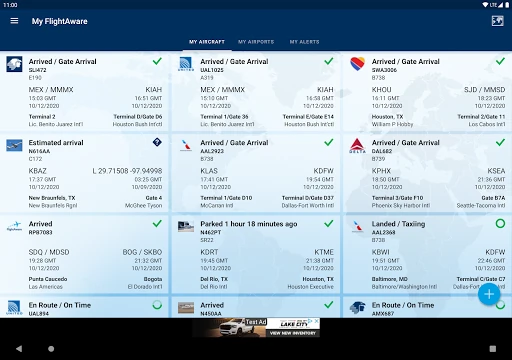
Push notifications offer a less hands-on alternative to refreshing a screen. I can set a real-time flight alert and let the app bring an update to me, which is handy when I’m working or getting ready to leave. The app also includes airport delays, so checking a trip can involve the wider airport picture, not just the movement of one aircraft.
Details beyond the flight path
The standout feature is the combination of broad flight search and a live map. FlightAware says it tracks commercial flights worldwide, along with general aviation in the United States and Canada. That scope is useful if I’m following a scheduled passenger trip one day and curious about private or charter aircraft within the supported regions another day.
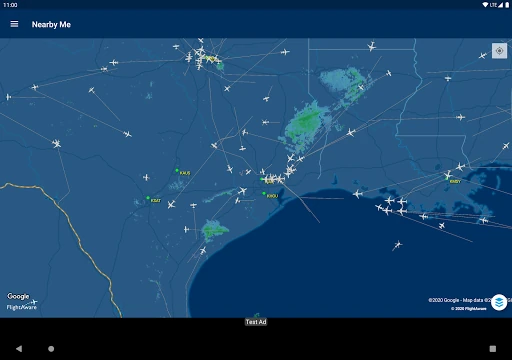
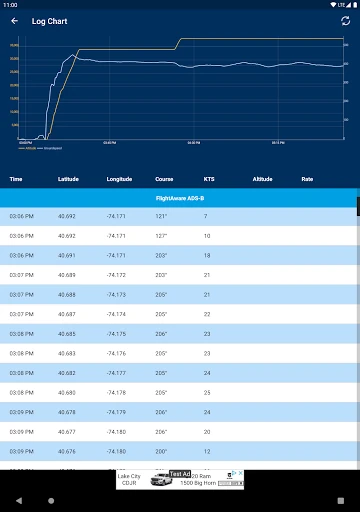
There are a few other useful layers to the experience: full-screen maps, a NEXRAD radar overlay, airport delay information, and a view of nearby flights overhead. None of those needs to be part of every check. Together, though, they make the app feel aimed at people who want to explore flight activity, rather than just confirm one estimated arrival time.
A calmer pickup routine
For an airport pickup, I’d start by finding the traveler’s flight and setting an alert. That gives me a reason to check the live track when timing matters without making me stare at the app throughout the day. Before setting out, I can review the status and airport delays; if I have a few spare minutes, the map can help me follow the aircraft’s progress.
I’d use nearby flights for a different kind of moment, such as looking up while outside and wondering what is passing overhead. Searching by airport code or city pair can also be handy when I’m curious about activity around a place rather than tracking a known passenger. These are simple habits, but they let the app serve both practical planning and casual observation without confusing the two.
Things to keep in mind
A tracker’s detailed view is not automatically useful for everyone. If all I need is a quick arrival check, the map, radar overlay, and nearby-flight view may feel like extra information. FlightAware is also not presented as a booking or itinerary-management tool, so it should not be mistaken for a complete travel companion. Its appeal depends on whether following aircraft and airport conditions is part of the job.
The app contains ads and offers in-app purchases, which are practical considerations for anyone who prefers a more streamlined experience. Its stated Android requirement is version 9 or higher, so compatibility is worth checking before installing on an older device. As with any flight-tracking app, I’d treat the displayed information as a way to follow a journey, not as a substitute for an airline’s direct travel communications.
FlightAware Flight Tracker is a capable choice when I want more than a bare arrival estimate. Its multiple search options, live map, alerts, delay information, and nearby-flight view give it real range, especially for frequent travelers and curious aviation watchers. The trade-off is a busier, more detailed experience than a simple status lookup needs.
I’d try it if I regularly follow flights or coordinate airport pickups and want the aircraft’s progress in view. For occasional travelers who only need a quick confirmation, a simpler checker may be enough. FlightAware’s strongest case is for people who will actually use the map and tracking tools, not just install them for one trip.
FlightAware Flight Tracker Frequently Asked Questions
What is FlightAware Flight Tracker used for?
FlightAware Flight Tracker is used to check flight status and view a flight’s track on a live map. It can search by flight number, route, airline, city pair, airport code, or aircraft registration. The app also offers real-time push alerts, airport delay information, nearby flights, full-screen maps, and a NEXRAD radar overlay.
Which devices can run FlightAware Flight Tracker?
FlightAware Flight Tracker is an Android app, and its description says Android 9 or higher is required. It is intended for Android devices rather than a desktop system or Apple App Store download. If you are unsure whether a particular device or software version is compatible, check the Google Play store details before installing.
Does FlightAware Flight Tracker cost money?
The app is free to download, but it contains ads and offers in-app purchases. The listed in-app purchase range is $0.99 to $5.99 per item. The available purchases and their prices can vary, so it is worth checking the Google Play store page for the current details before making a purchase.
Where does FlightAware track flights?
FlightAware says it tracks commercial flights worldwide and general aviation, including private and charter flights, in the United States and Canada. You can search in several ways and view flight details and a map track. The flights and information available depend on the route and aircraft being searched.
Is FlightAware Flight Tracker suitable for casual travelers?
It can suit casual travelers who want to follow a flight for a pickup or check a journey on a map. It may be more detailed than necessary if you only want a quick status check, and it is not described as a booking or itinerary-planning app. The free app contains ads and offers optional in-app purchases.
Pros
- Search flights by number, route, airline, city pair, airport code, or aircraft registration.
- Live map tracks provide a more visual way to follow a journey.
- Flight alerts and airport delay information support practical travel checks.
- Nearby flights and radar overlays add useful depth for aviation watchers.
Cons
- Map and aircraft details may be unnecessary for a quick arrival-time check.
- The app contains ads and offers in-app purchases.
- Android 9 or higher is required.
- Category
- Travel & Local
- Version
- 5.16.3











