Fender Studio: Jam & Record
- 53
- 3.7
- Installs
- —
- Price
- Free
Screenshots
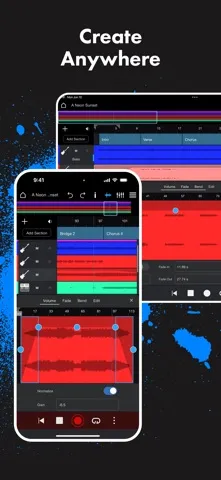
Analysis by Reviewed APKs
Fender Studio: Jam & Record is a mobile recording and music-making app for guitarists, bass players, singers, and anyone who wants to build a track. I like its focus on getting an idea recorded quickly, then giving you practical tools to shape it with Fender tones and effects. It can serve beginners and more experienced creators, though its recording setup and optional extras matter.
From quick riff to track
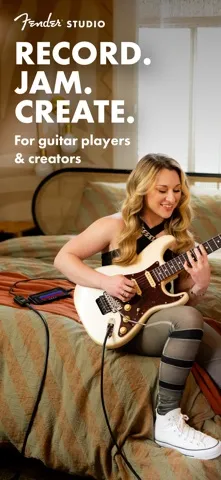
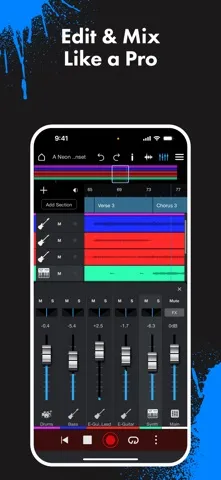
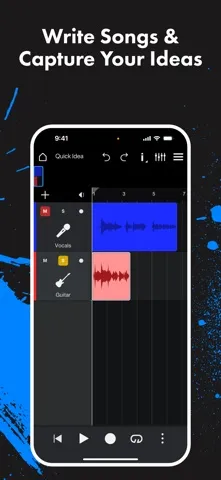
When I have a guitar idea between other tasks, I want to capture it before I forget the phrasing. Fender Studio is built for that kind of moment: I can use the device microphone or connect a compatible audio interface, choose a Jam Track, and start recording. The app offers recording, editing, and mixing in one place, so the first take can become the beginning of a more finished arrangement rather than a note stranded in another app.
A realistic session might start with a guitar part over one of the included Jam Tracks, then grow into a vocal layer or another instrument. The app supports up to eight tracks before free registration, with a higher limit after registration. I can also work with effects such as EQ, compression, reverb, and delay. That gives a rough idea room to develop without requiring a full desktop production setup at the outset.
A mobile studio, not a DAW replacement
Compared with a voice memo app, Fender Studio is aimed at making music rather than simply preserving sound. Tracks, effects, Jam Tracks, and export options make it more useful for shaping a demo or practice recording. Compared with a desktop music production setup, its appeal is the mobile workflow and Fender-focused sounds. It can also send a project over a network to Fender Studio Pro 8 or later, where the project’s tones and effects load.
I would not treat it as a universal solution for every kind of production. Its center of gravity is recording and working with guitar, bass, voice, and backing material, not replacing every tool a large studio session might involve. Some expanded content and capabilities require free registration, while the Complete Fender Amps & FX add-on is a separate purchase. Those distinctions are worth considering before building a workflow around one particular feature.
Make sessions easier to return to
A small habit that helps is deciding what a session is for before recording: a guitar sketch, a vocal idea, or a pass over a backing track. That keeps a mobile session manageable and makes it easier to judge whether the take needs another layer or just a simple effect adjustment. Fender Studio includes presets to get started, so I can begin with a sound instead of spending the whole session searching for one.
I would also make export part of the routine rather than leaving it until the end of a project. The app supports WAV and FLAC exports, with MP3 available after free registration. For a larger production, sending a project to Studio Pro 8 or later over the network offers another handoff. The Chord Track, tempo adjustment, and global transpose tools can also help when I want to experiment with a progression or change the feel.
More From Our News Desk

Zoom Meetings, Google Meet, or Teams: Which Is Easiest to Join?

How I Build a Free Streaming Lineup With Tubi

Why Crunchyroll Is the Default Anime App for So Many Fans

YouTube TV: A Practical Guide to Cutting Cable

Rummikub and the Small Comfort of Phone Games

TeamViewer Remote Control or AnyDesk for Helping Family?
Who might enjoy it
I would recommend Fender Studio to guitarists, bassists, and songwriters who want a mobile place to record ideas, explore tones, and assemble a demo. It also has useful ingredients for people making vocal recordings or podcasts, including effects and track-based editing. Beginners can start with presets and Jam Tracks, while musicians who already use Fender Studio Pro may appreciate the project handoff.
It may be less appealing if you only need a quick voice memo, want every feature available without registering or purchasing an add-on, or prefer doing all production on a computer. Recording with an instrument also depends on having a compatible interface if you are not using the device microphone. I would check the features and add-on terms in the App Store before deciding how well it fits a particular setup.
Fender Studio: Jam & Record is made by Fender Digital, LLC and is available for iPhone and iPad through the Apple App Store. It requires iOS 16 or later. The app is free to download, has a 4+ age rating, and its current version is 1.3. The App Store shows a 3.7 out of 5 rating from 53 ratings.
The app was released on May 20, 2025, and its last update was July 30, 2026. The Complete Fender Amps & FX add-on is available as an in-app purchase; its price can vary by platform and is worth checking in the App Store. Free registration unlocks additional features and content. The store rating and version may change over time.
A closer look at the recording workflow
A focused first impression
The first thing I notice about Fender Studio is how clearly it is built around making a recording, rather than browsing a general library of music tools. Its pitch is straightforward: bring in a guitar, bass, voice, or microphone recording, then work on the sound and arrangement. That focus should make sense to musicians who want to get from an initial idea to a playable sketch without switching among several separate apps.
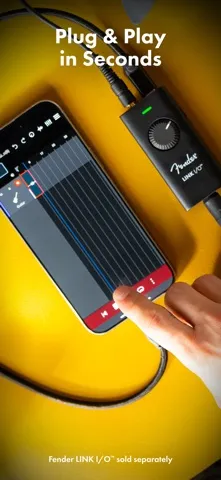
Getting started can be as simple as using the device microphone, though a compatible interface is the route for plugging in an instrument. Fender mentions its Link I/O as an easy way to record guitar. I would think about the recording source before a session, since the quality and convenience of a take depend on the equipment and room as well as the app.
Recording in everyday sessions
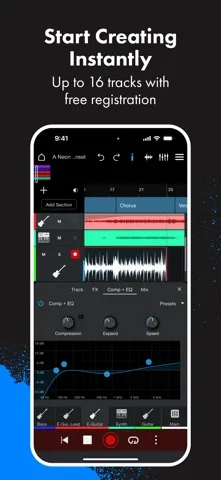
The everyday workflow is built around recording, editing, and mixing within the same app. That is useful when I have a short window to capture a riff or want to layer a few parts without setting up a full computer session. Fender Studio supports up to eight tracks before registration, and up to sixteen after free registration, giving a small project room to expand.
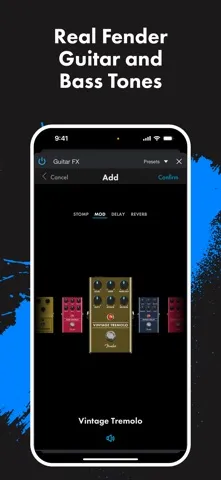
Effects are part of the recording experience, not just an afterthought. The described tools include compression, EQ, reverb, and delay, along with vocal effects such as De-Tuner, Transformer, and Vocoder. I would use those selectively: a little reverb can help a part sit in a sketch, while trying every effect at once can distract from the performance that made the idea worth recording.
Tones, chords, and Jam Tracks
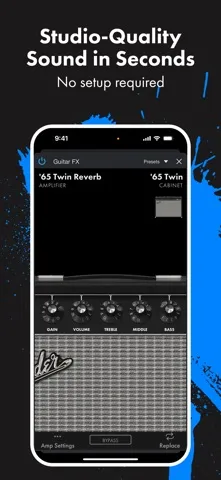
Fender-branded instrument sounds are a notable part of the app’s identity. The included guitar setup features a ‘65 Twin Reverb amp with four effects and a tuner; the bass setup includes a Rumble 800 amp with four effects and a tuner. Free registration unlocks more amps and effects, while the Complete Fender Amps & FX add-on expands the available Fender Mustang and Rumble sounds, pedals, and presets.
The musical tools extend beyond tone shaping. Fender Studio includes five Jam Tracks, and free registration raises that selection to twenty. There is also a Chord Track for creating progressions or dragging audio in for automatic chord recognition, plus real-time global transpose and tempo adjustment. Those tools give me a way to try a different key or feel without treating every experiment as a new recording from scratch.
A practical practice routine
For a low-pressure practice routine, I would choose a Jam Track, record a single pass, and listen back before adding anything. That makes the app useful not only for songwriting but also for hearing how a part fits with accompaniment. If a progression feels awkward, the Chord Track and transpose controls offer ways to explore alternatives. The point is not to polish every practice take, but to keep a useful idea moving.
When a sketch starts to feel like a song, I can add further tracks, refine effects, and choose an export format. WAV and FLAC are available for export, while MP3 becomes available with free registration. A user who works with Fender Studio Pro 8 or later can transmit a project over the network. That creates a practical bridge from a mobile idea to a larger Studio Pro session.
Keep the trade-offs in view
The main practical distinction is between what comes with the initial app, what free registration adds, and what requires the paid Complete Fender Amps & FX add-on. Registration brings features such as the drum metronome, more tracks, additional Jam Tracks, MP3 export, and more amps and effects. The add-on brings a broader Fender sound collection and a 32-track limit. I would check those boundaries against my needs before starting a long project.
The app’s Fender-focused tools are a strength for musicians drawn to those sounds, but that emphasis will not be equally important to every creator. Recording an instrument also calls for a compatible interface unless I use the device microphone. Finally, the transfer feature depends on having Fender Studio Pro 8 or later running on the network. Those are manageable considerations, but they shape who gets the most from the app.
Fender Studio: Jam & Record makes the most sense as a portable songwriting and recording companion. It brings together tracks, Fender tones, effects, Jam Tracks, chord tools, and export options in a workflow that can start with a quick idea and grow from there. I like that the app offers a path from a mobile project to Studio Pro, while keeping registration and add-on features distinct.
I would try it if I play guitar or bass, record vocals, or want a more involved place to develop mobile demos than a basic recorder provides. If I only need occasional sound capture, or want every amp and effect without extra steps, it may be more app than I need. For the right musician, it is a thoughtful way to keep creative sessions close at hand.
Fender Studio Frequently Asked Questions
What is Fender Studio: Jam & Record used for?
Fender Studio: Jam & Record is for recording, editing, and mixing music on a mobile device. It supports guitar, bass, voice, and microphone recording, with effects, Jam Tracks, chord and tempo tools, and audio export. It can also transmit a project over a network to Fender Studio Pro 8 or later.
Which devices can run Fender Studio: Jam & Record?
The app is available through the Apple App Store for iPhone and iPad, and it requires iOS 16 or later. Fender also describes support across iOS, iPadOS, and macOS, but device and operating-system availability can vary. Check the App Store for the requirements that apply to your device.
Does Fender Studio: Jam & Record cost money?
Fender Studio: Jam & Record is free to download. The Complete Fender Amps & FX add-on is an in-app purchase, and the app also offers free registration for additional features and content. The add-on price may vary by platform, so check the App Store for current purchase details.
Does Fender Studio: Jam & Record require Android?
No Android version is described here; Fender Studio: Jam & Record is available on the Apple App Store and requires iOS 16 or later. If you are checking whether a particular iPhone or iPad is supported, the current App Store compatibility details are the best place to confirm.
Who is Fender Studio: Jam & Record best for?
It should suit guitarists, bassists, singers, and songwriters who want to record and develop ideas on a mobile device. Its Fender tones and Jam Tracks may be especially useful to musicians who want to build a demo or practice with accompaniment. People who only need a basic voice memo may not need its broader tools.
Pros
- Combines mobile recording, editing, mixing, and Fender-focused effects in one workflow.
- Jam Tracks, chord tools, transpose, and tempo controls support musical experimentation.
- Free registration adds tracks, Jam Tracks, MP3 export, and other features.
- Projects can transfer over a network to Fender Studio Pro 8 or later.
Cons
- The larger Fender amp and effects collection requires a separate in-app purchase.
- Instrument recording needs a compatible interface unless using the device microphone.
- Some useful limits and export options depend on free registration.
- Category
- Music & Audio
- Version
- 1.3











