EZView UNV
- 652
- 3.2
- Installs
- —
- Price
- Free

Screenshots
Analysis by Reviewed APKs
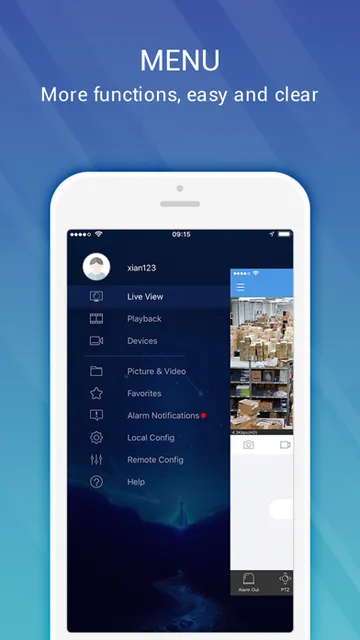
EZView UNV is a mobile surveillance app for people who use Uniview security products and want to check live or recorded video away from their usual viewing setup. It also supports alarm notifications and cloud-device management. I see its appeal in focused, occasional check-ins rather than all-day phone use: it brings several surveillance tasks together, but its usefulness depends on having compatible Uniview equipment.
A quick camera check
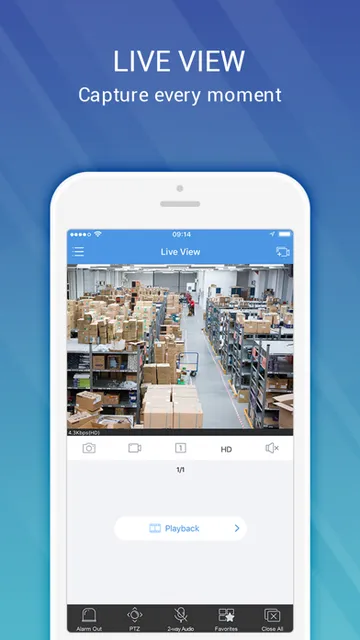
Picture arriving at work and wanting to check a camera view before settling in, or being away from home and needing to review something that happened earlier. EZView UNV is built for that sort of remote look-in: it connects to Uniview surveillance products over a network and offers both live and recorded video. Instead of needing to be in front of a dedicated viewing setup, I can use my phone for a focused check.
The app also brings alarms and cloud-device management into the same mobile surveillance role. In an everyday routine, that means the phone can be a convenient place to view footage or respond to an alert, rather than just a screen for live video. I would approach it as a companion to an existing Uniview system, not as a standalone camera app that creates a surveillance setup by itself.
A companion, not a camera
Compared with opening a camera’s own viewing app or going to a dedicated surveillance screen, EZView UNV is specifically for accessing Uniview products from a mobile phone. That focus is useful if Uniview equipment is already part of your setup. Live and recorded video, alarms, and cloud-device management are the jobs it covers, so it can serve as a practical remote point of access rather than a general-purpose media app.
That narrow purpose is also its main boundary. EZView UNV is not described as a way to turn a phone into a camera, manage unrelated brands, or replace a complete surveillance system. If your equipment is not part of the Uniview ecosystem, the app’s core purpose may not fit your needs. I would think of it as an extension of compatible products, not a broad alternative to every camera service.
Make check-ins purposeful
A useful habit is to open EZView UNV when there is a clear reason to check a live view, review recorded video, or look at an alarm. That keeps the phone’s role simple and avoids treating a surveillance app like a screen that needs to stay open all day. Since the app is intended for mobile access to Uniview products, brief, intentional visits are a natural way to fit it into a routine.
I would also separate a quick live check from a review of recorded video: they answer different questions. An alarm can prompt a closer look, while cloud-device management gives the app a role beyond viewing footage. The best routine will depend on the Uniview products in use, but keeping the purpose of each visit clear can make a focused tool easier to use.
More From Our News Desk

Zoom Meetings, Google Meet, or Teams: Which Is Easiest to Join?

How I Build a Free Streaming Lineup With Tubi

Why Crunchyroll Is the Default Anime App for So Many Fans

YouTube TV: A Practical Guide to Cutting Cable

Rummikub and the Small Comfort of Phone Games

TeamViewer Remote Control or AnyDesk for Helping Family?
Who will find it useful
I would recommend EZView UNV to people who already use Uniview surveillance products and want mobile access to live or recorded video. It is also worth considering if alarms and cloud-device management are useful parts of how you keep track of that system. The App Store version requires iOS 15.0 or later, so it is aimed at iPhone or other compatible Apple-device users running a sufficiently recent system.
It may not suit someone looking for a general camera app, a way to build a surveillance system from scratch, or support for equipment outside the Uniview range. People who prefer to do all viewing from a dedicated screen may have less reason to use a phone companion. I would also consider the App Store rating, 3.2 from 652 ratings, as one signal to weigh alongside whether its specific functions match your setup.
EZView UNV is published by Uniview Technologies Co., Ltd. on the Apple App Store and is listed in the Business category. It is free to download, with a 4+ age rating. The current version shown is 2.60.120, and the app requires iOS 15.0 or later. On the App Store it has a 3.2 rating from 652 ratings.
The app was released on April 6, 2015, and its most recent update is dated November 9, 2026. These details give a quick sense of its history and current version, while the iOS requirement is the key compatibility point for prospective users. I would check the App Store page on the device you plan to use for the latest availability and compatibility information.
A focused window into Uniview systems
First, check compatibility
My first question with an app like EZView UNV would be whether I have Uniview surveillance products to access. That matters more than the general promise of mobile viewing, because the app’s purpose is to connect with Uniview equipment over a network. If that matches your setup, the app has a clear job; without compatible products, there is little reason to expect it to serve as a general camera viewer.
On Apple devices, the stated requirement is iOS 15.0 or later. I would check that before downloading, especially when using an older device. Once compatibility is established, the app’s scope is easy to understand: view live or recorded video, receive alarms, and manage cloud devices from a mobile phone. It is a specific toolkit rather than a broad suite of unrelated features.
Mobile viewing, day to day
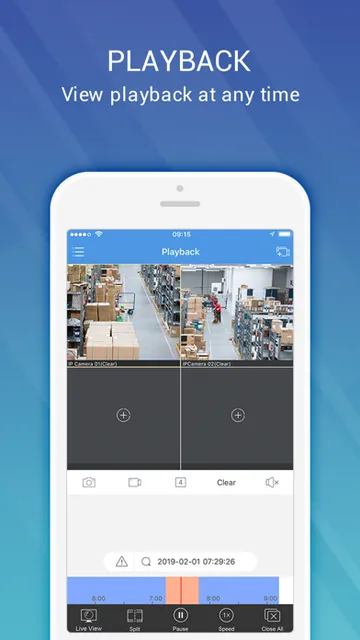
The core experience described for EZView UNV is remote access to surveillance video. Live viewing suits a quick look at what is happening now; recorded video is for checking what happened earlier. Having both options in a mobile app makes it useful for different kinds of check-ins, whether I am checking a current view or following up on an event after the fact.
I would expect the value of that access to depend on the Uniview products and network setup already in place. The app is a viewing and management companion, not a replacement for the equipment it connects to. That keeps expectations grounded: it can put certain surveillance tasks on a phone, but it does not, by itself, provide the cameras or footage.
More than live video
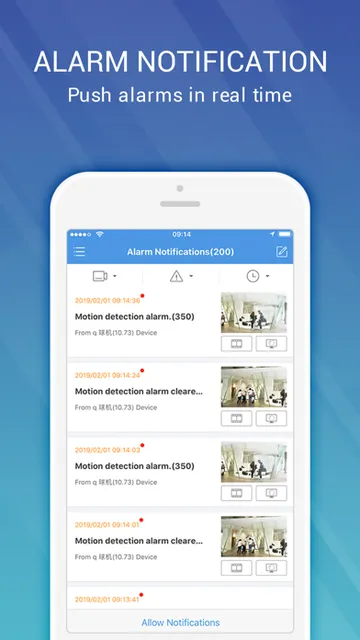
Alarms are one of the features that make EZView UNV more than a simple remote video screen. An alert can give me a reason to open the app and take a closer look, while recorded video can help review the relevant footage. I would treat an alarm as a prompt to check the system rather than assuming the notification alone tells the whole story.
Cloud-device management is another stated part of the app’s role. Along with live and recorded video, it gives the mobile app a place in the broader management of Uniview devices. The description does not spell out every management control, so I would avoid assuming a particular setting or workflow. What is clear is that the app is intended to support access and management from a phone.
A practical check-in routine
A simple routine could start with a purposeful live view when I want to see the current camera feed. If an alarm arrives, I can use the app as a place to access the Uniview system and follow up with video. When the question is about an earlier moment, recorded video is the relevant option. This keeps each visit tied to a concrete need instead of turning the app into a constant distraction.
For someone who manages cloud devices, occasional access to that part of the app can sit alongside video checks. I would keep the routine straightforward: use the feature that fits the task, then close the app when the check is done. The exact flow depends on the equipment in use, but the combination of video, alarms, and device management supports more than one kind of mobile check-in.
Keep its scope in mind
The clearest limitation is that EZView UNV is tied to Uniview surveillance products. It is not presented as a universal way to view cameras from any manufacturer, and it cannot provide a surveillance setup on its own. That makes compatibility the first practical question. If the equipment does not fit, the app’s main functions will not be a compelling reason to install it.
There is also a distinction between having mobile access and having every detail of a full surveillance system at hand. The app is described in terms of video, alarms, and cloud-device management; I would not assume additional functions beyond those. Its App Store rating is 3.2 from 652 ratings, so prospective users may want to read recent feedback and weigh it against their own device and system needs.
EZView UNV has a clear, practical purpose: it puts mobile access to Uniview surveillance products in one app, with live and recorded video, alarms, and cloud-device management. Its appeal is strongest for people who already use compatible equipment and want a convenient way to check in from an Apple device.
I would recommend it to Uniview users who need those specific mobile functions and meet the iOS requirement. If you want a universal camera app or do not use Uniview products, this is probably not the right fit. Check compatibility and the current App Store details before deciding.
EZView UNV Frequently Asked Questions
What is EZView UNV used for?
EZView UNV is a mobile surveillance app for accessing Uniview products over a network. It supports viewing live or recorded video, receiving alarms, and managing cloud devices from a mobile phone. It is intended as a companion to Uniview surveillance products, rather than a standalone camera app.
Which devices can run EZView UNV?
EZView UNV is available on the Apple App Store, and the stated system requirement is iOS 15.0 or later. Whether it works with a particular device can depend on that device’s operating system and current store availability, so check the App Store page on the device you plan to use.
Does EZView UNV require a particular iOS version?
The stated minimum requirement is iOS 15.0. If your device is running an older version, check the app’s App Store page for current compatibility details before trying to install it. The app is designed to access Uniview surveillance products, so compatible equipment is also central to using its main features.
Is EZView UNV free to download?
EZView UNV is listed as free on the Apple App Store. Store details can change, and any costs or purchase options may vary by region or over time, so check the current App Store page for the latest information before downloading.
Is EZView UNV right for my surveillance setup?
It is most relevant if you use Uniview surveillance products and want mobile access to live or recorded video, alarms, or cloud-device management. It may not suit someone seeking a general camera app or support for other equipment. Check the App Store information and your system’s compatibility before relying on it.
Pros
- Combines live and recorded video access for Uniview products in a mobile app.
- Includes alarm notifications alongside video viewing and cloud-device management.
- Free to download from the Apple App Store.
- Has a clear purpose for users already invested in Uniview equipment.
Cons
- Its usefulness depends on having compatible Uniview surveillance products.
- Requires iOS 15.0 or later, ruling out older system versions.
- The App Store rating is 3.2 from 652 ratings.
- Category
- Business
- Version
- 2.60.120











