Employee Portal Payroll Relief
- 282
- 2.6
- Installs
- 100.00K
- Price
- Free

Screenshots
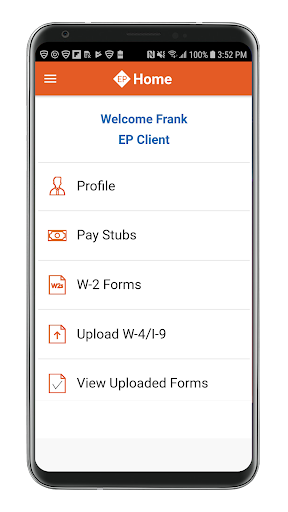
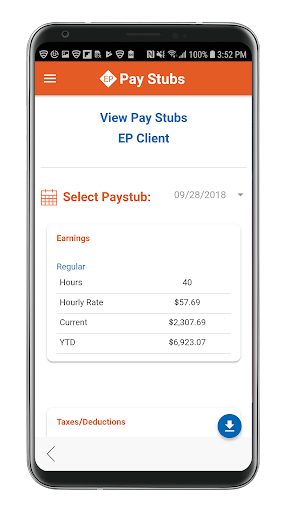
Analysis by Reviewed APKs
Employee Portal Payroll Relief is a work-focused app for checking payroll details and handling a few employee forms from an Android phone. It suits people whose employer uses Payroll Relief and who want pay stubs, tax forms, and payday notifications close at hand. I like the practical scope: it brings several routine payroll tasks together, though it is an employer-connected portal, not a general-purpose money management app.
A Payday Check-In
When payday comes around, I want to confirm that the payroll process has moved along without digging through old email. This app is built for that small check-in: it can notify employees when their payroll processor has paid them, and it provides access to pay stubs and payroll tax forms. I can picture opening it during a coffee break, checking the latest stub, and then getting on with the rest of my day.
The app also has a role between paydays. If I need to update my mailing address, phone number, or email, those profile details can be changed through the portal. It can also be used to upload W-4 or I-9 forms to an employer. That makes it more useful than a simple payday alert, especially when a new job or a change in personal details creates a small burst of payroll paperwork.
A Payroll Portal, Not a Budget
The closest alternative is usually whatever payroll portal or employer process I already use, whether that means checking a website or looking for a message from payroll. Employee Portal Payroll Relief focuses on the employee side of that relationship: notices, pay stubs, tax forms, profile details, and document uploads. Its appeal is convenience when an employer supports it, rather than a broad set of tools for tracking household spending.
I would not choose it as a replacement for a budgeting app, a bank app, or a service for comparing income over time. The supplied details describe access to payroll records and employee forms, not spending plans or account management. It also depends on getting a firm code, user ID, and password from an employer, so it is not a portal that every employee can simply set up independently.
Make It Part of Payroll Day
A useful habit is to check the app when a payday notification arrives, then take a moment to review the corresponding pay stub. That keeps the alert tied to the document that explains the payroll entry, rather than leaving it as a message I notice and forget. When I need a tax form later, having a place to look for payroll documents can also save me from searching through unrelated files.
I would handle profile updates when something actually changes, such as a new phone number or mailing address, rather than treating the app as a daily destination. If an employer asks for a W-4 or I-9, the upload option gives that task a clear place in the workflow. Those modest routines suit the app's job: quick employee administration, not constant monitoring.
More From Our News Desk

Zoom Meetings, Google Meet, or Teams: Which Is Easiest to Join?

How I Build a Free Streaming Lineup With Tubi

Why Crunchyroll Is the Default Anime App for So Many Fans

YouTube TV: A Practical Guide to Cutting Cable

Rummikub and the Small Comfort of Phone Games

TeamViewer Remote Control or AnyDesk for Helping Family?
Who May Find It Useful
I would recommend Employee Portal Payroll Relief to employees whose workplace provides the required account details and uses the service for payroll. It brings payday notifications, pay stubs, tax forms, profile updates, and certain document uploads into one phone-based portal. For someone who otherwise has to remember a separate payroll website or chase a form by email, that focused access can be genuinely handy.
It may be less appealing to people who want a feature-rich finance app or who do not have employer credentials for the portal. The 2.6-star Google Play rating across 282 ratings is also a reason to approach it with realistic expectations rather than assuming every experience is smooth. Its value depends on the employer connection and on whether these particular payroll tasks are useful in your routine.
Employee Portal Payroll Relief is a free Android business app from Payroll Relief. Google Play shows over 100,000 installs and a 2.6-star rating from 282 ratings. The content rating is Everyone. It is listed as free, with no in-app purchases or ads, so the described payroll access does not come with a stated purchase requirement.
The app's current listed version is 2.0.6. It was released on October 15, 2018, and its most recent listed update was March 24, 2025. To start using it, employees need a firm code, user ID, and password from their employer. Android version requirements can vary, so check the Google Play entry for compatibility with your device.
A Closer Look at the Employee Portal
Starting With Employer Details
The first thing to understand is that this is not a standalone payroll account you create from scratch. The app's setup depends on a firm code, user ID, and password supplied by the employer. That makes the opening step less about browsing features and more about getting the right access details from the workplace before expecting the portal to be useful.
Once those details are in hand, the app's purpose is fairly easy to grasp. It is meant to bring employee payroll information and a few related tasks onto a phone. I appreciate that defined scope: there is no need to mistake it for a general finance dashboard. The main question at setup is simply whether my employer uses the service and has provided the credentials.
Useful Between Paydays
A payroll app could easily become something I open only when a deposit is due, but access to pay stubs and payroll tax forms gives it a reason to remain useful between paydays. If I need to refer to a payroll document, I can use the portal rather than relying only on a notification or trying to remember where I saved a copy.
The everyday experience described here is deliberately practical. Payday notifications tell me when the processor has paid me, while the document and profile functions cover occasional follow-up jobs. I would not expect a stream of financial insights or a constant feed of activity. This is a place for checking specific payroll information when there is a reason to check it.
Forms and Profile Details
The stand-out functions are the ones that connect payroll information with employee administration. Alongside pay stubs and tax forms, the app allows users to upload W-4 or I-9 forms to their employer. That can be useful during onboarding or when an employer needs an updated document, giving the employee a phone-based route for submitting it.
Profile editing is another small but sensible inclusion. The description names mailing address, phone number, and email address as details users can update. These are not flashy features, but they are the sort of information that becomes inconvenient when it is out of date. The app's overall value comes from collecting these ordinary payroll tasks in one employee portal.
A Simple Payroll Routine
My practical routine would be to keep the app for moments when payroll actually requires attention. When a payday alert arrives, I would open the portal and view the pay stub. If I receive a request for a tax or employment form, I would use the relevant document access or upload function rather than letting the task disappear into my inbox.
I would also make profile changes promptly when my contact information changes, then avoid checking the app out of habit when there is nothing to do. This keeps the portal in its natural role as a utility. It can help keep payroll documents and employee details accessible, but it does not need to become another app demanding daily attention.
Keep the Scope in Mind
The biggest limitation is that usefulness starts with employer support and credentials. Without the firm code, user ID, and password provided by an employer, there is no independent route described for getting into the portal. That makes it a workplace-specific tool rather than an app I would recommend downloading first and figuring out later.
Its narrow focus is another consideration. The app covers employee payroll access and related paperwork, not broader budgeting or banking tasks. The Google Play rating is 2.6 stars from 282 ratings, which is worth weighing alongside the convenience it offers. I would treat it as a practical access point for supported employees, not as a polished all-in-one financial service.
Employee Portal Payroll Relief makes the most sense as a compact companion to an employer's payroll process. Payday notifications, pay stubs, tax forms, profile edits, and document uploads are useful in everyday situations, particularly when I want to handle a small payroll task from my phone.
I would try it if my employer provides access and I regularly need those records or forms. I would skip it if I am looking for budgeting tools or if my workplace does not use Payroll Relief. The modest Play rating also makes it sensible to keep expectations grounded.
Employee Portal Frequently Asked Questions
What is Employee Portal Payroll Relief used for?
Employee Portal Payroll Relief gives employees access to payday notifications, pay stubs, and payroll tax forms. It also lets users update profile details such as mailing address, phone number, and email, and upload W-4 or I-9 forms to an employer. An employer must provide the firm code, user ID, and password needed to use the app.
Which devices can use Employee Portal Payroll Relief?
Employee Portal Payroll Relief is an Android app available through Google Play. Check the Google Play entry for current device compatibility and Android requirements, since those details can vary. The app's payroll functions also depend on having the account credentials supplied by an employer that uses the portal.
Does Employee Portal Payroll Relief cost money?
The app is listed as free on Google Play, with no in-app purchases or ads. Its purpose is to provide access to employer-connected payroll details and forms. Check the store entry for current information, since app availability and store details can vary.
Can I use Employee Portal Payroll Relief without my employer?
The app requires a firm code, user ID, and password from your employer, so it is not described as an independent payroll service. It is intended for employees whose workplace provides access. If you are unsure whether your employer uses it, ask your employer or check the app's Google Play details.
Is Employee Portal Payroll Relief a good fit for everyone?
It may suit employees who want to check pay stubs and tax forms, receive payday notifications, or handle payroll paperwork on a phone. It is less suitable if you want budgeting or banking features, or if your employer does not provide credentials. Google Play shows a 2.6-star rating from 282 ratings, so expectations are best kept practical.
Pros
- Payday notifications make it easier to notice when the payroll processor has paid you.
- Pay stubs and payroll tax forms are accessible through the employee portal.
- Employees can update contact details and upload W-4 or I-9 forms.
- The Android app is free and has no listed ads or in-app purchases.
Cons
- Access depends on receiving a firm code, user ID, and password from an employer.
- Its narrow payroll focus will not replace a budgeting or banking app.
- The Google Play rating is modest at 2.6 stars from 282 ratings.
- Category
- Business
- Version
- 2.0.6











