edge
- —
- —
- Installs
- 50.00K
- Price
- Free

Screenshots
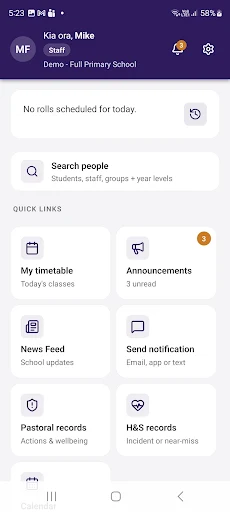
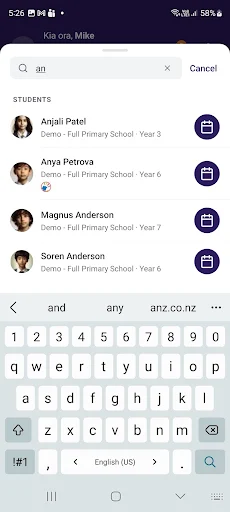
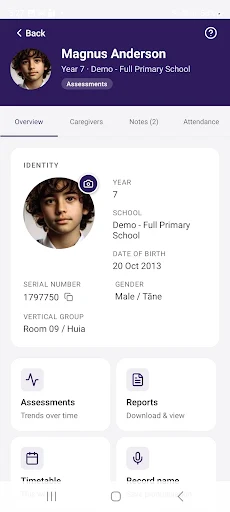
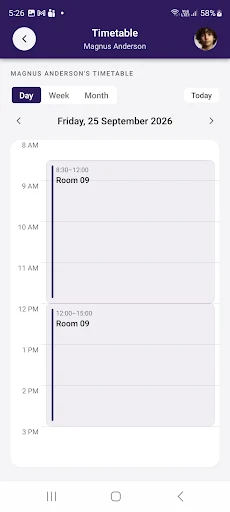
Analysis by Reviewed APKs
edge is a school-community app from MUSAC that brings everyday school information and communication into one place. Staff can use it for attendance and student notes, while caregivers and students can check school details, and caregivers can report absences or make payments. I see its value in reducing the need to chase routine information across different channels, provided your school uses it and has given you sign-in details.
A school day at a glance
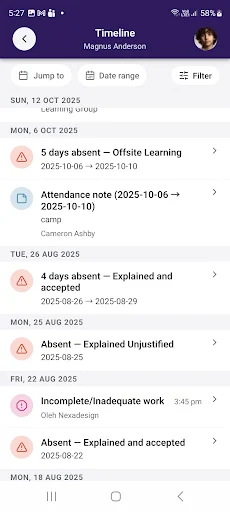
Picture a caregiver getting ready for the school run and wanting to check whether there is anything to follow up on. In edge, they can look at a child's timetable, attendance, results, or reports, then send the school an absence notice if needed. The point is not to turn the morning into a dashboard session; it is to put several school-related checks in one familiar place before the day gets busy.
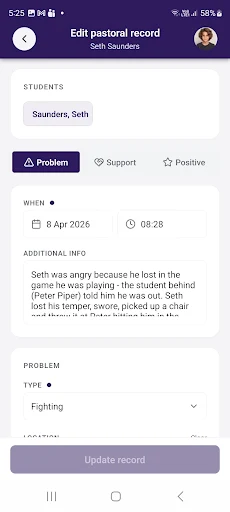
I can also see the staff side fitting into the same routine. A staff member can mark rolls while away from a desk, look up student information, and add notes. That makes edge more than a parent portal: it is intended to serve people with different roles in a school community. The experience depends on signing in with details supplied by the school, so it is tied to an existing school relationship rather than open-ended browsing.
More than a school noticeboard
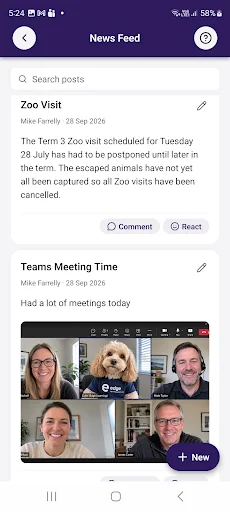
The obvious alternative is to rely on a mix of school emails, paper notices, and separate conversations when a question comes up. edge brings school news and announcements together with practical records such as attendance and reports. That combination is its clearest distinction: it is meant to support regular school administration as well as keep caregivers and students informed, rather than functioning only as a place to read announcements.
It is not a general planner, social network, or broad education library. The description focuses on information and communication connected to a school, including staff attendance tasks and caregiver payments. That narrower purpose is useful if your school community is already using MUSAC edge, but it also means the app is not a substitute for whatever other tools a family uses for calendars, homework, or conversations outside school.
Make the checks count
A sensible way to use edge is to treat it as a quick school check-in rather than something to keep open all day. A caregiver might review the timetable and attendance, read any new school announcement, and check reports when there is a reason to do so. If a student will be absent, the caregiver can use the app to let the school know. Those are small tasks, but having them grouped can make them easier to remember.
Staff can build a different routine around the same idea: use the mobile app when marking rolls on the go, then look up student information or add a note when the situation calls for it. I would keep expectations practical. The app provides school-related tasks and information; it does not remove the need to follow the school's own communication practices. Sign-in details from the school are the first step to making any of these routines useful.
More From Our News Desk

Zoom Meetings, Google Meet, or Teams: Which Is Easiest to Join?

How I Build a Free Streaming Lineup With Tubi

Why Crunchyroll Is the Default Anime App for So Many Fans

YouTube TV: A Practical Guide to Cutting Cable

Rummikub and the Small Comfort of Phone Games

TeamViewer Remote Control or AnyDesk for Helping Family?
Who will find it useful
I would recommend edge to caregivers and students whose school uses MUSAC edge and wants them to check timetables, attendance, results, reports, and school updates in one app. Caregivers who need to report an absence or make a payment may also appreciate having those tasks available alongside the information they already check. For school staff, the ability to mark rolls on the go and look up student details gives the app a practical role beyond family-facing updates.
It may not suit someone looking for a standalone learning app, a broad homework organizer, or a tool that works without a connection to a participating school. Its usefulness is closely tied to school-provided sign-in details and the school community it serves. I would also be cautious about expecting every school to use every function in the same way; the app's purpose is clear, but the everyday experience depends on the school context.
edge is an Education app developed by MUSAC. Google Play shows more than 50,000 installs. The app is free to download, has no in-app purchases, and contains no ads. Its content rating is Everyone. These details make the basic cost straightforward, though the app is intended for use with school-provided sign-in details rather than as an independent service.
The Google Play version is listed as varying with device. No minimum Android version, rating score or rating count, release date, or last update date is provided in the available app details. If you are checking whether a particular phone is compatible, or want the latest version information, the Google Play page is the place to check.
A closer look at school life
A role-based first impression
When I first opened the idea of edge, what stood out was how clearly it addresses a school community rather than a single kind of user. Staff, caregivers, and students all have reasons to use it, but not necessarily for the same tasks. That is a practical starting point: a caregiver may be checking a report, while a staff member may be marking a roll.
Getting started depends on receiving sign-in details from the school. That puts the school at the center of the setup, which makes sense for an app built around school records and communication. I would approach the first visit with those details ready and a specific task in mind, such as checking a timetable or finding an announcement, rather than expecting a general app experience before connecting to a school.
Everyday checks, kept together
The day-to-day appeal is the variety of school information available in one place. Students and caregivers can check timetables, attendance, results, and reports, while school news and announcements provide a route to wider updates. I like that this covers both routine reference and the occasional item that needs attention, instead of framing the app as useful only when a report or major announcement arrives.
In practical terms, that could mean checking attendance after a school day, looking at a timetable before the week begins, or reading an announcement when one is relevant. I would not expect every user to open every section daily. The value is having these kinds of school details available through the same app, with the specific reason to check changing as the term and family routine move along.
Useful tools for different roles
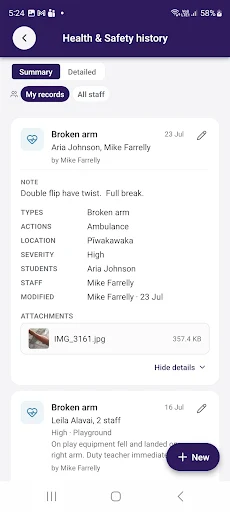
The staff functions are among the more distinctive parts of edge. Staff can mark rolls on the go, look up student information, and add notes. Those tasks give the app a working role in school activity, not just a channel for pushing information outward. They also help explain why a single school-community app may need to serve a different set of needs from a caregiver-facing information portal.
For caregivers, absence reporting and payments sit alongside access to school information. Students and caregivers can also check results and reports. These are concrete school-related functions rather than general productivity promises. I would keep the distinction in mind when judging the app: it is built to connect users with their school, and its most useful features are the ones that support that relationship.
A practical weekly rhythm
One low-effort routine would be to check edge at a consistent point in the week. A caregiver could review the timetable, scan school news and announcements, and look at attendance or reports when something prompts a closer check. If an absence needs to be communicated, the app provides a way for the caregiver to let the school know. That routine keeps the app tied to actual school needs instead of adding another habit for its own sake.
Staff could use it more in the moment, particularly for marking rolls away from a desk or looking up student information when needed. I like that these examples do not require elaborate planning: they are ordinary school tasks, made available on mobile. The best routine will depend on the user's role and the school's practices, so I would start with the one task that already takes the most effort.
Keep expectations grounded
edge is focused, and that focus is also its main limitation. It is designed around school information, records, and communication, not as a universal organizer or a replacement for every conversation with a school. A user who does not have school-provided sign-in details has little reason to expect it to be useful. The app's relevance depends on being part of the school community it serves.
It is also worth keeping the different roles in view. A caregiver's experience centers on checking information, reporting absences, and payments, while staff have functions such as roll marking and adding notes. The app brings these groups together, but it does not make their needs identical. I would judge it by whether it makes the relevant school tasks easier to reach, not by how many unrelated tools it contains.
edge makes the most sense as a practical companion to a school that already uses MUSAC edge. Its mix of staff tasks, student and caregiver information, school announcements, absence reporting, and payments gives it a clear job without trying to be an all-purpose app. I would recommend it to members of a participating school community who want those routine interactions within reach on mobile.
If you are looking for independent study tools or a planner that works across school and personal life, this is not that. But for caregivers, students, and staff who have school-provided sign-in details, edge offers a focused set of useful school functions. Its value will come down to how well those functions match the routines of your particular school.
edge Frequently Asked Questions
What is edge used for?
edge is a companion app for the MUSAC edge school community. Staff can mark rolls on the go, look up student information, and add notes. Students and caregivers can check timetables, attendance, results, reports, and school announcements. Caregivers can also notify the school about an absence and make payments.
Which devices can I use edge on?
edge is an Android app available through Google Play. The available details do not specify a minimum Android version, and the version is described as varying with device. If you want to check compatibility with a particular phone or tablet, consult the Google Play page for the current requirements.
Does edge cost anything to use?
edge is free to download, and the available app details say it has no in-app purchases and contains no ads. You need sign-in details provided by your school to use it. For any current changes to the store's cost information, check the Google Play page.
Do I need a school account for edge?
Yes. The app's description says to sign in with the details provided by your school. Its features are centered on a school community, including school information, attendance, reports, announcements, and related tasks. Contact your school if you need to find out how it provides access.
Is edge suitable for students and caregivers?
It is intended for students and caregivers who want to check school information, and caregivers can also report absences and make payments. Staff have separate school-related functions, including roll marking and adding notes. It may not suit people looking for a general study, planning, or communication app outside their school community.
Pros
- Brings timetables, attendance, reports, and school announcements into one school-focused app.
- Caregivers can report absences and make payments through the app.
- Staff can mark rolls on the go and add student notes.
- Free to download, with no in-app purchases or ads.
Cons
- Requires sign-in details supplied by the school to get started.
- Its usefulness depends on a school using MUSAC edge.
- It is focused on school tasks rather than general planning or study tools.
- Category
- Education











