ecobee
- 41.82K
- 4.3
- Installs
- 1.00M
- Price
- Free

Screenshots
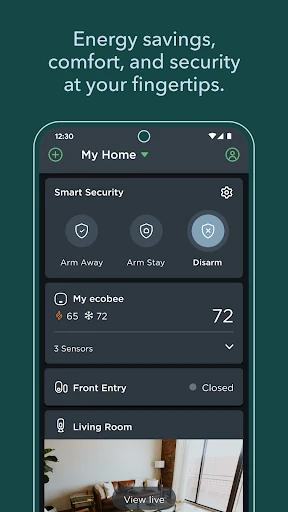
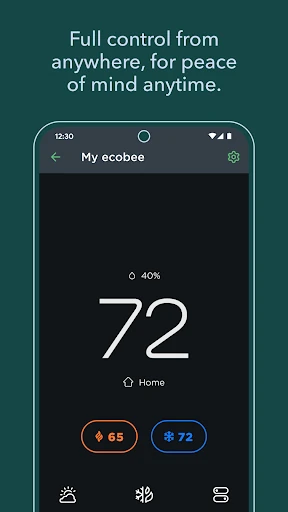
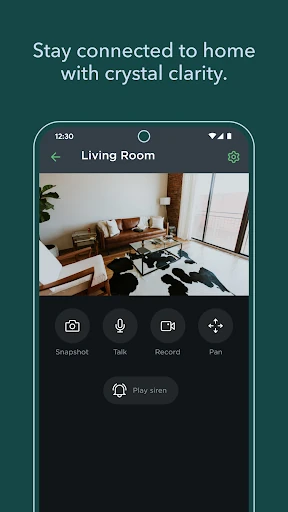
Analysis by Reviewed APKs
ecobee is a home-control app for managing compatible ecobee thermostats, SmartCameras, and SmartSensors from a phone. It suits people who want to adjust comfort settings, organize a thermostat schedule, or keep an eye on certain areas of their home. My overall take is that it brings several practical home tasks together, though its usefulness depends on having ecobee devices to manage.
A More Comfortable Morning
When I picture using ecobee in an everyday routine, it’s a chilly morning when I’m getting ready to leave. Instead of walking over to the thermostat, I can use the app to check and adjust the temperature. If I’m heading out, I can also use the phone to manage my ecobee setup while away. It gives the thermostat a place in a broader home routine rather than treating it as a wall control.
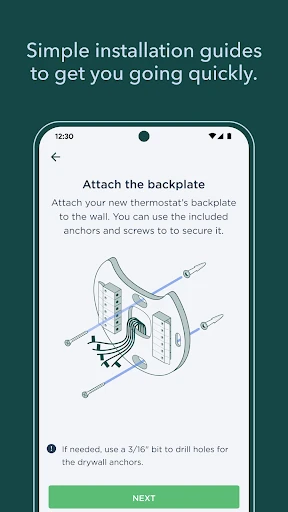
The schedule is useful for turning a repeated pattern into something I don’t have to rethink each day. I can customize the thermostat schedule around when I’m usually home and when I’m away, with comfort and energy use both in mind. The app also supports step-by-step installation instructions for a new ecobee device, so the phone can be part of setup as well as daily control.
A Home Tool, Not a General Utility
Compared with a basic thermostat interface, ecobee’s scope reaches beyond temperature adjustments. Its app can control an ecobee SmartCamera and SmartSensor, support home automations through Autopilot, and provide intelligent alerts related to entryways, windows, drawers, and cabinets. That makes it more relevant to someone already building an ecobee-equipped home than to someone who only wants a simple, standalone temperature display.
It is not a general-purpose home dashboard for every device brand, based on the functions described. The controls are centered on ecobee products and their supported uses. If you’re looking for a carbon-footprint calculator, a climate-news feed, or a directory of eco-friendly businesses, those aren’t the app’s described purpose. Its focus is practical device management, scheduling, monitoring, and utility-rebate discovery.
Small Habits That Help
I’d start by setting aside a few minutes to make the thermostat schedule reflect a normal week instead of trying to adjust temperatures manually every time plans change. It’s also worth revisiting that schedule when your routine shifts. The app’s purpose is to make those settings accessible on the phone, and a schedule that matches real life is more useful than one created once and then forgotten.
For a home with the relevant devices, I’d make checking alerts part of an existing habit, such as reviewing the app when I get home or before leaving for a trip. A SmartSensor or SmartCamera can add another way to keep tabs on parts of the home, while Autopilot offers a route to smart home automations. I’d explore these gradually so each setting has a clear purpose.
More From Our News Desk

Zoom Meetings, Google Meet, or Teams: Which Is Easiest to Join?

How I Build a Free Streaming Lineup With Tubi

Why Crunchyroll Is the Default Anime App for So Many Fans

YouTube TV: A Practical Guide to Cutting Cable

Rummikub and the Small Comfort of Phone Games

TeamViewer Remote Control or AnyDesk for Helping Family?
Who May Find It Useful
I’d recommend ecobee to people who own or are considering ecobee smart home devices and want to manage them from a phone. It makes particular sense for households that care about thermostat schedules, want to control a SmartCamera or SmartSensor, or would like to explore home automations. The utility-rebate search may also be a handy extra for someone checking what support their utility company offers.
It may be a poor fit if you don’t have ecobee devices or want an app focused on unrelated household tasks. People who prefer to make every adjustment directly on a thermostat may not get much from adding phone controls. And while the app can help manage comfort and monitoring, it can’t make decisions about what settings suit every household; those choices still depend on your routines and preferences.
ecobee is developed by ecobee inc. and is available on Google Play, where it has more than 1 million installs. Its rating is 4.3 out of 5, based on around 42,000 ratings. The app is free to download, with no in-app purchases or ads. Its content rating is Everyone, making it suitable for a general audience.
The Android version is listed as varying with device, rather than as one fixed version number. The app was released on September 29, 2014, and its most recent recorded update is October 26, 2026. A minimum Android version is not included in the available app details, so check the Google Play page for current device compatibility before installing.
How ecobee Fits Into Home Life
Getting Started With ecobee
When I first opened ecobee, the main thing I wanted to understand was what it could manage. The answer is a set of ecobee home devices: a smart thermostat, SmartCamera, and SmartSensor. That gives the app a clear job, but it also means the first impression depends on whether you already have compatible hardware. Without a device to connect to, much of its practical value is out of reach.
The step-by-step installation instructions are a thoughtful part of the experience for someone setting up a new ecobee device. I like that installation help sits alongside the everyday controls, rather than being an entirely separate concern. The app description doesn’t lay out every setup screen, so I wouldn’t expect a particular flow beyond the stated guided instructions. Still, having setup support on the phone is a useful starting point.
The Everyday Controls
The core daily job is managing thermostat comfort and schedules from a phone. I’d use the app to make an adjustment when plans change, then rely on a schedule for the more predictable parts of the week. This combination is practical: one handles the exception, while the other takes care of a routine. It keeps the app connected to ordinary decisions about being home, leaving, and settling in.
The schedule is also where comfort and energy considerations meet. ecobee lets users customize a thermostat schedule to help save energy while staying comfortable. That’s a useful goal, but it isn’t a promise of a particular bill reduction or a substitute for choosing settings that work for your household. I’d treat the schedule as a way to organize preferences and revisit it when the rhythm of home life changes.
More Than Temperature
What stands out is that the app covers more than climate control. It can control an ecobee SmartCamera and SmartSensor as well as a thermostat, which gives users a single ecobee app for those device categories. The features have different everyday roles: temperature settings help manage comfort, while cameras and sensors can support monitoring around the home. That breadth is useful if those are products you actually use.
The monitoring options include intelligent alerts for areas such as entryways, windows, drawers, and cabinets. I can see those alerts being relevant when I want to know about activity in a particular part of the home. The app also offers Autopilot for creating smart home automations. These features add flexibility, although their usefulness depends on having the appropriate ecobee devices and deciding which alerts or automations make sense.
A Practical Weekly Routine
A simple routine I’d try is to check the thermostat schedule at the start of the week, especially if the days ahead look different from usual. I’d make any needed adjustments in the app, then use phone controls for one-off changes. That keeps the schedule from becoming a set-and-forget plan that no longer matches the household. It also makes the app useful in small moments rather than only during setup.
For a household using monitoring devices, I’d pair that weekly check with a quick look at relevant alerts. I wouldn’t turn on every possible notification without a reason; I’d focus on the areas I actually want to monitor. If I were exploring Autopilot, I’d begin with a straightforward automation and see whether it fits my routine. The app also supports searching for eligible utility rebates, which is worth checking when reviewing energy-related options.
Limits to Keep in Mind
The biggest limitation is also the app’s defining focus: it is designed around ecobee devices. If your home uses other brands or you don’t have a thermostat, SmartCamera, or SmartSensor from ecobee, the described controls may not be relevant. That’s different from a general household organizer, and it’s worth considering before downloading. The app is most compelling as a companion to a compatible setup, not as a standalone utility.
There’s also a difference between offering tools and guaranteeing an outcome. Scheduling can help organize comfort and energy preferences, and alerts can provide information about selected parts of the home, but the app description doesn’t promise a specific amount of savings or cover every monitoring need. I’d think of ecobee as a convenient control layer for its products, with the usefulness of each feature depending on the devices and settings in place.
ecobee makes sense as a companion app for people who want to manage ecobee home devices from their phone. I like the combination of thermostat scheduling, device controls, monitoring alerts, and installation guidance. Its focus is clear, and that focus is also the main caveat: it won’t have much to offer someone without ecobee hardware.
If you already use an ecobee thermostat or related devices, I’d give the app a try for scheduling and day-to-day control. It brings several useful tasks together without presenting itself as a general home-management tool. If you’re still choosing hardware, I’d first make sure ecobee’s device range and the app’s specific functions match what you want at home.
ecobee Frequently Asked Questions
What is the ecobee app used for?
The ecobee app is used to control ecobee smart thermostats, SmartCameras, and SmartSensors from a phone. It also supports thermostat scheduling, step-by-step device installation instructions, Autopilot automations, and intelligent alerts for areas such as entryways, windows, drawers, and cabinets. Users can also search for eligible utility rebates.
Which phones and devices work with ecobee?
The app is available on Android through Google Play. Its version is listed as varying with device, and a minimum Android requirement is not provided in the available details. For current compatibility with a particular phone, check the Google Play page. The app’s described controls are for ecobee devices, including thermostats, SmartCameras, and SmartSensors.
Is the ecobee app free, and does it have purchases?
ecobee is free to download on Google Play. The available app details say it has no in-app purchases and contains no ads. Device ownership is a separate consideration: the app’s main functions are described as controls and tools for ecobee thermostats, SmartCameras, and SmartSensors.
What Android version does ecobee require?
A specific minimum Android version is not provided in the available app details, and the app version varies with device. Requirements can change, so check the ecobee page on Google Play for the current compatibility information for your phone before installing.
Is ecobee a good fit for my home?
It may suit you if you use ecobee devices and want phone-based thermostat control, schedules, monitoring, or home automations. It may be less useful if you don’t have ecobee hardware or want a general-purpose home app. The best fit depends on which devices you own and which of the app’s supported functions you plan to use.
Pros
- Controls ecobee thermostats, SmartCameras, and SmartSensors from a phone.
- Thermostat schedules help organize comfort settings around regular routines.
- Includes guided installation instructions and utility-rebate search.
- Supports monitoring alerts and Autopilot home automations.
Cons
- Its core functions depend on having ecobee devices to manage.
- A minimum Android version is not stated in the available details.
- The usefulness of monitoring and automations depends on device setup and personal needs.
- Category
- House & Home