Date & Time Widget
- 103
- 3.5
- Installs
- —
- Price
- Free
Screenshots
Analysis by Reviewed APKs
Date & Time Widget puts more than the hour on your iPhone screen, combining an analog clock with calendar details such as the week number, time zone, and exact seconds. I see it suiting people who like to glance at useful date information without opening a calendar app. Its appeal is practical rather than flashy: it gathers several small details in one place, though it is a focused widget rather than a full planning tool.
A quicker date check
Picture checking your phone between errands to confirm the date, then realizing you also need the week number or the time in another time zone. With Date & Time Widget, those details are meant to be visible from a lock or home screen, alongside an analog clock. I like that sort of glanceable setup for small questions that otherwise mean opening an app and searching around.
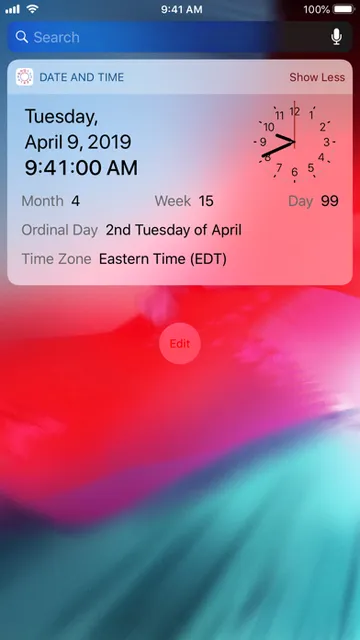
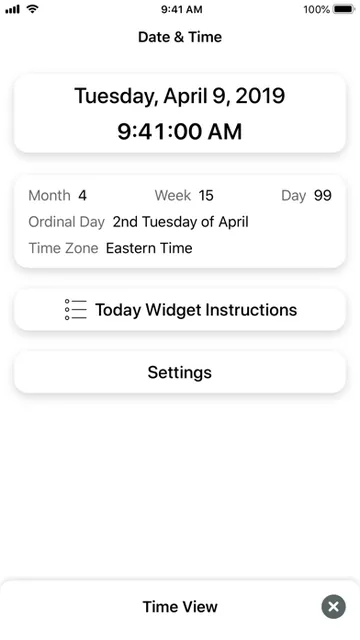
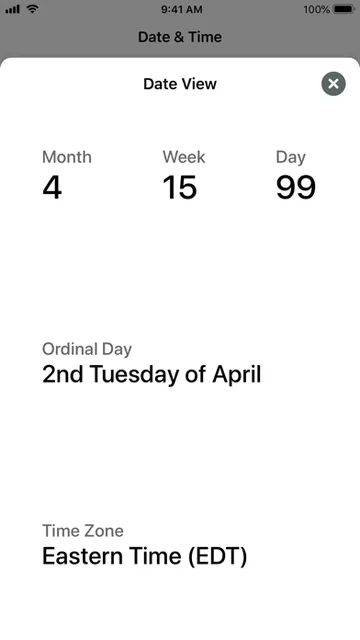
The information goes beyond a standard clock face. The widget can show the full date and time down to the seconds, the day of the month, the month number, the week of the year, and the ordinal day, such as “3rd Friday of January.” That makes it useful for quick orientation during a busy day. It does not turn those details into reminders or appointments; the emphasis is simply on seeing them.
A widget, not a planner
The obvious comparison is the clock or calendar information already available on an iPhone. Date & Time Widget’s distinction is its combination of an analog clock with several less-common date details, including the week number, ordinal day, and time zone. If those are things I regularly look up, putting them together can save a few taps. If I only need the current time and date, the built-in basics may be enough.
I would not choose it as a replacement for a calendar, a task manager, or a scheduling app. Its described job is displaying information, not organizing events or managing a day. That narrow focus is both its strength and its limit: there is less to learn, but also no reason to expect planning tools. It makes most sense for people who want a compact reference on their screen.
Make the glance count
A useful habit would be to check the widget when deciding what week of the year it is or confirming the date before writing it down. The exact seconds can also be handy when I need a precise time reference rather than a rough glance. These are small conveniences, not a new routine that requires keeping up with entries or notifications.
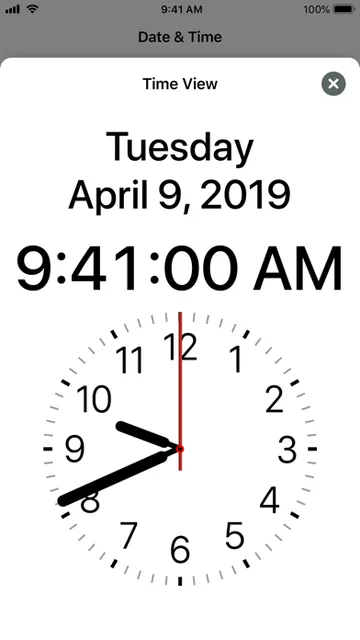
I would start by choosing between the small and large widget, then decide which screen makes the information easiest to glance at. The app also presents the time and its other information in a larger in-app display, so opening it can serve when I want a closer look. Keeping the widget’s purpose simple helps: use it as a quick reference, and turn to a calendar app for anything that needs planning.
More From Our News Desk

Zoom Meetings, Google Meet, or Teams: Which Is Easiest to Join?

How I Build a Free Streaming Lineup With Tubi

Why Crunchyroll Is the Default Anime App for So Many Fans

YouTube TV: A Practical Guide to Cutting Cable

Rummikub and the Small Comfort of Phone Games

TeamViewer Remote Control or AnyDesk for Helping Family?
Who may appreciate it
I would recommend Date & Time Widget to iPhone users who often want more than the date and time at a glance. The week number, ordinal day, time zone, and exact seconds give it a specific appeal for people who refer to those details during ordinary work or personal routines. The analog clock adds a familiar visual touch, while the choice of small or large widget makes the display adaptable.
It may be less useful if the built-in clock already answers every question you have, or if you are looking for a calendar that manages appointments and plans. This is a display tool, not an all-purpose productivity system. I would also keep expectations modest: its value rests on whether the extra date information is relevant to your day. If it is, having it close by is the point.
Date & Time Widget is an iOS app from Beacon Rock Enterprises, Inc. It is free to download on the Apple App Store and has a 4+ age rating. The store reports a 3.5-star rating from 103 ratings. The app is version 2.1.2, and its listed minimum requirement is iOS 9.0.
The app was released on January 23, 2017, and its last recorded update was December 15, 2020. It offers small and large widgets, an analog clock, and date and time information, including seconds and time zone. It also supports iOS 13 Dark Mode. Those are the practical details that help set expectations before trying it.
A closer look at its daily widget
First look and setup
The idea is easy to understand from the start: this is a clock and date reference designed to live on the lock or home screen as a widget. I appreciate that the central job does not require learning a complicated system. The display can include an analog clock and several calendar details, so the first useful question is simply whether those details are ones I want to see regularly.
There are two widget sizes to choose from, small and large, and the app itself offers a larger time display with the other information and analog clock. That gives me a straightforward way to think about the layout: use a compact glance when space matters, or a larger presentation when readability is the priority. I would choose based on the screen and how much detail I expect to check.
The everyday glance
Once it is part of a screen routine, the widget’s appeal is in avoiding little interruptions. I can check the day and date, read the time, and notice the week number without treating each as a separate lookup. The seconds are there when precision matters, but they do not have to be the reason to use the app. Most of the value is having several reference points together.
The analog clock gives the display a familiar shape, while the full date and time provide a more exact readout. That mix suits quick checks better than a screen devoted only to a traditional clock face. I would use it as a glanceable companion during the day, not as something that demands attention. The app’s practical character comes from showing information rather than asking me to maintain it.
Details beyond the date
The standout feature is the range of calendar details packed alongside the time. It can show the day of the month and month number, as well as the week of the year and an ordinal day such as “3rd Friday of January.” Those details are easy to overlook in a typical clock view, but they can be useful when a week-based schedule or a specific point in the month matters.
Time zone information is another helpful addition for anyone who keeps track of time across zones. The app also includes exact seconds and a simple analog clock, so the display balances precise and familiar ways of reading time. I would not call each item essential for everyone. The strength is that users who want these particular details can see them together rather than opening separate tools.
A simple daily routine
A practical routine might begin with a morning glance at the date and week number, then use the same widget later to confirm the time zone or exact time. I can imagine that being useful when moving between a personal schedule and a work week organized by week number. The app does not need to become a destination; the point is that its information is available in the places where a quick check fits.
For a closer look, I would open the app’s larger display, which includes the time, the other information, and the analog clock. The small and large widget options also give me a simple way to match the display to my preference. I would keep the workflow uncomplicated: use the widget for reference, and switch to a calendar or another app when I need to do more than read the date.
Limits to keep in mind
The focused feature set means Date & Time Widget will not add much for someone who rarely needs details beyond the current date and time. Its week number, ordinal day, seconds, and time zone are specific conveniences. If none of those come up in an ordinary day, the extra information may feel like clutter rather than a reason to add another widget.
It also should not be mistaken for an event calendar or planning tool. The described features center on displaying a clock and date information, so I would not expect appointment management or reminders from it. The store lists version 2.1.2, last updated December 15, 2020, and a 3.5-star rating from 103 ratings. Those facts are useful context, but the best test is whether the information it displays is useful to you.
Date & Time Widget is a compact answer to a specific need: seeing an analog clock and extra calendar information without opening a separate app. I like its practical mix of seconds, week number, ordinal day, and time zone, especially for people who already check those details during the day.
I recommend giving it a try if you want that information on an iPhone lock or home screen. If you need appointments, reminders, or broader planning features, look elsewhere; this app is a reference display, and its value depends on how often you use the details it provides.
Date & Time Widget Frequently Asked Questions
What is Date & Time Widget used for?
Date & Time Widget displays an analog clock and useful date and time information as a widget. It can show the full date and time, exact seconds, day of the month, month number, week of the year, ordinal day, and time zone. It is intended as a quick reference from an iPhone lock or home screen, rather than a calendar for managing appointments.
Which devices can run Date & Time Widget?
Date & Time Widget is an iOS app available through the Apple App Store. Its listed minimum requirement is iOS 9.0, and it supports iOS 13 Dark Mode. Check the App Store for current compatibility details for a particular device and iOS release, since requirements and availability can change.
How much does Date & Time Widget cost?
Date & Time Widget is listed as free to download. Store details can change, so it is worth checking the Apple App Store for current pricing and any purchase information before downloading. Its described purpose is to display date and time information, with small and large widget options.
Does Date & Time Widget need a newer iOS version?
The stated minimum requirement for Date & Time Widget is iOS 9.0. The app also supports iOS 13 Dark Mode. For the most current compatibility information, check its Apple App Store page and your device’s software version, because requirements may vary over time.
Who should try Date & Time Widget?
It may suit iPhone users who regularly check details such as the week number, ordinal day, time zone, or exact seconds and want them alongside an analog clock. It is less suited to someone looking for appointment scheduling or task management, since its described features focus on displaying information. The usefulness depends on whether those details matter in your routine.
Pros
- Combines an analog clock with several useful calendar and time details.
- Offers both small and large widget options.
- Shows the week number, ordinal day, time zone, and exact seconds.
- Supports iOS 13 Dark Mode.
Cons
- Its focused display is not a replacement for an appointment calendar.
- Extra date details may be unnecessary for people who only check the time.
- The listed last update was December 15, 2020.
- Category
- Tools
- Version
- 2.1.2











