Data Usage Monitor
- 32.23K
- 3.9
- Installs
- 1.00M
- Price
- Free

Screenshots
Analysis by Reviewed APKs
Data Usage Monitor is an Android tool for keeping an eye on mobile and Wi-Fi consumption before a data plan runs low. I can see it suiting anyone who wants a clearer picture of which apps use data and when to expect a warning. Its appeal is practical rather than flashy: graphs, app-level breakdowns, alerts, and quick-glance widgets bring the essentials together, though ads and premium features are part of the deal.
A better read on data
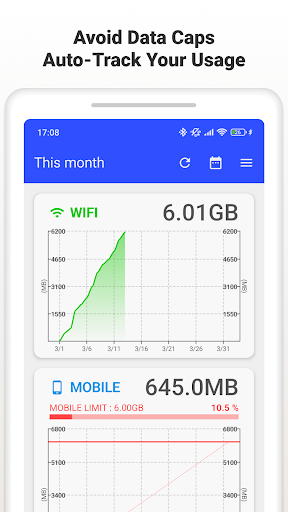
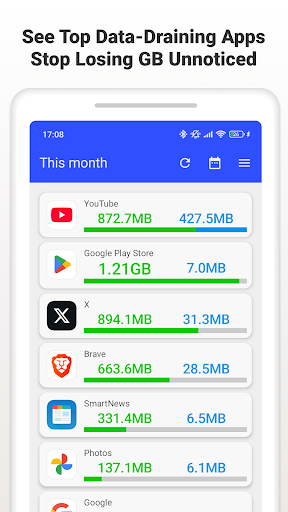
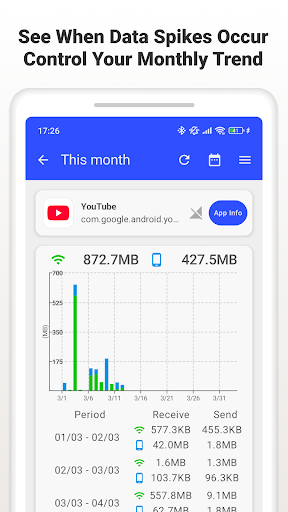
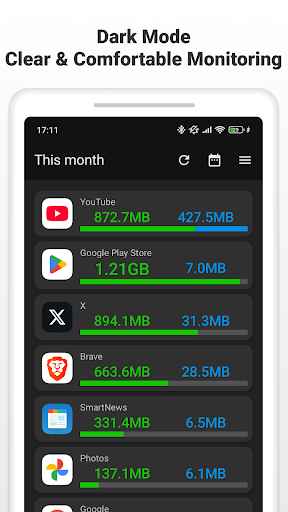
Imagine checking your phone midway through a billing cycle and wondering whether video, navigation, or background activity has eaten through most of your allowance. Data Usage Monitor is built for that moment. It tracks mobile and Wi-Fi traffic automatically, then sorts usage into daily, weekly, and monthly views. I like that the app-level breakdown can help turn a vague worry into a more useful question: which apps are actually responsible?
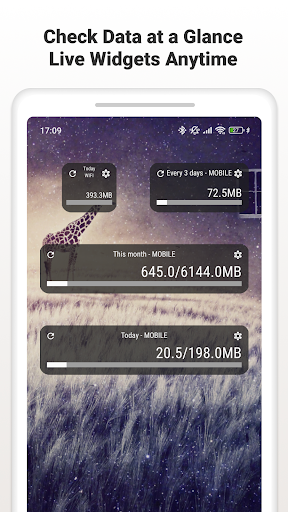
The alerts make the tracking more actionable. You can set a cap and warning levels, then get a notification as usage approaches your chosen threshold. A widget or status bar meter can also keep the remaining data visible without opening the app for every check. That combination suits someone who wants a nudge before the end of the month, rather than a report they remember to inspect only after a surprise.
A tracker, not a data plan
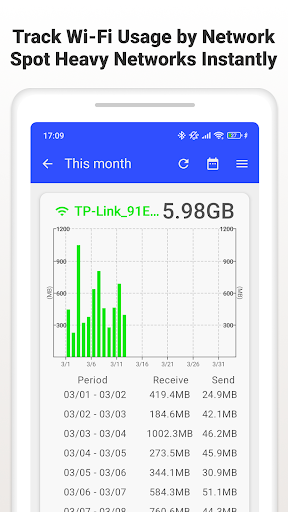
Compared with checking a carrier’s own usage page, Data Usage Monitor puts mobile and Wi-Fi totals, trends, and per-app figures in one tracking-focused place. It also supports per-SSID Wi-Fi stats, which may be useful if you move between home, work, and public networks. I see it as a companion to the carrier’s account tools, not a replacement for them: the app measures activity, while your provider remains the source for plan terms and billing.
It is not a way to make a limited plan unlimited, boost a weak connection, or automatically decide which apps deserve access. Its job is to show patterns and offer warnings, leaving decisions to you. That distinction matters for anyone expecting a data-saving service that blocks traffic or changes network settings. If the main goal is simply to see what has been using data and keep an eye on a threshold, this is much closer to the mark.
Small habits, clearer patterns
I would start by setting the alert limit and warning levels to match the plan I actually use. The app’s settings include Data Alerts, where those thresholds can be configured. After that, a quick glance at the daily graph can become part of a regular routine, especially after a day of streaming or using maps away from Wi-Fi. A warning is most helpful when its threshold reflects a real allowance rather than a guess.
For a more useful picture, I would check the app-by-app breakdown alongside the overall total. If a number jumps, comparing it with recent daily or weekly usage can help identify whether the change is a one-off or a pattern. The widget and status bar meter are handy for less deliberate checks, while the graphs are better for looking back. If a widget stops refreshing, the app’s guidance is to allow background activity and disable battery saver for it.
More From Our News Desk

Zoom Meetings, Google Meet, or Teams: Which Is Easiest to Join?

How I Build a Free Streaming Lineup With Tubi

Why Crunchyroll Is the Default Anime App for So Many Fans

YouTube TV: A Practical Guide to Cutting Cable

Rummikub and the Small Comfort of Phone Games

TeamViewer Remote Control or AnyDesk for Helping Family?
Who may find it useful
I would recommend Data Usage Monitor to people on capped mobile plans who want a heads-up before they approach their limit, and to anyone curious about which apps consume the most data. The daily, weekly, and monthly graphs offer a simple way to spot changes, while separate mobile and Wi-Fi figures keep unlike kinds of usage from being lumped together. Users who prefer a glanceable reminder may also appreciate the widget or status bar meter.
It may be less appealing if you want a completely ad-free app without paying for premium, or if you expect a tool that actively limits traffic for you. The app is a monitor, so you still need to interpret the figures and choose what to do. People who rarely approach their data allowance may not need its alerts and charts. And because some features rely on Android permissions and background activity, setup and refresh behavior can depend on device settings.
Data Usage Monitor is a Tools app from Lufesu Inc. On Google Play, it has over 1 million installs and a 3.9-star rating from about 32,000 ratings. The app is free to download and contains ads. Its content rating is Everyone. The current version shown is 1.25.3367, and the recorded release date is June 10, 2014.
Optional in-app purchases are available, with listed items ranging from $1.99 to $4.99 each. The premium features include an ad-free experience, an always-on status bar meter, and enhanced widgets. The app was last updated on October 22, 2026. It uses Android’s background tracking and can resume measuring after a reboot; its required Android version is worth checking on Google Play for the device you plan to use.
Keeping an eye on everyday data
A straightforward start
When I first opened an app like this, the useful first step would be to decide what I want to track: mobile data, Wi-Fi, or both. Data Usage Monitor measures both automatically and separates them in its totals. There is also a per-app view for spotting heavier users. That gives the app a clear purpose from the outset, rather than asking me to build a complicated tracking system before seeing anything useful.
Some of the detailed views depend on Android permissions. Usage Access is needed for per-app data statistics, while Wi-Fi information and Location are needed to read the network name for Wi-Fi usage. Those requirements are tied to the kinds of breakdowns the app offers. I would take a moment to review the permission prompts and grant the ones needed for the views I actually plan to use.
The everyday check-in
The core experience is a running account of data use, with charts that group activity by day, week, and month. That range makes it easier to answer both a quick question—whether today has been unusually heavy—and a broader one about how the month is shaping up. Color cues indicate when usage is approaching a limit, giving the visual summaries a practical purpose beyond simply displaying totals.
I would expect the app to be most useful when it becomes a small check-in rather than another screen to monitor constantly. A glance at the widget or notification-bar meter can provide a quick reminder, and the fuller graphs are there when I want context. If background tracking is interrupted by device settings, the widget may not update as expected; the app advises allowing background activity and disabling battery saver for it.
Useful detail without clutter
The strongest feature is the combination of separate mobile and Wi-Fi totals with per-app usage. Overall numbers tell me whether I am close to a limit; app-level figures can point toward what is driving that total. Per-SSID statistics add another layer for Wi-Fi networks. I would not need all of those views every day, but having them together makes it easier to investigate a change instead of relying on memory.
Customizable alerts are another standout because a single generic warning may arrive too early or too late for a particular plan. Data Usage Monitor lets users set thresholds and receive notifications as they near a cap. The graphs also cover daily, weekly, and monthly patterns, so I can pair a warning with a sense of how quickly usage is building. This is useful context, though it does not replace checking plan details with a carrier.
A routine that sticks
A practical routine could begin with setting a data cap and one or more warning thresholds in Data Alerts. After that, I would use the status bar or home-screen widget for quick checks during ordinary use, then open the graphs once a week to see whether the current pace looks typical. This keeps the app’s different views in their proper roles: quick reminders for the present, charts for a little perspective.
If I noticed a sudden increase, I would compare the relevant period with the per-app breakdown and check whether mobile or Wi-Fi use changed. That does not automatically tell me why an app used data, but it gives me a more specific place to investigate. People who switch Wi-Fi networks can also look at per-SSID statistics. These are small habits, not a promise that every data spike can be prevented.
Limits to keep in mind
The app measures usage and sends warnings; it does not itself make a data plan cheaper or stop a connection from being throttled. I would treat its totals as a monitoring aid and continue to use my carrier’s account information for plan and billing details. That is especially sensible when approaching a cap, since the value here is an earlier heads-up and a clearer view of usage patterns, not control over the provider’s network.
Ads are included in the free app, and the ad-free experience is a premium feature. The always-on status bar meter and enhanced widgets are also listed as premium features, so users should not assume every glanceable option is included at no cost. Background tracking and widget updates can also be affected by battery settings. Those trade-offs do not erase the app’s usefulness, but they are worth weighing before making it part of a daily routine.
Data Usage Monitor has a sensible focus: show where data is going, make trends easier to read, and warn me as I approach a limit. I especially like the mix of app-by-app detail and quick-glance options. Its limitations are just as clear: it monitors rather than controls usage, and the free version includes ads.
I would try it if I were managing a capped plan or wanted a better handle on mobile data habits. People who need active blocking or a fully ad-free experience should look elsewhere or consider whether the premium features are worthwhile. For straightforward tracking and reminders, it covers the basics with useful depth.
Data Usage Monitor Frequently Asked Questions
What is Data Usage Monitor used for?
Data Usage Monitor tracks mobile and Wi-Fi traffic, with totals by day, week, and month. It can show per-app usage and per-SSID Wi-Fi statistics, and users can set alerts for approaching a data cap. Widgets and a status bar meter offer quick-glance information. It is a monitoring tool rather than a service that changes your plan or automatically blocks data.
Which phones can run Data Usage Monitor?
Data Usage Monitor is an Android app available through Google Play. The minimum Android version can vary by release and device, so check the app’s Google Play details for the current requirement before installing. Some features also rely on Android permissions, including Usage Access for per-app statistics and Wi-Fi information and Location for reading an SSID.
Does Data Usage Monitor cost money?
The app is free to download and contains ads. It also offers in-app purchases, with listed items ranging from $1.99 to $4.99 each. Premium features include an ad-free experience, an always-on status bar meter, and enhanced widgets. Check Google Play for current purchase details, since prices and available items may vary.
Does Data Usage Monitor work with Wi-Fi?
Yes. The app tracks Wi-Fi as well as mobile data, separates the totals, and can provide statistics by Wi-Fi network name. Android requires Wi-Fi information and Location access to read an SSID. If you only need to watch mobile usage, you can still use its mobile totals and alerts; the available views depend on permissions.
Who should use Data Usage Monitor?
It may suit Android users who want to watch a data allowance, understand which apps use data, or get a warning before reaching a chosen threshold. It may not suit someone looking for automatic data blocking or a fully ad-free experience without an in-app purchase. Background activity and battery settings can affect tracking and widget updates.
Pros
- Separates mobile and Wi-Fi totals, with additional per-app and per-SSID detail.
- Daily, weekly, and monthly graphs make usage patterns easier to review.
- Custom warning thresholds and notifications can help flag an approaching cap.
- Widgets and a status bar meter support quick-glance checks.
Cons
- The free app contains ads, while several features are premium.
- Background tracking and widget updates may depend on device battery settings.
- It monitors usage but does not automatically block data or change a plan.
- Category
- Tools
- Version
- 1.25.3367











