Dallas ISD
- 5
- 3.8
- Installs
- 5.00K
- Price
- Free

Screenshots
Analysis by Reviewed APKs
Dallas ISD is a school-district app for keeping up with district events, announcements, staff contacts, and messages tied to a student’s organization. I see it as a practical companion for Dallas ISD families and community members who want district information in one place. Its focus is refreshingly specific, though it makes the most sense if you are already connected to the district.
Keeping a School Week Straight
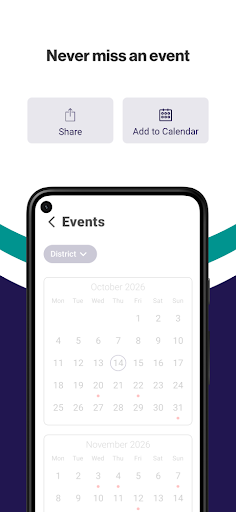
When I picture using Dallas ISD, it is on a busy Sunday evening, when I am trying to make sense of the week ahead. I can look through the district’s event list, find an event that matters to my family, and add it to my calendar. Being able to share an event with relatives is a small convenience, especially when more than one person needs to know where to be.
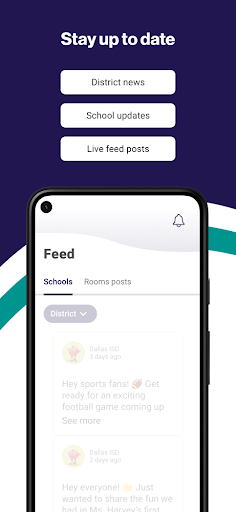
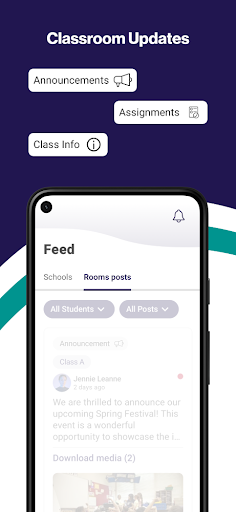
The app also gives me a place to check district updates rather than relying on a message getting forwarded in a family group chat. Feed and News carry announcements from the administration, while the organization-based notification option is meant to help users receive messages relevant to their student. I would still check details in the original announcement, but this setup makes routine school information easier to follow.
A District Tool, Not a School Hub
Compared with a general calendar or a family messaging app, Dallas ISD has a narrower job: it brings district events, administrative updates, organization-related notifications, and a staff and department directory together. That focus is useful if Dallas ISD is already part of your daily routine. Instead of treating it as a broad education platform, I would think of it as a district information channel that complements the tools a family already uses.
It is not presented as a classroom learning app, a homework tracker, or a general-purpose social network. The described features are about staying informed and finding district contacts, not completing schoolwork or managing every part of a student’s schedule. Families who mainly need class-specific tools may still rely on other resources. For someone outside Dallas ISD, the district-specific focus also means there may be little reason to keep it installed.
Make Notifications Useful
A useful first habit is to select the student’s organization in the app so notifications can be tailored to the relevant group. I would take a moment to make that choice carefully, then keep an eye on messages as they arrive. The aim is to cut down on unrelated district noise and make important updates easier to notice, rather than turning every phone alert into something I automatically dismiss.
For event planning, I would browse the list at the start of the week and add the dates I actually expect to attend to my calendar. Sharing an event with family can help everyone stay on the same page. I would also revisit Feed and News when I have a few minutes, rather than assuming that a calendar entry covers every district announcement or change.
More From Our News Desk

Zoom Meetings, Google Meet, or Teams: Which Is Easiest to Join?

How I Build a Free Streaming Lineup With Tubi

Why Crunchyroll Is the Default Anime App for So Many Fans

YouTube TV: A Practical Guide to Cutting Cable

Rummikub and the Small Comfort of Phone Games

TeamViewer Remote Control or AnyDesk for Helping Family?
Who Will Find It Useful
I would recommend Dallas ISD to parents, guardians, and other community members who want a convenient way to check district events and announcements. The calendar add and share options suit households that coordinate school-related plans across several people. The directory is another sensible reason to keep the app handy when you need to find a relevant staff member or department without searching through unrelated information.
It may be less useful to people who are not connected to Dallas ISD, or to families looking for a complete academic organizer with classroom assignments and student progress tools. Those are not the functions described here. I would also be cautious about expecting every school-specific detail to live in the app; its stated role is district updates and information. For that focused job, it looks straightforward and practical.
Dallas ISD is an Android education app developed by Apptegy Play Store. Google Play shows 5,000+ installs and a 3.8-star rating from five ratings. Those figures offer only a small snapshot of how people have rated it, so I would not treat the score as a definitive verdict. The app is free to download, and the store details say it contains no ads.
The app is rated Everyone, and its version is listed as varying with device. No minimum Android version is provided in the details here, so check Google Play on your device for compatibility. The release date shown is September 4, 2025. There is no in-app purchase charge reported; the app itself is free.
A Closer Look at District Updates
A Focused First Impression
When I first opened Dallas ISD, the clearest thing about its purpose was the district-specific mix of information: events, news and feed updates, notifications, and contacts. It is not trying to be an all-purpose school suite. That focused scope makes the app easier to understand at a glance, particularly for a parent or guardian who mainly wants to know what is happening across the district.
I would start by choosing the student’s organization for notifications, then take a quick look at the event list and the news area. That gives the app a more personal role than simply opening it when a problem comes up. The setup described is uncomplicated in concept, although the exact Android compatibility can vary by device, so checking the store before installing is sensible.
The Everyday Information Loop
In day-to-day use, the app’s main value is having a few kinds of district information gathered together. I can imagine checking Feed and News over breakfast, scanning upcoming events later in the day, and returning to an announcement when I need its details. It is a modest routine, but having a dedicated place for district updates can be easier than piecing them together from forwarded messages.
Notifications are most useful when they match the student’s organization, because that is the app’s stated way to help users avoid missing relevant messages. I would not assume that an alert replaces reading the full update. Instead, I would treat it as a prompt to open the app and check what the district has shared, especially when a message affects a plan or event.
Small Features With Purpose
The event tools are more useful than a plain list when a date needs to become part of a real family schedule. Adding an event to a calendar gives it a place alongside other plans, and the one-tap sharing option can pass the information to friends or relatives. Those are simple actions, but they fit the common practical problem of making sure everyone knows about a district event.
I also like that the app includes a staff and department directory as part of the same district-focused package. When I need a relevant contact, I would rather start from a directory organized around the district than hunt through a general search. The feature is described as a way to find staff and departments; it should not be mistaken for a promise that every question can be answered inside the app.
A Weekly Family Routine
A sensible routine would be to check the event list once a week, add the dates that matter to my calendar, and share the ones that other family members need to know about. Then I would glance at Feed and News during the week for new administration updates. This gives the app a clear job without requiring constant checking or turning every school-related task into another phone habit.
I would also make sure the selected student organization is the one I care about before relying on notifications. If an alert appears, I would open the related message rather than relying on a quick notification preview. That routine uses the app’s features as intended: the calendar handles planning, the feed carries updates, and notifications draw attention to messages.
Keep the Scope in Mind
The main limitation is also the app’s defining choice: Dallas ISD is built around one district. Its usefulness depends on having a reason to follow that district, and the described tools do not cover classroom assignments, grades, or broader student organization. Families may need other apps or resources for those needs. I would judge it on whether it makes district communication easier, not on whether it replaces every school tool.
The public Google Play snapshot is modest, with 5,000+ installs and five ratings, so the 3.8-star score should be read in that context. The version varies with device, and the Android requirement can be worth checking directly in the store before installing. None of that changes the basic appeal for a district family, but it is useful context when deciding whether the app fits your device and routine.
Dallas ISD seems most successful as a practical, district-specific companion: check announcements, keep track of events, choose relevant notifications, and find staff or departments. I appreciate that its tools connect to ordinary family routines instead of promising to manage every part of school life.
I would recommend giving it a try if you are part of the Dallas ISD community and want district information close at hand. If you need a full classroom or academic organizer, this is not that app. For staying informed about the district, though, its focused set of features makes sense.
Dallas ISD Frequently Asked Questions
What is the Dallas ISD app used for?
Dallas ISD is used to follow district events and administrative updates, receive messages connected to a student’s organization, and find staff or departments in a directory. Users can add events to a calendar and share them. It is focused on district information rather than classroom assignments or a general learning platform.
Which devices can run the Dallas ISD app?
Dallas ISD is an Android app available through Google Play. The version is listed as varying with device, and the Android minimum requirement may vary or depend on your device. Check the Google Play store entry on your phone or tablet for the compatibility details that apply to it.
Does Dallas ISD cost money or include purchases?
The app is free to download, and the available details say it has no in-app purchases and contains no ads. Store information can change, so it is worth checking Google Play for current terms before installing. The app’s main functions include district updates, event tools, notifications, and a directory.
Is the Dallas ISD app suitable for every family?
It is best suited to families and community members who want information about Dallas ISD, including events and district announcements. People looking for a classroom learning app or a broad academic organizer may need other tools as well. The app’s usefulness depends on whether Dallas ISD is relevant to your household.
What Android version does Dallas ISD require?
The minimum Android version is not provided in the available app details, and the app version varies with device. Requirements can vary, so check the Dallas ISD entry on Google Play from the device you plan to use. That is the practical way to see whether your phone or tablet is compatible.
Pros
- Combines district events, administrative updates, organization notifications, and a staff directory.
- Lets users add events to a calendar and share them with others.
- Free to download, with no ads or in-app purchases reported.
Cons
- Its district-specific focus makes it less useful outside the Dallas ISD community.
- It is not described as a classroom, homework, or academic progress tool.
- The Google Play rating is based on only five ratings.
- Category
- Education











