Cync (the new name of C by GE)
- 93.32K
- 4.4
- Installs
- 1.00M
- Price
- Free

Screenshots

Analysis by Reviewed APKs
Cync is a companion app for controlling Cync and C by GE smart-home products, especially lights, plugs, and an indoor camera. It suits people who want room-based controls, lighting schedules, color adjustments, and shared access in one place. I like how its features connect to ordinary routines, from setting a bedtime light to switching on outdoor decorations. It is most useful when your home already includes compatible Cync devices.
A More Comfortable Evening
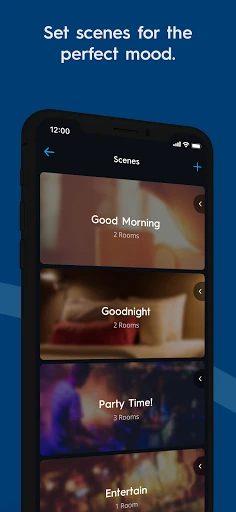
Imagine getting home after dark with your hands full. If you have Cync lighting set up, the app lets you control lights from your phone and create a schedule so the house need not greet you in darkness. I like that this is a specific, practical job rather than smart-home control for its own sake. The same idea applies at bedtime: a saved scene can bring a few compatible devices together for a one-touch change.
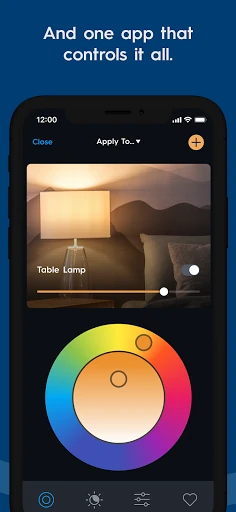
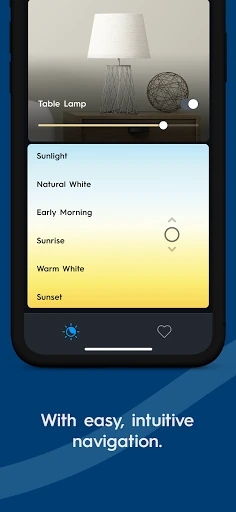
A weekend evening offers another useful example. You might want softer, warmer-looking light in the living room without changing the room itself. Cync offers color and brightness controls, including a double color wheel and the option to enter RGB values. I can see myself nudging a color while relaxing on the sofa, then using a room or device grouping to adjust the lights I mean to change rather than searching through one long list.
A Companion, Not a Universal Hub
Cync makes the most sense as the control center for Cync and C by GE products. Its room organization, device groups, schedules, color tools, and multiple profiles are aimed at managing those products around the home. The app also supports voice control through Amazon Alexa or Hey Google, with no hub needed according to its description. That gives users more than one way to control compatible devices, without making the app itself a general-purpose home dashboard.
It is not a standalone lighting simulator or a way to control every smart-home brand. Its value depends on having compatible Cync or C by GE products, and its features focus on control rather than replacing the devices themselves. The app description mentions an indoor smart camera with HD video and two-way audio, but I would not treat Cync as a full security service based on that alone. It is best approached as a product companion.
Small Habits, Better Control
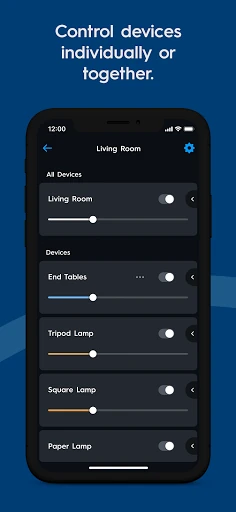
A little organization can make a smart-home app easier to use. Cync lets you add photos of rooms and devices, which should help distinguish similar fixtures at a glance. I would give rooms clear names and use device groups for separate sets of lights in the same space. The app’s example of separating kitchen island fixtures from a ceiling fan captures the benefit: related devices stay in one room, but they do not have to move together.
I would also start with a couple of routines that solve real annoyances instead of trying to automate everything at once. A schedule for arriving home and a one-touch sleep scene are sensible places to begin. If I often adjust the same lights, the dynamic home screen is designed to bring frequently used products forward. And for late-night checks, switching to the dark theme may make the interface more comfortable to view.
More From Our News Desk

Zoom Meetings, Google Meet, or Teams: Which Is Easiest to Join?

How I Build a Free Streaming Lineup With Tubi

Why Crunchyroll Is the Default Anime App for So Many Fans

YouTube TV: A Practical Guide to Cutting Cable

Rummikub and the Small Comfort of Phone Games

TeamViewer Remote Control or AnyDesk for Helping Family?
Who Cync Makes Sense For
I would recommend Cync to people who own compatible Cync or C by GE lights, plugs, or other products and want an app for everyday control. It is especially appealing if you care about room organization, changing light color, scheduling, or sharing control with other people at home. The combination of device photos, room groups, and a changing home screen points toward practical use, not just occasional tinkering.
It may be a poor fit if you do not use Cync-compatible products or want a single app for a broad mix of smart-home brands. People who prefer physical switches and have no interest in phone-based controls may not get much from it either. I would also keep expectations centered on the described features: lighting, plugs, a camera, and compatible voice control, rather than assuming it covers every connected-home need.
Cync is developed by Savant Systems, Inc. On Google Play, it has over one million installs and a 4.4-star rating from around 93,000 ratings. The app is free to download, with no in-app purchases or ads. Its content rating is Everyone. The listed version is 6.24.1.175-5fe1975.
The app was released on March 9, 2016, and its listed last update is October 27, 2026. Cync is for Android, though the minimum Android version is not included in the supplied app details. If compatibility is a deciding factor, check the Google Play page on the device you plan to use.
Making Smart Lighting Feel Everyday
A Personal Home Screen
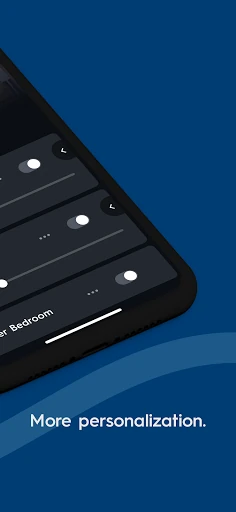
Cync’s new app experience puts personalization near the center. You can add photos of rooms and devices, and the home screen changes to surface products you use most. When I think about opening a smart-home app in a hurry, that is a thoughtful approach: recognizable labels and images can reduce the little bit of hunting that makes a simple light adjustment feel like a chore.
The app also offers a dark theme, which is a welcome option for checking controls late at night. I appreciate that this is a choice rather than an assumed preference. These touches do not replace the need for compatible devices, but they suggest an interface intended for repeated, everyday use rather than a setup screen you visit once and forget.
Room-Based Daily Control
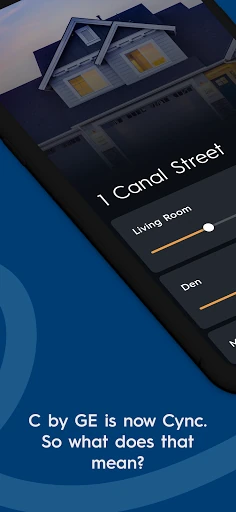
Room organization gives the app a clear way to represent a home. More specifically, Cync allows devices to be grouped within a room, so a user can keep separate collections without creating extra rooms. That is useful in spaces where different fixtures serve different purposes. I would rather tap a group of island lights than accidentally change every light assigned to the kitchen.
The description also emphasizes faster connections and improved reliability compared with the earlier C by GE app. Those are meaningful priorities for a control app: a light adjustment is only convenient if the app and product respond when needed. I can’t assume every home will have the same experience, but the stated focus on speed and stability fits the app’s central job.
More Precise Color Choices
Color control is one of Cync’s more distinctive areas. Alongside brightness and color changes, the app supports entering RGB values to match a light to paint or décor. That gives a more deliberate option than tapping around until a shade looks close. If you are trying to coordinate accent lighting with a room, having a numerical route may be useful.
The double color wheel offers another way to pinpoint a color. I like that the app provides both a hands-on visual control and RGB entry, since not every lighting adjustment starts with the same goal. Sometimes I want a quick change in mood; other times I have a particular color in mind. These tools are for compatible lighting products, not a promise that every bulb or fixture behaves identically.
A Routine That Sticks
A useful way to approach Cync is to build a modest routine around the parts of the day that repeat. For example, I would schedule lights for the time I usually arrive home, then make a separate bedtime scene that pairs smart bulbs and plugs. The app description specifically supports schedules and one-touch scenes, so this kind of setup follows its intended use without requiring an elaborate automation plan.
Once those basics are in place, I would refine the room groups and home screen based on what I actually tap most. If the same fixtures are always adjusted together, grouping them can make that action simpler. If I share control with someone else, multiple profiles are available. This gradual approach seems less frustrating than trying to organize every device perfectly on the first day.
Know the Product Boundaries
Cync’s clearest limitation is also its purpose: it is designed around Cync and C by GE products. The app can keep current C by GE devices alongside Cync products, but that does not mean it controls every brand of connected lighting or home equipment. Before building a setup around it, I would check that the products I own are compatible and that the features I care about apply to them.
The app description mentions an indoor camera, an outdoor smart plug, lighting schedules, shared profiles, and voice compatibility with Alexa or Hey Google. Those details make the ecosystem sound broad enough for several everyday tasks, but they are not a reason to expect unrelated functions such as energy monitoring or comprehensive security tools. Keeping the focus on the described products makes it easier to judge whether Cync is the right companion.
Cync’s strengths are practical: room and device groups, schedules, color controls, personalized shortcuts, and support for both Cync and C by GE products. I especially like the attention to small usability details, such as adding room photos and choosing a dark theme. The app is most convincing when it helps make a home’s compatible lights and plugs easier to manage.
I would try it if I already owned compatible devices or planned to build around them. If I wanted one app for a wide assortment of unrelated smart-home products, I would look elsewhere. For a Cync household, though, the combination of everyday controls and flexible lighting options makes this a reasonable app to keep within reach.
Cync Frequently Asked Questions
What is Cync used for?
Cync is used to control Cync and C by GE products, including compatible lights and plugs. Its described tools include room and device groups, schedules, color and brightness adjustments, personalized room or device photos, and shared profiles. The app also describes an indoor smart camera and voice control through Amazon Alexa or Hey Google.
Which phones and devices can run Cync?
Cync is an Android app available through Google Play. The supplied details do not give a minimum Android version, so requirements may vary with the current release and device. Check the Google Play page from the phone you plan to use for its current compatibility information.
Does Cync cost money or include purchases?
Cync is free to download. The supplied app details say it has no in-app purchases and contains no ads. Compatible Cync or C by GE products are needed to use the app’s product controls; check Google Play for current app details and product compatibility.
Can I use Cync with older C by GE products?
The app description says you can keep current C by GE products and connect them with Cync products. Cync is intended to control those product families, though compatibility can depend on the specific device. Check the Google Play information and product details before relying on a particular setup.
Who is Cync best suited for?
Cync is best suited to people with compatible Cync or C by GE devices who want phone-based lighting and product controls, schedules, or shared access. It may not suit someone seeking a general controller for many unrelated smart-home brands or someone without compatible products. The app’s listed content rating is Everyone.
Pros
- Room-level device groups help separate fixtures that serve different purposes.
- Color controls include a double wheel and direct RGB entry.
- Schedules, shared profiles, and one-touch scenes support everyday routines.
- Photos and a dynamic home screen make frequent controls easier to identify.
Cons
- Its usefulness depends on owning compatible Cync or C by GE products.
- The supplied details do not state the minimum Android version.
- The feature set is centered on its own connected-product ecosystem.
- Category
- Lifestyle
- Version
- 6.24.1.175-5fe1975











