Norwegian Cruise Line
- 38.55K
- 4.8
- Installs
- 1.00M
- Price
- Free

Screenshots
Analysis by Reviewed APKs
Norwegian Cruise Line is a trip-planning and onboard companion app for people taking a Norwegian cruise. It brings together itinerary details, reservations, schedules, menus, check-in and onboard spending, so there is less to keep track of across separate plans. After reviewing its feature set, my take is that it is most useful when paired with an actual cruise: a practical organizer for the lead-up and days at sea, rather than a general travel guide.
From booking to boarding
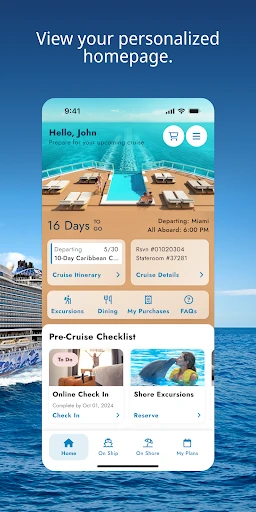
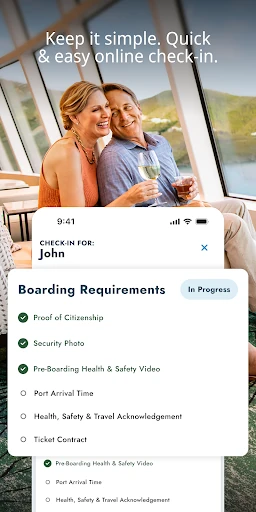
When I picture using the app, I imagine opening it a few weeks before a cruise to check what still needs doing. The pre-cruise checklist gives the planning phase some structure, while the itinerary helps keep the trip details in one place. I could use the countdown as a small nudge to finish preparations, then complete online check-in through the app instead of leaving that task until the last minute.
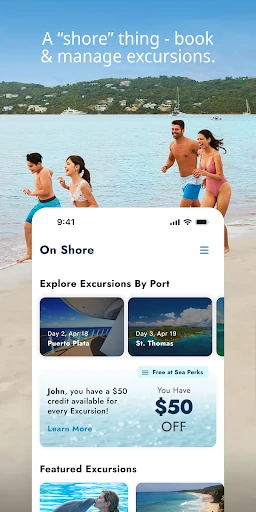
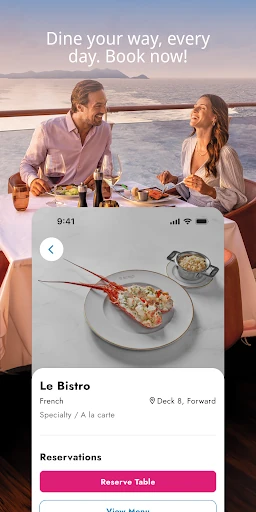
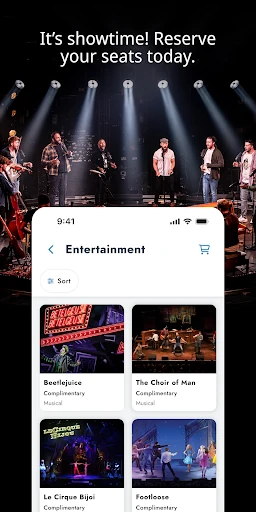
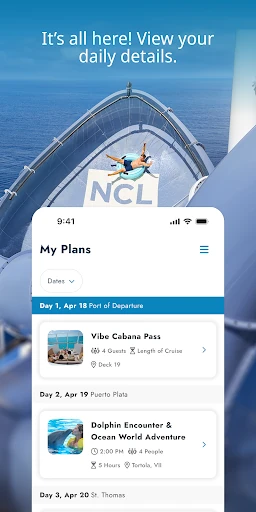
Once the basics are handled, the app can help turn a loose list of vacation ideas into an actual plan. I can look into shore excursions, dining, and entertainment, then make reservations for the options that appeal to me. My Plans is especially useful as the trip takes shape: it gathers planned activities so I can refer back to them without relying on memory or scattered notes.
A cruise-specific companion
The obvious alternative is keeping plans in a calendar, email, or a general trip-organizing app. Those can work well for flights and hotel details, but Norwegian Cruise Line focuses on the cruise itself: onboard schedules, dining menus, entertainment listings, excursions, and reservations for experiences. That narrower purpose is its strength. When I want details tied to a Norwegian cruise, one dedicated place is easier to scan than a mix of reminders and saved pages.
This is not a broad travel-discovery app for comparing cruise companies, planning an unrelated city break, or organizing every part of a multi-stop holiday. Its usefulness is closely connected to sailing with Norwegian Cruise Line. If I were not taking one of those cruises, there would be little reason to keep it in my regular travel routine. For the right trip, though, the focused approach can cut down on last-minute searching.
A few habits that help
I would start by checking the itinerary and working through the pre-cruise checklist in short sessions, rather than trying to handle everything in one sitting. When I decide on an excursion, meal, or show, I would make the reservation and then look for it in My Plans. That simple habit gives the app a clear job: turn decisions into a schedule I can revisit as the departure date gets closer.
Onboard, I would make a quick pass through the daily schedule and use My Plans to keep upcoming activities in view. If I am choosing where to eat, browsing the menus before making a dining reservation can help narrow things down. I would also check the spending information during the trip, rather than waiting until the end, so purchases and daily expenses are easier to keep an eye on.
More From Our News Desk

Zoom Meetings, Google Meet, or Teams: Which Is Easiest to Join?

How I Build a Free Streaming Lineup With Tubi

Why Crunchyroll Is the Default Anime App for So Many Fans

YouTube TV: A Practical Guide to Cutting Cable

Rummikub and the Small Comfort of Phone Games

TeamViewer Remote Control or AnyDesk for Helping Family?
Who will get the most from it
I would recommend Norwegian Cruise Line to people who have booked a Norwegian cruise and like having trip information close at hand. It should be particularly handy for travelers who want to arrange excursions, dining, and entertainment before sailing, then keep an eye on onboard schedules and plans. If you prefer a little structure without building a detailed itinerary from scratch, the checklist and My Plans are practical places to start.
It may be less appealing if you prefer to make every decision spontaneously or already manage cruise details in a way that suits you. The app is focused on Norwegian Cruise Line vacations, so it is not a substitute for a general-purpose travel organizer. It is also a companion for the cruise experience, not a reason on its own to download a travel app when no Norwegian sailing is on your calendar.
Norwegian Cruise Line is published by Norwegian Cruise Line Holdings LTD. On Google Play, it has over one million installs and a 4.8-star rating from about 38,500 ratings. The app is free to download, and the supplied store information says it contains no ads and offers no in-app purchases. Its content rating is Everyone.
The supplied app details give version 1.45.0, a release date of August 8, 2024, and a last update date of October 21, 2026. A minimum Android version is not included in the available app facts, so check the Google Play page on your device for current compatibility information.
A More Organized Cruise Day
A focused first impression
The first thing I notice about the app’s purpose is how closely it follows the rhythm of a cruise: plan before departure, then use the phone as a reference once onboard. It is not asking me to organize every kind of travel. Instead, the checklist, itinerary, reservations, and activity plans all relate to making a Norwegian cruise easier to manage.
For getting started, I would look at the detailed itinerary and pre-cruise checklist, then decide which reservations I want to handle early. Online check-in is part of the preparation flow, too. That gives the app a useful starting point even before the vacation begins, rather than making it relevant only after stepping onto the ship.
Useful in the daily flow
A cruise day can involve choosing a meal, deciding whether to go ashore, and keeping track of entertainment or other activities. The app brings several of those decisions together through onboard schedules, menus, excursion details, and reservations. I can imagine checking it over breakfast to see what is coming up, then referring to My Plans later rather than trying to remember every time and booking.
The app also connects to the ship’s complimentary internet for use onboard without charge, according to its description. That makes it a natural place to check the Freestyle Daily and keep tabs on planned activities. The day-to-day value is less about browsing endlessly and more about having the information for this particular vacation within reach when a decision comes up.
Planning details in one place
My Plans is one of the more useful ideas here because reservations can otherwise become a collection of confirmation details that are easy to forget. The app describes it as a way to keep track of activities and show upcoming vacation plans. I would use it as the quick reference for what I have arranged, especially when several days include different dining, entertainment, or excursion plans.
The app also covers a broad range of cruise-specific options: browsing updated menus, viewing entertainment listings, exploring shore excursions, and making reservations for onboard experiences. That breadth matters because the choices are related to the same trip. Instead of switching between a generic schedule and separate notes for each activity, I can use one cruise-focused tool to plan and review them.
A simple onboard routine
My practical routine would begin with a quick look at My Plans in the morning. I would check the onboard schedule, note the next activity, and browse the dining options if I had not settled on a meal. If an excursion is part of the day, the app’s destination and excursion information can help me revisit those details. It is a small check-in, not a demand to plan every hour.
Later, I would glance at the spending information to see daily expenses and purchases in real time, as described by the app. Before bed, I would check what is lined up for the next day. This routine uses the app as a reference point rather than a distraction: a few purposeful checks to keep reservations, activities, and spending visible while leaving room for the vacation itself.
Keep the scope in mind
The main limitation is also the app’s defining choice: it is built around Norwegian Cruise Line. Its tools make sense for that cruise experience, but they do not turn it into a universal itinerary manager. Travelers who want one app for unrelated trips, broad destination research, or comparing cruise operators should expect to use other resources alongside it.
A second consideration is personal planning style. The range of reservations, schedules, and activity details can be useful if I like having options organized, but not everyone wants to plan meals and entertainment in advance. The app supports making reservations and keeping plans visible; it does not mean every traveler needs to fill a schedule. I would use the features that make the trip smoother and leave the rest alone.
Norwegian Cruise Line makes the most sense as a practical companion to a Norwegian sailing. I like the way it links pre-cruise preparation with onboard schedules, reservations, My Plans, menus, excursions, and spending information. The experience is focused rather than universal, which is exactly why it can be useful for the right vacation.
If I had a Norwegian cruise booked, I would try it for check-in, planning, and keeping daily activities straight. If I wanted a general travel app or prefer not to organize much in advance, I would look elsewhere. For its intended audience, it offers a sensible way to keep cruise details close at hand.
Cruise Norwegian Frequently Asked Questions
What is Norwegian Cruise Line used for?
Norwegian Cruise Line helps travelers prepare for and manage a Norwegian cruise. It includes itinerary information, a pre-cruise checklist, online check-in, reservations for dining, entertainment and excursions, onboard schedules, menus, My Plans, and information about daily expenses and purchases.
Which devices can run Norwegian Cruise Line?
The supplied store details describe the Android app on Google Play. Check the Google Play page for the current device and Android compatibility information before installing. The minimum Android version can vary with app updates and device support.
Does Norwegian Cruise Line cost money?
The app is free to download on Google Play. The supplied information says it has no in-app purchases and contains no ads. For the latest availability or any changes to store terms, check the Google Play page.
Can I use Norwegian Cruise Line onboard?
Yes. The app description says you can connect to the ship’s complimentary internet to use it onboard without charge. It can then help you check the Freestyle Daily, view schedules and menus, manage reservations, and keep My Plans handy during the cruise.
Who should use Norwegian Cruise Line?
It is best suited to people taking a Norwegian cruise who want help with preparation, reservations, and onboard plans. It may not suit travelers looking for a general-purpose trip organizer or people who would rather make every plan spontaneously. Its features are centered on the Norwegian cruise experience.
Pros
- Combines pre-cruise checklist, itinerary, and online check-in in one focused app.
- My Plans helps keep reservations and upcoming activities easy to revisit.
- Covers onboard schedules, menus, excursions, entertainment, and spending information.
- Free to download, with no ads or in-app purchases in the supplied store details.
Cons
- Its cruise-focused tools are of limited use for other kinds of travel.
- The range of planning features may feel unnecessary to spontaneous travelers.
- Minimum Android requirements should be checked on Google Play for device compatibility.
- Category
- Travel & Local
- Version
- 1.45.0











