CPU Monitor - temperature
- 34.63K
- 4
- Installs
- 5.00M
- Price
- Free
Screenshots
Analysis by Reviewed APKs
CPU Monitor - temperature is an Android utility for checking processor temperature and frequency, along with selected CPU, memory, and battery information. I see it suiting people who like to keep an eye on their phone during demanding tasks or simply want more detail about its hardware. Its appeal is practical rather than essential: useful readings and history in one place, with a few handy ways to keep key values visible.
Checking During a Busy Session
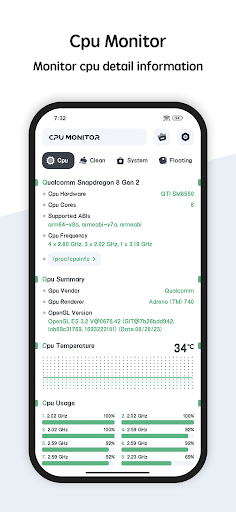
When I want to know whether a phone is getting warm during a long gaming session or while juggling several apps, a monitor like this gives me a place to check instead of guessing from how the case feels. CPU Monitor - temperature shows processor temperature and frequency, and it can also display RAM and battery information. That makes it a quick status check, rather than a tool I need to study before using.
The history view is the part I would use after a demanding stretch. A single temperature reading is just a snapshot; looking at temperature and frequency history can give me a better sense of how values changed over time. I would check it after a session, then compare it with another routine day if I wanted context. The app reports information; it does not explain every cause or tell me what action I must take.
A Monitor, Not a Cleaner
Compared with opening a device's settings for basic system details, CPU Monitor - temperature is focused on ongoing readings. It brings CPU temperature and frequency together with memory and battery information, and offers a history view, a floating window, and widgets. That makes it more suited to checking status repeatedly than to looking up one hardware specification and closing the app.
I would not treat it as a phone speed-up tool, a repair service, or a complete diagnostic suite. The supplied features describe monitoring and device information, not changing processor behavior or fixing hardware. It is also not a substitute for understanding what a reading means on a particular device. If I were troubleshooting persistent heat, I would use the readings as context rather than assume the app can identify the underlying cause.
Make Checks More Useful
A small habit that helps with any monitor is to compare like with like. I would check the temperature after ordinary use, then look again after a similar stretch of gaming or multitasking. The history feature can make those comparisons easier than relying on memory. I would also glance at CPU frequency alongside temperature, since both are among the values the app is designed to show.
The widget and floating window offer different ways to keep information at hand. I would choose whichever feels less distracting for the way I use my phone, rather than keep every reading on screen all day. A quick check before and after a demanding task is likely more useful than repeatedly refreshing without a specific question. Themes provide a bit of control over the app's appearance, too.
More From Our News Desk

Zoom Meetings, Google Meet, or Teams: Which Is Easiest to Join?

How I Build a Free Streaming Lineup With Tubi

Why Crunchyroll Is the Default Anime App for So Many Fans

YouTube TV: A Practical Guide to Cutting Cable

Rummikub and the Small Comfort of Phone Games

TeamViewer Remote Control or AnyDesk for Helping Family?
Who May Find It Useful
I would recommend CPU Monitor - temperature to curious Android users who want a convenient view of processor temperature and frequency, or who like checking memory and battery information alongside them. It is especially relevant if you already pay attention to how your phone behaves during long sessions and want historical readings rather than a one-time glance. The widget and floating window may suit people who prefer not to reopen the main view every time.
It may be less appealing if you rarely look at system readings, want the app to automatically solve performance problems, or expect detailed explanations and recommendations. The listed job is to show and track information, not to diagnose every issue. Since the app contains ads, anyone who prefers an entirely ad-free experience should weigh that against its convenience. For casual users who only need occasional basic information, its extra monitoring options may be more than necessary.
CPU Monitor - temperature is a free Android app from System monitor tools lab - Cpu Ram Battery. Google Play shows more than 5 million installs and a 4.0-star rating from about 34,600 ratings. It is rated Everyone. The app contains ads, and the supplied details say it does not offer in-app purchases.
The current version provided is 11.11.1. The app was released on August 27, 2015, and its recorded last update is October 21, 2026. A minimum Android version is not supplied in the available facts, so check Google Play for compatibility with a particular device.
Keeping an Eye on Phone Readings
A Straightforward First Look
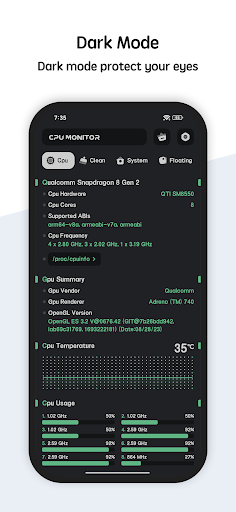
When I first opened CPU Monitor - temperature, the central idea was easy to grasp: it is a place to check CPU temperature and frequency, with related device information available too. That focus makes the app understandable even if I am not looking for a deep technical lesson. The theme choices are a welcome personal touch, although the main value is the information rather than the styling.
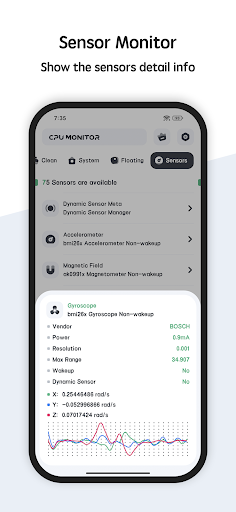
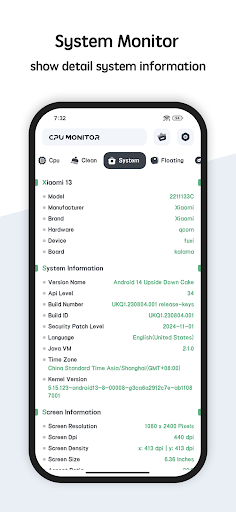
The app's listed features include CPU, system, hardware, and screen information, as well as RAM and battery details. That gives me a few reasons to visit beyond a temperature check. I would start by finding the readings I care about and then decide whether the widget or floating window fits my routine. There is no need to turn every available display into a permanent part of phone use.
The Everyday Monitoring Loop
In day-to-day use, the practical loop is simple: check a reading, use the phone as usual, and return to see how it has changed. CPU temperature and frequency are the headline values, while RAM and battery information add context. The history feature is useful when I want to look beyond the current moment and compare how the readings moved during a stretch of use.
I would avoid treating a single number as a verdict on the phone. Temperatures and frequency are measurements, and the app's job is to display and track them. A reading makes more sense when I know what I was doing at the time. That keeps the monitor useful without turning an ordinary warm phone or a changing frequency into a reason for unnecessary worry.
Useful Ways to Keep Readings Close
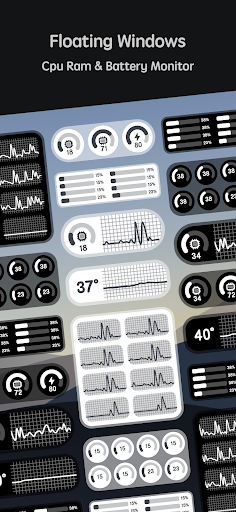
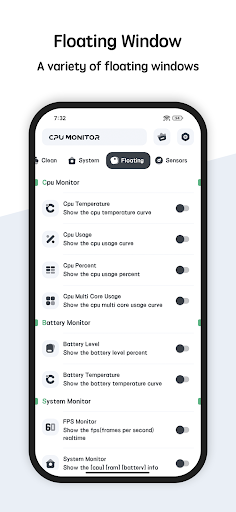
The floating window is one of the more distinctive options. It can show CPU temperature, battery temperature, and RAM usage in real time, so I can keep those values visible while using other parts of the phone. I can see the appeal during a demanding task, though I would use it selectively; a persistent overlay is not something everyone wants on screen.
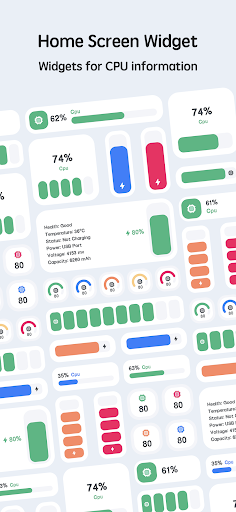
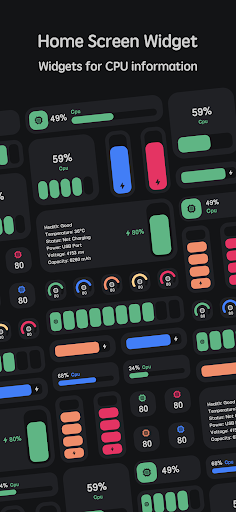
The desktop widget offers another quick route, with CPU, battery, and RAM information. For someone who likes checking a home screen at a glance, that could be more convenient than opening the app each time. Multi-theme switching is a smaller feature, but it gives the interface some flexibility. Together, these options make the monitor easier to fit around different habits without changing its basic purpose.
A Simple Comparison Routine
A sensible routine for me would be to check readings once during normal use, then again after a similar period of gaming, streaming, or multitasking. I could look at the history afterward to see how the CPU temperature and frequency changed. Repeating that on another day under comparable conditions would be more informative than comparing unrelated snapshots.
I would keep the routine lightweight. The app can show CPU and battery temperatures, RAM usage, and device information, but constant checking can become its own distraction. A widget or floating window is handy when I have a specific reason to watch values; otherwise, opening the monitor briefly is enough. The goal is to understand a pattern, not to watch every fluctuation.
Limits to Keep in Mind
The app is a monitor, so its information is only one part of understanding a phone's behavior. The listed features do not include automatic fixes or an explanation for every change in temperature or frequency. I would use the history to add context, not assume that it identifies a fault. Readings may also be most useful when I consider what the phone was doing at the time.
The floating window and widget can make information more accessible, but they may not suit people who prefer a minimal screen. Ads are another practical consideration, since the app is ad-supported. And while it includes device information, users looking for a specialized diagnostic tool should keep their expectations aligned with its stated monitoring features. It is best approached as a handy status display, not an all-purpose maintenance solution.
CPU Monitor - temperature is a focused utility for people who like seeing what their phone is doing under the hood. Temperature and frequency history, alongside RAM and battery information, give it more depth than a one-number glance. The widget and floating window add useful options, while ads and the monitor-only scope are worth bearing in mind.
I would try it if checking device readings is already part of your routine, or if you want a convenient way to observe them during demanding use. If you want automatic repairs, extensive diagnosis, or no advertising, it may not be the right fit. For straightforward monitoring on Android, its purpose is clear and its feature set is practical.
CPU Monitor Frequently Asked Questions
What is CPU Monitor - temperature used for?
CPU Monitor - temperature is used to view CPU temperature and frequency and examine their history. It also shows RAM, CPU, and battery information, along with device details such as system and hardware information. A floating window and widget can keep selected readings accessible. Its described purpose is monitoring information, rather than automatically fixing performance or hardware problems.
Which devices support CPU Monitor - temperature?
CPU Monitor - temperature is an Android app. The supplied details do not specify a minimum Android version, so compatibility can vary by device and system version. Check the Google Play store page for the current requirements before installing it. The listed features include multicore CPU monitoring, but that does not establish compatibility with every Android device.
Does CPU Monitor - temperature cost money?
The app is free to download and the provided facts say it has no in-app purchases. It does contain ads. Store details can change, so check the Google Play page for current information about cost and any changes to its advertising or purchase options.
Can CPU Monitor - temperature show readings outside the app?
Yes. Its described features include a floating window showing CPU temperature, battery temperature, and RAM usage in real time, as well as a desktop widget for CPU, battery, and RAM information. Those options may suit people who want readings close at hand, though a floating display may not fit every user's preferred screen setup.
Who should use CPU Monitor - temperature?
It may suit Android users who want to check processor temperature and frequency, review their history, or keep RAM and battery information nearby. It may be less suitable for someone seeking automatic repairs or extensive diagnosis, since the described features focus on displaying and tracking readings. The app contains ads, which may also matter to users who prefer an ad-free experience.
Pros
- Tracks CPU temperature and frequency, with history for reviewing changes over time.
- Adds RAM, battery, and device information alongside its main CPU readings.
- Widget and floating window offer convenient ways to keep selected readings visible.
- Theme choices let users adjust the app's appearance.
Cons
- Contains ads, which may interrupt an otherwise quick information check.
- Monitoring readings does not automatically diagnose or fix device problems.
- The minimum Android requirement should be checked for a specific device.
- Category
- Tools
- Version
- 11.11.1











