Cozycozy: All accommodations
- 74.19K
- 4.7
- Installs
- 5.00M
- Price
- Free

Screenshots
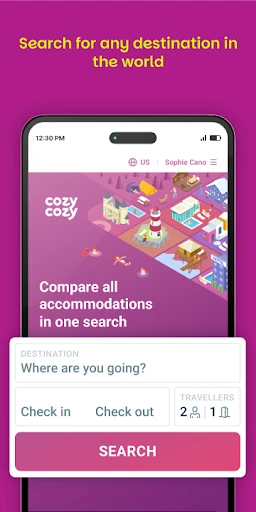
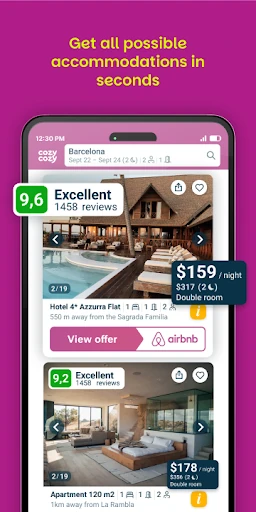
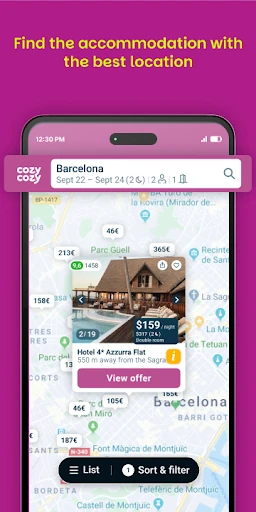
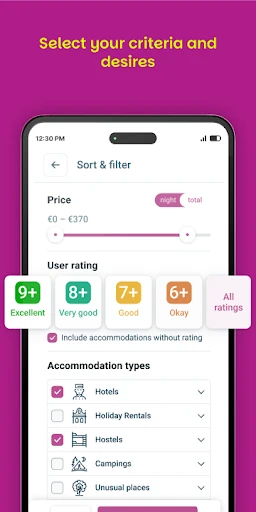
Analysis by Reviewed APKs
Cozycozy: All accommodations helps me compare places to stay across multiple booking sites, from hotels and apartments to cottages and unusual rentals. It suits travelers who want to widen their search before choosing where to book, rather than starting over on one site at a time. I like its broad approach and useful filters, though the actual reservation happens with the accommodation provider, not inside Cozycozy.
One Search, Many Stays
When I’m planning a weekend away, I usually have a destination and dates in mind but not a firm idea of what kind of place I want. Cozycozy is useful at that early stage: I can search by a city, region, country, or point of interest, then compare hotel and rental options gathered from different booking sites. It gives me a wider starting point than opening one familiar service and assuming it has the right fit.
The interactive map helps me think about location alongside price and property type. I can narrow the results with filters for things such as a pool, air conditioning, pet-friendly stays, or wheelchair accessibility, then save listings I want to revisit or share them with travel companions. I’d use it for the first pass on a family trip or a quick getaway, especially when the group has different ideas about what makes a stay worthwhile.
A Search Tool, Not a Hotel
The obvious alternative is searching directly on a booking site such as Airbnb or Booking.com. Cozycozy’s appeal is that it brings options from many services into one search, including familiar names and other providers I might not think to check. That can be handy when I’m still weighing a hotel against an apartment or a more unusual stay. Instead of treating one service’s inventory as the whole market, I can compare a broader set of possibilities.
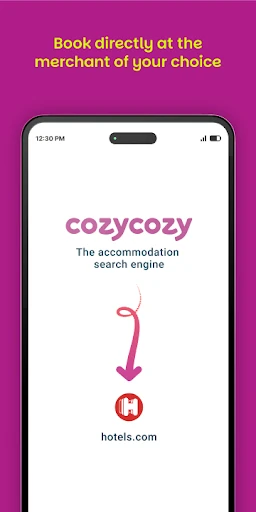
It is still a comparison and discovery app, not a single accommodation company with every reservation handled in one place. Once I choose somewhere, Cozycozy connects me to the merchant site to reserve and pay. I wouldn’t use it to manage an existing booking or expect it to replace the provider’s own reservation process. Its strength is helping me find and compare places before I decide where to complete the transaction.
Small Search Habits
I get more value from starting with flexible criteria. Searching the destination and dates first, then comparing property types, makes it easier to spot whether a hotel, apartment, or cottage suits the trip. I’d add a price range once I understand the choices and use amenity filters for genuine needs rather than selecting every appealing extra. A pet-friendly filter, for example, is more useful when it reflects a real requirement.
Saving promising listings gives me a way to pause instead of making a rushed choice, and sharing them can help a group compare the same options. I’d also open the merchant’s offer before booking and review its details there, since that is where the reservation and payment take place. For a last-minute search, the app says it supports instant booking, but I’d still check the provider’s terms and availability before committing.
More From Our News Desk

Zoom Meetings, Google Meet, or Teams: Which Is Easiest to Join?

How I Build a Free Streaming Lineup With Tubi

Why Crunchyroll Is the Default Anime App for So Many Fans

YouTube TV: A Practical Guide to Cutting Cable

Rummikub and the Small Comfort of Phone Games

TeamViewer Remote Control or AnyDesk for Helping Family?
Who May Find It Useful
I’d recommend Cozycozy to travelers who like comparing options before they settle on a place. It is especially useful if your search could reasonably include a hotel, apartment, cottage, villa, or another kind of stay, or if you want to look across more than one booking provider. The map, filters, saved listings, and sharing options give practical ways to narrow a broad search without committing to the first result.
It may be less appealing if you already know which booking service you want to use, or if you expect to complete and manage the entire reservation in one app. Cozycozy sends you to the merchant to book and pay, so there is an extra step between comparison and purchase. Travelers who prefer to research each provider separately may also see less value in an aggregator, though the broader search can be a helpful first check.
Cozycozy: All accommodations is a free Android travel app from cozycozy.com. Google Play shows more than 5 million installs and a 4.7-star rating from 74,189 ratings. The app is rated Everyone. Those figures offer a quick sense of its reach, while the main practical point is that it can be used to search accommodation options without paying a fee to Cozycozy.
The app does not contain ads or offer in-app purchases, according to its Google Play details. Version 2.10.18 is shown as the current version, with a release date of October 11, 2019, and a last update date of September 17, 2026. A minimum Android version is not included in the available details, so check the Google Play entry for device compatibility.
How Cozycozy Fits Into Trip Planning
A Broad First Impression
When I first opened Cozycozy, the idea that made sense was simple: search for a destination and dates, then look across accommodation options from multiple booking services. That is a useful first step when I haven’t decided whether I want a hotel room or a place with more of a home-like setup. The range described includes ordinary stays and more distinctive choices, so the search is not limited to one property style.
Getting started is centered on the trip search rather than on building a reservation inside the app. I can enter a location in several ways, including a point of interest, and then explore results on a map. That gives me a practical route from a loose idea—say, staying near somewhere I plan to visit—to a more focused comparison of available places.
The Everyday Comparison
For a normal trip search, the useful part is seeing options from different booking sites together. I can compare the displayed offers, consider the property types, and decide which ones deserve a closer look. Cozycozy says its results include access to more than 20 million accommodations from more than 100 booking sites, including well-known services and smaller or more specialized providers.
I’d treat that breadth as a way to make a better-informed shortlist, not as a reason to stop checking the details. The app connects me to the merchant when I’m ready to reserve and pay, so the final transaction belongs to that provider. That division is easy enough to understand, but it means I need to pay attention to which site I’m being sent to when I move from browsing to booking.
Filters That Matter
The filters are among the most practical features because accommodation searches can get broad quickly. I can adjust the price range, choose among property types, and look for amenities such as air conditioning or a swimming pool. Options also include pet-friendly stays and wheelchair accessibility. These are useful distinctions when a trip has a real constraint, not just when I’m browsing for inspiration.
The map adds a spatial view to those choices, while saved listings make it easier to keep track of places I may want to compare later. Sharing options help when another person is part of the decision. Together, these tools support a small but common travel-planning job: turning a large set of possibilities into a shortlist that reflects where I want to stay and what I need there.
A Weekend Planning Routine
For a weekend trip, I’d begin with the destination and dates, then scan the map to see how the available stays relate to the places I plan to visit. Next I’d compare hotels with apartments or cottages, depending on who is traveling and how we want to spend the time. A price range can help make the choices manageable, while one or two relevant amenity filters keep the search focused.
I’d save a handful of candidates and share them if I were planning with someone else. Once we had a favorite, I’d follow the offer to the merchant and review the reservation details there before paying. This routine keeps Cozycozy in its strongest role: broad discovery and comparison up front, followed by a deliberate handoff to the provider that handles the booking.
What to Keep in Mind
A comparison app can make searching more convenient, but it does not remove the need to review the booking provider’s terms. Cozycozy connects users to merchant sites to reserve and pay, so the experience after choosing a stay can depend on that provider. I’d check the details of the offer at the point of booking rather than relying only on a comparison view.
The app describes its displayed price as including everything and says the price shown is the final price to pay. That is a helpful aim for comparison, but I would still read the merchant’s checkout information before completing a reservation. Also, a wide selection can mean more choices to sort through; filters and saved listings help, but the app is most useful when I know which trip needs and preferences matter.
Cozycozy is a handy accommodation comparison tool for the part of trip planning when I want to see more than one provider’s options. Its mix of property types, map browsing, filters, saved listings, and sharing gives the search a practical shape without charging for use or adding ads.
I’d recommend it as a first stop for travelers who are open to comparing different kinds of stays and booking services. If you want one app to handle the entire reservation from search through payment, this is not quite that; Cozycozy helps you find and compare, then hands the booking to the merchant.
Cozycozy Frequently Asked Questions
What is Cozycozy: All accommodations used for?
Cozycozy is used to search and compare places to stay, including hotels, apartments, cottages, villas, and other accommodation types. It gathers offers from multiple booking sites and provides search filters, a map, and options to save or share listings. When you choose a place, it connects you to the merchant site to reserve and pay.
Which devices can run Cozycozy?
Cozycozy is an Android app available through Google Play. The available app details do not specify a minimum Android version, so compatibility may vary by device and operating system. Check the Google Play entry on your device for the current requirements before installing.
Does Cozycozy cost money or include purchases?
Cozycozy is free to use, and its Google Play details say it has no in-app purchases and contains no ads. The app connects you to a merchant site when you are ready to reserve and pay for accommodation, so review the provider’s price and booking details before completing a reservation.
Can I book a stay directly in Cozycozy?
Cozycozy helps you compare accommodation offers and then connects you to the merchant site to reserve and pay. The booking step takes place with that provider. Cozycozy describes an instant booking feature for accommodations, including last-minute trips, but you should check the merchant’s offer and availability as you proceed.
Who is Cozycozy best suited to?
It is a good fit for travelers who want to compare different accommodation types and booking services before choosing a stay. Its filters can help narrow choices by price, property type, and amenities, while saved listings and sharing support group planning. It may suit you less if you want one provider to handle the entire booking process.
Pros
- Compares accommodation options across many booking sites in one search.
- Filters cover property types, price ranges, and useful amenities.
- Map browsing, saved listings, and sharing support trip planning.
- Free to use, with no in-app purchases or ads.
Cons
- Reservations and payments take place on the merchant’s site.
- A large pool of options may take time to narrow down.
- Minimum Android version is worth checking in Google Play.
- Category
- Travel & Local
- Version
- 2.10.18











