Computer File Explorer
- 86.47K
- 4.4
- Installs
- 10.00M
- Price
- Free
Screenshots
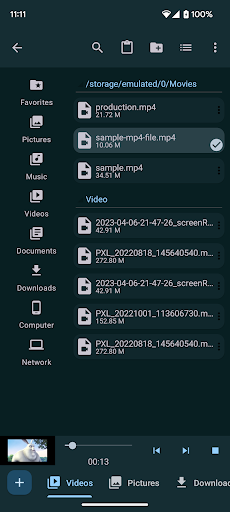
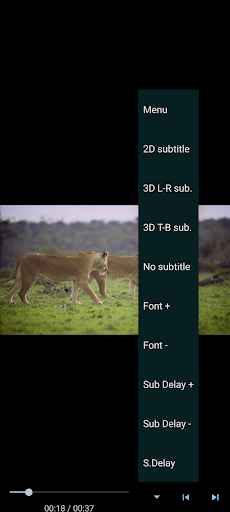
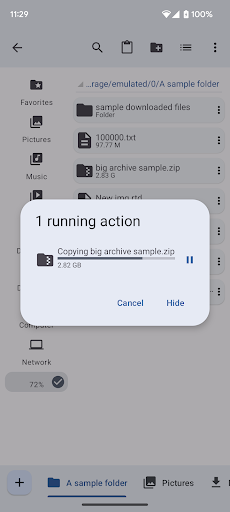
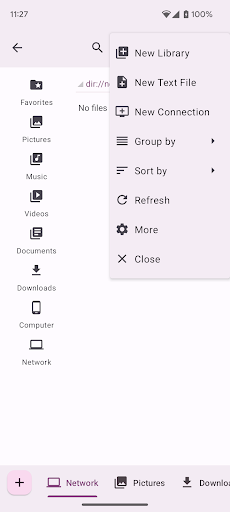
Analysis by Reviewed APKs
Computer File Explorer is an Android file manager for people who want to handle folders and files in a more desktop-like way. Its mix of multiple tabs, ZIP tools, media playback and network connections gives it more range than a basic folder browser. I found the idea practical for everyday file chores, though the number of tools may be more than someone needs for occasional downloads.
A Better File-Sorting Session
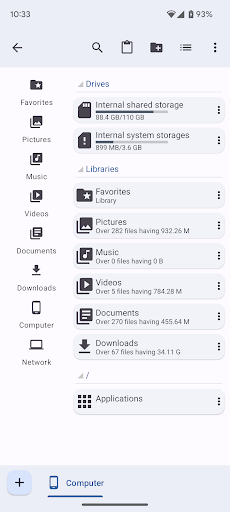
When I first pictured using Computer File Explorer, it was during the familiar cleanup after downloading a handful of documents and photos. Instead of opening one folder, moving a file, then backing out to find another, I could keep multiple folders open in tabs and work between them. Copy and paste for files and folders makes that desktop-style routine feel straightforward, especially when I am sorting a group of items into a clearer structure.
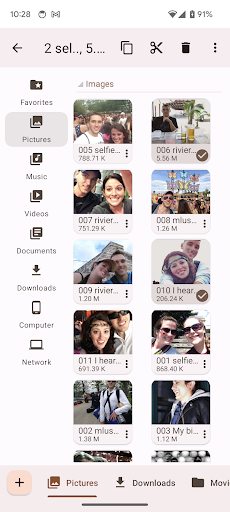
The built-in media viewer and player also make the app useful beyond filing. I can browse photos, music and videos from the same place rather than treating every file as something that must be opened in a separate app. For a practical evening task, that means I can organize a folder, check that the media inside is what I expected, and move on without turning a small cleanup into a string of app switches.
More Than a Basic Browser
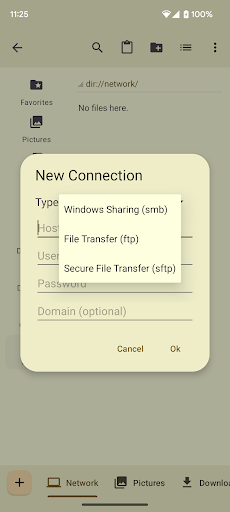
A simple file browser is enough when I only need to locate one download. Computer File Explorer is aimed at a broader routine: moving folders, working with ZIP archives, managing apps and reaching shared documents over SMB, FTP or SFTP. Those additions give it a useful desktop-tool flavor, particularly for someone who regularly moves between local files and network locations.
That breadth does not make it a general computer replacement or a dedicated media-editing tool. Its described job is file management, app management and basic media viewing or playback, not creating documents or editing photos and videos. If all I need is an occasional glance at a download, a simpler option may feel less busy. The extra capabilities matter most when I actually use them.
Small Habits That Help
I would get the most from the tab system by opening the source and destination folders together before starting a batch of moves. That keeps the two places in view and makes repeated copy-and-paste work less stop-and-start. For a larger cleanup, I would sort files in small groups, check them in the built-in viewer when useful, and then close tabs I no longer need.
ZIP support suggests another handy habit: use the app to extract an archive when its contents need to be sorted, or create an archive when a set of files belongs together. Network access can also fit a regular workflow if shared documents live on an SMB, FTP or SFTP connection. These are practical tools rather than automatic organization; the app still depends on me deciding where things belong.
More From Our News Desk

Zoom Meetings, Google Meet, or Teams: Which Is Easiest to Join?

How I Build a Free Streaming Lineup With Tubi

Why Crunchyroll Is the Default Anime App for So Many Fans

YouTube TV: A Practical Guide to Cutting Cable

Rummikub and the Small Comfort of Phone Games

TeamViewer Remote Control or AnyDesk for Helping Family?
Who Will Get the Most From It
I would recommend Computer File Explorer to Android users who often copy files between folders, browse media, handle ZIP archives or access documents through network connections. The multiple-tab approach is particularly appealing if you think in terms of source and destination folders, rather than opening and closing the same locations repeatedly. Its application manager is another useful extra for someone who wants app-related actions near their file work.
It may be more than necessary for someone who rarely touches files beyond opening a recent download. The app is ad-supported, even though its description says ads do not appear while working and can be closed or temporarily turned off in Settings. People who want a focused single-purpose media app, or who do not need its file and network tools, may prefer a simpler experience.
Computer File Explorer is made by Byte Mobile and is in the Tools category on Google Play. It is free to install, has ads and offers in-app purchases; the stated in-app product price is $119.99 per item. Google Play shows a 4.4 rating from about 86,000 ratings, with over 10 million installs. Its content rating is Everyone.
The current version is 2.5.b145. The app was released on February 29, 2012, and its most recent update is dated July 9, 2026. The supplied Android-version requirement is not included in these practical details, so check Google Play for the requirement shown for your device. The app’s free status and purchase details are worth reviewing in the store before installing.
A Desktop-Style Approach to Android Files
A Familiar First Impression
The first impression I take from Computer File Explorer is that it wants file handling to feel familiar to anyone used to a desktop. The emphasis on folders, copy and paste, and multiple open locations points toward hands-on organization rather than a minimal launcher for recent files. That makes its purpose easy to understand: it is for getting into folders and doing something with what is inside.
Getting started is most appealing if I already have a small task in mind, such as sorting documents or opening an archive. The description covers several kinds of work, so I would begin with the basics—finding a folder and moving or viewing a file—before exploring app management or network access. That keeps the first session practical instead of turning setup into a tour of every capability.
Everyday File Work
For day-to-day use, tabs are the feature I would reach for first. Keeping multiple folders open can make a sequence of moves easier to follow: one tab for the folder I am sorting, another for the place where its contents should go. Copy and paste cover the routine actions, and the app is designed to let me work on files and folders in that desktop-like manner.
Media support adds a second everyday role. I can use the built-in viewer and player for photos, music and videos, which is convenient when I am already browsing the files themselves. I would not expect that to replace a specialized player for every format or purpose; the practical advantage is having viewing and playback included alongside file management.
Useful Extras in One Place
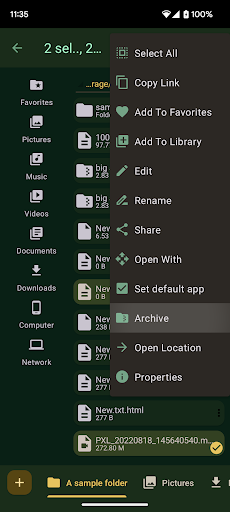
ZIP support is a particularly tangible extra. The app can create ZIP archives and extract them, so I can handle a compressed bundle as part of a file-sorting session rather than treating it as a separate chore. That is useful for both unpacking a group of received files and gathering related items into an archive.
The application manager expands the app’s scope in a different direction. It can open an app, uninstall it or take me to that app’s system management page. There is also access to shared documents through SMB for PCs, FTP or SFTP. Those options make the app more versatile, although their value depends on whether I use those kinds of connections.
A Simple Weekly Routine
A sensible routine would be to set aside a few minutes to sort incoming documents, images or other files into folders. I would open the relevant locations in separate tabs, copy or paste items where they belong, and use the viewer to check a photo or the player to check a media file when its identity is unclear. The point is to keep related actions together, not to make file cleanup into a big project.
On a day when I receive a ZIP archive, I could extract it and sort its contents in the same session. If I work with shared documents, the SMB, FTP and SFTP support offers another route into the routine. Computer File Explorer supplies the tools for those tasks, but it does not decide how I should name folders or organize the results.
A Few Trade-Offs
The biggest limitation is also a matter of fit: a feature-rich file manager can feel like extra equipment when all I need is to open one download. Tabs, archive tools, app management and network connections are useful only if they match my habits. Someone who prefers a highly focused app may find the broader toolkit less appealing than a basic file browser.
The app is supported by ads, which is worth knowing before making it part of a regular workflow. Its description says ads are not shown while working and can be quickly closed or temporarily turned off in Settings. That is a helpful detail, but it does not change the fact that ads are part of the free app’s model. I would also check the store for device requirements and current purchase information.
Computer File Explorer makes the most sense as a practical Android utility for people who regularly move, inspect or package files. Multiple tabs are a sensible center for the experience, while media playback, app management and network access give it useful reach beyond basic browsing.
I would try it if file organization is a recurring task and those extras fit my routine. For occasional file access, I would keep expectations modest and choose based on whether the broader toolkit feels worthwhile. It is a capable all-purpose option, not a necessity for every phone.
Computer File Explorer Frequently Asked Questions
What is Computer File Explorer used for?
Computer File Explorer is an Android file manager for browsing and organizing files and folders. It supports copy and paste, multiple open folder tabs, ZIP creation and extraction, and built-in viewing or playback for photos, music and videos. It can also manage apps and access shared documents through SMB, FTP or SFTP.
Which devices can run Computer File Explorer?
Computer File Explorer is an Android app available through Google Play. The Android version requirement can vary by device and app release, so check the Google Play page for the requirement shown for your phone or tablet before installing.
Does Computer File Explorer cost money?
The app is free to install and contains ads, with in-app purchases available. The stated in-app product price is $119.99 per item. Prices and purchase details can change or vary by region, so check Google Play for the current information before making a purchase.
Can Computer File Explorer connect to shared folders?
Yes. Computer File Explorer supports access to shared documents through SMB, FTP and SFTP connections. Its other file tools include multiple tabs and ZIP support. The details of setting up a particular connection depend on the shared location and your network.
Who should use Computer File Explorer?
It is best suited to Android users who regularly sort folders, move files, handle ZIP archives or work with shared documents. The built-in media viewer and player and app-management tools add convenience. If you only open a file now and then, a simpler file browser may better match your needs.
Pros
- Multiple tabs make it easier to work between source and destination folders.
- Built-in ZIP tools cover both creating archives and extracting them.
- Media viewing, playback and app-management actions add useful range.
- Supports shared documents over SMB, FTP and SFTP.
Cons
- Its broad toolkit may feel excessive for occasional file browsing.
- The free app contains ads, despite their described limits while working.
- The stated in-app product price is high for some users.
- Category
- Tools
- Version
- 2.5.b145











