CloudEdge
- 91.89K
- 4.3
- Installs
- 1.00M
- Price
- Free

Screenshots
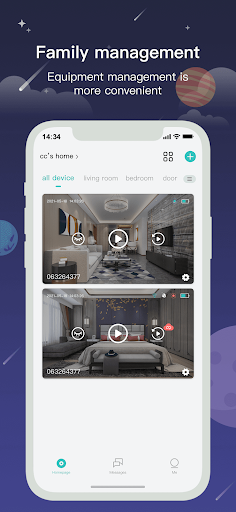
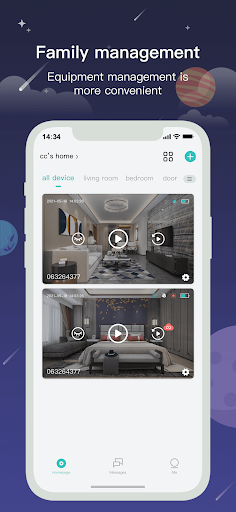
Analysis by Reviewed APKs
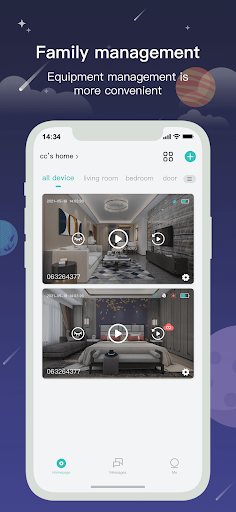
CloudEdge is a video-monitoring app for people who want to check camera footage and receive alerts when motion is detected. I see it as a practical companion for keeping an eye on a home or business, rather than an all-purpose smart-home or business-management tool. Its useful basics are live video, playback, reminders, and sharing images; the experience depends on having a compatible camera system to work with.
A quick check from anywhere
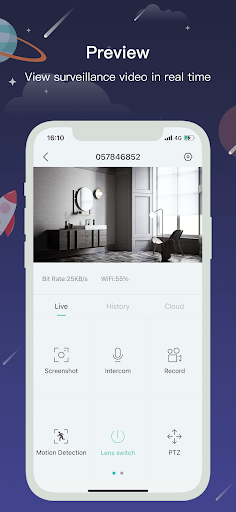
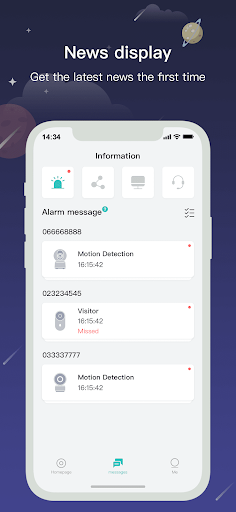
Imagine leaving home for the day and wanting to check what is happening without waiting until you return. CloudEdge is built around that sort of quick look: its real-time video feature lets you view a camera feed, while motion detection can trigger an instant push message. I like the straightforward idea. Instead of treating camera footage as something to review only after an incident, the app makes checking in part of an ordinary day.
The playback and image-checking functions give that routine a second step. If I notice an alert, I can look back at footage or check an image rather than relying on the notification alone. The app also includes time and message reminders, so it is not limited to a live view. Those pieces make sense together: a prompt brings my attention to something, and the video tools help me see more context.
A camera companion, not a command center
CloudEdge is most useful when the main job is viewing video, checking playback, and sharing a video image. That makes it a different kind of tool from a general home organizer or a business operations suite. Despite its broad family-and-enterprise framing, the concrete functions are focused on video services and alerts, not task management, customer records, analytics, or reporting.
I would not choose it as a substitute for a camera itself, or as a general-purpose messaging app. Its role is to help someone use a video system and stay aware of motion notifications. That focused scope can be a plus if I want camera-related checks in one place. It may be a poor match if I am looking for a wide range of smart-home controls or tools for managing a company's daily work.
Make alerts easier to use
A small habit that helps with any motion-alert setup is deciding when a notification deserves a closer look. When I see an alert, I can use the live video function for a current view or playback and image checking for a past event. That keeps the app's basic tools in a sensible sequence, rather than opening each one without a clear reason.
Sharing can also be useful when someone else needs to see the same video image. I would use that selectively, for example when a family member or colleague is helping keep an eye on a place. The app's reminders offer another way to bring attention back to a time or message. A calm routine—check the prompt, review the relevant footage, then share only what is useful—makes the feature set feel more manageable.
More From Our News Desk

Zoom Meetings, Google Meet, or Teams: Which Is Easiest to Join?

How I Build a Free Streaming Lineup With Tubi

Why Crunchyroll Is the Default Anime App for So Many Fans

YouTube TV: A Practical Guide to Cutting Cable

Rummikub and the Small Comfort of Phone Games

TeamViewer Remote Control or AnyDesk for Helping Family?
Who may find it useful
I would recommend CloudEdge to someone who already uses a compatible video setup and wants a mobile way to view footage, check images, and receive motion alerts. It suits people who make occasional check-ins part of their routine, whether they are watching a home or a workplace. The appeal is practical rather than flashy: the listed features cover the basic loop of being alerted, looking at video, and sharing an image.
It may not suit someone who does not have a camera system to use with it, or who expects one app to handle every smart-home and business task. The description centers on video services rather than broader controls. I would also be cautious about assuming that every camera or every storage arrangement will work the same way; checking compatibility and any relevant plan details before relying on it is sensible.
CloudEdge is made by Hangzhou Meari Technology Co., Ltd. On Google Play, it has over 1 million installs and a 4.3-star rating from about 92,000 ratings. The app is free to download, contains no ads, and offers in-app purchases. Google Play gives an in-app purchase range of $1.99 to $384.99 per item, so the free download does not necessarily mean every purchase or service is free.
The app is rated Everyone on Google Play. Its current version is 6.3.6; it was first released on November 23, 2017, and the store records its latest update as October 28, 2026. The minimum Android version is not included in the available details, so check the Google Play page on the device you plan to use. The same store page is the place to review current purchase options.
A closer look at everyday video checks
Opening the app
My first impression is that CloudEdge has a clearly defined job: bring video viewing and related alerts onto a phone. The description does not present it as a multi-purpose control panel, which helps set expectations before I start. I would approach it as the viewing and notification side of a camera arrangement, then check the store information and device compatibility before making it part of a regular routine.
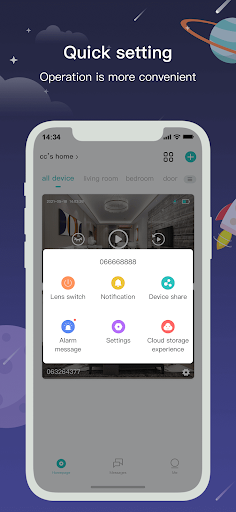
The useful starting point is the set of named functions: real-time video, playback image checking, reminders, and sharing a video image. That gives me a simple mental map of what I can do when I open it. I would not assume that every option appears in the same way for every setup; the experience can depend on the video system in use.
The daily viewing loop
The central experience is a straightforward loop. I can look at a live video feed when I want a current view, then use playback or image checking when I need to revisit something. If motion is detected, the alarm system can send an instant push message, which gives me a reason to open the app rather than checking footage at random.
That kind of workflow is useful for short checks during a busy day. A notification can tell me that motion was detected, but the video tools are where I get more context. I appreciate that the listed functions cover both the immediate view and a look back. The app's value is less about constant interaction and more about having those checks available when a prompt or question comes up.
Features with a clear purpose
The motion alert is the feature that gives CloudEdge its most immediate role. A push message after detected motion can bring an event to my attention, while real-time video lets me check what is happening. I find that combination more practical than a notification on its own, because it connects the alert to a way of looking at the scene.
Playback image checking adds a separate use: reviewing an image or footage after the moment has passed. Time and message reminders round out the described feature set, and sharing a video image can help involve another person when needed. These are concrete, video-oriented tools. I would avoid expecting unrelated extras, but the functions listed do connect naturally around monitoring and reviewing.
A simple check-in routine
For a home check-in, I would keep the routine short. If a motion message arrives, I would open CloudEdge, check the relevant video, and decide whether the footage needs to be shared. If there is no alert but I still want a current look, the real-time video function covers that. Keeping the steps tied to a specific question avoids turning every notification into a long session.
For a family or workplace where more than one person may need to see something, the sharing function can be part of the follow-up. I would share the relevant video image rather than treating the app as a general chat channel. Reminders may also help bring a time or message back to attention. The most useful habit is to make each feature serve a specific check, rather than expecting the app to organize everything around it.
Keep expectations grounded
CloudEdge's focus on video is also its main limitation. The description names live viewing, playback image checking, reminders, motion alerts, and image sharing, but it does not describe a wider toolkit for managing a household or a business. Someone searching for a general productivity app should look elsewhere; this is a focused video service companion.
The practical experience also relies on the camera arrangement and any associated services being suitable for the user. The app's store details include in-app purchases, with individual items in a broad price range, so I would review current purchase information before depending on any paid option. Android requirements should be checked on Google Play as well. Those checks are ordinary due diligence, not a reason to dismiss the core video features.
CloudEdge makes the most sense as a focused way to check video, respond to motion alerts, revisit images, and share a view with someone else. I like that its purpose is easy to understand and that the main functions fit a simple check-in routine. Its usefulness will depend on having a compatible video setup and being comfortable with any relevant paid options.
I would try it if camera viewing and motion notifications are the specific needs, and I would confirm device compatibility and purchase details first. I would skip it if I wanted broad smart-home controls or business-management features. For a video-centered use case, CloudEdge offers a practical set of tools without pretending to be something much wider.
CloudEdge Frequently Asked Questions
What is CloudEdge used for?
CloudEdge is a video service app for viewing live video, checking playback images, receiving time and message reminders, and sharing a video image. Its alarm system can send an instant push message when motion is detected. It is intended to support family and enterprise video use, rather than serve as a general-purpose business or home-management app.
Which devices can run CloudEdge?
CloudEdge is available on Android through Google Play. The minimum Android version is worth checking on the store page for the device you plan to use, since it can vary. The app is designed for mobile video viewing, but the available details do not specify particular camera models or compatibility requirements, so check those before relying on it.
Does CloudEdge cost anything?
CloudEdge is free to download and contains no ads, but it offers in-app purchases. Google Play shows items ranging from $1.99 to $384.99 each. The price of a particular option may vary, so review the current Google Play information before purchasing or assuming that a specific video service is included at no extra cost.
Does CloudEdge require a particular Android version?
The minimum Android version is not specified in the available app details. Check CloudEdge on Google Play from the Android device you want to use; the store page can show whether that device meets the current requirement. It is also worth checking the camera setup's compatibility, since the app's main functions depend on using a video system.
Who is CloudEdge best suited to?
CloudEdge is best suited to someone who wants mobile access to video, motion notifications, playback image checking, and image sharing for a home or enterprise setting. It may not suit someone seeking broad smart-home controls, general messaging, or business-management tools. I would also check compatibility and any relevant in-app purchase details before making it part of a regular monitoring routine.
Pros
- Combines live video viewing with playback image checking for current and past events.
- Motion detection can trigger an instant push message to prompt a check-in.
- Includes reminders and a way to share a video image with others.
- Free to download and contains no ads.
Cons
- Its described functions focus on video rather than broader home or business management.
- In-app purchases range widely in price, so check the current options before buying.
- Android and camera compatibility details are worth checking before relying on the app.
- Category
- Lifestyle
- Version
- 6.3.6











