Chicago CTA Train Bus Tracker
- 843
- 4.4
- Installs
- 100.00K
- Price
- Free
Screenshots
Analysis by Reviewed APKs
Chicago CTA Train Bus Tracker is a Chicago-focused transit app for checking CTA trains and buses, PACE buses, and Metra service. I’d consider it for regular commuters and visitors who want route information, maps, and trip planning together rather than bouncing among separate tools. Its broad coverage is appealing, though the number of transit options means it may take a little practice to find the details I need quickly.
Planning a Chicago Trip
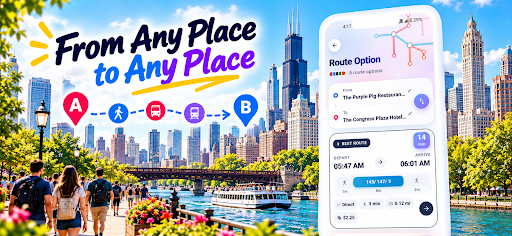
When I’m heading across town, I want to know more than which train or bus to catch. This app brings Chicago-area transit information into one place, including route timings, service updates, and maps. I can plan a trip between a starting point and destination, look at suggested directions, and compare alternate routes. That makes it useful for the ordinary question of whether a train-and-walk option is easier than a bus connection.
I’d use the planner before leaving home, especially for a trip involving a transfer or a destination I don’t visit often. The app describes planning for both an immediate departure and a later date and time, which is handy when working out an evening plan in advance. Once I’ve chosen a route, the details include walking to and from transit, so I can judge the whole journey rather than just the ride.
More Than a Bus Tracker
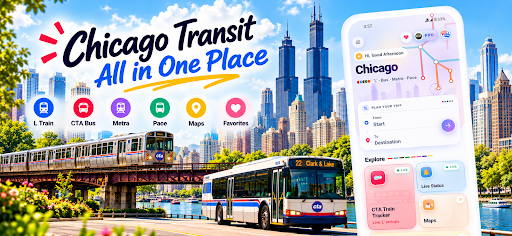
The obvious alternative is to use separate tools for CTA trains, city buses, and suburban service. Chicago CTA Train Bus Tracker aims to make that less fragmented by covering CTA rail and buses alongside PACE buses and RTA Metra. For someone whose routine crosses those networks, the combined approach is the main reason to try it. It also includes transit maps, giving the app a reference role beyond checking the next departure.
That wide scope does not make it a general-purpose travel or city guide. Its focus is Chicago public transportation, with nearby-place information for categories such as restaurants, ATMs, and car rentals as an extra. I wouldn’t choose it primarily to browse attractions or navigate a road trip. And if I only ever ride one line, a broader set of services may feel like more than I need.
Small Ways to Stay Ready
I’d get more from the app by checking a route before I leave, then using its service information to see whether an update affects the plan. For a familiar commute, the useful habit is simple: look up the bus or train, check the direction and timing, and keep an alternate route in mind. The app’s route details and service bulletins can make that routine more informed than relying on a stop name alone.
For less familiar journeys, I’d plan ahead instead of waiting until I’m already on the platform. I can use the trip planner to compare routes, note the amount of walking, and check a map before heading out. The offline map access described for the app is especially practical as a reference when connectivity is unavailable. It won’t replace live service information in that moment, but a saved mental picture of the route can still help.
More From Our News Desk

Zoom Meetings, Google Meet, or Teams: Which Is Easiest to Join?

How I Build a Free Streaming Lineup With Tubi

Why Crunchyroll Is the Default Anime App for So Many Fans

YouTube TV: A Practical Guide to Cutting Cable

Rummikub and the Small Comfort of Phone Games

TeamViewer Remote Control or AnyDesk for Helping Family?
Who Might Find It Useful
I’d recommend Chicago CTA Train Bus Tracker to Chicago residents who use more than one transit network, commuters who want bus and rail details together, and visitors who would rather plan a route before setting off. Having CTA, PACE, and Metra information in the same app gives it a useful niche for trips that cross between city and suburban services. The route planner and maps add value when the trip is unfamiliar.
It may be less appealing if you want a narrowly focused tracker for one route or a polished general city guide with little emphasis on transit. The app includes ads and offers in-app purchases, so those are worth keeping in mind if you prefer an uncluttered, no-extra-cost experience. Its wide feature set also means the best fit is someone willing to spend a little time learning where the information they use most often lives.
On Google Play, Chicago CTA Train Bus Tracker is published by Synergy App Studio and has more than 100,000 installs. It holds a 4.4-star rating from 843 ratings. The app is free to install, contains ads, and offers in-app purchases; the listed in-app product price is $5.99 per item. Its content rating is Everyone.
The current version is 1.4.6. Google Play gives its release date as March 21, 2021, and its last update as October 13, 2026. The minimum Android version is not included in the available app details, so check Google Play for the requirement shown for your device before installing.
A Closer Look at Daily Transit
A Broad First Impression
When I first opened the app, the breadth of its purpose stood out: this is not just a CTA train arrival checker. It brings together rail, bus, regional transit, maps, and route planning for Chicago. That can be reassuring when I’m still figuring out a trip, though a newcomer may need a moment to decide whether to start with a route search, a map, or a particular service.
The key practical point is that the app is organized around getting around Chicago, not around one transit operator. I’d approach it with a specific question in mind on my first visit, such as finding a route or checking a bus. Starting with that task should make the range of coverage feel useful instead of like a long list of unrelated options.
Checking Service Day to Day
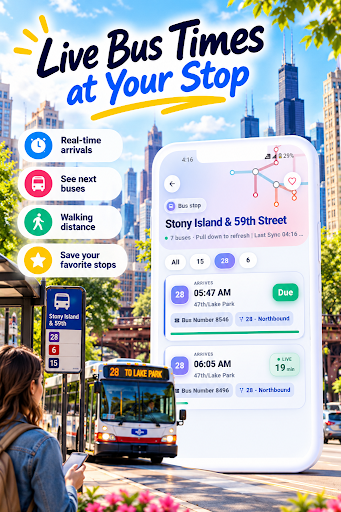
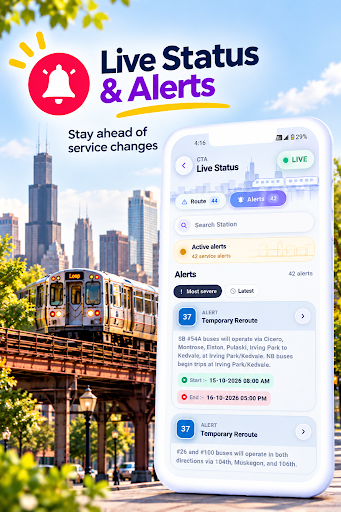
For an everyday commute, the tracker’s core appeal is having train and bus information close at hand. CTA rail lines are described with live running status and color coding, while train details include journey duration and platform information. Bus information covers routes in both directions, with timings, destinations, journey duration, and service bulletins. Those are the kinds of details I’d check when deciding whether to leave now or reconsider my usual connection.
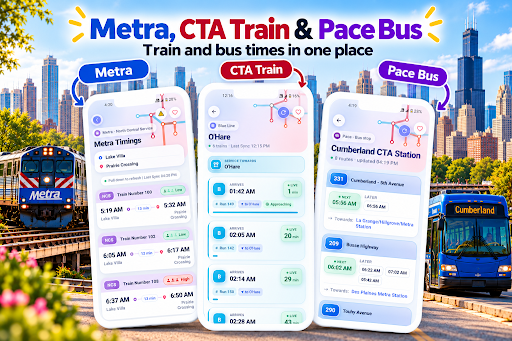
The app also covers PACE bus service and RTA Metra routes and timings. That is helpful when a trip reaches beyond the CTA network, though it means the experience depends on which service I’m trying to check. I’d be careful to select the right mode and direction rather than assuming every transit detail is presented in exactly the same way.
Maps and Route Options
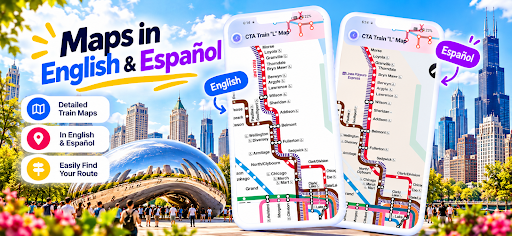
The maps are one of the app’s more practical features for getting oriented. It includes Chicago transit maps for the CTA rail system and Metra, including downtown-focused maps, and the description says they can be accessed offline. I like that as a backup for the basic question of where a line goes, especially when I’m unfamiliar with an area or don’t have a reliable connection.
The trip planner is more than a simple point-to-point suggestion. It can offer a preferred route and alternatives, with details about the walk to a pickup point and from a drop-off point to the destination. Planning for a later departure or arrival is also supported. That makes it useful for comparing a few ways to travel instead of treating the first result as the only sensible choice.
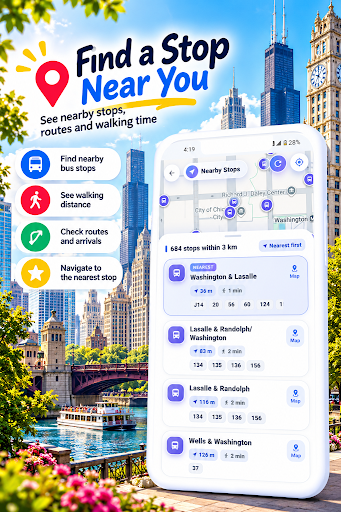
Nearby-place information is another small convenience, with categories including restaurants, ATMs, and car rentals, along with ratings. I’d treat that as a helpful extra when I’m near a stop, rather than the central reason to install the app. The transportation tools are what give it a clear purpose.
A Routine for Unfamiliar Routes
If I had an appointment somewhere new, I’d start by entering the origin and destination in the planner before the day of travel. I’d compare the suggested route with its alternatives, paying attention to the walking portions and the transit modes involved. If the trip were for a particular time, I’d use the later-date-and-time planning option to check what the journey might look like around then.
On the day itself, I’d check the relevant service details again, including any available bulletins or alerts, before leaving. I’d also glance at a map if I needed to understand how the route fits together. This two-step habit—plan ahead, then check service information closer to departure—makes more sense than trying to solve the whole trip while rushing to a stop.
Trade-Offs to Consider
The biggest trade-off is breadth. Combining CTA trains, CTA buses, PACE, Metra, maps, route planning, and nearby places can save app-switching, but it can also be a lot for someone who only wants the next arrival on one familiar line. I’d expect the experience to work best once I know which sections matter to my own routine.
The app contains ads and offers in-app purchases, which may be a drawback for people who prefer an entirely ad-free or purchase-free tool. Its listed in-app items cost $5.99 each, and the app is otherwise free to install. It’s worth deciding whether the combined coverage is useful enough to make the ads and optional purchases acceptable.
Finally, transit information is most valuable when it is easy to interpret at a glance. With several operators and types of detail in one app, I’d check route direction, timing, and service before committing to a plan. The app gives travelers tools to compare and prepare, but it should be treated as a practical aid rather than a reason to stop paying attention to changing trip conditions.
Chicago CTA Train Bus Tracker makes a sensible case for itself through coverage: CTA rail and buses, PACE, Metra, maps, and trip planning are gathered around Chicago travel. I like its potential for cross-network journeys and unfamiliar routes. The main compromise is that its scope, ads, and in-app purchases won’t suit every commuter.
I’d try it if I regularly travel around Chicago and want route planning and several transit services in one place. It is a less obvious pick if my needs are limited to one familiar line or I want a transit-only experience without ads. For the right traveler, it offers a useful set of planning and checking tools.
Chicago CTA Bus Tracker Frequently Asked Questions
What is Chicago CTA Train Bus Tracker used for?
Chicago CTA Train Bus Tracker is for checking Chicago-area public transit and planning journeys. It covers CTA trains and buses, PACE buses, and RTA Metra, with route timings, service information, maps, and a trip planner. It also includes information about nearby places such as restaurants and ATMs.
What devices support Chicago CTA Train Bus Tracker?
The app is available on Android through Google Play. The minimum Android version can vary by release or device, so check the Google Play page for the requirement that applies to your phone before installing. The app’s focus is Chicago transit rather than a general travel service.
Does Chicago CTA Train Bus Tracker cost money?
The app is free to install, contains ads, and offers in-app purchases. The listed in-app product price is $5.99 per item. Prices and purchase options can vary, so check Google Play for the current details before buying anything.
Can I use Chicago CTA Train Bus Tracker for Metra and PACE?
Yes. Its described coverage includes PACE bus service and RTA Metra routes and timings, alongside CTA rail and bus information. The app also has Chicago transit maps and a trip planner for routes between destinations. Check the route details in the app when planning a particular journey.
Who should use Chicago CTA Train Bus Tracker?
It may suit Chicago commuters and visitors who want several transit networks, maps, and route planning in one app, especially for journeys involving more than one service. Someone who only needs a simple tracker for one familiar route may find its broader set of tools unnecessary. Ads and in-app purchases are also worth considering.
Pros
- Combines CTA rail and bus details with PACE and Metra coverage.
- Trip planner offers alternate routes and walking details.
- Transit maps are described as available offline.
- Includes service bulletins, alerts, and nearby-place information.
Cons
- The broad mix of services may take time to navigate.
- The app contains ads and offers paid in-app items.
- May be more than needed for single-route commuters.
- Category
- Travel & Local
- Version
- 1.4.6











