Camtro
- 23.78K
- 4.5
- Installs
- 500.00K
- Price
- Free

Screenshots
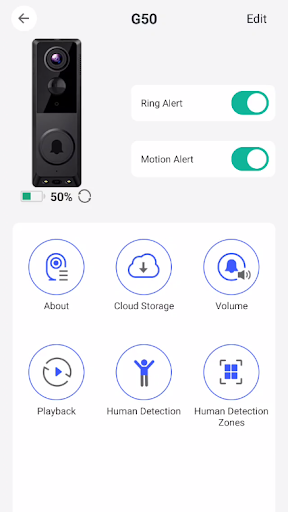
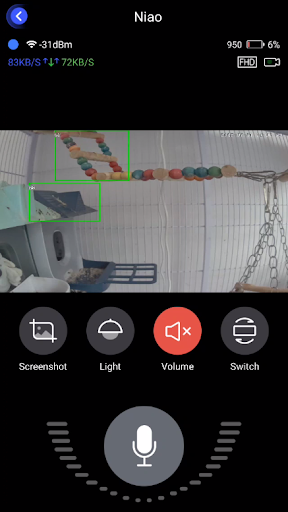
Analysis by Reviewed APKs
Camtro is a home-monitoring app for people using a compatible doorbell or motion sensor who want to respond to visitors from their phone. It brings together alerts, HD video, and two-way conversation, so I can see and speak with someone without heading straight to the door. I like the practical focus, though its usefulness depends on having the relevant device set up.
A visitor at the door
Picture me cooking dinner while the doorbell rings from the other side of the house. With Camtro connected to a compatible device, the app can send an alert when someone presses the bell or triggers its PIR motion sensor. I can check the video on my phone, see who is there, and speak to the visitor. That makes the app useful in the ordinary in-between moments when I cannot immediately get to the door.
The same idea works when I am away from home: Camtro is designed to let me see, hear, and talk to visitors remotely. I can imagine checking an alert while out running errands rather than wondering whether I missed a delivery. The app's job is focused and easy to understand. It turns a supported doorbell or sensor into a way to check in and communicate, rather than simply notifying me that something happened.
A focused home tool
Camtro makes the most sense alongside a compatible doorbell or motion sensor. It is not a general-purpose camera editor, a social video app, or a place to share creative projects; those ideas do not describe the product's stated purpose. Instead, it gives a phone a way to receive alerts and access video and conversation from a supported home-monitoring device. That narrow scope is a strength if I want a straightforward visitor check.
Compared with relying on a basic doorbell chime, the app offers a remote view and the option to speak with someone. It is also different from simply checking a camera feed: its alerts are tied to a doorbell press or motion trigger, helping draw attention to a visitor. I would not choose it as a standalone solution for every home-security need. Its value depends on the device and features described for Camtro.
Small habits that help
A useful routine is to leave notifications enabled when I am expecting a delivery or know I will be away from the entrance. When an alert arrives, I can open the app, check the HD video, and decide whether speaking to the visitor is helpful. That simple sequence makes better use of the app than treating it as something to open only after I have already missed a ring.
I would also make device setup part of the initial routine rather than waiting until the first visitor arrives. The description emphasizes that setup is easy, but the key practical step is having the supported device connected in advance. Once that is done, I can get familiar with the alert-and-check flow at home. A quick test in an ordinary moment can help me understand how the app fits into my day.
More From Our News Desk

Zoom Meetings, Google Meet, or Teams: Which Is Easiest to Join?

How I Build a Free Streaming Lineup With Tubi

Why Crunchyroll Is the Default Anime App for So Many Fans

YouTube TV: A Practical Guide to Cutting Cable

Rummikub and the Small Comfort of Phone Games

TeamViewer Remote Control or AnyDesk for Helping Family?
Who may find it useful
I would recommend Camtro to someone who has a compatible doorbell or PIR motion sensor and wants to check visitors from a phone. It should appeal to people who are often in another room, step out during the day, or simply prefer to see who is at the entrance before answering. The combination of notifications, video, and two-way conversation gives the app a clear everyday purpose.
It may be a poor fit if I do not have the relevant device, want a broad home-monitoring suite, or am looking for photo and video editing tools. Camtro is centered on visitor monitoring, not general media creation. I would also consider whether I actually want alerts for doorbell presses or motion events before adding another notification source to my routine. The app is most compelling when those specific checks would make daily life easier.
Camtro is developed by DigitalConverge Intellect Limited and is available on Google Play for Android. It has over 500,000 installs and a 4.5-star rating from around 23,800 ratings. The app is rated Everyone. Its listed version is 2.0.5, with a release date of May 29, 2025, and a last update date of October 13, 2026.
The app is free to install and contains ads. It also offers in-app purchases, with listed items ranging from $18.99 to $99.99 each. Those purchase options are worth keeping in mind if I prefer to avoid spending beyond a free download. Camtro's Google Play age rating is Everyone, while Android version requirements are best checked on its store page before installing.
How Camtro Fits Into Home Life
Getting started
My first impression is that Camtro has a practical, specific purpose rather than trying to be an all-in-one home app. The description says setting up a device in the app is easy, and the rest of the experience revolves around what happens after that connection: alerts, video, and a way to communicate with visitors. That focus makes it easier to picture where Camtro belongs in a household routine.
I would start by setting up the compatible device before relying on the app for an expected delivery or visitor. The central promise is simple, but it depends on having the device ready to send an alert and provide video. Once set up, I can get used to receiving a notification and checking the person at the door. There is no need to invent a complicated workflow for what is essentially a quick check-in.
Everyday checks
Day to day, the most useful part is the link between an event and a response. A doorbell press or PIR motion-sensor trigger can prompt an instant notification, giving me a reason to open the app. From there, HD video lets me see what is happening, while the app's audio functions let me hear and speak with the visitor. That is a more useful chain than an alert with no way to check the scene.
I can see this being handy when I am occupied with chores or have gone out briefly. Instead of walking to the entrance just to discover who rang, I can use my phone to check first. The app is designed to work from anywhere, which suits those moments away from home as well. I would still treat the alert as a prompt to look, not as a reason to expect every household question to be solved remotely.
Video and conversation
The standout combination is HD video with the ability to see, hear, and speak to visitors. Each part supports a different small decision: video helps me identify who is there, hearing provides context, and speaking lets me respond without opening the door. Together, those capabilities make Camtro more than a notification receiver. They give me a short, direct way to handle an arrival from wherever I happen to be.
Motion alerts add another useful trigger alongside the doorbell. If a visitor or movement activates the PIR sensor, the app can notify me even without a button press. That gives the system a role in noticing activity near the entrance, while the video offers a way to check what prompted the alert. These are specific monitoring functions; I would not assume they amount to broader security coverage beyond the described doorbell and sensor use.
A practical routine
For a normal weekday, I would keep Camtro ready while expecting a parcel, then leave my phone nearby as I work around the house. If the doorbell rings, I can check the notification, view the HD video, and speak to the person if needed. When I am out, the same sequence gives me a way to respond remotely rather than waiting until I get home to find out who stopped by.
The motion-sensor alerts could be useful as a separate prompt to check the entrance. I would pay attention to which alerts matter in my routine and use the app when they arrive, instead of opening it repeatedly without a reason. The useful habit is straightforward: set up the device, notice the alert, and check the video before deciding what to do. That keeps Camtro's role clear and manageable.
Limits to consider
Camtro's usefulness depends on having a compatible device. Without a doorbell or PIR motion sensor that works with the app, its main features have little to connect to. The app's focus is also quite narrow: it is for visitor alerts and remote viewing and conversation, not for editing clips or handling every possible home-monitoring task. I would check that this specific use matches my needs before making it part of my setup.
There are also practical details to weigh. Camtro contains ads and offers in-app purchases, so a free install does not mean every aspect of use is necessarily free of commercial prompts or optional spending. The listed purchase prices are substantial enough to notice, ranging from $18.99 to $99.99 per item. I would review the store information and purchase details before deciding whether any paid option is relevant to me.
Finally, an alert is only useful if it reaches me at a time when I can act on it. I would make sure the phone and device are ready for the role I expect Camtro to play, then avoid assuming it replaces other household arrangements. It is a convenient way to see and talk to visitors, but the app's stated functions are specific and should be judged on that basis.
Camtro's appeal is its clear, everyday job: notify me about a doorbell press or motion trigger, then let me check the video and speak with the visitor. That is a useful bit of convenience for the right device setup, especially when I am busy or away. Ads and optional purchases are worth factoring into the decision.
I would try Camtro if I already use a compatible doorbell or sensor and want visitor checks on my phone. If I am searching for a general camera platform or have no compatible device, I would look elsewhere. Its focused approach is sensible, provided the hardware and remote-check routine match what I need.
Camtro Frequently Asked Questions
What is Camtro used for?
Camtro is used to monitor visitors through a compatible doorbell or PIR motion sensor. It can send notifications when someone rings or triggers the sensor, and it lets users view HD video and see, hear, and speak with visitors remotely. Its purpose is visitor monitoring rather than general photo or video editing.
Which devices and platforms support Camtro?
Camtro is an Android app available through Google Play. It is intended to work with a compatible doorbell or motion sensor, so having the relevant device is central to using its visitor alerts and video features. Check the Google Play page for current device compatibility and installation details.
What Android version does Camtro require?
The Android version requirement can vary with the app's current release and the device being used. I would check Camtro's Google Play page before installing to confirm that the current version supports your phone. The app is designed to connect with a compatible doorbell or PIR motion sensor.
Is Camtro free, and does it have purchases?
Camtro is free to install, contains ads, and offers in-app purchases. Listed purchase items range from $18.99 to $99.99 each. Prices and purchase details can vary, so check the Google Play page for the current options before buying anything.
Who is Camtro best suited for?
Camtro is best suited to someone with a compatible doorbell or PIR motion sensor who wants phone alerts, video, and two-way conversation with visitors. It may not suit someone without that hardware or someone seeking a general-purpose camera or media-editing app. Its focus is checking and responding to people at the entrance.
Pros
- Combines doorbell and motion-trigger alerts with HD video and two-way conversation.
- Designed to let users check on visitors from anywhere.
- Focused feature set makes its visitor-monitoring purpose easy to understand.
- Free to install on Google Play.
Cons
- Its main features depend on having a compatible doorbell or motion sensor.
- The app contains ads and offers in-app purchases.
- Its visitor-focused tools are not a broad home-monitoring solution.
- Category
- Tools
- Version
- 2.0.5











