Calls Blacklist - Call Blocker
- 857.46K
- 4.5
- Installs
- 10.00M
- Price
- Free

Screenshots
Analysis by Reviewed APKs
Calls Blacklist - Call Blocker is for people who want more control over which phone calls get through, from silencing hidden numbers to blocking specific callers. I like that it can work with simple rules but also supports schedules, profiles, and a trusted-number whitelist. It is a practical call-filtering tool, though its range of options may feel like more than some people need.
A Quieter Evening
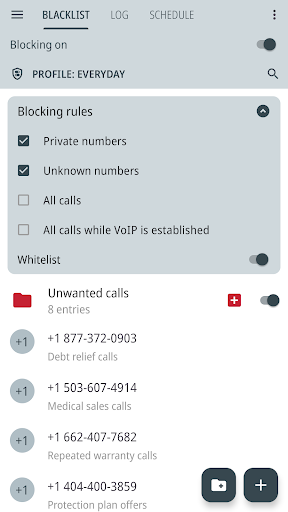
When I picture using Calls Blacklist on an ordinary evening, the appeal is straightforward: I want calls from people in my contacts to ring, but I do not want every unfamiliar number interrupting dinner. I can choose to block numbers that are not saved in my contacts and allow trusted numbers through a whitelist. Private numbers can be blocked separately, which helps when hidden caller ID is the source of unwanted interruptions.
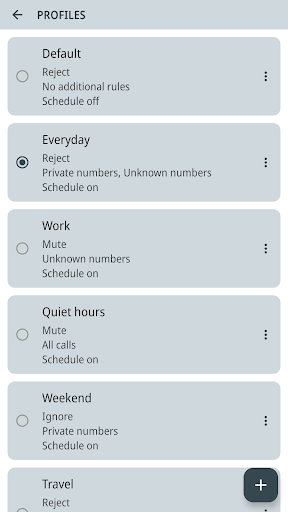
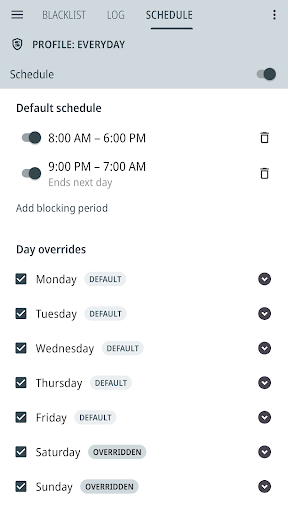
What makes that setup more flexible than a one-off block is the option to save a profile for a particular situation. I could keep one combination of rules for personal time and another for work or sleep, then switch between them instead of rebuilding my settings. The app also lets me schedule blocking by day and time, including multiple periods in a day, for routines I want to repeat.
A Focused Call Filter
Compared with blocking a single number in a phone’s call history, Calls Blacklist is built for broader rules. I can add specific numbers, block number patterns by prefix or digits they contain, and organize numbers into folders. That makes it more suited to people who want to manage a list over time than to someone who only needs to silence one persistent caller once.
It is still a call blocker, not a general messaging filter or a promise that every unwanted call will disappear. The app’s description focuses on incoming phone calls, and it notes that blocked callers may still reach voicemail depending on carrier handling. If I only want to mute one call occasionally, the profile, schedule, and list tools may be more setup than I need.
Keep Rules Manageable
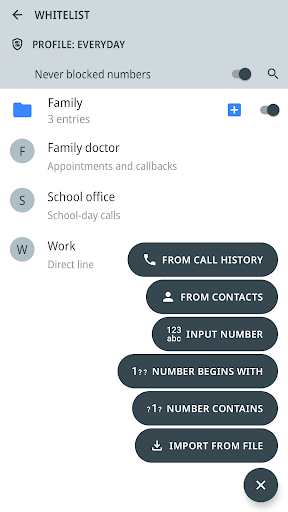
I would start with a small blacklist and whitelist rather than trying to anticipate every possible caller. Adding a number from the app’s call log or local call history gives me a practical way to update the list after an interruption. Folders can help once the list grows: I can group numbers and switch a folder on or off instead of editing individual entries.
Profiles and schedules are most useful when I give them clear jobs. A sleep profile can use different blocking settings from a work profile, while a weekly schedule handles times I know in advance. For a larger list, importing and exporting TXT or CSV files and backing up settings offer a way to move or preserve rules. I would still review active folders and whitelist settings when switching profiles.
More From Our News Desk

Zoom Meetings, Google Meet, or Teams: Which Is Easiest to Join?

How I Build a Free Streaming Lineup With Tubi

Why Crunchyroll Is the Default Anime App for So Many Fans

YouTube TV: A Practical Guide to Cutting Cable

Rummikub and the Small Comfort of Phone Games

TeamViewer Remote Control or AnyDesk for Helping Family?
Who May Find It Useful
I would recommend Calls Blacklist to someone who regularly gets unwanted calls and wants more than a manual block for each number. Its combination of unknown-caller controls, private-number blocking, custom lists, and time-based profiles is useful for people whose call preferences change during the week. The whitelist is especially handy if they want a stricter filter without blocking trusted numbers.
It may be less appealing if you prefer a very simple, hands-off phone experience or rarely receive calls you want to filter. There are several kinds of rules, folders, schedules, and profiles to keep straight, so a little setup pays off. It also cannot control whether a blocked caller reaches voicemail; that part is handled by the carrier.
Calls Blacklist - Call Blocker is developed by Enchan Li. Google Play shows over 10 million installs and a 4.5-star rating from around 857,000 ratings. It is free to install and contains ads, with in-app purchases priced from $1.99 to $15.99 per item. The content rating is Everyone.
The supplied app details give version 4.16.1, a release date of February 5, 2012, and a last update date of October 21, 2026. The minimum Android version is not included in the available app details, so check Google Play for the requirement that applies to your device.
Making Call Rules Fit Real Life
A Flexible First Setup
When I first opened an app like this, I would want to decide what counts as an unwanted call before turning on a strict rule. Calls Blacklist lets me choose whether to block unknown numbers, private numbers, or all incoming calls. I can also add numbers to either list manually or from contacts, so the first pass can stay focused on the callers I actually want to manage.
The setup can grow gradually. A whitelist lets trusted numbers through when blocking is active, while prefix rules can cover numbers beginning with particular digits. I would begin with the least disruptive option that solves my problem, then adjust only if unwanted calls continue. No account is required to use the app, which keeps that initial step centered on call settings rather than registration.
Everyday Blocking Choices
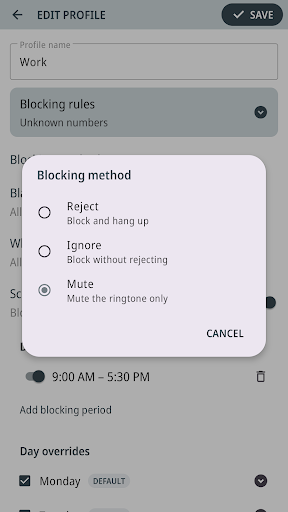
The day-to-day experience is shaped by the blocking method I choose. Reject declines an incoming call, Ignore blocks it without rejecting it, and Mute silences its ringtone. Those options give the app a bit more nuance than a single on-or-off switch, although the right choice depends on how I want interruptions handled.
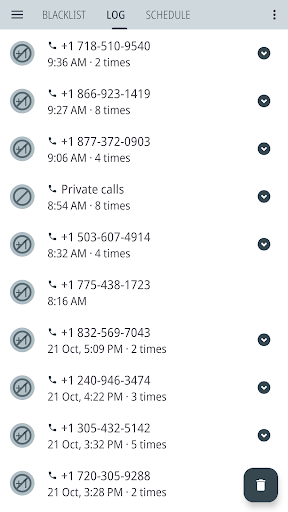
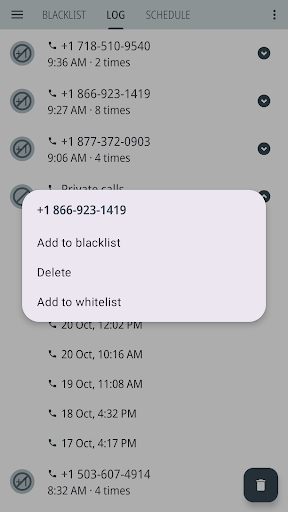
The call log makes it easier to see blocked calls and decide whether a number belongs on a list. I can also add numbers from the app’s log or local call history to either list. If I want less noise from the app itself, I can choose whether blocked-call notifications are enabled. These are practical controls for adjusting the experience after the initial setup.
Profiles, Lists, and Schedules
Profiles are one of the most useful ideas here because they let me save different call-blocking settings for work, sleep, or personal time. Each profile can use a blocking method and whitelist setting, and I can choose which number folders are active. Instead of changing every rule when my day shifts, I can switch to a saved combination.
Scheduling adds another layer for predictable routines. I can set blocking periods by time of day and day of the week, including different times on individual days and multiple periods within one day. This suits someone with a consistent workday or quiet hours. It is less valuable if I rarely follow a schedule, since a manual profile switch may be enough.
A Routine That Scales
For a manageable routine, I would keep a shortlist of trusted numbers in the whitelist and add unwanted callers after checking the call log. If the list gets busy, folders can separate groups of numbers and let me enable or disable them together. Prefix and contained-digit rules are available for patterns, so I would use them deliberately and check that they match the calls I mean to block.
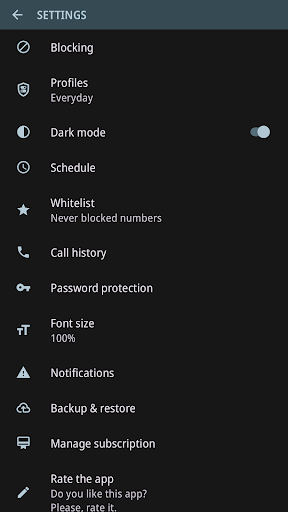
A useful weekly rhythm could be to let a sleep profile handle quiet hours automatically, then use a less restrictive profile during the day. For people managing many entries, the app can import and export numbers in TXT or CSV format. It can also back up lists, rules, and settings, with an option for daily automatic backups and previous backups. Those tools help make a larger setup easier to maintain.
Limits to Remember
The main trade-off is complexity. Profiles, active folders, number patterns, schedules, and whitelist rules are powerful, but they create more choices than a basic call-block button. I would keep the setup small and test changes in stages, especially before enabling a rule that blocks all incoming calls or a broad number pattern.
Blocking a call does not necessarily keep its caller from leaving a voicemail; the carrier handles voicemail. Some features are available only with Premium, so not every option should be assumed to be included in the free experience. The app also contains ads and offers in-app purchases. Those are worth weighing if I want a quiet, uncomplicated utility.
Calls Blacklist - Call Blocker is a capable choice for people who want their call rules to reflect different parts of the day. Unknown and private number controls cover the basics, while profiles, schedules, folders, and backups give more involved users room to organize a detailed setup.
I would try it if unwanted calls are a recurring nuisance and I am willing to spend a little time maintaining rules. If I only need to block a caller once in a while, a simpler built-in option may suit me better. Its strongest value is flexibility, not a completely hands-off experience.
Calls Blacklist Frequently Asked Questions
What is Calls Blacklist - Call Blocker used for?
Calls Blacklist - Call Blocker is used to manage incoming call blocking. It can block unknown or private numbers, specific numbers, and number patterns, and it can allow trusted numbers through a whitelist. It also offers profiles, schedules, folders, and a log of blocked calls. Blocked callers may still reach voicemail, which is handled by the carrier.
Which phones can run Calls Blacklist - Call Blocker?
Calls Blacklist - Call Blocker is an Android app available through Google Play. The supplied details do not give a minimum Android version, and requirements can vary as the app is updated. Check the Google Play store entry for the current compatibility information for your phone.
Does Calls Blacklist - Call Blocker cost money?
The app is free to install and contains ads. It also offers in-app purchases priced from $1.99 to $15.99 per item. Some features are available only with Premium, so check Google Play for the current purchase details and which options are included.
Can Calls Blacklist - Call Blocker block private numbers?
Yes. The app description says you can block private numbers with hidden caller ID, as well as unknown numbers that are not saved in your contacts. You can also use a whitelist for trusted numbers and choose among different blocking methods. Carrier handling still determines whether blocked callers can leave voicemail.
Who should use Calls Blacklist - Call Blocker?
It is best suited to people who receive unwanted calls often and want control over lists, schedules, and different blocking profiles. It may be more involved than necessary if you only need to block a number occasionally. Features vary by app version and some require Premium, so the Google Play store entry is worth checking before installing.
Pros
- Blocks unknown and private callers while letting whitelisted numbers through.
- Profiles and schedules adapt call rules to work, sleep, or personal time.
- Folders, number patterns, and import tools support larger lists.
- Backups can preserve lists, rules, and settings across reinstalls or device changes.
Cons
- Profiles, schedules, and layered rules take time to configure and maintain.
- Blocked callers may still reach voicemail, depending on carrier handling.
- The app contains ads, and some features require Premium.
- Category
- Communication
- Version
- 4.16.1











