C-SPAN Now
- 1.03K
- 4.1
- Installs
- 100.00K
- Price
- Free

Screenshots
Analysis by Reviewed APKs
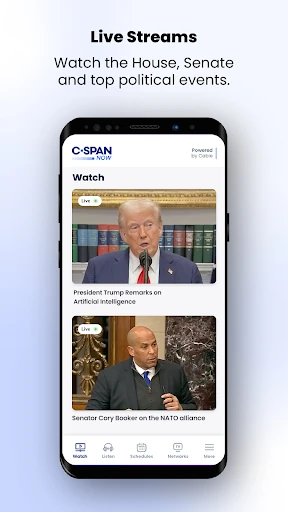
C-SPAN Now brings U.S. government and public-affairs coverage to a phone, with live and on-demand proceedings, hearings, White House events, radio, and podcasts. It suits people who want to follow a hearing or catch up on a public discussion without relying on a general news recap. My overall take is that it is a focused companion for watching events unfold, though some live TV streams require a provider sign-in.
Following a hearing on the go
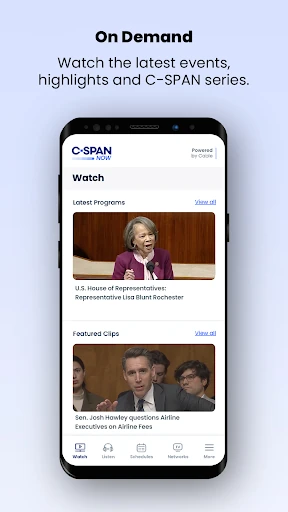
When I want to understand what is happening in a congressional hearing, a short headline can leave out the actual exchange that matters. C-SPAN Now is built for that moment: I can turn to live or on-demand coverage of House and Senate proceedings and committee hearings, then listen or watch the discussion itself. It is a more direct way to spend a lunch break than piecing together snippets from several news stories.
I can also picture checking the app during a busy day, noticing a hearing is underway, and keeping up with it in a short stretch rather than treating it like a full evening of television. Coverage extends beyond Congress to White House events, courts, and campaigns. The practical appeal is access to the event as it happens, with the option to return to on-demand programming when my schedule does not line up.
Direct coverage, not a news desk
Compared with a conventional news app, C-SPAN Now puts more emphasis on proceedings and public-affairs programming than on quick summaries. That is useful when I want to hear an exchange in context or follow a hearing directly. The app also includes C-SPAN Radio, podcasts, schedules for C-SPAN TV networks and radio, and recent episodes of Washington Journal and Q&A, giving it more than one way to follow the day's public discussion.
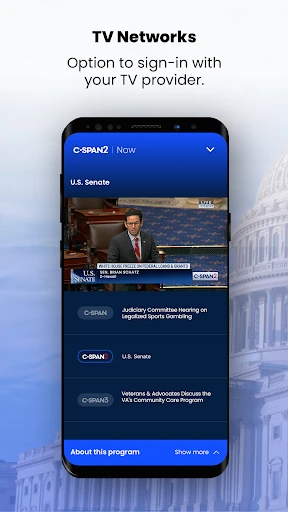
It is not a broad all-purpose news feed, and I would not open it expecting a personalized stream of headlines or a substitute for reporting and analysis. Its strength is access to the source event, not explaining every development for me. There is also a distinction between the available content and live streams of C-SPAN, C-SPAN2, and C-SPAN3: those TV streams require a TV provider sign-in.
Make a simple viewing routine
I get more from an event-focused app when I have a reason to check it, rather than trying to follow everything. A useful habit is to look at the schedules for the C-SPAN networks and radio, pick a hearing or public event that interests me, and set aside a little time to watch or listen. If the timing is inconvenient, on-demand coverage and the latest episodes of Washington Journal and Q&A offer other ways to fit public-affairs programming into the day.
I would treat the app as a place to return to when a particular proceeding or topic catches my attention. For example, I might listen to C-SPAN Radio while doing a routine task, then use video coverage when I have time to focus on a hearing. The mix of live and on-demand programming makes that flexible. I would keep the TV-provider requirement in mind before planning around one of the three live network streams.
More From Our News Desk

Zoom Meetings, Google Meet, or Teams: Which Is Easiest to Join?

How I Build a Free Streaming Lineup With Tubi

Why Crunchyroll Is the Default Anime App for So Many Fans

YouTube TV: A Practical Guide to Cutting Cable

Rummikub and the Small Comfort of Phone Games

TeamViewer Remote Control or AnyDesk for Helping Family?
Who will get the most from it
I would recommend C-SPAN Now to people who want to hear public proceedings in their own words, especially anyone who follows congressional business, hearings, White House events, courts, or campaigns. It can also suit a listener who prefers radio or podcasts to watching a screen all day. The app's range of live and on-demand programming makes it easier to follow a subject when a fixed broadcast schedule does not fit.
It may be less satisfying for someone who mainly wants fast news summaries, a wide mix of unrelated topics, or an app that does all the context-setting for them. Some users may also find the TV-provider sign-in requirement inconvenient if they want live C-SPAN, C-SPAN2, or C-SPAN3 streams. Other content is available without sign-in, so that requirement does not apply to everything in the app.
C-SPAN Now is published by National Cable Satellite Corporation and is listed in Google Play under News & Magazines. It has over 100,000 installs and a 4.1-star rating from 1,035 ratings. The app is free to download, contains ads, and does not offer in-app purchases. Its content rating is Everyone.
The listed Android requirement is Android 7.0 or later, and the current version is 1.24.2. C-SPAN Now was released on September 24, 2021, and its last update was January 27, 2026. Those basics make it accessible on a range of Android phones, while the TV-provider sign-in requirement applies specifically to live streams of C-SPAN, C-SPAN2, and C-SPAN3.
A closer look at C-SPAN Now
A focused first impression
When I first opened C-SPAN Now, the clearest thing about its purpose was the programming it brings together: government proceedings and public-affairs coverage, rather than a general mix of news and entertainment. The description covers live and on-demand video, radio, podcasts, network and radio schedules, and recent episodes of Washington Journal and Q&A. That makes the app feel aimed at following events, not just checking a headline and moving on.
There is an important practical detail to understand before settling in. Live streams for C-SPAN, C-SPAN2, and C-SPAN3 require a TV provider sign-in, while other content is available without one. I would keep that difference in mind when deciding what to watch. It does not prevent me from using the rest of the app, but it can affect whether a particular live network stream is immediately available.
How it fits each day
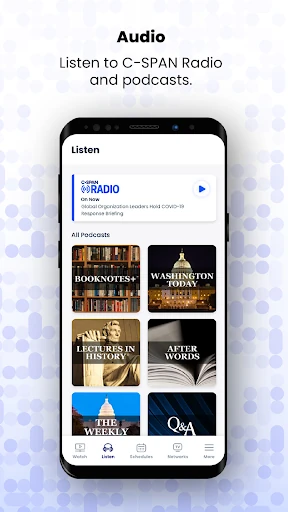
The day-to-day appeal is having several formats for public-affairs programming in one app. When I have time to pay attention, live or on-demand video can bring me to a proceeding or hearing. When I am occupied with something else, C-SPAN Radio or a podcast gives me an audio option. I like that this is a choice of formats rather than a promise that every event must be watched in real time.
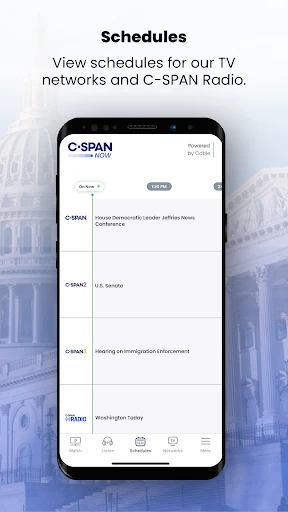
Schedules for C-SPAN's TV networks and radio are useful when I want to plan around programming instead of opening an app and hoping something relevant is on. On-demand coverage gives me another route when I miss a live event. The app also offers the latest episodes of Washington Journal and Q&A, which gives regular listeners a familiar place to find those programs.
The breadth of coverage
What stands out is the range of public events the app says it covers. Alongside House and Senate proceedings and congressional hearings, it includes White House events, courts, campaigns, and more. That breadth makes it useful beyond someone who only wants to watch a session of Congress. I can use it as a dedicated source for different kinds of U.S. public-affairs programming without expecting it to behave like a general news service.
The combination of video, radio, podcasts, and schedules is another useful distinction. For me, it means the same app can serve a focused viewing session or a more casual listening routine. The latest episodes of Washington Journal and Q&A add specific programs to that mix. Those are concrete options for exploring C-SPAN programming, rather than features I would assume are available in a typical headline-driven news app.
A practical way to keep up
A routine I would use is to check the schedules when I know I have time to follow an event, then choose between live coverage and listening on radio. If the event happens while I am busy, I can turn to the on-demand option later. That simple pattern makes the app easier to use in fragments of the day, rather than requiring me to sit down at a particular hour every time.
For a public-affairs listener, I would also make room for the podcasts and the latest Washington Journal or Q&A episodes when I want programming beyond a single hearing. The point is not to consume every stream or schedule item. I find it more practical to follow one event or program that matters to me and use the app's different formats to fit it around work, chores, or a quieter evening.
A few limits to remember
The biggest limitation to plan around is the provider sign-in for live C-SPAN, C-SPAN2, and C-SPAN3 streams. If I open the app specifically to watch one of those channels, I need to account for that. Other content does not require sign-in, which leaves room to use the app for other programming, but the distinction matters when a live network stream is the main reason for opening it.
The app's subject matter is also intentionally narrow. People looking for a fast-moving general news feed or brief, explanatory updates may prefer a different kind of news app. C-SPAN Now is better suited to following public events and programming directly. Its 4.1-star Google Play rating and more than 100,000 installs give a sense of its store presence, but whether that focused approach fits depends on what I want from a news app.
C-SPAN Now makes the most sense as a dedicated way to watch or listen to public-affairs programming, with live and on-demand coverage, radio, podcasts, schedules, and selected program episodes. I appreciate the option to follow an event directly rather than relying only on a recap. The TV-provider requirement for three live network streams is the main detail I would check before making it part of my routine.
I would recommend it to curious viewers and listeners who want access to proceedings, hearings, and related events in a range of formats. If I wanted a general news feed or analysis first, I would look elsewhere. For someone who values direct coverage and can work around the live-stream sign-in requirement, C-SPAN Now is a practical, focused Android option.
C-SPAN Now Frequently Asked Questions
What is C-SPAN Now used for?
C-SPAN Now is for watching or listening to public-affairs programming, including live and on-demand coverage of House and Senate proceedings, congressional hearings, White House events, courts, and campaigns. It also includes C-SPAN Radio, podcasts, schedules for C-SPAN networks and radio, and the latest episodes of Washington Journal and Q&A.
Which phones and platforms support C-SPAN Now?
C-SPAN Now is an Android app on Google Play. The listed requirement is Android 7.0 or later. Live streams of C-SPAN, C-SPAN2, and C-SPAN3 require a TV provider sign-in; other content is available without sign-in. Check the Google Play store details for current device compatibility.
Does C-SPAN Now cost money?
C-SPAN Now is free to download and does not offer in-app purchases. It contains ads. Watching the live streams of C-SPAN, C-SPAN2, and C-SPAN3 requires a TV provider sign-in, so access to those streams depends on that requirement. Store details and availability can vary, so it is worth checking Google Play.
What Android version does C-SPAN Now need?
The listed minimum requirement for C-SPAN Now is Android 7.0. The app's current version is 1.24.2, though compatibility details can change with updates or vary by device. I would check the Google Play store entry on the phone where I plan to install it before relying on a particular device.
Is C-SPAN Now a good fit for casual news readers?
It can suit casual readers who are curious about government and public-affairs events and are happy to watch or listen to proceedings directly. It is more focused on event coverage, radio, and podcasts than on broad news summaries. People who want quick general headlines may prefer another app; the Google Play description is worth checking for current content details.
Pros
- Combines live and on-demand coverage of Congress, hearings, White House events, courts, and campaigns.
- Offers radio, podcasts, schedules, and episodes of Washington Journal and Q&A.
- Other content is available without signing in to a TV provider.
- Free to download, with no in-app purchases.
Cons
- Live C-SPAN, C-SPAN2, and C-SPAN3 streams require a TV provider sign-in.
- Its public-affairs focus may not suit people who want broad news summaries.
- The app contains ads.
- Category
- News & Magazines
- Version
- 1.24.2