Bose
- 188.22K
- 3.5
- Installs
- 10.00M
- Price
- Free

Screenshots



Analysis by Reviewed APKs
Bose is a companion app for setting up and controlling compatible Bose speakers, soundbars, headphones, earbuds, amplifiers, OpenAudio products, and portable PA systems. I see it as most useful for people who already own Bose gear and want its settings in one place. In my view, its appeal is practical rather than universal: it brings useful listening controls together, but it is not a replacement for a general music app.
A More Comfortable Commute
When I picture using Bose on an ordinary weekday, I start with a pair of compatible QuietComfort earbuds and a noisy trip across town. The app gives me access to noise-cancellation controls and listening Modes, so I can choose between Quiet Mode and Aware Mode depending on whether I want to shut out the commute or hear more of what is around me. That makes the app feel like a useful companion to the headphones, not just a setup tool.
On a quieter walk, I might prefer to keep some awareness of my surroundings while still listening to music. Aware Mode is intended to let in both the environment and audio, while supported products can use ActiveSense to make surrounding sounds more comfortable. I would not expect every Bose feature to be available on every product, but when the feature matches the headphones, having its controls in the app makes it easier to shape the experience around the moment.
A Companion, Not a Player
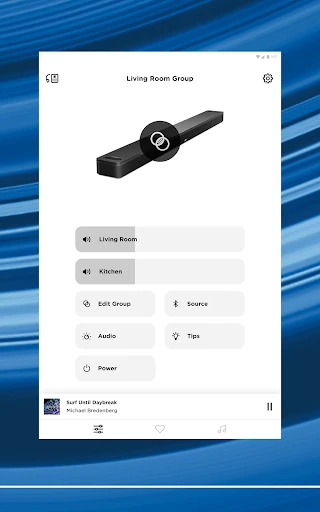
The most useful comparison is with the settings app that comes with a device, rather than with a full music-streaming service. Bose gathers controls for compatible products and can help manage listening around the home, including playing the same content in multiple areas or different content in different areas. If you already have Bose speakers as well as headphones, one place for product controls is a more compelling reason to install it.
I would not treat Bose as a universal audio hub for equipment from every brand, or as a substitute for whichever service supplies your music. Its described role is to control Bose products, personalize supported listening features, and make presets available. If you do not own compatible Bose gear, there is little reason to expect the app to improve an unrelated speaker or to provide a complete listening library of its own.
Small Habits That Help
A simple habit is to adjust the settings that matter for your regular listening instead of reopening the app only when something feels wrong. Bose lets owners of supported products work with EQ settings and choose on-product shortcuts, which can make a preferred setup easier to reach later. I would start with one or two practical changes, such as a comfortable sound balance or a shortcut I actually use, rather than changing everything at once.
For home listening, presets are worth setting up around the stations or playlists you return to most. The app says those favorites can be reached in the app, through speaker buttons, or with a soundbar remote. That gives a routine a useful second step: choose a few reliable favorites once, then use the quickest available control when it is time to listen. These options depend on the compatible Bose product and its supported features.
More From Our News Desk

Zoom Meetings, Google Meet, or Teams: Which Is Easiest to Join?

How I Build a Free Streaming Lineup With Tubi

Why Crunchyroll Is the Default Anime App for So Many Fans

YouTube TV: A Practical Guide to Cutting Cable

Rummikub and the Small Comfort of Phone Games

TeamViewer Remote Control or AnyDesk for Helping Family?
Who Will Get the Most From It
I would recommend Bose to people who own one or more compatible Bose products and want a central place to set them up and adjust how they sound. It is particularly relevant if you use QuietComfort headphones or earbuds and want to manage Modes, noise cancellation, EQ, or supported product shortcuts. Owners of multiple Bose speakers may also appreciate being able to control products around the home and set up listening presets.
It may not suit someone looking for a standalone music player, a way to control another brand’s equipment, or a reason to buy Bose products in the first place. The app’s usefulness is tied to compatible devices, and some features are specific to particular product lines. I would also keep expectations measured: on Google Play it has a 3.5-star rating from around 188,000 ratings, so it is not universally loved.
Bose is developed by Bose Corporation and is available on Google Play. The app is free to download, has no in-app purchases, and contains no ads. Its Google Play content rating is Everyone. It has more than 10 million installs, and its current version is listed as varying with device.
The app was released on September 19, 2018, and its last update is dated October 22, 2026. Google Play shows a 3.5-star rating from around 188,000 ratings. A minimum Android version is not included in the supplied app details, so check the Google Play page for the requirement that applies to your device.
A Closer Look at Bose Controls
Getting Started
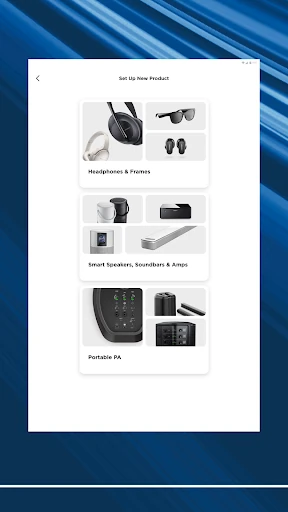
My first impression is that Bose has a clear job: bring control of compatible Bose products together. The description covers speakers, soundbars, amplifiers, headphones, earbuds, OpenAudio products, and portable PA systems. That breadth makes the app potentially useful in a household with more than one type of Bose gear, though it does not mean every feature works on every device.
Setup is presented as a way to get compatible products ready and then move on to listening. For Bluetooth Bose products, nearby-devices access is required so the app can find, connect to, and communicate with them. Location access is not required. Microphone access is optional and is used for CustomTune, so you can decline it if you do not use that feature.
Everyday Listening Controls
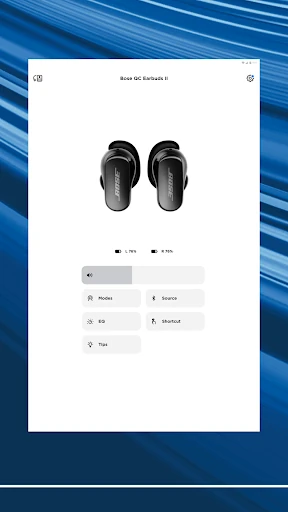
Day to day, the biggest benefit is having relevant product controls close at hand. On supported QuietComfort products, the app lets you work with noise cancellation and choose Modes, including Quiet and Aware. Aware is designed for listening to music while hearing more of the surroundings. Supported products can also offer Aware Mode with ActiveSense, which brings surrounding sounds down to a more comfortable level.
For compatible headphones and earbuds, Bose also describes EQ adjustments and choices for on-product shortcuts. I like the practical emphasis: these are settings that can change how a familiar product fits a particular listening situation. They are not a promise that every Bose owner gets identical options. Product line and feature support matter, so the useful question is what the app offers for the device you actually own.
Features With a Purpose
The app’s most distinctive headphone feature is the ability to choose how much of the outside world you want to hear on supported QuietComfort products. Modes make that choice explicit, while select products add ActiveSense to soften surrounding sounds in Aware Mode. The Ultra line also offers Immersive Audio features through the app. These controls are most meaningful when they address a real listening preference, rather than simply adding another setting to explore.
Home audio is the other strong part of the pitch. Bose says compatible products can play the same content throughout a home or different content in different areas, with control from any room. Presets add a convenient layer: favorite playlists or stations can be assigned for one-touch access in the app, on a speaker, or through a soundbar remote. That can reduce the small friction of repeating the same selection.
A Simple Listening Routine
A practical routine could begin by setting up a supported speaker or pair of headphones, then choosing the sound settings that suit the most common situation. For headphones, that might mean finding a comfortable EQ balance and deciding which Mode makes sense for a commute or a quieter listening session. For home speakers, it could mean choosing a few favorite playlists or stations as presets.
Once those choices are in place, the goal is to use the fastest control available rather than turn every listening session into a settings session. A speaker button or soundbar remote can access presets, while the app remains useful when you want to change product settings or control Bose gear in another room. I would keep the routine modest and revisit preferences when my listening habits change.
Limits to Keep in Mind
The central limitation is compatibility. Bose is meant to control Bose products, and the feature set varies by product. A person with a basic speaker should not assume they will see QuietComfort Modes, Immersive Audio, or every other feature described for headphones and the Ultra line. Before relying on a specific control, it is sensible to check whether the particular Bose model supports it.
The app also has a 3.5-star Google Play rating, which suggests a mixed reception rather than a universally smooth experience. That number does not explain individual frustrations, but it is a useful reason to keep expectations grounded. Bose’s role is product setup and control, not replacing a music service or making non-Bose equipment part of the same system.
Bose makes the most sense as a practical companion for people already invested in compatible Bose audio products. Its strongest ideas are straightforward: adjust supported headphone listening, manage products around the home, and reach favorite content through presets. I appreciate that optional microphone access is limited to CustomTune and that location access is not required.
If you own supported Bose gear, I would try it as the central place to set up and personalize that equipment. If you want a general music app or control for other brands, this is not the right fit. The app’s value depends on your specific device, but for the right Bose setup, its everyday controls have a clear purpose.
Bose Frequently Asked Questions
What is the Bose app used for?
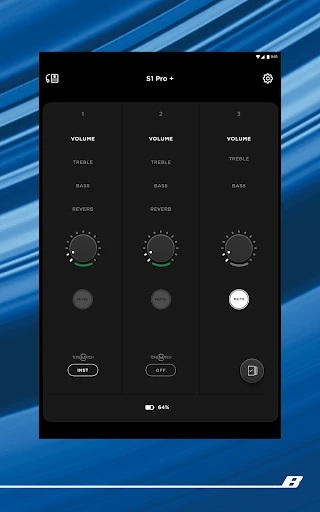
Bose is used to set up and control compatible Bose products, including speakers, soundbars, headphones, earbuds, amplifiers, OpenAudio products, and portable PA systems. Supported features include headphone listening controls, EQ, product shortcuts, home audio control, and presets for favorite playlists or stations. The options available depend on the Bose product you use.
Which devices and platforms support the Bose app?
The supplied store details describe Bose as an Android app on Google Play. It is designed to work with compatible Bose audio products, including Bluetooth products that the app can find and connect to using nearby-devices access. Check Google Play and your product information for current device compatibility and requirements.
What Android version does the Bose app require?
The minimum Android version can vary and is worth checking on the Bose Google Play page before installing. The app’s version is also described as varying with device. For Bluetooth Bose products, nearby-devices permission is required for finding and communicating with supported products.
Does the Bose app cost anything?
Bose is free to download on Google Play. The supplied app details say it has no in-app purchases and contains no ads. Product compatibility still matters: the app’s controls are intended for compatible Bose equipment, and particular features may be available only on supported products.
Is the Bose app worth trying for me?
I would try it if you own compatible Bose headphones, earbuds, speakers, or other supported products and want their setup and controls in one place. It is less suited to someone seeking a general music player or controls for other brands. Google Play shows a 3.5-star rating from around 188,000 ratings, so experiences are mixed.
Pros
- Brings controls for compatible Bose products together in one app.
- Offers supported QuietComfort Modes, EQ adjustments, and on-product shortcut choices.
- Home audio presets can be reached through the app or supported product controls.
- Free to download, with no ads or in-app purchases.
Cons
- Its usefulness depends on owning compatible Bose products.
- Available controls and listening features vary by product.
- Google Play ratings are mixed, at 3.5 stars.
- Category
- Music & Audio