Bluetooth File Transfer
- 230.32K
- 3.7
- Installs
- 10.00M
- Price
- Free
Screenshots
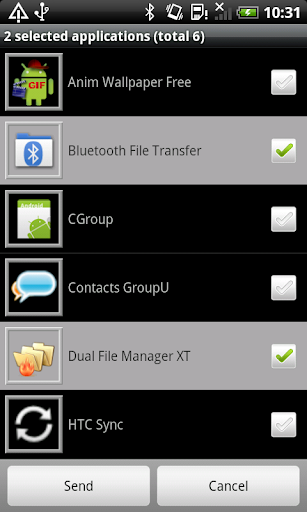
Analysis by Reviewed APKs
Bluetooth File Transfer is an Android file manager built around exchanging files with nearby Bluetooth devices. I found its appeal less in a polished, one-tap sharing flow and more in having browsing, file management, and Bluetooth transfer tools together. It suits people who regularly move files between compatible devices and are comfortable exploring a feature-rich utility, though casual users may find its breadth more than they need.
A Nearby File Handoff
Imagine you have a photo or document on your phone and want to pass it to a nearby Bluetooth-ready device. Bluetooth File Transfer lets you browse files on your phone, connect with another device using Bluetooth file-transfer profiles, and send items. It can also receive files, so the exchange does not have to be one-way. I like that the app brings both sides of that basic job into one utility rather than treating sending as its only purpose.
The app reaches beyond individual files. Its integrated explorer supports selecting multiple items, then cutting, copying, moving, pasting, or deleting them. You can also share a single file or an entire path, and send contacts as vCard files. When I think about using it in an everyday routine, the useful part is having these actions close at hand while I am already browsing, rather than switching among separate file tools for every small task.
More Than a Share Button
The obvious alternative for a quick handoff is a simpler sharing tool, but Bluetooth File Transfer is better understood as a file manager with Bluetooth support. It can browse and manage files on the phone as well as work with another Bluetooth device. That broader approach is useful if you want to inspect folders, select several items, or handle archives along the way. It is not just a minimal screen for sending one photo and closing the app.
That breadth also means it is not the right fit for every kind of sharing. The app’s described transfer methods are Bluetooth File Transfer Profile and Object Push Profile, not a general cloud service or a cable-based transfer tool. I would not choose it expecting a streamlined, modern handoff flow for every device or a substitute for online storage. Its strength is a set of local file and Bluetooth utilities, with more options to learn than a basic share button.
Small Habits That Help
A little preparation can make a file session less fiddly. I would use the app’s bookmarks for folders I return to often, sort files before selecting a batch, and use multiselect when several items need the same action. The home-folder option and desktop-folder shortcuts can also help keep familiar locations close. These are modest conveniences, but they matter when a utility has many functions and you are trying to complete a quick task.
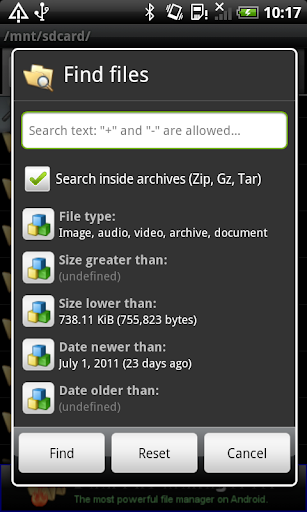
For less routine jobs, I would check what the app can do before reaching for another tool. It can search within ZIP, GZ, and TAR archives, create or extract ZIP, GZip, and TAR files, and test archive integrity. It can also calculate MD5 and CRC32 values. I would treat those as useful options for occasional file housekeeping, rather than assuming every transfer requires extra checks or compression.
More From Our News Desk

Zoom Meetings, Google Meet, or Teams: Which Is Easiest to Join?

How I Build a Free Streaming Lineup With Tubi

Why Crunchyroll Is the Default Anime App for So Many Fans

YouTube TV: A Practical Guide to Cutting Cable

Rummikub and the Small Comfort of Phone Games

TeamViewer Remote Control or AnyDesk for Helping Family?
Who May Find It Useful
I would recommend Bluetooth File Transfer to Android users who often move files over Bluetooth and want a capable explorer alongside the transfer tools. It is especially appealing if you like choosing exactly what to send, work with multiple files, or sometimes handle compressed archives and contacts. The range of functions makes it more versatile than a single-purpose sender, and the app does not require root access according to its description.
I would hesitate to recommend it to someone who wants the simplest possible sharing experience or rarely manages files beyond tapping Share. The interface is described as customizable, including expert-oriented options, and the available tools may take time to sort through. Bluetooth also needs a compatible receiving device and a suitable connection. If your main need is cloud access or a universal cross-platform transfer service, this app is not presented as that kind of product.
Bluetooth File Transfer is developed by Medieval Software and is a free Android app in the Communication category. Google Play shows over 10 million installs and a 3.7-star rating from about 230,000 ratings. The app contains ads, and its description says advertising can be removed by purchasing Medieval Licensing System. The current version shown is 5.67.
The content rating is Everyone, and the recorded last update is October 11, 2023. The supplied app information does not include an Android minimum requirement or an original release date, so check Google Play for current device compatibility details. The app description identifies Bluetooth File Transfer Profile and Object Push Profile as its transfer methods and says root access is not required.
A Closer Look at Bluetooth File Transfer
Opening the Toolbox
My first impression is that this is a utility meant to do more than one job. The description brings together a file explorer, Bluetooth connections, archive tools, contact sending, and customization. That can be reassuring if you want a single place for file chores, but it also sets an expectation: this is not a tiny, single-purpose app. I would approach it as a toolbox and learn the parts I actually need.
Getting started is most straightforward when I have a clear task in mind, such as browsing a folder or preparing a file to send. The app supports browsing and managing files on a Bluetooth-ready device, and incoming connections can be limited through a security manager that allows the user to accept or refuse. That makes the connection decision part of the process, rather than something I would treat as invisible background activity.
Everyday File Handling
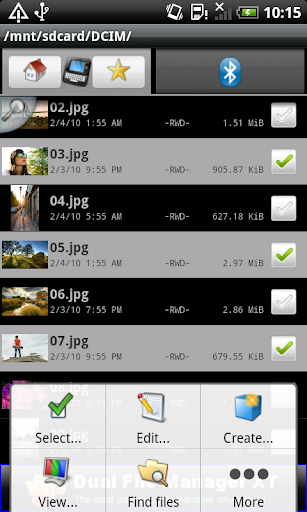
The integrated explorer is central to the app’s day-to-day value. It supports multiselect and familiar actions such as cut, copy, move, paste, and delete. I can see the benefit when cleaning up a folder before sending anything: select a group, organize it, then share a file or path. The app also offers sorting and an option to open files in different ways, which gives the explorer a practical role beyond locating transfer items.
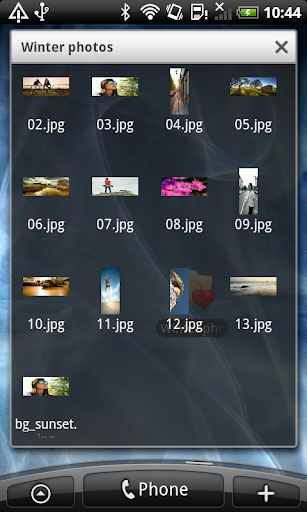
Browsing is supported by thumbnails for APKs, audio, video, and image files, including items inside ZIP, GZip, and TAR archives. The description says thumbnail images are not stored in phone memory. Search can also look inside those archive formats, though advanced archive searching can take twice as long. I appreciate that the app covers these less common file tasks, while keeping in mind that a deeper search may require patience.
Standout Utility Features
Bluetooth exchange is the defining feature, with support for File Transfer Profile and Object Push Profile. The app can send contacts as vCard files, and its contact-sending screen supports groups and manipulation of telephone numbers in generated vCards. If I need to pass a contact rather than a document, that dedicated function gives the app a use beyond ordinary folder browsing.
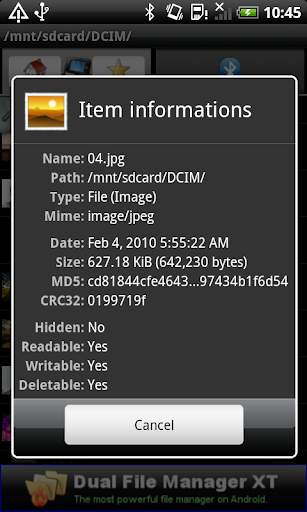
Archive support is another notable part of the package. I can use the app to compress, uncompress, and extract ZIP, GZip, and TAR files, and password-protect ZIP files using supported encryption options. It also offers archive-integrity testing, plus MD5 and CRC32 calculations. These are specialized tools, not necessities for every person, but their presence can reduce the number of separate utilities needed for occasional file work.
There are smaller touches for different preferences and workflows: bookmarks with sorting, a home folder, desktop-folder shortcuts, hidden-media controls, and a customizable file viewer. The app also describes a power-saving management option and streaming service. I would not expect every user to need these, but they help explain why the product feels like a broad file utility rather than a Bluetooth-only transfer screen.
A Practical Transfer Routine
For a planned handoff, I would first use the explorer to find the relevant folder and sort or select the items I want. If there are several, multiselect can avoid repeating the same selection process item by item. From there, I can share a file or a path and use Bluetooth to connect with the intended device. The app’s ability to receive files makes it useful when the other person is sending something back, too.
If the task involves private files, I would pay attention to the connection prompt and the app’s security controls. The description says the security manager allows authorized devices to connect if accepted, and a refused request receives no access to the app’s servers. Enhanced Bluetooth server security is disabled by default, so I would review those settings rather than assume they are already configured the way I want.
After a transfer, I might use the same session to tidy the source folder, move items, or create an archive for later handling. Bookmarks can make repeat locations easier to reach, while archive search and integrity checks can help with files that need extra inspection. This is a sensible routine for someone who already spends time managing local files; it would be unnecessary ceremony for an occasional single-photo exchange.
Limits to Keep in Mind
The biggest limitation is that the app’s central exchange method is Bluetooth. It is useful when the other device supports the relevant Bluetooth profiles, but it is not described as a cloud storage or internet-based sharing service. Compatibility and connection behavior can depend on the devices involved, so I would not assume every phone, computer, or accessory will offer the same experience.
The number of tools may also be a drawback. File operations, archives, contact handling, security options, customization, and Bluetooth functions give the app range, but a new user may need time to find a comfortable workflow. Some customization is explicitly aimed at expert users. If all you want is a clean, guided transfer of one item, the extra options may feel like clutter rather than an advantage.
Finally, the app contains ads, and its recorded last update is October 11, 2023. Its Google Play rating is 3.7 stars, which gives prospective users a useful point of context, though ratings do not tell me whether it fits a particular device or routine. I would check the current store details and compatibility before relying on it for an important exchange.
Bluetooth File Transfer makes the most sense as a capable Android file utility with Bluetooth exchange at its center. I like the combination of browsing, batch file operations, contact sending, and archive tools. The trade-off is a busier experience than a straightforward sharing app, along with a workflow tied to Bluetooth-compatible devices.
I would try it if I regularly move local files over Bluetooth and want extra control over folders and archives. For occasional, effortless sharing, I would look for something simpler. Its 10 million-plus installs show a sizable audience, but the 3.7-star rating and ad-supported model are worth weighing against the practical feature set.
Bluetooth File Transfer Frequently Asked Questions
What is Bluetooth File Transfer used for?
Bluetooth File Transfer is an Android app for browsing and managing files on Bluetooth-ready devices and exchanging files using Bluetooth File Transfer Profile and Object Push Profile. It can send and receive files, send contacts as vCards, and handle file tasks such as archive compression and extraction. Its explorer also supports selecting and managing multiple items.
Which devices can use Bluetooth File Transfer?
Bluetooth File Transfer is an Android app, and its described functions depend on Bluetooth-ready devices that support compatible transfer profiles. The supplied details do not give a minimum Android version, so check the Google Play page for current device requirements and compatibility. The app description says root access is not required.
Does Bluetooth File Transfer cost anything?
The app is free to install and contains ads. Its description says users can remove advertising by purchasing Medieval Licensing System. The supplied information does not give a price for that purchase, and store details can change, so check Google Play for the current cost and purchase information.
What Android version does Bluetooth File Transfer require?
The minimum Android version is not included in the available app details. Bluetooth File Transfer is listed as an Android app, but requirements can depend on the current release and device. Check its Google Play page before installing to see whether your phone or tablet is supported.
Who should use Bluetooth File Transfer?
It may suit Android users who regularly exchange files over Bluetooth and want a file manager with batch operations, contact sending, and archive tools. People who prefer a very simple sharing screen may find its range of options more than they need. It is not described as cloud storage or a general online transfer service.
Pros
- Combines Bluetooth transfers with an integrated file explorer and multi-item file operations.
- Includes contact sharing, archive handling, and search inside supported archives.
- Offers bookmarks, sorting, customizable viewing, and hidden-media controls.
- Does not require root access, according to the app description.
Cons
- The broad feature set may take time to learn and navigate.
- Bluetooth exchanges depend on compatible devices and supported transfer profiles.
- Contains ads, and the recorded last update is October 2023.
- Category
- Communication
- Version
- 5.67











