Blackboard
- 104.50K
- 3.2
- Installs
- 10.00M
- Price
- Free

Screenshots
Analysis by Reviewed APKs
Blackboard is a mobile companion for students and instructors whose school or college uses Blackboard to run courses. It brings course updates, assignments, tests, grades, teaching materials and communication tools together on a phone or tablet. After looking at what it offers, I see its main value as practical access between classes, not a replacement for a full learning platform. Its usefulness depends on how an institution has configured Blackboard.
Between Classes, Stay Informed
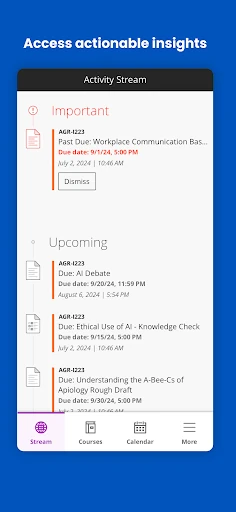
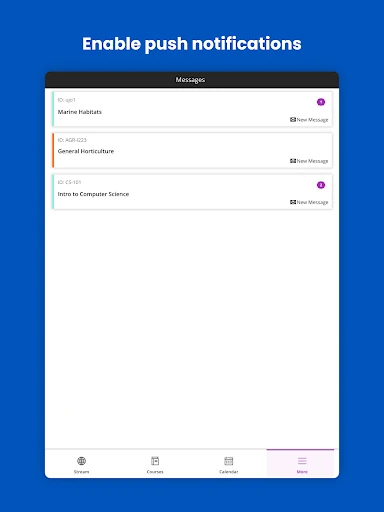
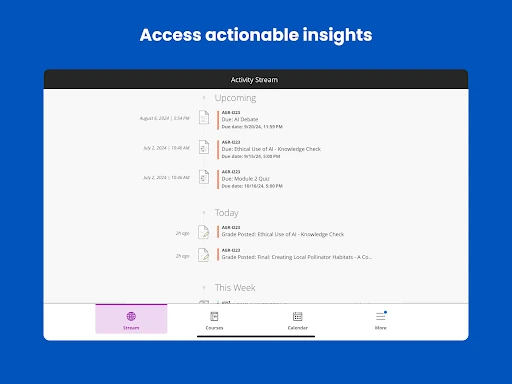
Picture checking your phone between lectures to see whether a course announcement has changed the plan for the week. Blackboard is designed for that kind of quick check: students can view course updates and receive alerts about due dates and announcements. Instead of waiting until you are back at a computer, you can keep an eye on what is happening across your courses while moving through an ordinary day.
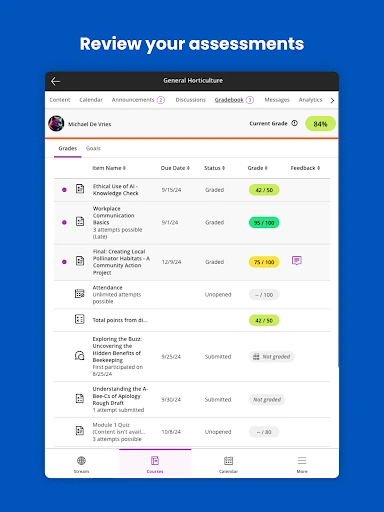
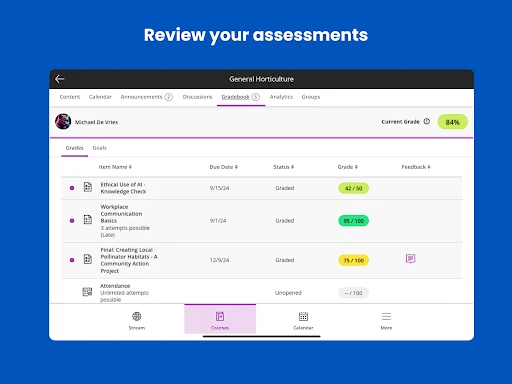
When an assignment is on your mind, the app also gives students ways to work with coursework, submit assignments, take tests and track progress. Grades for courses, assignments and tests are available, too. I like that this puts several useful student tasks in one place. The practical benefit is less about studying entirely on a phone and more about being able to check a detail or handle a task when a computer is not nearby.
A Companion, Not a Classroom
Blackboard makes the most sense when your institution already uses its Blackboard platform. It connects to that institution’s server, so the app is a mobile route into existing courses rather than a standalone place to find classes. Students can use it for updates, coursework and grades; instructors can work with materials, assessments, announcements, discussions and grading. That shared course setting is what separates it from a general notes app or a simple calendar.
I would not treat Blackboard as a universal study planner or assume every course will offer every tool in the app. Your institution’s settings and software updates affect what is available. It is also not a substitute for the course itself: the app supports learning and teaching activity, but its purpose is to connect people with courses their institution has set up. If your school does not use Blackboard, this app is unlikely to be useful.
Make Course Checks a Habit
A simple habit is to check course updates at a regular point in your day, such as before leaving campus or when you sit down to plan the evening. Blackboard’s course notices and due-date alerts can help surface changes, while the grade and progress views give students another reason to check in. I would use those quick visits to stay oriented, then set aside focused time for the actual work.
Instructors have a different routine to build. The app supports uploading and organizing course materials and assessments, setting custom alerts for items such as submissions ready for grading, and responding to students. It also offers announcements and discussion management. A useful approach is to handle small course interactions on a phone, while remembering that the precise tools depend on the institution’s setup.
More From Our News Desk

Zoom Meetings, Google Meet, or Teams: Which Is Easiest to Join?

How I Build a Free Streaming Lineup With Tubi

Why Crunchyroll Is the Default Anime App for So Many Fans

YouTube TV: A Practical Guide to Cutting Cable

Rummikub and the Small Comfort of Phone Games

TeamViewer Remote Control or AnyDesk for Helping Family?
Who Will Find It Useful
I would recommend Blackboard to students who already rely on a school’s Blackboard courses and want a convenient way to check notices, deadlines, coursework and grades while away from a computer. It can also suit instructors who need mobile access to course materials, student interactions and grading tasks. The strongest fit is someone who wants a companion to an existing course routine, rather than a new platform to organize every part of life.
It may be a poor fit for people whose institution does not use Blackboard, or for anyone expecting the same tools in every course. The app’s role is tied to the institution’s Blackboard server and settings, so the experience can differ from one school to another. Students who prefer doing substantial coursework on a larger screen may still find the mobile app useful for checks and updates, without making it their main workspace.
Blackboard is an Education app from Blackboard T&L, LLC. Google Play shows more than 10 million installs and a 3.2-star rating from about 105,000 ratings. It is free to download, with no in-app purchases or ads indicated in the supplied app facts. Its content rating is Everyone, making that the store’s stated age classification.
The supplied app facts give version 11.8.0, a release date of January 15, 2015, and a last update date of October 22, 2026. The minimum Android version is not included in those facts, so check Google Play for the requirement that applies to your device. Access to course tools also depends on the institution’s Blackboard server and settings.
A Closer Look at Blackboard on Mobile
Getting Into Your Courses
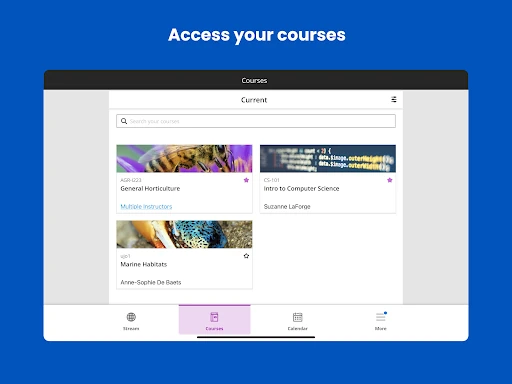
My first impression of Blackboard is that its purpose is clear: connect a student or instructor with courses already hosted by their institution. That context matters before you even consider the individual tools. This is not an app that creates a learning space by itself; it works in conjunction with the institution’s Blackboard server, and the available experience follows the way that institution has configured its platform.
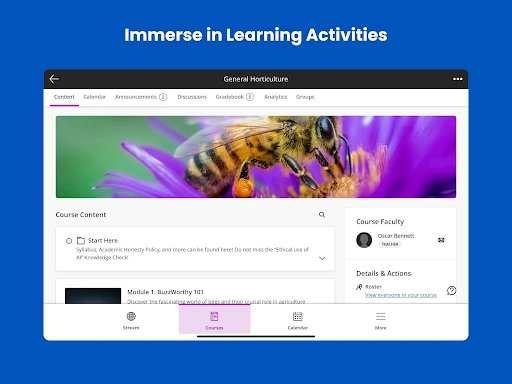
Once you have access to the relevant courses, the appeal is having essential course activity within reach on a phone or tablet. Students can check changes and updates, while instructors can access course-management and engagement tools. I would start by seeing which of those functions are available for my courses, rather than expecting a uniform set of options across every class.
The Everyday Course Check
For students, the day-to-day job is a mix of staying informed and handling course tasks. Blackboard can show updates and changes, provide alerts about due dates and announcements, and offer access to coursework, tests and progress. Grades for courses, assignments and tests are part of the experience as well. That combination makes it useful for short visits throughout the day, especially when a class schedule or task needs a quick check.
I would use the app as a way to keep course details from slipping out of view, not as a promise that every part of studying will feel effortless on a small screen. Its supported tasks are practical, but the exact access varies with institutional settings and software updates. A quick look at a course can help me stay oriented; the app’s value still rests on the course information and tools my institution provides.
Tools for Both Sides
Blackboard serves instructors as well as students, which gives it a broader role than a student-only grade checker. Instructors can upload and organize course materials and assessments, set custom alerts for events such as submissions ready for grading, and grade assignments with feedback from a phone or tablet. The app also supports sending announcements and creating or managing discussion threads.
That range is useful because course work involves more than handing in assignments. Instructors can interact with student comments, while students can use the app to follow updates and coursework. I appreciate that both sides of a course have a place here. Still, the description points to tools that institutions can configure differently, so the actual mix of features is tied to the local Blackboard setup.
A Practical Weekly Routine
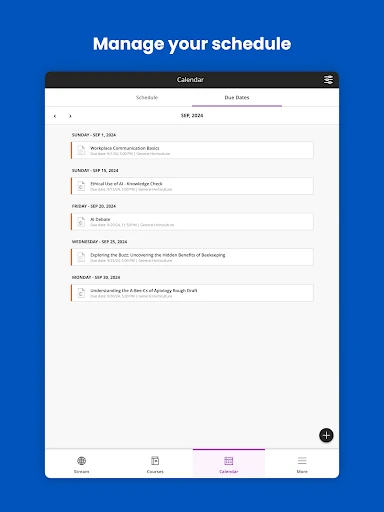
A student could make Blackboard part of a weekly planning routine by checking course updates and due-date alerts before deciding what needs attention. From there, the app provides ways to complete and submit assignments, take tests, track progress and check grades. I would use it to notice what is coming up and to deal with suitable tasks when convenient, rather than relying on memory or waiting for a desktop session.
An instructor’s routine might center on course communication and assessment work. The app supports organizing materials, managing assessments, responding to student comments and handling grading or feedback from a phone or tablet. Custom alerts can help draw attention to events such as work ready for grading. These are useful ways to stay connected to a course, though the available tools depend on the institution’s Blackboard settings.
Keep Its Limits in View
The most important limitation is also the app’s defining condition: it depends on an institution’s Blackboard server. Someone without access to a school or college using Blackboard will not get the intended course experience. Even for users with access, features can vary with institutional settings and software updates, so it is sensible to check which tools are available in each course rather than assuming every class works alike.
There is also a difference between mobile access and a complete replacement for every study or teaching workflow. Blackboard supports specific course tasks, from student submissions and grades to instructor materials, grading and discussions. Whether those tasks are comfortable on a phone depends on the person and the work involved. I would treat it as a useful companion for course activity, while keeping expectations tied to its institutional role.
Blackboard’s strength is its connection to existing courses: it brings updates, coursework, grades and instructor tools within reach on a mobile device. It is not a one-size-fits-all learning app, and the institution’s setup shapes what you can do. For people already using Blackboard through school, that focused role can make everyday course checks more convenient.
I would recommend trying it if your institution uses Blackboard and you want mobile access to course activity. Students and instructors both have supported tools, but the available features can differ. If you are looking for a standalone study platform, Blackboard is not aimed at that job.
Blackboard Frequently Asked Questions
What is the Blackboard app used for?
Blackboard connects students and instructors with courses on an institution’s Blackboard platform. Students can check updates, alerts, coursework, tests, progress and grades. Instructors can work with course materials and assessments, grade assignments, send announcements and manage discussions. The app’s available tools depend on the institution’s settings and software updates.
Can I use Blackboard on my phone or tablet?
The app is intended for mobile use and supports course activity on a phone or tablet. The supplied facts identify it as an Android app available through Google Play. Access depends on your institution’s Blackboard server and course setup. Check Google Play for current device compatibility and the Android version requirement that applies to your device.
What Android version does Blackboard require?
The Android version requirement can vary with the current app release and your device. Check the Blackboard page on Google Play for the requirement that applies before installing or updating. Even with a compatible device, the courses and features you can access depend on your institution’s Blackboard server and settings.
Does Blackboard cost money or include purchases?
The supplied Google Play facts describe Blackboard as free to download, with no in-app purchases or ads indicated. Store details can change, so it is worth checking the current Google Play information for the latest terms. Separately, using the app requires access to an institution’s Blackboard platform and courses.
Is Blackboard useful for every student or instructor?
It is most useful for students and instructors whose institution uses Blackboard and provides access to its courses. Students can follow course activity and handle supported tasks; instructors have tools for materials, grading and engagement. It may not suit someone looking for a standalone learning platform, and features vary by institution.
Pros
- Brings course updates, due-date alerts and grades into a mobile companion.
- Supports student coursework and instructor grading, materials and course discussions.
- Free to download, with no in-app purchases or ads indicated in the supplied facts.
- Serves both students and instructors using an institution’s Blackboard platform.
Cons
- Requires access to an institution’s Blackboard server to provide its intended course tools.
- Available features can vary with institutional settings and software updates.
- A mobile companion may not suit every substantial study or teaching task.
- Category
- Education
- Version
- 11.8.0











