Birdfy
- 3.89K
- 4.1
- Installs
- —
- Price
- Free

Screenshots
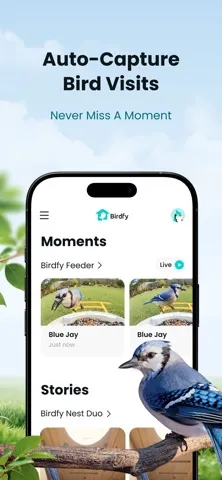
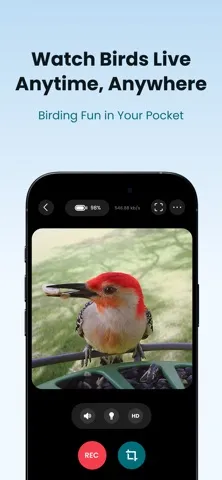
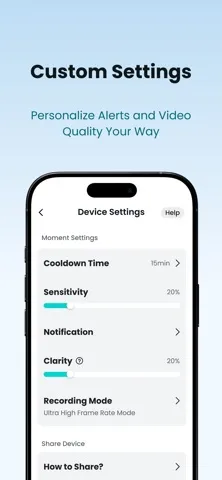
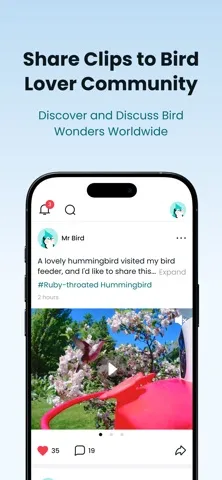
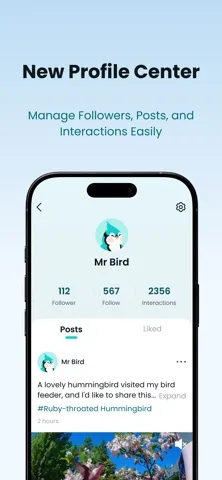
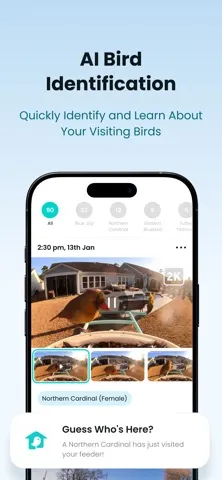
Analysis by Reviewed APKs
Birdfy is a companion app for viewing and organizing footage from a compatible birdwatching device. It suits people who enjoy seeing which birds visit their yard but can’t keep watch all day. After spending time with its mix of live viewing, automatically captured clips, and species-based browsing, I see it as a practical way to make backyard observations easier to revisit, rather than a substitute for watching in person.
A Window on the Yard
Imagine checking the yard between meetings or while making breakfast. With a Birdfy device in place, I can open the app to see its live feed and check whether anything is visiting. If a bird or another creature triggers a recording, the app keeps a short clip to watch later. That turns a quick glance at my phone into a small record of what has been happening outside.
The appeal is in catching the moments I would otherwise miss. I might see a visitor live, then return later to watch a saved clip more closely. The app also lets me organize clips by species, using recognition results or my own selection. I found that combination more useful than a stream alone: it gives casual checks a second life as observations I can browse when I have a spare minute.
More Than a Live Feed
Birdfy sits somewhere between a live camera viewer and a personal wildlife clip library. A basic camera feed can show what is happening right now; Birdfy adds automatic short recordings, species-based organization, and a community stream where people share observations. For someone who already enjoys backyard birdwatching, those features make it easier to revisit visits instead of relying on memory.
It is not a general nature guide or a replacement for a dedicated camera device: the app’s described job is to work with footage from a Birdfy device. Nor is it mainly a social network, even though sharing and browsing other users’ clips are available. I’d approach it as a companion for observing and organizing visits, with optional cloud services for people who want more analysis and storage.
Make Clips Easier to Find
A small habit that helps is checking saved clips at a regular time, rather than opening the app only when I happen to remember. I can browse what the device captured, then sort videos by species recognition or make my own selections. That gives the collection some order and makes it easier to find a particular visitor later without scrolling through every recording.
If I want a broader view, the community area offers another way to browse: I can explore shared observations and browse by bird species. Birdhouse-device owners also have a distinct nesting and hatching timeline feature, which organizes stages from nest building through fledging. Optional cloud services add daily highlights, monthly or annual recaps, and visit data, so the best routine depends on how much history I want to keep.
More From Our News Desk

Zoom Meetings, Google Meet, or Teams: Which Is Easiest to Join?

How I Build a Free Streaming Lineup With Tubi

Why Crunchyroll Is the Default Anime App for So Many Fans

YouTube TV: A Practical Guide to Cutting Cable

Rummikub and the Small Comfort of Phone Games

TeamViewer Remote Control or AnyDesk for Helping Family?
Who Will Enjoy Birdfy
I’d recommend Birdfy to people who already have, or are considering, a Birdfy device and like checking in on backyard wildlife. It’s particularly appealing if you enjoy saving short clips, sorting observations by species, or sharing what you’ve seen. The live feed gives you a way to look in from elsewhere, while automatic recording means you don’t have to be watching when a visitor arrives.
It may be less satisfying for someone who wants a standalone bird identification guide or has no Birdfy device to connect with. People who prefer a simple live view may not need the added collection and cloud options, while users wanting longer recordings or more storage should note that those are tied to paid cloud services. I see it as a focused hobby companion, not an essential app for every nature fan.
Birdfy is published by NETVUE, INC. for iOS and is available on the Apple App Store. The store shows a 4.1 rating from 3,891 ratings, and the app is marked for ages 4+. Its current version is 1.24.3. The release date shown is September 21, 2023, and the most recent update date provided is November 3, 2026.
The app is free to download. Its description identifies optional paid cloud services, including AI recognition, MVR recording, and additional collection storage; specific prices are worth checking in the App Store. Birdfy requires iOS 15.5 or later. Install counts and ad details are not included in the available store figures.
A More Organized Backyard Watch
A Clear Starting Point
When I first opened Birdfy, its purpose was easy to grasp: view a device’s feed, revisit captured moments, and explore bird observations. That focus helps keep the app approachable for someone who mainly wants to see what has been visiting. I didn’t have to think of it as a complicated wildlife database; the central experience is watching and managing footage.
The app’s value depends on having a Birdfy device supplying the footage. Once that is part of the picture, the main ideas make sense: live viewing when I’m curious, automatically saved clips when I’m away, and a collection to browse afterward. The available description doesn’t lay out a detailed setup walkthrough, so I’m keeping my expectations to those core functions rather than assuming a particular pairing process.
A Useful Daily Check
Day to day, the live stream is the quickest way to see what is happening. I can check in from wherever I am, then watch short recordings later if a bird or other animal has triggered one. That split between live viewing and saved moments suits an uneven hobby: some days I have time to watch, and other days I only want to catch up.
I like that the saved footage is meant to be browsed inside the app, rather than treated as a one-time alert. Sorting clips by species recognition or manual selection gives the collection a practical structure. It also makes a short idle moment—waiting for coffee, for instance—a reasonable time to look back at visits instead of setting aside a formal birdwatching session.
Features With a Purpose
Automatic moment capture is the feature that most changes how I’d use Birdfy. The device records short clips when it detects birds or other creatures, so I don’t need to operate it manually for each visit. Species-based organization adds another layer: I can browse using recognition results or choose categories myself, which gives me some control over how the footage is arranged.
For owners of Birdhouse devices, Birdfy can organize nesting and hatching activity by stages, from nest building and egg laying through hatching and fledging. It presents those stages on a timeline and generates a combined video of the process. That’s a more specialized use than checking ordinary feeder visits, but it gives birdhouse footage a clear way to follow a longer story.
A Simple Review Routine
A routine I’d use is to check the live feed when I have a moment, then review the saved clips once a day or every few days. I can sort the collection by species and select clips manually where I want a different arrangement. That keeps casual observations from becoming a pile of videos I never revisit, without turning the hobby into another demanding schedule.
The community stream can add variety when I want to browse beyond my own device’s visitors. I can explore other users’ shared content and browse by bird species. If I’m more interested in a long-term picture, optional AI cloud features include daily highlights, monthly and annual recap videos, and reports on visit times, frequency, and species. Those are extras, not a requirement for the basic viewing routine.
Keep the Trade-Offs in View
Birdfy’s main limitation is also part of its focus: it is built around footage from a Birdfy device, rather than being a general-purpose birdwatching app. If I don’t have that device, the app’s live feed and automatic recordings have little to work with. The description does not position it as an identification guide that can identify birds independently of device footage.
The cloud options also create a choice between standard limits and additional paid services. Standard moment recordings are 20 seconds, while subscribing provides longer recordings of 30 seconds or more and longer preservation. Standard collection storage is 5GB; subscribing raises it to 20GB or more. Those differences matter if I plan to keep lots of clips, so I’d check current App Store details before relying on a particular plan.
Birdfy makes the most sense as a companion to a backyard camera: it lets me check in live, keep automatically captured moments, and make a growing collection easier to browse. The species sorting and, for birdhouse devices, nesting timeline give it more purpose than a bare feed viewer. Optional cloud tools extend that experience, though they bring paid-service trade-offs.
I’d recommend it to Birdfy device owners who enjoy revisiting wildlife visits and want a more organized record of them. If I only wanted a general bird guide, or had no compatible device, I’d look elsewhere. For the right setup, Birdfy offers a straightforward way to bring the yard’s visitors into a daily phone routine.
Birdfy Frequently Asked Questions
What is the Birdfy app used for?
Birdfy is used with a Birdfy device to view its live feed and watch automatically recorded clips of birds or other animals. It can organize videos by species, support sharing and browsing community observations, and track nesting stages for Birdhouse devices. Optional paid cloud services add features such as AI recognition, highlights, visit data, and more storage.
Which devices can run Birdfy?
Birdfy is an iOS app available through the Apple App Store and requires iOS 15.5 or later. The available platform details are for iOS rather than Android, so I’d check the App Store page for current compatibility with a particular device. The app is described as a companion to a Birdfy device.
Does Birdfy cost money?
Birdfy is free to download, and its description includes optional paid cloud services. Those services cover additional capabilities such as AI recognition, longer moment recordings, and more collection storage. Specific subscription prices can vary, so I’d check the current App Store information before choosing a cloud option.
Does Birdfy need a Birdfy camera?
The app’s live feed and automatic clips are based on footage from a Birdfy device, so it is intended as a companion rather than a standalone camera or general bird guide. If you are deciding whether a particular device works with the app, check the current App Store details and the relevant device information.
Who is Birdfy best suited to?
Birdfy is best suited to people who enjoy backyard wildlife and want to view, save, and organize visits captured by a Birdfy device. Birdhouse owners may also appreciate the nesting timeline. It may not suit someone looking only for a general bird identification guide or someone without a Birdfy device.
Pros
- Live viewing and automatic clips make it easier to catch visits while away.
- Species-based sorting helps make a growing video collection easier to browse.
- Birdhouse devices can track nesting stages on a timeline.
- Optional cloud tools add highlights, visit reports, and expanded storage.
Cons
- The core live-viewing and recording experience depends on a Birdfy device.
- Longer recordings and expanded collection storage require paid cloud services.
- Standard moment recordings are 20 seconds, which may feel brief for some visits.
- Category
- Tools
- Version
- 1.24.3











