Best Ringtones 2026 for iPhone
- 24.32K
- 4.6
- Installs
- —
- Price
- Free
Screenshots
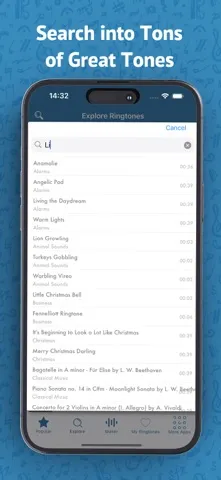
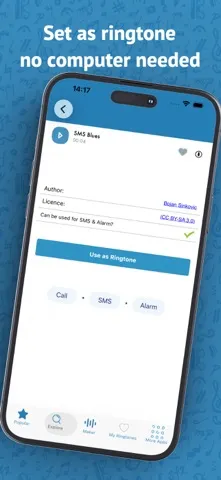
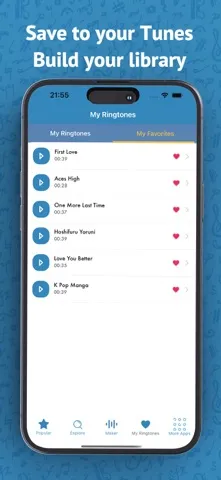
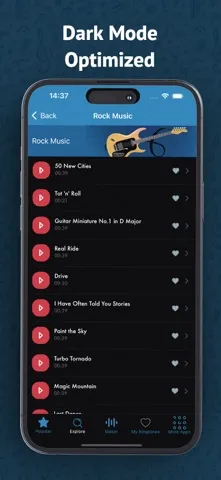
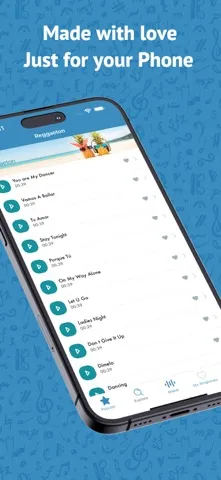
Analysis by Reviewed APKs
Best Ringtones 2026 for iPhone is a ringtone library and simple tone-making tool for people who want their phone to sound a little less like everyone else’s. I like that it pairs ready-made sounds with trimming tools for personal audio, rather than making me choose between browsing and creating. It is focused and practical, though its appeal depends on how much you care about customizing call and alarm sounds.
A More Personal Ring
When I first opened Best Ringtones 2026 for iPhone, I pictured the familiar moment when a phone rings in a crowded room and three people reach for theirs. A distinctive sound can make that small interruption less confusing. I could browse for a tone that suits a particular mood, whether that means a lively music style, a comic sound, or something calmer for a quieter day.
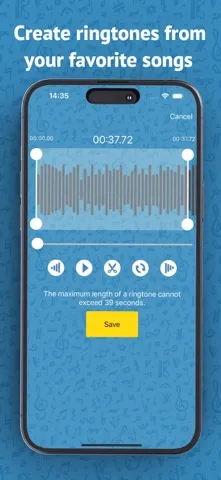
The other useful scenario is wanting a short piece of a song or video rather than a ready-made ringtone. The app describes a workflow for importing audio from the iTunes music library or Files, trimming the portion I want, and adding fade-in or fade-out effects. That makes the app more than a catalog: it can also help turn a familiar clip into a more personal sound.
A Focused Alternative
The obvious alternative is to keep using the iPhone’s existing sounds and avoid spending time choosing anything. That is perfectly reasonable if a default tone does the job. Best Ringtones 2026 for iPhone is for people who enjoy browsing options or want to shape a sound themselves. Its library spans styles and moods, while its editing tools give audio already on the phone another possible use.
I would not approach it as a general music player, a full audio production studio, or a tool for managing every part of an iPhone. The described job is narrower: find a ringtone or make a custom one, then use it to personalize moments such as calls or alarms. That focus is helpful, but people who rarely notice their ringtone may not get much out of another customization app.
Small Ways to Make It Useful
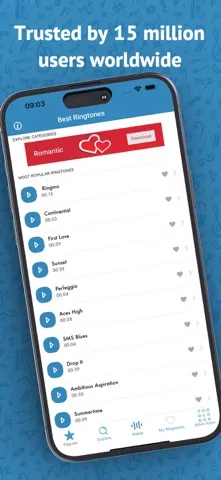
I’d get more from the app by deciding what I want before opening the library. If I need a tone for work, I can look for something distinct but not overly distracting; if I want a sound for personal calls, a playful or familiar clip may fit better. The available categories make browsing by style or mood a natural starting point instead of listening to sounds at random.
For a custom tone, a little restraint helps. I would pick a short section with a clear beginning, trim it carefully, then consider whether a fade makes the clip feel smoother. Saving finished creations in the app’s private collection could make it easier to return to them later. The app also describes requesting a missing ringtone, which gives me another route when browsing does not turn up the sound I had in mind.
More From Our News Desk

Zoom Meetings, Google Meet, or Teams: Which Is Easiest to Join?

How I Build a Free Streaming Lineup With Tubi

Why Crunchyroll Is the Default Anime App for So Many Fans

YouTube TV: A Practical Guide to Cutting Cable

Rummikub and the Small Comfort of Phone Games

TeamViewer Remote Control or AnyDesk for Helping Family?
Who Might Enjoy It
I’d recommend Best Ringtones 2026 for iPhone to anyone who likes giving calls, alarms, or contacts a more individual sound. It should especially appeal to people who already have audio in their iTunes music library or Files and want to select a short section for a custom tone. The mix of ready-made categories and basic editing makes sense for casual personalization, without requiring an interest in complex audio tools.
It may not suit someone who is happy with the iPhone’s standard sounds or rarely uses audible alerts. The app is also a poor match if what you really want is a full music library or a comprehensive sound editor; its described purpose is ringtone selection and creation. Since the experience is built for iPhone, it is not the choice for someone looking for an Android version.
Best Ringtones 2026 for iPhone is an iOS Music & Audio app by Fabien Maurice. On the App Store, it has a 4.6 rating from 24,322 ratings and a 4+ age rating. It is free to download. The App Store version is 3.3.7, and the app’s release date is March 30, 2019.
The stated minimum requirement is iOS 15.0. Its most recent update date is October 8, 2026. The available store details do not provide an install count, and pricing or other store details can change, so it is worth checking the App Store before downloading.
Making Your iPhone Sound More Like Yours
First Look and Setup
My first impression is that this app has a clear, everyday purpose: browse sounds or bring in audio to make a ringtone. That is an easier proposition than a multipurpose audio app with a dozen unrelated tools competing for attention. The categories give browsing a starting point, while the custom-tone option is there for anyone who already has a particular song or clip in mind.
The setup requirement to keep in mind is iOS 15.0 or later. For a custom creation, the described sources are the iTunes music library and the Files app. That gives the process a practical foundation: I can start with audio I already have on my iPhone, then use the app’s trimming and fade controls rather than needing to create a sound from scratch.
The Everyday Experience
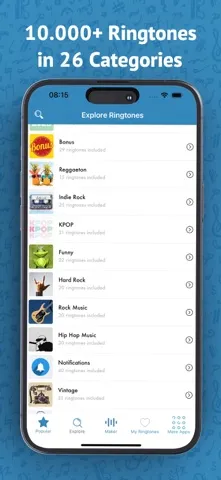
Day to day, the appeal is being able to choose a sound that fits the moment instead of settling for a familiar default. I can imagine browsing when I want a fresh call tone, or looking for something more soothing for an alarm. Categories cover genres such as rock, classical, country, hip-hop, and K-pop, alongside nature sounds, comedy, and holiday selections.
This kind of app works best in short sessions. I can browse until something catches my ear, or import a clip when I know exactly what I want. Either way, the task is bounded: pick a sound, make a small adjustment if needed, and keep the finished tone in a private collection. That is a useful little customization job, not a reason to spend an entire evening managing audio.
Library and Editing Tools
The strongest combination here is a library for quick choices and editing tools for personal ones. The library is organized around different genres and occasions, so the idea is not limited to one musical taste. A business-oriented tone, an animal sound, and a seasonal selection all serve different needs, while a missing favorite can be requested for possible addition.
For custom tones, the app describes importing from iTunes or Files, trimming to the portion I want, and applying fade-in or fade-out effects. Those are sensible tools for turning a longer audio source into a short, more deliberate ringtone. The app also says finished custom tones can be saved in a private collection, which gives the workflow a place to keep the results rather than treating each edit as disposable.
The most compelling feature is the choice between convenience and control. If I just want a different sound, I can browse the catalog. If I want a particular snippet, I can work from audio I have. That flexibility is more useful than a large catalog alone, especially for people who want their phone’s sounds to feel personal without learning a complicated editing program.
A Routine That Works
A practical routine would start with one sound I want to change, rather than trying to personalize every alert at once. I might browse for a call tone first, listen for something distinctive, and save a favorite. Later, I could use an audio clip from Files for a custom sound, trimming it down and adding a fade if that makes the opening feel less abrupt.
I’d also keep the app’s different categories in mind when the need changes. A calm nature sound might suit a quieter setting, while a more recognizable tone could be useful when I want to identify a call quickly. The description also points to using tones for alarms and assigning sounds to contacts. Those possibilities make the library more versatile than a one-time novelty, though the best results still depend on choosing sounds that fit the situation.
Limits to Keep in Mind
The main limitation is also the app’s focus: it is about ringtones, not broader phone personalization. If I do not care what my alerts sound like, its collection and editing workflow may feel unnecessary. And while a selection of genres and moods gives me ways to browse, no single library will automatically include every sound or music snippet someone hopes to find.
Custom creation also depends on having an audio source to import from the iTunes music library or Files. The trimming and fade tools sound approachable, but they are aimed at preparing a tone, not carrying out more involved audio work. I would keep my expectations there: this is a convenience tool for short personal sounds, rather than a substitute for a full editing setup.
Finally, it is an iPhone app with an iOS 15.0 minimum requirement, so it is not for Android users or iPhones running an older system. Store information such as pricing and availability can change over time, so checking the current App Store details is sensible before making a decision.
Best Ringtones 2026 for iPhone is a focused option for making calls and alarms sound more personal. I like the balance between browsing ready-made tones and shaping a short clip from audio on the phone. Its appeal is straightforward rather than universal: if ringtone customization is something you enjoy, the library and editing tools give you useful ways to do it.
I’d recommend giving it a look if you have a sound in mind or enjoy changing your phone’s everyday details. If you are content with default alerts, there is little reason to add another step to your routine. For iPhone users who do want more choice, this is a practical, approachable place to start.
Best Ringtones 2026 for iPhone Frequently Asked Questions
What is Best Ringtones 2026 for iPhone used for?
Best Ringtones 2026 for iPhone is for browsing ringtone sounds and creating custom tones. Its described tools let you import audio from the iTunes music library or Files, trim a section, and add fade-in or fade-out effects. The app also describes using sounds for calls, alarms, and contacts.
Which devices can use Best Ringtones 2026 for iPhone?
The app is for iOS and is available through the Apple App Store. The developer describes it as compatible with iPhone models, with iOS 15.0 as the minimum system requirement. It is not an Android app. Device and store availability can vary, so check the App Store details for your iPhone.
What iOS version does Best Ringtones 2026 for iPhone require?
The stated minimum requirement is iOS 15.0. If your iPhone is running an earlier version, it may not meet that requirement. The current App Store page is the best place to check the latest compatibility details for your device before downloading.
Does Best Ringtones 2026 for iPhone cost money?
The app is listed as free to download on the App Store. Other pricing details can change and are worth checking on the current store page before installing. The available information does not specify further purchase details.
Who should try Best Ringtones 2026 for iPhone?
It is a good fit for iPhone users who want more choice in ringtone sounds or would like to make a tone from audio they already have. Its catalog and trimming tools are aimed at casual personalization. If you are happy with standard alerts or want a full audio editor, it may not be the right fit.
Pros
- Combines a categorized ringtone library with tools for making custom tones.
- Supports importing audio from the iTunes music library or Files.
- Trimming and fade effects offer simple ways to shape a clip.
- Includes sounds across music styles, moods, and seasonal themes.
Cons
- Its narrow focus may not appeal to people content with default alerts.
- Custom tones depend on having an audio source to import.
- Requires iOS 15.0 or later and is not for Android.
- Category
- Music & Audio
- Version
- 3.3.7











