Audio Evolution Mobile Studio
- 10.51K
- 4.3
- Installs
- 100.00K
- Price
- $11.99

Screenshots
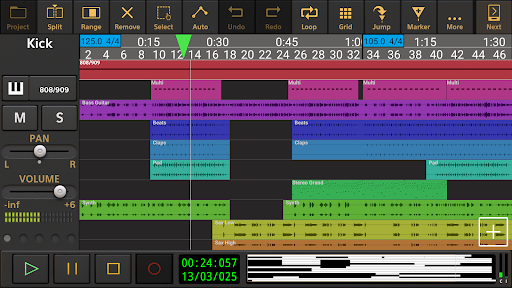
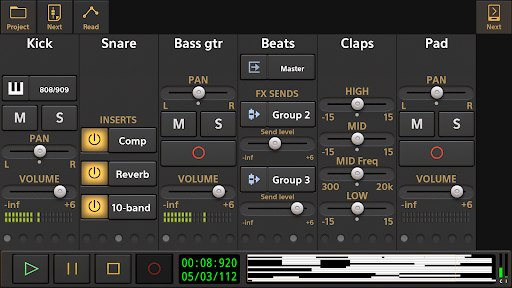
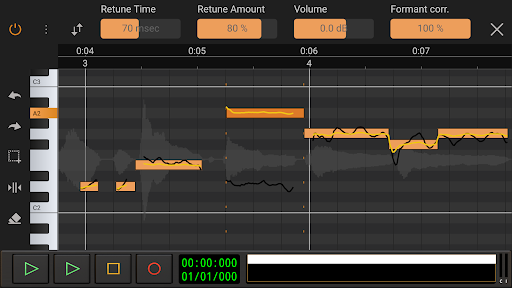
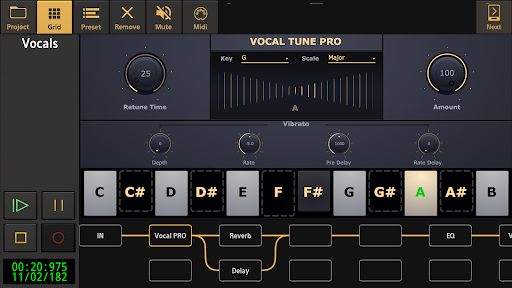
Analysis by Reviewed APKs
Audio Evolution Mobile Studio is a multitrack recording and music-production app for Android, built for musicians who want to capture ideas, arrange audio and MIDI, and work on mixes away from a desktop. My overall take is that it offers an unusually broad toolkit for a phone or tablet, from virtual instruments to detailed effects and editing. It suits people willing to spend time learning a full digital audio workstation rather than looking for a simple recorder.
From idea to session
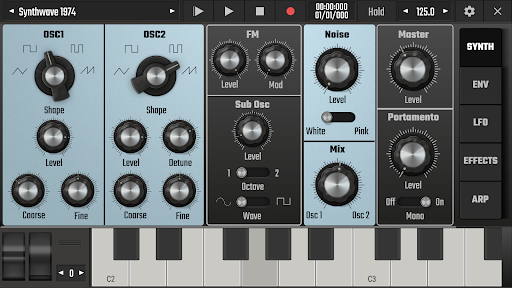
Picture a melody arriving on the bus, or a guitar phrase you want to keep before the details fade. Audio Evolution Mobile Studio can record through the device’s internal microphone, then let you build a multitrack project around that take. You can add MIDI parts, virtual instruments, drum patterns, and effects, which makes the app useful for turning a quick voice memo into the beginnings of an arranged song.
For a more involved session, the workflow can grow with you: import existing audio, edit clips, adjust tempo, and shape the mix with real-time effects and automation. If you have a compatible USB audio interface, the app also supports multichannel recording and playback. I like that this gives the same project room for rough sketches and more ambitious work, though a phone screen is still a much tighter workspace than a computer.
A DAW, not a voice recorder
The obvious comparison is a basic recorder or mobile note-taking app. Those are quicker when all you need is a spoken reminder or a single take. Audio Evolution Mobile Studio is aimed at a different job: recording and arranging multiple audio and MIDI tracks, editing clips, and mixing with effects. It can take the place of a simple four-track-style workflow for someone who wants more room to build a song.
That breadth is also its main trade-off. This is not a one-tap recorder, a stripped-down loop toy, or a dedicated music player. A project can involve tracks, instruments, effects, routing, and automation, so there is more to learn and manage. I would choose it when I want control over a production, not when I need to capture a quick note and get straight back to whatever I was doing.
Small habits, better sessions
A useful habit is to start with one clear task: record a part, make a drum pattern, or try a sound with the virtual instruments. Once that works, add another layer. Audio and MIDI clips can be edited with unlimited undo and redo, so it is easier to experiment without treating every change as permanent. Gradual tempo changes and time-signature changes also give a project room to develop beyond one fixed beat.
For projects that move between devices, cloud sync with Google Drive can back up or share work, and projects are interchangeable with the iOS version. When handing a project to another DAW, you can render tracks as separate audio files, or mix down to common audio formats. Those options make a simple finishing routine practical: save a working project, export a mix, and keep stems when you need separate parts.
More From Our News Desk

Zoom Meetings, Google Meet, or Teams: Which Is Easiest to Join?

How I Build a Free Streaming Lineup With Tubi

Why Crunchyroll Is the Default Anime App for So Many Fans

YouTube TV: A Practical Guide to Cutting Cable

Rummikub and the Small Comfort of Phone Games

TeamViewer Remote Control or AnyDesk for Helping Family?
Who will enjoy the depth
I would recommend Audio Evolution Mobile Studio to musicians who already think in tracks, or who are curious about learning that style of production. Songwriters can capture ideas and develop arrangements; performers can use virtual instruments and the live performance mode; and home producers can work with audio, MIDI, effects, and exports in one Android app. USB interface support is especially relevant if you want to connect recording gear rather than rely only on the built-in microphone.
It may be less appealing if you want a very simple recording experience, dislike navigating detailed editing tools, or mainly need a casual way to play music. The extensive options are valuable when you use them, but they can feel like overhead for a tiny task. People considering add-on instruments, effects, or the custom USB audio driver should also be comfortable checking the available in-app purchases before settling on the setup they want.
Audio Evolution Mobile Studio is a paid Music & Audio app from eXtream Software Development for Android. Google Play shows over 100,000 installs and a 4.3-star rating from about 10,500 ratings. The app is listed at $11.99, with in-app purchases ranging from $1.14 to $17.99 per item. It contains no ads, and its content rating is Everyone.
The current version shown is 5.5.8.1. The app was released on March 16, 2012, and the listed last update is November 3, 2026. The available facts do not specify a minimum Android version, so check the Google Play app details against your device before installing.
A Portable Studio With Room to Grow
First session, first impressions
When I first considered opening a project in a mobile DAW, the big question was whether it could do more than collect isolated takes. Audio Evolution Mobile Studio’s feature set points toward a complete working session: record audio or MIDI, arrange clips, use instruments, and mix. That makes it worth approaching as a studio workspace, rather than expecting the immediate simplicity of a dedicated memo recorder.
Setup can be as simple as using the device’s internal microphone, or it can involve a USB audio or MIDI interface. The distinction matters: the app supports interface-based recording, and an optional custom USB audio driver is available for expanded audio handling. If you are planning to connect external gear, check compatibility and the purchase details before building your routine around it.
Working through a project
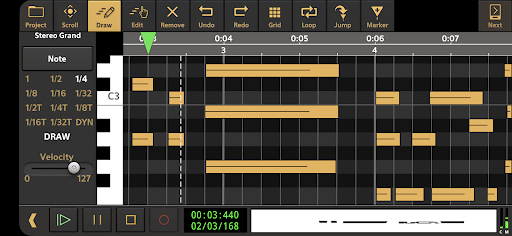
Day to day, the central appeal is having audio and MIDI recording and playback in the same project. A vocal or instrument take can sit alongside MIDI parts, sample-based Soundfont instruments, and drum patterns. You can edit audio and MIDI clips, change tempo or time signature, and use unlimited undo and redo while shaping an arrangement. That combination supports more than simply recording a few successive takes.
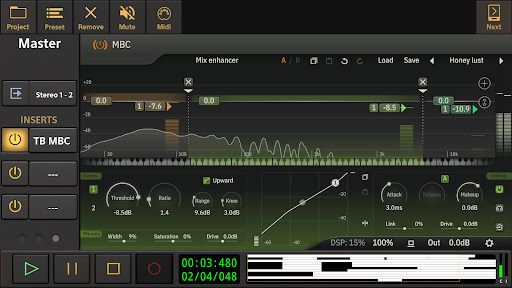
Mixing is part of the same workflow. The app includes real-time effects such as EQ, reverb, delay, chorus, compression, and noise gating, along with mixer automation. For an edit that needs more than a level adjustment, time stretching and normalization are also available. I would expect a project with many tracks and decisions to take patience on a small screen, but the toolset can carry it beyond an initial sketch.
Instruments and editing tools
Effects routing goes beyond placing a single filter on a track. The app supports flexible routing with parallel effect paths, and mixer and effect parameters can be automated. Compressor effects can use sidechain, while LFOs can be assigned to effect parameters or synchronized to tempo. Neural Amp Modeler support with TONE3000 integration provides access to a library of amp, pedal, and cabinet captures and impulse responses.
The range is impressive, but not every tool is necessarily included in the base purchase. The description identifies optional in-app purchases for items such as the custom USB audio driver, ToneBoosters effects, Vocal Tune options, loops, and Soundfonts. I would treat the feature list as a menu of what the studio can support, then check which specific add-ons are relevant before budgeting for them.
A practical song routine
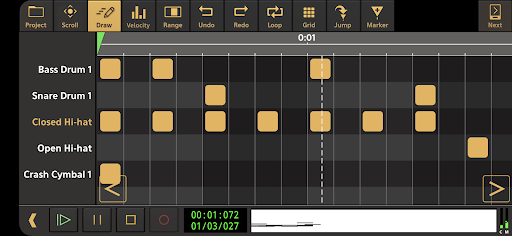
One grounded way to use the app is to build a song in passes. Start by recording a rough vocal or instrument idea with the internal mic. Add a drum pattern or MIDI instrument part to establish the shape, then make clip edits and adjust the tempo if the arrangement needs room to breathe. Once the main parts are there, use effects and automation to refine the balance rather than reaching for every option at once.
When a project needs to leave the phone, export a finished mix to WAV, MP3, AIFF, FLAC, or OGG. If you want to continue mixing elsewhere, render individual tracks as stems. Google Drive sync can help back up or exchange projects across Android and iOS devices, and projects are interchangeable with the iOS version. Those handoff options make the app useful even when it is one stage of a larger production routine.
Limits to keep in mind
The first limit is the nature of mobile production. Even with a broad set of tools, arranging many tracks and adjusting detailed parameters on a phone can be less comfortable than working at a desktop. The app’s feature depth is a strength for focused sessions, but it also means beginners may need time to find a comfortable workflow. A tablet may offer more room, though the app is still designed for Android devices.
External recording has its own practical consideration. The app can use Android’s USB audio driver, while the optional custom driver is described as adding low-latency, high-quality multichannel recording and playback, subject to the device’s support. Compatibility is worth checking if an interface is central to your setup. Add-on purchases can also increase the cost beyond the initial paid app, so decide which extras you actually need.
Audio Evolution Mobile Studio makes a strong case for a serious music workspace on Android. Multitrack audio and MIDI, instruments, editing, effects, automation, and useful export options give it real scope. The price of that flexibility is a steeper learning curve and a busy mobile workflow, especially for people who only want to record a quick idea.
I would recommend it to musicians who want to develop arrangements and mixes on a phone or tablet, especially if they will use its editing and export tools. If your needs are simple, a basic recorder will be easier. For everyone else, this is a capable studio to explore, with optional purchases and device compatibility worth considering first.
Audio Evolution Mobile Frequently Asked Questions
What is Audio Evolution Mobile Studio used for?
Audio Evolution Mobile Studio is a music-production app for recording, editing, and mixing audio and MIDI. It supports multitrack projects, virtual instruments, drum patterns, real-time effects, automation, and audio exports. That makes it suited to developing song ideas and productions, rather than simply recording a short voice memo or playing back music.
Which devices can run Audio Evolution Mobile Studio?
The app is available for Android, and its projects are interchangeable with the iOS version. It supports recording with a device’s internal microphone and can also work with USB audio or MIDI interfaces. Interface support and audio behavior can depend on the connected gear and device, so check the Google Play details and compatibility information for your setup.
What Android version does Audio Evolution Mobile Studio require?
The minimum Android version can vary with app updates and device compatibility. Check the current Google Play app details from the Android device you plan to use before installing. If you intend to record through a USB audio interface, it is also sensible to check whether your device and interface work with the audio setup you want.
How much does Audio Evolution Mobile Studio cost?
Google Play lists Audio Evolution Mobile Studio at $11.99, with in-app purchases ranging from $1.14 to $17.99 per item. Optional purchases include some audio tools and the custom USB audio driver. Prices and available items can vary, so check the current store listing for the exact cost of any add-on you are considering.
Is Audio Evolution Mobile Studio suitable for beginners?
It can suit a beginner who wants to learn multitrack recording and is willing to explore a detailed toolset. The app includes audio and MIDI editing, instruments, effects, and mixing features, so it offers room to grow. If you mainly need quick, uncomplicated recordings, a simpler recorder may be a more comfortable fit.
Pros
- Combines multitrack audio and MIDI recording with editing and mixing tools.
- Includes virtual instruments, drum editing, effects, and automation.
- Exports finished mixes and separate stems for other workflows.
- Supports Google Drive project sharing and Android-iOS project interchange.
Cons
- Its broad feature set can take time to learn and navigate.
- Some tools, instruments, and USB audio features require extra purchases.
- Detailed project work may feel cramped on a phone screen.
- Category
- Music & Audio
- Version
- 5.5.8.1











