ARMOURY CRATE
- 11.79K
- 3.4
- Installs
- 1.00M
- Price
- Free
Screenshots
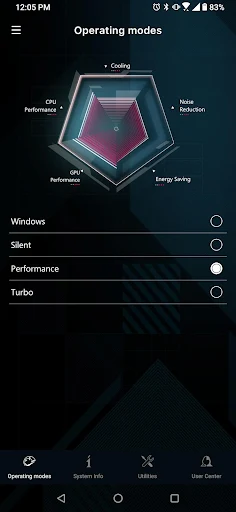
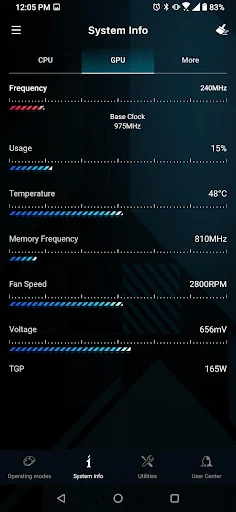
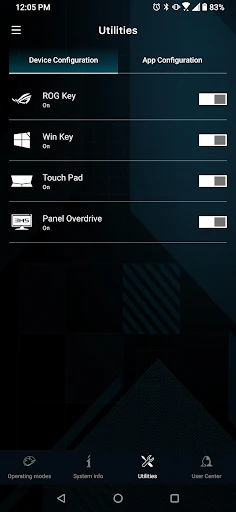
Analysis by Reviewed APKs
ARMOURY CRATE is a mobile companion for people who use a ROG laptop or compatible ROG headset. It lets you check laptop status and adjust certain settings remotely, while supported headsets get audio options and battery monitoring. I see it as a focused convenience tool rather than a general gaming hub: most useful when your gear is already in the ASUS ecosystem, and less compelling if it isn’t.
A quick check between sessions
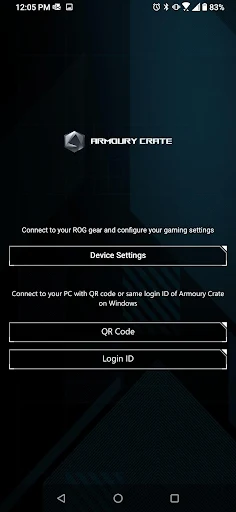
Picture settling in for a game and realizing you want to check your ROG laptop’s system status without leaning over to the computer. ARMOURY CRATE is built for that kind of small, practical task. After linking the app by scanning the QR code on the laptop, you can monitor status and change PC ARMOURY CRATE settings remotely. It is not a replacement for sitting down at the computer, but it can make a nearby phone useful.
I’d also use it when packing up or switching between gaming and everyday use. The app can back up a gaming profile to an ASUS account and restore one from that account, which gives those settings a clear purpose beyond a single session. For a compatible headset, the experience shifts to Bluetooth pairing, audio profile choices, battery percentage, and—on supported TWS models—a low-latency gaming mode.
A companion, not a hub
ARMOURY CRATE makes most sense alongside a ROG laptop or one of the supported headsets, not as a standalone place to manage any gaming setup. Compared with opening the laptop’s own controls, its appeal is remote access to selected settings and profile backup. For headset owners, its EQ profiles and virtual surround effect put a few sound adjustments within reach on the phone.
That narrow focus is also important to understand before installing it. The supplied features do not describe a general game library, controls for unrelated devices, or a full desktop replacement. Headset support is specifically given for ROG Strix Go BT and ROG Cetra true wireless, and the low-latency mode is limited to the TWS Series. If your hardware is outside that scope, the app may have little to do for you.
Make profiles work for you
A useful habit is to treat profile backup as a small bit of housekeeping. If you have a gaming profile you want to keep, the app can back it up to your ASUS account and restore it later. That makes the feature easier to remember when changing settings, rather than something you only look for after you need a saved profile.
With a supported headset, I’d check battery percentage before starting a longer session and try the available audio profiles in the context where I actually listen. EQ changes are personal, so a short comparison while playing or watching something is more useful than picking a preset by name alone. If the headset is a TWS model, low-latency mode is another setting to consider for gaming.
More From Our News Desk

Zoom Meetings, Google Meet, or Teams: Which Is Easiest to Join?

How I Build a Free Streaming Lineup With Tubi

Why Crunchyroll Is the Default Anime App for So Many Fans

YouTube TV: A Practical Guide to Cutting Cable

Rummikub and the Small Comfort of Phone Games

TeamViewer Remote Control or AnyDesk for Helping Family?
Who may find it useful
I’d recommend ARMOURY CRATE to ROG laptop owners who want to check system status, adjust PC settings remotely, or keep a gaming profile backed up. It is also worth a look for owners of the named compatible headsets who want to personalize EQ, use a ROG audio preset, or see battery percentage from the phone. In both cases, the value comes from having supported ASUS gear to connect.
It may not suit someone looking for a broad gaming dashboard or controls for a mixed collection of devices. The available headset features are model-specific, and some are limited further to the TWS Series. If you do not own a supported laptop or headset, there is little reason to expect the app to become part of your routine. I’d check the compatibility details before making it a regular tool.
ARMOURY CRATE is developed by ASUSTeK COMPUTER INC. and is a free Android app in the Tools category. Google Play shows over 1 million installs and a 3.4-star rating from 11,794 ratings. The app is rated Everyone. Those figures give a useful snapshot of its reach, though the rating suggests users’ experiences are mixed.
The current version is 6.0.15. It was released on September 10, 2018, and the recorded last update is April 7, 2026. The app has no in-app purchases and contains no ads. Its minimum Android version is worth checking on Google Play, since that requirement can vary with app updates and device compatibility.
A closer look at phone-side control
Getting connected
The first impression is that ARMOURY CRATE has a specific job: connect a phone to ROG equipment, then offer a handful of related controls. For a laptop, the connection starts inside the mobile app, where you scan the QR code to link it. That makes the setup path easy to understand, especially if the computer is already in front of you.
Headset setup takes a different route. The listed compatible headsets can connect through Bluetooth in the phone’s system settings or through the ARMOURY CRATE app. I like that the description gives both options rather than making the app the only stated path. It also means the experience depends on having one of the supported models, not simply any Bluetooth headset.
Everyday laptop use
Once a ROG laptop is linked, the main day-to-day appeal is checking system status and setting up PC ARMOURY CRATE options remotely. I can see that being handy when the laptop is docked or positioned where reaching its controls is inconvenient. It is a small convenience rather than a reason to keep a phone open throughout a gaming session.
The profile backup and restore options add a more occasional use. A gaming profile can be backed up to an ASUS account or restored from one, giving users a way to preserve and retrieve those settings. I’d expect this to matter most when someone has spent time shaping a profile and wants a simple way to keep it available.
Headset audio choices
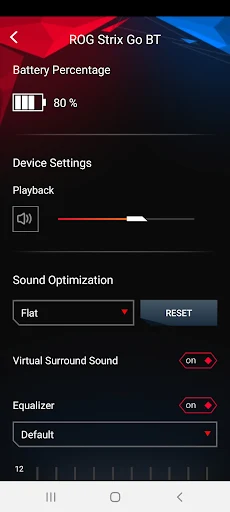
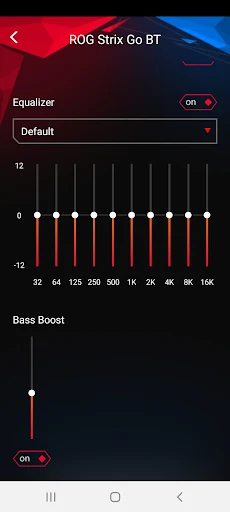
The headset side is more focused on listening preferences. ARMOURY CRATE offers a virtual surround sound effect, EQ profile personalization, and ROG preset audio profiles. Those options make the app more than a battery checker for supported headsets, though the payoff depends on whether you enjoy adjusting sound rather than leaving a default alone.
Battery percentage is a straightforward practical detail: it can help answer whether a headset is ready for a session. Low-latency gaming mode is also included, but only for the TWS Series. I appreciate that limitation being explicit, because it sets a realistic expectation instead of making the mode sound universal across every supported headset.
A simple session routine
A sensible routine might start with checking headset battery before settling in, then choosing an EQ or ROG preset that suits the game or other audio. If the headset is part of the TWS Series, low-latency mode is available as an additional gaming option. I would keep these adjustments occasional and purpose-driven; there is no need to turn every session into a settings experiment.
For laptop owners, I’d make the QR-code connection once, then reach for the phone when remote status or settings are genuinely useful. Profile backup can fit into the same routine after making changes worth keeping. That approach plays to what the app describes well: a companion for specific device tasks, rather than something that needs constant attention.
Keep compatibility in mind
The biggest limit is the hardware boundary. The laptop features are for a ROG laptop, while the stated headset support names ROG Strix Go BT and ROG Cetra true wireless. If your devices do not match those categories, the app’s main functions may not apply. I would verify the exact model support before building a workflow around it.
There is also a difference between having a setting available and needing it. EQ profiles, presets, virtual surround, and low-latency mode are useful only if you want to adjust headset sound. Laptop status and remote setup are similarly specialized. ARMOURY CRATE is best judged as a collection of companion controls, not as an essential app for every Android gamer.
Finally, the Android version requirement is a practical detail to check before installing, as can be the case with device-specific companion apps. The app’s 3.4-star Google Play rating is another reason to approach it with measured expectations. Its usefulness depends heavily on compatible ROG hardware and on whether those particular remote and audio controls solve a real annoyance for you.
ARMOURY CRATE has a clear, useful role for the right owner: remote ROG laptop checks and settings, gaming-profile backup, or a few headset audio and battery controls. I like that the features are concrete, but they are also tied closely to specific ASUS equipment.
I’d recommend it to ROG laptop users and owners of the supported headsets who want those companion features on a phone. If you have different gear or want a general gaming utility, I’d skip it. Check your model and Android compatibility first, then decide whether these small conveniences fit your routine.
ARMOURY CRATE Frequently Asked Questions
What is ARMOURY CRATE used for?
ARMOURY CRATE is a mobile companion for ROG laptops and supported ROG headsets. It can monitor laptop system status, set up PC ARMOURY CRATE settings remotely, and back up or restore gaming profiles through an ASUS account. With compatible headsets, it offers audio profile options, battery percentage, and low-latency mode for TWS Series.
Which phones and devices work with ARMOURY CRATE?
ARMOURY CRATE is an Android app. Its described device features are for a ROG laptop and the ROG Strix Go BT and ROG Cetra true wireless headsets. The app connects to a laptop by scanning a QR code, while a headset can connect through Bluetooth settings or the app. Check Google Play for device compatibility details.
What Android version does ARMOURY CRATE require?
The Android version requirement can vary by app release and device, so check the ARMOURY CRATE Google Play page for the current requirement before installing. The app’s stated functions also depend on compatible ROG hardware, so meeting the Android requirement alone does not ensure that every feature will apply to your devices.
Does ARMOURY CRATE cost money?
ARMOURY CRATE is free to download on Google Play. It has no in-app purchases and contains no ads. You will need compatible ROG hardware to use the laptop or headset features described, so the app is most relevant to people who already own the supported equipment.
Is ARMOURY CRATE worth trying for me?
I’d try it if you own a ROG laptop and want remote status or settings, or a supported headset and want its audio controls and battery percentage. It is a narrower fit if you use other brands or want a general gaming app. The Google Play page is the best place to check your model’s compatibility.
Pros
- Lets ROG laptop owners monitor system status and adjust PC settings remotely.
- Supports backup and restoration of gaming profiles through an ASUS account.
- Offers EQ personalization, ROG audio presets, and headset battery monitoring.
- Free to download, with no in-app purchases or ads.
Cons
- Its main functions depend on having compatible ROG hardware.
- Low-latency gaming mode is limited to the TWS Series.
- The 3.4-star Google Play rating reflects mixed user feedback.
- Category
- Tools
- Version
- 6.0.15











