Aprende Institute
- 2.67K
- 4.7
- Installs
- 100.00K
- Price
- Free

Screenshots


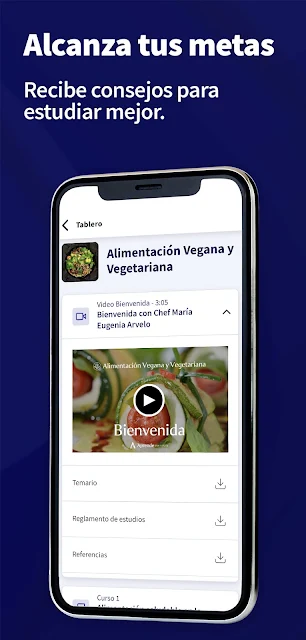
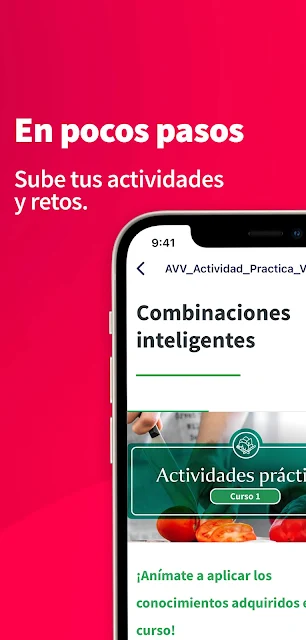



Analysis by Reviewed APKs
Aprende Institute is a mobile learning app for enrolled students who want to keep up with their courses away from a computer. I found its appeal less about turning a phone into a full classroom and more about making study tasks easier to fit around a busy day: download course material, check progress reminders, schedule live classes, and submit assignments. It is a practical companion to the institute’s learning platform.
Study in the in-between moments
When I first pictured using Aprende Institute, I thought of the small gaps that tend to disappear during a busy week: a few minutes before an appointment, a quiet ride, or an evening when opening a laptop feels like too much. The app is designed to let enrolled students access their courses on a phone or tablet, so those moments can become useful study time rather than another reason to fall behind.
A workable routine might be to download course materials while connected, then review them later when the connection is unreliable or unavailable. I could also use the app to keep an eye on progress and assignment reminders, schedule an upcoming live class, and send an assessment from my phone. It brings several course tasks together in one mobile setting, rather than asking me to wait until I am back at a computer.
A course companion, not a catalog
The most important distinction is that Aprende Institute’s app is for students who already have access to the institute’s learning platform. It is not presented as an open course browser where anyone can casually browse lessons and start learning without enrolling. If I were comparing it with a general video-learning app, I would see this as a mobile doorway to a specific school experience, with course access and student tasks at its center.
That focus is useful if I am already studying through Aprende Institute and want to handle course work away from a computer. It is less suited to someone who simply wants a broad collection of unrelated lessons or is shopping for courses inside the app. People considering enrollment should look into the institute’s plans and prices through its website; the mobile app itself is described as a tool for current students.
Make mobile study easier
I would get more out of the app by treating it as a regular part of a study routine instead of opening it only when an assignment is due. A quick check of progress and assignment reminders can help me decide what to tackle next. Scheduling a live class in advance also gives that session a place in my week, rather than leaving it as something I mean to arrange later.
For offline study, I would download the materials I expect to need before leaving a dependable connection. When an assessment is ready, the ability to submit it from a mobile device can save a trip to a computer. The app also supports uploading images, audio, video, and other files, which is worth keeping in mind when a course task calls for material beyond a written response.
More From Our News Desk

Zoom Meetings, Google Meet, or Teams: Which Is Easiest to Join?

How I Build a Free Streaming Lineup With Tubi

Why Crunchyroll Is the Default Anime App for So Many Fans

YouTube TV: A Practical Guide to Cutting Cable

Rummikub and the Small Comfort of Phone Games

TeamViewer Remote Control or AnyDesk for Helping Family?
Who may find it useful
I would recommend Aprende Institute to people who are already students there and want course access to travel with them. It makes particular sense for someone who divides study time into short sessions, has limited access to a computer, or wants to manage class scheduling and assessment submissions from a phone or tablet. The offline-study option is also handy for planning ahead when internet access may not be available.
It may not suit someone looking for a standalone learning service with a broad course catalog, or a way to enroll directly through the mobile app. The app’s stated purpose is to give students access to their learning platform, so its usefulness depends on being part of that student experience. If I were deciding whether to study with the institute, I would first explore its course options and plans separately.
Aprende Institute is the developer, and the app is listed in the Education category on Google Play. It has over 100,000 installs and a 4.7-star rating from 2,674 ratings. The app is free to download, with no in-app purchases or ads reported in the supplied store facts. Its content rating is Everyone.
The current version is 5.1.2. The recorded release date is March 11, 2021, and the latest update date supplied is September 16, 2026. The minimum Android version is not included in the available app facts, so I would check the Google Play page on the device I plan to use before installing.
How Aprende Institute Fits a Study Day
A direct mobile starting point
My first impression is that Aprende Institute has a clear, practical job: bring the institute’s learning platform to a student’s mobile device. The description does not frame it as a place to discover a new school or browse an open library. Instead, it is for carrying on with studies already underway, especially when a computer is not close at hand.
That purpose makes the app easiest to judge by the everyday tasks it supports. I would look for whether it helps me reach course material, keep track of reminders, and complete work without having to change devices. The description also points to a help and support center, which gives students a direct place to turn when they need assistance.
Coursework on the move
Day to day, the most useful part is having course access on a phone or tablet. I can imagine checking in during a lunch break, studying on the way to an appointment, or using a spare stretch of the evening to make progress. The app also supports downloading material for study without an internet connection, which makes a little preparation worthwhile.
The mobile format does not mean every study task has to happen in the same way. Students can schedule live classes and submit assessments from a mobile device, alongside reviewing their course content. That combination makes the app more than a reading companion: it can support some of the routine coordination and submission work that often pushes people back to a computer.
Useful study tools
Progress and assignment reminders are among the features I would pay attention to first. A reminder can make the next step harder to overlook when coursework is competing with work, errands, and everything else. The app also lets students schedule live classes, so arranging a session can be part of the same mobile study workflow rather than a separate task.
File uploads add flexibility to assessment work. The app supports images, audio, video, and other files, which may be useful when a task calls for more than a typed answer. I also like the practical value of downloadable study material: it allows students to plan around their connection instead of assuming they will always have reliable internet when it is time to learn.
A simple weekly rhythm
If I were using Aprende Institute through a busy week, I would start by checking progress and assignment reminders at a consistent time. That gives me a quick sense of what needs attention. I could then schedule any live classes that fit my calendar and set aside a realistic block for studying, rather than waiting for a large stretch of free time to appear.
Before heading somewhere with limited internet, I would download the course material I expect to study. Later, I could use a short break to review it and, when appropriate, submit an assessment or upload the required files. This is not a complicated system, but the app’s mobile access and offline study option make it possible to divide course work into manageable sessions.
Keep its scope in mind
The main limitation is also the app’s defining boundary: it is intended for students with access to Aprende Institute’s learning platform. Someone who has not enrolled should not expect to use it as a general education app. The institute directs prospective students to its website for information about plans and prices, so the app is not the whole enrollment decision.
I would also keep the mobile format in perspective. A phone can make course access and assignments more convenient, but students should choose the device that works for the task at hand. The app’s description supports study, scheduling, submissions, and file uploads; it does not establish that every part of a course is equally comfortable on a small screen.
Aprende Institute makes the most sense as a practical companion for students who want to keep their course work within reach. Downloadable material, progress reminders, live-class scheduling, and mobile assessment submissions all serve that purpose without pretending the app is a general course marketplace.
I would recommend it to current students who study in short sessions or need a mobile option when a computer is unavailable. If you are exploring the institute for the first time, start with its course and enrollment information instead. For the right student, this app is a useful way to keep learning moving between the larger study sessions.
Aprende Institute Frequently Asked Questions
What is the Aprende Institute app used for?
Aprende Institute gives students mobile access to the institute’s learning platform. Students can download course material for offline study, receive progress and assignment reminders, schedule live classes, submit assessments, upload files, and access the help and support center. It is intended as a companion for coursework, rather than a general catalog for browsing courses.
Which devices can run Aprende Institute?
The app is available for Android phones and tablets through Google Play. The description specifically refers to using it from a mobile device, including a phone or tablet. The minimum Android version can vary by app release and device, so check the Google Play page for the current requirement before installing.
What Android version does Aprende Institute require?
The minimum Android version can vary with the app’s current release and device compatibility. Check the Google Play page on the Android device you plan to use for its current requirement. The app is designed to let students access their Aprende Institute learning platform from a phone or tablet.
Does Aprende Institute cost money?
The app is free to download, and the supplied Google Play facts report no in-app purchases or ads. The app is for students with access to the learning platform; prospective students are directed to the institute’s website for information about plans and prices. Enrollment costs may vary, so check the institute’s current information.
Is Aprende Institute a good fit for me?
It is a good fit if you are already an Aprende Institute student and want to study or handle course tasks on a phone or tablet. Offline downloads, reminders, class scheduling, and mobile submissions can help fit coursework around a busy routine. It may not suit someone seeking an open, general-purpose course library or an app for enrolling directly.
Pros
- Lets enrolled students access courses from a phone or tablet.
- Supports downloading study material for use without an internet connection.
- Includes reminders, live-class scheduling, and mobile assessment submissions.
- Accepts image, audio, video, and other file uploads.
Cons
- Designed for students with access to Aprende Institute’s learning platform.
- Prospective students need to check course plans and prices elsewhere.
- Some course tasks may be less comfortable on a small screen.
- Category
- Education
- Version
- 5.1.2











