ANRAN
- 14.85K
- 4.5
- Installs
- 500.00K
- Price
- Free

Screenshots
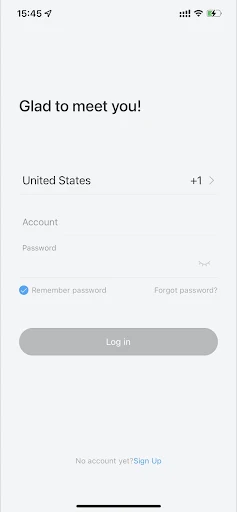
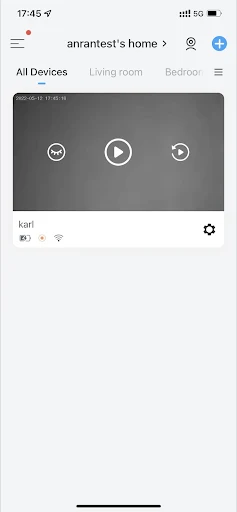
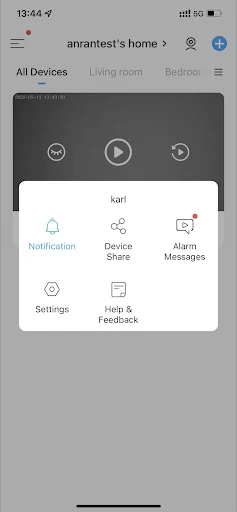
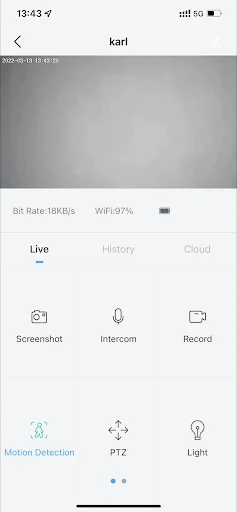
Analysis by Reviewed APKs
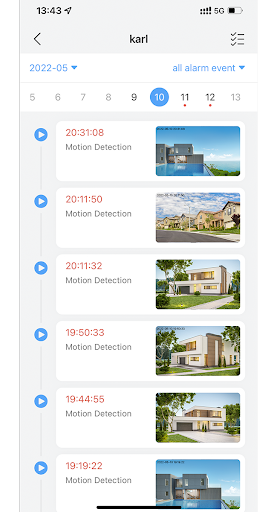
ANRAN is a phone companion for viewing live video from an ANRAN alarm system, checking recorded images, and receiving motion alerts. I see it suiting people who already use compatible ANRAN equipment and want a simple way to check in while away. Its focus is practical rather than broad: the app brings a few surveillance tasks together, though it is not a replacement for the camera equipment itself.
A quick check while away
When I imagine using ANRAN during an ordinary day, the appeal is being able to check a camera without waiting until I get home. If motion is detected, the app can send a push message through the alarm system. I could then open the live video to see what is happening, rather than relying on a notification alone. That makes the app useful for brief check-ins around a home or workplace.
The practical value is in having a next step after an alert: view live video, or look back at images through playback. I would treat the notification as a prompt to check, not as a complete account of an event. ANRAN also includes time and message reminders, so it has a little more to offer than a live camera screen, while keeping its main job centered on surveillance.
A focused camera companion
Compared with a general smart-home app, ANRAN has a narrower purpose. Its stated functions are live video, playback image checking, reminders, and sharing video images. That focus may suit someone who wants a direct route to camera viewing without making the app a hub for unrelated home devices. The trade-off is that its usefulness depends on having an ANRAN alarm system to work with.
I would not choose it as a general-purpose home organizer, a video editor, or a substitute for installing surveillance equipment. It is also not described as a service for monitoring every kind of camera. People comparing security apps should first consider which equipment they have and whether ANRAN is the companion intended for it. For someone without that system, the app's specific toolset may have little to do.
Make alerts easier to use
A useful habit would be to keep notifications enabled if motion messages are part of the reason for using the app. When one arrives, I would check the live feed first if I want to see what is happening now, then use playback image checking if I need to review what the camera captured. Keeping those two actions distinct can make a quick check less confusing.
I would also set aside a calm moment to learn where live video, playback, reminders, and sharing sit in the app, rather than trying to work it out during an alert. If I share a video image, I would do so deliberately and with the recipient in mind. These are simple habits, but they make a small set of functions easier to remember when I need them.
More From Our News Desk

Zoom Meetings, Google Meet, or Teams: Which Is Easiest to Join?

How I Build a Free Streaming Lineup With Tubi

Why Crunchyroll Is the Default Anime App for So Many Fans

YouTube TV: A Practical Guide to Cutting Cable

Rummikub and the Small Comfort of Phone Games

TeamViewer Remote Control or AnyDesk for Helping Family?
Who may find it useful
I would recommend ANRAN to people who already have an ANRAN alarm system and want to view its camera feed or check images from a phone. It makes the most sense for someone who values occasional remote check-ins and motion notifications, rather than a large collection of smart-home controls. The mix of live viewing, playback, reminders, and image sharing gives those users a few clear reasons to keep the app handy.
It may not suit someone who has no compatible ANRAN equipment, expects a standalone camera service, or wants extensive home automation features. I would also be cautious about choosing it before checking that it works with the particular system in use. The app's purpose is quite specific, so it is a better fit for existing users of its surveillance setup than for someone shopping for an all-in-one home app.
ANRAN is a free Lifestyle app from Shenzhen Anran Security Technology CO.,Ltd. On Google Play, it has over 500,000 installs and a 4.5-star rating from about 14,900 ratings. The content rating is Everyone. Its recorded release date is May 13, 2022, and the current version shown is 6.3.1.
The app contains in-app purchases, with listed item prices ranging from $1.99 to $359.99. It does not contain ads. The latest recorded update date is October 28, 2026. Google Play does not provide an Android version requirement in the supplied app details, so check the store page on your device for current compatibility information.
A Closer Look at Remote Viewing
A straightforward first impression
When I first opened ANRAN, I understood its role as a companion to a surveillance system rather than a self-contained camera service. That distinction matters: the app's listed functions revolve around viewing video and checking images, so its value is tied to the equipment it is meant to accompany. I would start by confirming that connection before relying on it for a regular check-in routine.
The feature set is easy to summarize, which is helpful when deciding whether the app fits a particular need. It offers real video viewing, playback image checks, reminders, and sharing video images. I would not expect a long list of unrelated tools from that description. For an existing user, the straightforward scope may be a plus; for a newcomer, compatibility is the first practical question.
The daily viewing loop
Day to day, the central loop is simple: receive a motion message, open the app, and check the live video if I want a current view. If I am reviewing something that has already happened, playback image checking is the relevant feature. That separation between live viewing and reviewing images gives the app two different jobs without suggesting that every alert needs a lengthy investigation.
I would expect the experience to be most useful in short visits rather than long sessions. A quick look while out running errands, or a check during a work break, is a natural fit for remote video access. The app's stated functions support that kind of on-demand use. I would keep my expectations focused on the camera and its messages, not assume the phone app alone provides full surveillance.
Useful tools beyond live video
Live video is the obvious draw, but playback image checking is an important companion. A live feed shows a view at the moment I open it, while playback gives me a way to look back at images. That can help when I have noticed a message after the initial moment has passed. The app description does not spell out how playback is organized, so I would learn its available controls in use.
Time and message reminders add another small layer to the experience. They suggest that ANRAN is not only for reacting to motion, though the specific reminder options are not detailed in the supplied description. The ability to share a video image is also practical when I want another person to see what I am looking at. I would use that feature selectively, rather than treating sharing as an automatic part of every check.
A sensible check-in routine
For a routine, I would first decide when I actually need notifications, then leave the app available for the moments when a message is useful. If a motion alert arrives, I can check live video for the current view. If I need to review an earlier moment, I can turn to playback image checking instead. The routine stays manageable because each feature has a clear role.
I would avoid repeatedly opening the app without a reason; the stated use is remote viewing and responding to system messages, not constant attention. If another person needs context, sharing a video image can help communicate what I saw. It is also worth remembering that app access and camera equipment work together here. A phone routine is only useful when the associated surveillance system is available.
Limits to keep in mind
ANRAN's clearest limitation is its specific relationship to an ANRAN alarm system. The app's feature list does not describe a standalone camera, so downloading it alone may not deliver the experience people expect from a general camera app. I would verify compatibility with the equipment before making it part of a home or business routine.
The description also gives only a concise account of the available functions. It does not explain details such as how long images remain available, how reminders are configured, or what controls exist for video sharing. Those details can affect everyday use, so I would explore them in the app and check its Google Play page for current information. The core purpose is clear, but the fine points may matter to individual setups.
ANRAN is a focused companion for people who want remote video access and image checks through an ANRAN alarm system. I like that its core jobs are easy to understand: view live video, respond to motion messages, review images, and share them when useful. Its limited scope is also its main caveat, since the app is not presented as a general smart-home platform.
If you already use compatible ANRAN equipment, I think it is worth trying for convenient check-ins and alerts. If you are choosing an app before choosing a camera system, confirm compatibility first. For users outside that ecosystem, the app's specific surveillance role may not justify installing it.
ANRAN Frequently Asked Questions
What is the ANRAN app used for?
ANRAN is a mobile companion for an ANRAN alarm system. Its described functions include viewing live video, checking playback images, receiving time and message reminders, and sharing video images. Motion detection can trigger a push message through the alarm system, giving users a reason to open the app and check the camera.
Which devices and platforms support ANRAN?
ANRAN is available as an Android app on Google Play. The app description presents it as a mobile video-surveillance companion, but the supplied details do not specify other platforms or a full device-compatibility list. Check the Google Play page and the information for your ANRAN equipment before relying on it with a particular phone or system.
What Android version does ANRAN require?
The Android version requirement can vary with the app's current release and your device. Check the ANRAN page on Google Play for the requirement shown for your phone. The app's listed version is 6.3.1, but that number alone does not establish which Android versions are supported.
Does ANRAN cost money to use?
ANRAN is free to install on Google Play and contains in-app purchases. Listed in-app item prices range from $1.99 to $359.99, and the app does not contain ads. Which purchases are relevant may vary, so check the current Google Play page and in-app details before buying anything.
Is ANRAN suitable for someone without its cameras?
ANRAN is best suited to people who already use an ANRAN alarm system and want remote video access, image playback, or motion messages. The app is not described as a standalone camera service. If you do not have compatible equipment, check the product details before installing it, since its usefulness depends on that surveillance setup.
Pros
- Combines live video viewing with playback image checking for different kinds of check-ins.
- Motion detection can prompt a push message through the ANRAN alarm system.
- Includes reminders and a way to share video images.
- Free to install and contains no ads.
Cons
- Its main use depends on having an ANRAN alarm system.
- The supplied description gives few details about playback and reminder controls.
- In-app purchases span a wide listed price range.
- Category
- Lifestyle
- Version
- 6.3.1











