Annke Vision
- 65.37K
- 4.8
- Installs
- 500.00K
- Price
- Free

Screenshots
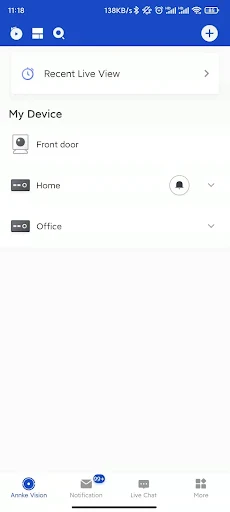
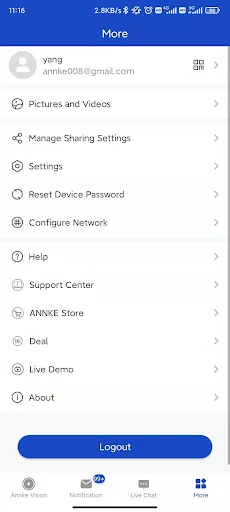
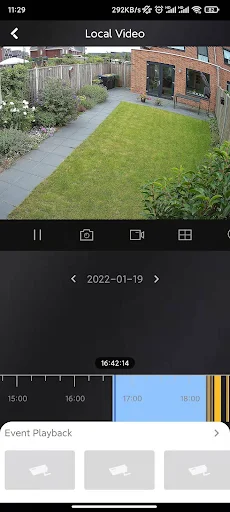
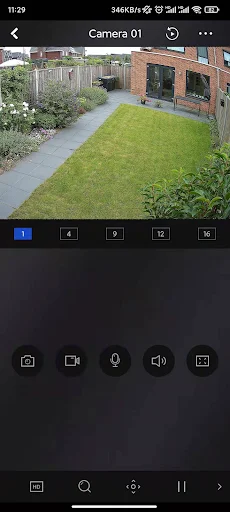
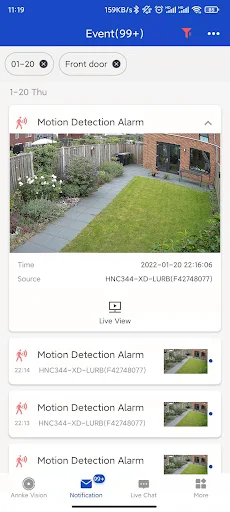
Analysis by Reviewed APKs
Annke Vision is a companion app for viewing compatible ANNKE security cameras and recorders from a phone. It suits people who already use ANNKE equipment and want to check live video, review recordings, or receive motion alerts while away. After looking at what it offers, my take is straightforward: it focuses on a few useful monitoring tasks rather than trying to be an all-purpose smart-home app.
A Quick Check While Away
Imagine leaving home for the day and wanting to check a camera without waiting until you return. Annke Vision is built for that kind of quick look: once you have an account and add a compatible device, you can view its live video remotely. I like that the central job is easy to explain. This is a way to reach your ANNKE cameras from your phone, not a replacement for having a camera system in the first place.
A motion alert can also give you a reason to open the app and see what happened. If you missed the moment, playback lets you look through recorded video rather than relying only on the live view. I can picture checking a notification during a lunch break, then reviewing footage later at home. The app’s value depends on having an ANNKE DNR, NVR, or IP camera that supports Cloud P2P.
A Companion, Not a Camera
Compared with a camera’s own screen or a recorder connected to a monitor, Annke Vision is more convenient when you are away from that equipment. It brings live monitoring, playback, and motion notifications into a mobile workflow. That makes it a useful companion for someone already invested in compatible ANNKE hardware, especially when a quick remote check is more practical than sitting down at a dedicated display.
It is not a general-purpose camera app for any brand, and it does not stand in for the cameras or recorder it connects to. The description specifically focuses on supported ANNKE equipment with Cloud P2P. If you are shopping for a standalone camera, want a broad smart-home control center, or expect features beyond monitoring, this is probably not the right place to start. Its appeal is tied to the hardware ecosystem.
Make Alerts Useful
I would treat notifications as prompts to check in, rather than as a running feed that needs constant attention. When a motion detection alarm comes through, open the live view if the event may still be happening, or use playback to check what the camera recorded. That simple split gives each feature a clear job. It also helps keep a quick phone check from turning into an aimless search through footage.
For a regular routine, I would first make sure the account and compatible device are set up, then use live video for brief checks and playback when I need context. This works well for ordinary moments such as checking a room while away or looking back after an alert. I would also keep expectations practical: the app’s usefulness rests on the connected ANNKE device and the recordings or notifications that device provides.
More From Our News Desk

Zoom Meetings, Google Meet, or Teams: Which Is Easiest to Join?

How I Build a Free Streaming Lineup With Tubi

Why Crunchyroll Is the Default Anime App for So Many Fans

YouTube TV: A Practical Guide to Cutting Cable

Rummikub and the Small Comfort of Phone Games

TeamViewer Remote Control or AnyDesk for Helping Family?
Who Will Get the Most From It
I would recommend Annke Vision to ANNKE camera or recorder owners who want remote access from a phone. The combination of live viewing, recorded-video playback, and motion notifications covers the basic reasons many people check a security system between visits to its monitor. It is especially appealing if you prefer to confirm an event yourself instead of relying on a notification alone.
It may not suit someone without compatible ANNKE equipment, or someone looking for an app that manages cameras from several different brands. People who rarely need remote video may also find its focused toolset less useful in daily life. I would think of it as a practical access point for an existing setup, rather than a complete security solution on its own.
Annke Vision is a free Android app from Zhuhai Dayu Electronic Commerce Co., Ltd. Google Play shows over 500,000 installs and a 4.8-star rating from around 65,000 ratings. It is rated Everyone. The app is intended to work with ANNKE DNRs, NVRs, and IP cameras that support Cloud P2P.
The app is listed at no cost and has no in-app purchases or ads. The current version shown is 6.9.481.0818. It was released on December 2, 2020, and its listed last update is August 20, 2026. Android requirements can vary by release, so check Google Play for the requirement that applies to your device.
A Focused Window Into Your Cameras
Getting Started
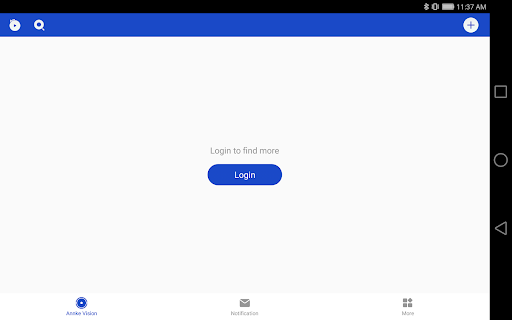
When I first opened the description, what stood out was how dependent the experience is on the equipment already in place. You create an account and add a compatible device; the app then gives you a way to reach its camera video remotely. That makes the first question less about learning a complicated set of tools and more about whether your ANNKE recorder or camera supports Cloud P2P.
I appreciate that the basic setup story is easy to follow: account, device, then remote viewing. Still, this is not an app I would download expecting it to produce video by itself. The camera or recorder is the source, and compatibility matters. Once that is sorted, the app’s main purpose is clear, which makes it easier to decide whether it belongs in your everyday phone routine.
The Daily Check-In
The everyday experience centers on a small loop: open the app to see live video, respond to a motion alarm, or look back at recorded footage. I like this division because each option answers a different question. Live viewing helps with what is happening now; playback helps with what happened earlier; a notification points you toward a possible event worth checking.
That focused approach can be handy when you are away from home or simply not near the recorder. Rather than treating the phone as a constant surveillance screen, I would use it for occasional checks when there is a reason. The app’s stated features support that kind of practical use without asking the user to turn every ordinary moment into a monitoring session.
Three Useful Tools
The standout features are the straightforward ones: real-time monitoring, video playback, and motion detection alarm notifications. None needs much explanation, but together they cover a useful sequence. You can see a live feed, get a prompt when the connected device detects motion, and review recorded video afterward. That gives the app a role both in the moment and when you want to understand an earlier event.
Playback is particularly valuable because an alert alone does not tell the whole story. If a motion notification arrives while you are busy, recorded video gives you a way to revisit the event later. I would not assume that every camera provides identical behavior; the app is designed to work with compatible ANNKE equipment, and the connected device is part of the experience.
A Practical Routine
A sensible routine might start with a quick live check before you leave, then leave the app alone unless a notification gives you a reason to return. If an alert arrives, you can check the current view when appropriate, or use playback later to see what the camera recorded. This makes the app feel like a tool for occasional decisions, rather than another screen that demands constant attention.
For a household or small workspace, I would also build in a simple habit of checking playback when an alert is unclear. That is where the app’s two viewing modes complement each other: the live feed gives a current picture, while recorded footage offers a look back. The exact usefulness depends on the compatible equipment and what it records, but the workflow itself is easy to understand.
Keep Expectations Grounded
The most important limitation is compatibility. Annke Vision is designed for ANNKE DNRs, NVRs, and IP cameras that support Cloud P2P, so it is not a universal viewer for every camera you might own. Anyone choosing an app before choosing hardware should check that their intended equipment fits this requirement. The mobile app is only one part of the setup.
Its feature set is also deliberately narrow. The material describes live video, playback, and motion alarm notifications, so I would not approach it expecting unrelated smart-home controls or extra camera functions. That focus is not necessarily a problem; it simply means the app is best judged on whether it makes a compatible ANNKE system easier to check remotely. If those are the tasks you need, the scope is sensible.
Annke Vision makes the most sense as a remote companion for compatible ANNKE security equipment. Its core features are easy to grasp, and live viewing, playback, and motion alerts make a useful set for occasional checks. I like the practical focus, with the clear caveat that the connected hardware determines whether the app is relevant to you.
If you already use a supported ANNKE camera or recorder and want to check it from your phone, I would give Annke Vision a try. If you need a brand-neutral camera app or have no compatible equipment, I would look elsewhere. It is a focused tool, and that focus is both its strength and its main boundary.
Annke Vision Frequently Asked Questions
What is Annke Vision used for?
Annke Vision lets you remotely view live video from compatible ANNKE DNRs, NVRs, and IP cameras that support Cloud P2P. It also supports playback of recorded video and motion detection alarm notifications. You need to create an account and add a compatible device to use those features; the app is a companion to that equipment.
Which phones and devices support Annke Vision?
Annke Vision is an Android app on Google Play. Its purpose is to connect with compatible ANNKE DNRs, NVRs, and IP cameras that support Cloud P2P. The minimum Android version can vary, so check the Google Play page for the requirement that applies to your phone. The app does not replace the camera or recorder.
Does Annke Vision cost money?
Google Play lists Annke Vision as free, with no in-app purchases or ads. You still need compatible ANNKE equipment to use its camera-monitoring features. Equipment costs are separate from the app. Store details can change, so it is worth checking Google Play for current information before installing.
What Android version does Annke Vision require?
The Android requirement may vary by app release and device. Check Annke Vision’s Google Play page for the current minimum version before installing. The app is designed to work with ANNKE DNRs, NVRs, and IP cameras that support Cloud P2P, so phone compatibility alone does not ensure your camera equipment is supported.
Is Annke Vision right for every camera owner?
It is aimed at people with compatible ANNKE equipment who want remote live viewing, video playback, and motion notifications. It may not suit owners of other camera brands or people looking for a general smart-home app. Check the equipment’s Cloud P2P support and the app’s current store details before deciding.
Pros
- Combines live remote viewing, recorded-video playback, and motion alarm notifications.
- A free app with no listed in-app purchases or ads.
- A clear companion role for compatible ANNKE camera and recorder systems.
Cons
- Requires compatible ANNKE equipment with Cloud P2P support.
- Its described feature set is focused on monitoring rather than broader smart-home tasks.
- The connected camera or recorder remains essential to the experience.
- Category
- Tools
- Version
- 6.9.481.0818











